1. Introdución
This manual provides detailed instructions for the operation and maintenance of your Boytone BT-101WT Bluetooth Turntable Briefcase Record Player. Please read this manual thoroughly before using the device to ensure proper function and to prevent damage.
The Boytone BT-101WT is a portable briefcase-style record player featuring Bluetooth connectivity, a built-in rechargeable battery, and dual stereo speakers. It supports 3-speed vinyl playback (33/45/78 RPM), FM radio, and includes an LCD display. The unit offers USB/SD card slots for MP3 playback and direct encoding of vinyl records, FM radio, or AUX input to MP3 files without requiring a computer. It also includes RCA line-out, AUX input, and a headphone jack. The device operates on AC-DC power (110V & 220V compatible).
2. Instrucións de seguridade
- Lea todas as instrucións antes de utilizar a unidade.
- Conserve o manual para futuras consultas.
- Non expoña a unidade á choiva nin á humidade.
- Non bloquee as aberturas de ventilación.
- Asegúrate de que o adaptador de corrente volvatage coincide coa súa fonte de alimentación local.
- Protexa o cable de alimentación para evitar que se pise ou se pinche.
- Desenchufe a unidade durante as tormentas eléctricas ou cando non se use durante longos períodos.
- Encargue toda a reparación a persoal de servizo cualificado.
- Non abra a unidade casing.
- Evite colocar a unidade preto de fontes de calor ou baixo a luz solar directa.
3. Contido do paquete
Verifique que todos os elementos que se indican a continuación estean incluídos no seu paquete:
- Boytone BT-101WT Turntable Unit
- Adaptador de alimentación AC/DC
- Cable USB
- Manual de instrucións
- Adaptador de 45 rpm
- Anti-Static Flat Mat (may be pre-installed)
4. Produto rematadoview
Familiarize yourself with the components of your BT-101WT unit.

Figure 4.1: Boytone BT-101WT Turntable in open position, showcasing the record player, speakers, and control panel.
4.1 Paneis dianteiro e traseiro

Figura 4.2: Arriba view showing the control panel with USB, SD, and AUX IN ports. Bottom view showing the power input, RCA line out, and AUX OUT ports.
- Disco de placa xiratoria: Area where records are placed for playback.
- Tone Arm: Holds the stylus and tracks the record grooves.
- Estilete (agulla): Reads the audio information from the record grooves.
- Selector de velocidade: Switch to select playback speed (33, 45, or 78 RPM).
- Interruptor de parada automática: Activa ou desactiva a parada automática do prato ao final dun disco.
- Botón de potencia/volume: Turns the unit on/off and adjusts the audio output volume.
- Botón de función/modo: Cycles through input sources (Phono, Bluetooth, FM, USB/SD, AUX).
- Pantalla LCD: Mostra o modo actual, a información da pista e a frecuencia FM.
- Porto USB: For connecting a USB flash drive for playback or MP3 encoding.
- Ranura para tarxetas SD: For inserting an SD card for playback or MP3 encoding.
- Conector AUX IN: Entrada de 3.5 mm para conectar dispositivos de son externos.
- Jack para auriculares: 3.5mm output for private listening with headphones.
- RCA Line Out Jacks: Stereo output for connecting to external amplevantadores ou altofalantes alimentados.
- Conector DC IN: Connection point for the AC/DC power adapter.
- Altofalantes incorporados: Altofalantes estéreo integrados para saída de audio.
4.2 Control Panel Details

Figure 4.3: Close-up of the control panel, highlighting the LCD display, function buttons, USB port, SD card slot, and AUX IN jack.
The control panel features buttons for playback control (Play/Pause, Skip Forward/Backward), recording (REC), deleting files (DEL), and mode selection. The LCD display provides visual feedback on the selected function and media status.
5. Configuración
5.1 Conexión de alimentación
- Asegúrese de que a unidade estea colocada sobre unha superficie estable e plana.
- Connect the AC/DC power adapter to the DC IN jack on the rear of the unit.
- Conecte o adaptador a unha toma de corrente.
- Alternatively, the unit has a built-in rechargeable battery for portable use. Ensure it is charged before first use.
5.2 Configuración inicial
- Open the briefcase lid.
- Retire a tapa protectora do estilete.
- If not already in place, position the anti-static flat mat on the turntable platter.
- Turn the Power/Volume knob clockwise to power on the unit. The LCD display will illuminate.
6. Instrucións de funcionamento
6.1 Playing Records

Figure 6.1: Illustration of the 3-speed control (33, 45, 78 RPM) for different record sizes (7", 10", 12").
- Coloque un disco no prato do tocadiscos.
- Select the appropriate speed (33, 45, or 78 RPM) using the speed selector switch, matching the record's speed.
- If playing a 45 RPM single, place the included 45 RPM adapter on the center spindle.
- Levante o brazo da lectura usando a palanca de referencia e colóqueo sobre a pista desexada no disco.
- Baixa con coidado o brazo da lectura sobre o disco usando a palanca de referencia. Comezará a reprodución.
- Axuste o volume usando o botón de acendido/volume.
- At the end of the record, if the Auto Stop switch is ON, the turntable will stop spinning automatically. If OFF, it will continue to spin.
- To stop playback manually, lift the tone arm and return it to its rest.
6.2 Funcionamento Bluetooth
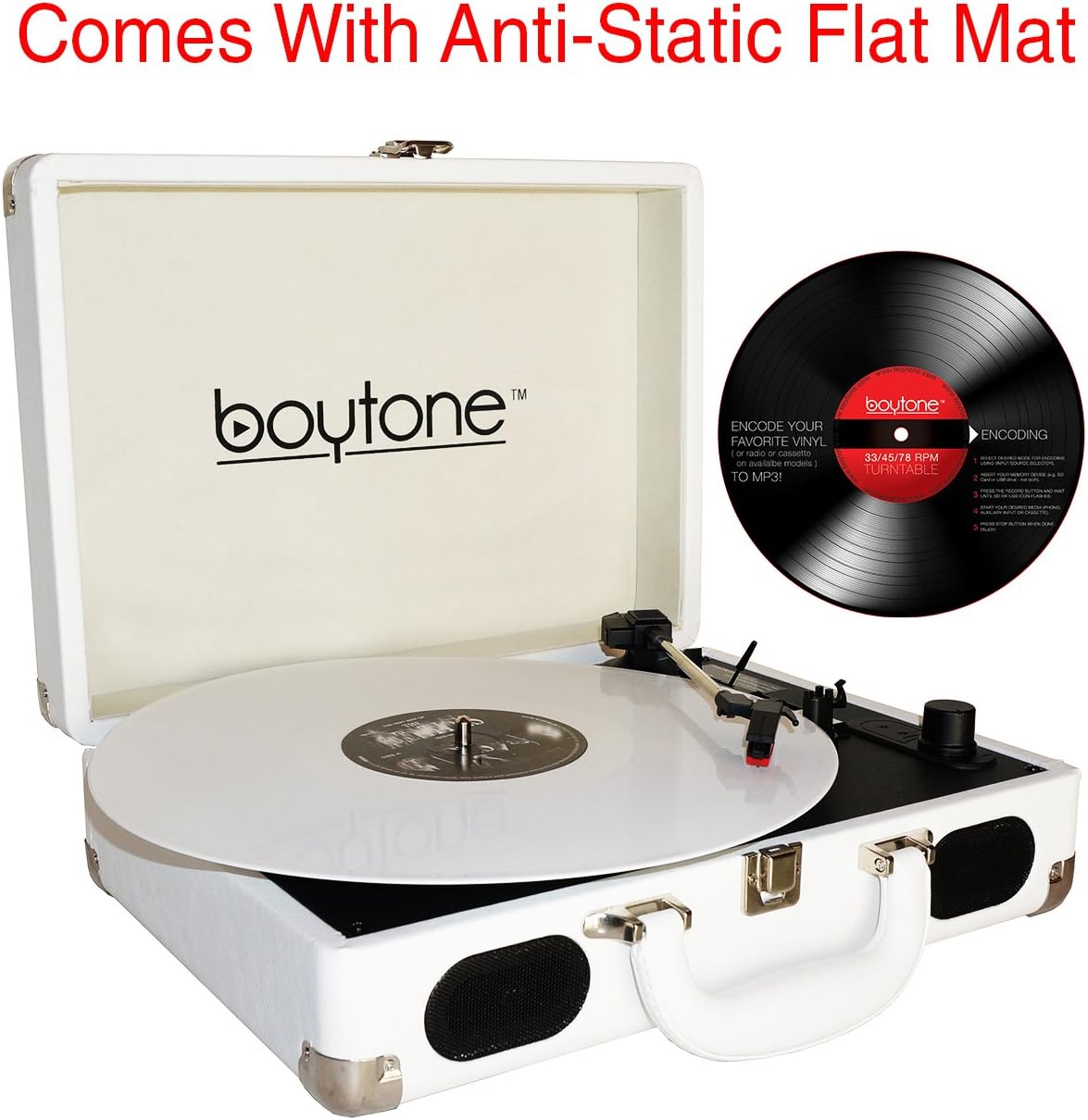
Figure 6.2: Visual representation of a smartphone wirelessly connecting to the BT-101WT via Bluetooth.
- Acende a unidade.
- Press the Mode button repeatedly until "BT" appears on the LCD display. The unit will enter Bluetooth pairing mode, indicated by a flashing "BT".
- Activa o Bluetooth no teu teléfono intelixente ou noutro dispositivo compatible con Bluetooth.
- Busca "Boytone BT-101WT" in your device's Bluetooth settings and select it to pair.
- Once paired, "BT" will stop flashing and remain solid. You can now stream audio from your device to the turntable.
- Control playback (play/pause, skip) from your connected device. Adjust volume using the turntable's volume knob or your device's volume controls.
6.3 Funcionamento da radio FM
- Acende a unidade.
- Press the Mode button repeatedly until "FM" appears on the LCD display.
- To auto-scan and save stations, press and hold the Play/Pause button. The unit will scan for available FM stations and store them.
- Use the Skip Forward/Backward buttons to navigate through saved stations.
- Axuste o volume usando o botón de acendido/volume.
6.4 Reprodución USB/SD
- Insira unha unidade flash USB no porto USB ou unha tarxeta SD na ranura para tarxetas SD.
- Press the Mode button repeatedly until "USB" or "SD" appears on the LCD display. The unit will automatically begin playing MP3/WMA files dos soportes inseridos.
- Use the Play/Pause, Skip Forward/Backward buttons to control playback.
- Axuste o volume usando o botón de acendido/volume.
6.5 MP3 Encoding (Recording)
The BT-101WT can convert audio from Vinyl, FM Radio, or AUX input directly to MP3 files nunha unidade USB ou tarxeta SD.
- Insert a USB flash drive or SD card into the corresponding slot. Ensure it has sufficient free space.
- Select the desired source for recording (Phono, FM, or AUX IN) using the Mode button.
- Start playback on the source (e.g., begin playing a record, tune to an FM station, or play audio from an AUX-connected device).
- Press the "REC" button on the control panel. The recording indicator will illuminate, and the unit will begin converting the audio to MP3.
- To stop recording, press the "REC" button again. The recording will be saved as an MP3 file on your USB drive or SD card.
- Para eliminar un gravado file, navega ata file in USB/SD playback mode and press the "DEL" button.
6.6 AUX Input and Output
- AUX IN: Connect an external audio device (e.g., smartphone, MP3 player) to the AUX IN jack using a 3.5mm audio cable. Press the Mode button until "AUX" appears on the display. Audio from the external device will play through the turntable's speakers.
- Saída de liña RCA: Connect the RCA Line Out jacks on the rear of the unit to an external amplifier or powered speakers using RCA cables for enhanced audio output.
- Jack para auriculares: Plug standard 3.5mm headphones into the headphone jack for private listening. This will mute the built-in speakers.
7. Mantemento
7.1 Limpeza da unidade
- Limpe o exterior da unidade cun pano suave e seco.
- Non empregue produtos de limpeza abrasivos, ceras nin solventes.
7.2 Coidado do punteiro
- Handle the stylus with care. Avoid touching the tip.
- Limpa o punteiro periodicamente cun cepillo suave, cepillando de atrás para adiante.
- A worn stylus can damage records and degrade sound quality. Replace the stylus when sound quality deteriorates.
7.3 Coidado de rexistros
- Keep records clean and free of dust. Use an anti-static brush before each play.
- Garda os discos en vertical nas súas fundas para evitar que se deformen.
8 Solución de problemas
| Problema | Causa posible | Solución |
|---|---|---|
| Sen poder | Power adapter not connected; Unit not turned on; Battery drained. | Check power connection; Turn Power/Volume knob clockwise; Charge the battery. |
| Non hai son dos altofalantes | Volume too low; Headphones connected; Incorrect mode selected. | Increase volume; Disconnect headphones; Select correct mode (Phono, BT, FM, USB/SD, AUX). |
| Tocadiscos non xira | Unit not powered on; Tone arm not lifted; Auto Stop engaged at end of record. | Ensure power is on; Lift tone arm from rest; Check Auto Stop switch. |
| Bluetooth non se sincroniza | Unit not in pairing mode; Device too far; Bluetooth already connected to another device. | Ensure "BT" is flashing; Move device closer; Disconnect from other devices. |
| Poor sound quality / Skipping records | Dirty stylus; Worn stylus; Dirty record; Unit not on a stable surface. | Clean stylus; Replace stylus; Clean record; Place unit on a stable, level surface. |
9. Especificacións
- Modelo: BT-101WT
- Fonte de enerxía: AC/DC Adapter (110V/220V), Built-in Rechargeable Lithium-Ion Battery
- Velocidades do tocadiscos: 33 1/3, 45, 78 RPM
- Relatores: 2 x altofalantes estéreo incorporados
- Conectividade: Bluetooth, USB, SD Card, AUX IN (3.5mm), RCA Line Out (Stereo)
- Radio: FM estéreo
- Codificación: Direct MP3 encoding from Vinyl, FM, AUX to USB/SD
- Jack para auriculares: 3.5 mm
- Dimensións (paquete): 16 x 13.1 x 6 polgadas
- Peso: 7 libras
- Material: Plástico
10. Garantía e soporte
This product is backed by a 1 Year direct Boytone USA warranty. For warranty claims or technical support, please contact Boytone customer service. Refer to the official Boytone websitio web ou a documentación da súa compra para obter os datos de contacto.
Boytone Customer Service: Por favor visite the Boytone Store on Amazon or the official Boytone websitio para obter información de soporte.