1. Configuración
1.1 Instalación da batería
The Insignia NS-RC03A-13 remote control requires two AAA batteries for operation. Follow these steps to install them:
- Localice a tapa do compartimento da batería na parte traseira do control remoto.
- Deslice a tapa cara abaixo ou prema o pestillo para abrila.
- Insira dúas pilas AAA, asegurándose de que os terminais positivo (+) e negativo (-) estean aliñados correctamente coas marcas do interior do compartimento.
- Deslice a tapa do compartimento da batería de volta ao seu lugar ata que faga clic de forma segura.
Imaxe: Traseira view of the Insignia NS-RC03A-13 remote control, showing the battery compartment open with two AAA batteries inserted. The remote is black with gray buttons.
2. Instrucións de funcionamento
This section details the primary functions and usage of your Insignia NS-RC03A-13 remote control.
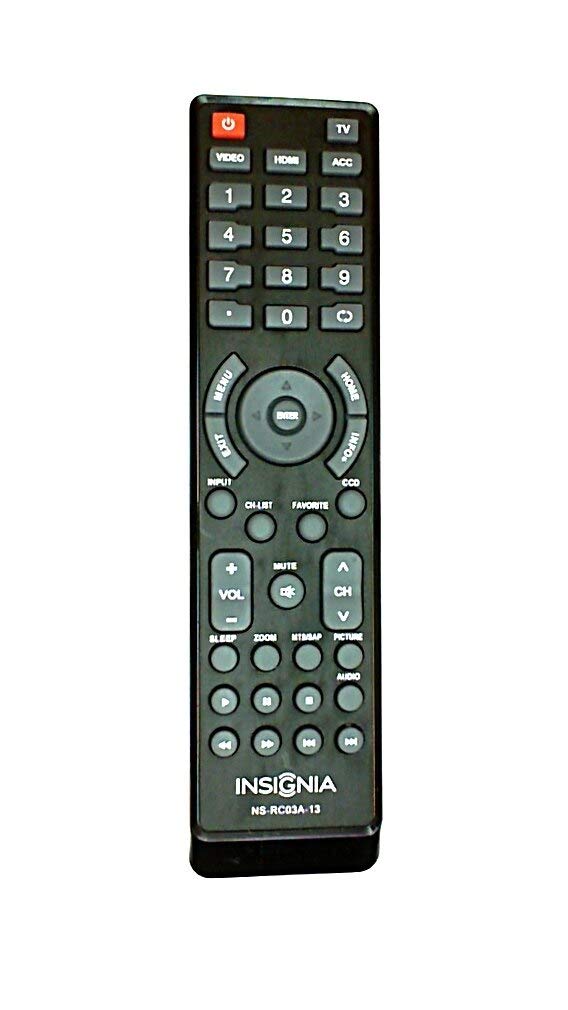
Imaxe: Fronte view of the Insignia NS-RC03A-13 remote control, displaying all buttons and their labels. The remote is black with gray buttons and white text.
2.1 Encendido/apagado
Preme o POTENCIA button (usually located at the top left) to turn your television on or off.
2.2 Selección de entrada
To switch between different video sources (e.g., HDMI 1, HDMI 2, Video), press the ENTRADA button. Continue pressing to cycle through available inputs until your desired source is selected.
2.3 Control de canles e volume
- Volume: Usa o VOL+ e VOL - buttons to increase or decrease the audio volume.
- Silenciar: Preme o MUTO button to instantly silence the television audio. Press it again to restore sound.
- Canles: Usa o CH + e CH - buttons to navigate through television channels.
- Pad numérico: Directly enter channel numbers using the numeric keypad (0-9).
2.4 Navegación por menús
Use the directional arrow buttons (Up, Down, Left, Right) around the ENTRAR button to navigate through on-screen menus. Press ENTRAR to confirm a selection. The MENÚ button typically opens the main menu, and SAIR péchao.
3. Mantemento
Proper care ensures the longevity and optimal performance of your remote control.
- Limpeza: Wipe the remote control with a soft, dry cloth. Avoid using liquid cleaners, abrasive materials, or chemical solvents, as these can damage the surface or internal components.
- Substitución da batería: Substitúa as pilas cando diminúa a resposta do mando a distancia. Substitúa sempre as dúas pilas ao mesmo tempo por unhas novas do mesmo tipo (AAA).
- Almacenamento: Garde o mando a distancia nun lugar seco, lonxe da luz solar directa, de temperaturas extremas e de alta humidade.
- Evita gotas: Protexa o mando a distancia de impactos físicos, xa que as caídas poden danar os circuítos internos.
4 Solución de problemas
Se tes problemas co teu mando a distancia, proba as seguintes solucións:
- O mando a distancia non responde:
- Comprobe se as pilas están inseridas correctamente coa polaridade correcta.
- Substitúa as pilas vellas por pilas AAA novas.
- Ensure there are no obstructions between the remote control and the TV's infrared (IR) receiver.
- Apunte o mando a distancia directamente ao receptor de infravermellos do televisor.
- Botóns específicos que non funcionan:
- Clean around the unresponsive buttons with a soft, slightly damp cloth to remove any debris or stickiness.
- If cleaning does not resolve the issue, the button mechanism may be faulty, and the remote might require replacement.
- TV not responding to input changes:
- Ensure the remote is correctly paired or compatible with your Insignia TV model.
- Proba a premer ENTRADA button multiple times to cycle through all available sources.
5. Especificacións
| Número de modelo | NS-RC03A-13 |
| Marca | INSIGNIA |
| Dispositivos compatibles | Televisión |
| Número máximo de dispositivos compatibles | 1 |
| Pilas necesarias | 2 pilas AAA |
| Cor | Negro |
| Característica especial | Ergonómico |
| Peso do elemento | 2.39 onzas |
| Dimensións do paquete | 7 x 2 x 1 polgadas |
6. Garantía e soporte
For detailed warranty information, product registration, or technical support, please visit the official Insignia websitio web ou póñase en contacto co seu departamento de atención ao cliente. Garde o recibo de compra como proba de compra para calquera reclamación de garantía.
Soporte en liña: www.insigniaproducts.com
Nota: Os termos específicos da garantía poden variar segundo a rexión e o vendedor.


