Introdución
Grazas pola compraasing the OontZ Angle 3 Ultra Portable Bluetooth Speaker by Cambridge Soundworks. This manual provides essential information for setting up, operating, maintaining, and troubleshooting your speaker. Designed for superior sound quality and durability, the OontZ Angle 3 Ultra features a 14-watt output, rich bass, IPX7 waterproofing, and an impressive 30-meter Bluetooth range. Enjoy up to 20 hours of playtime on a single charge.

Image: The OontZ Angle 3 Ultra Portable Bluetooth Speaker, showcasing its sleek black, triangular design with control buttons on one end.
Configuración
1. Artigos incluídos
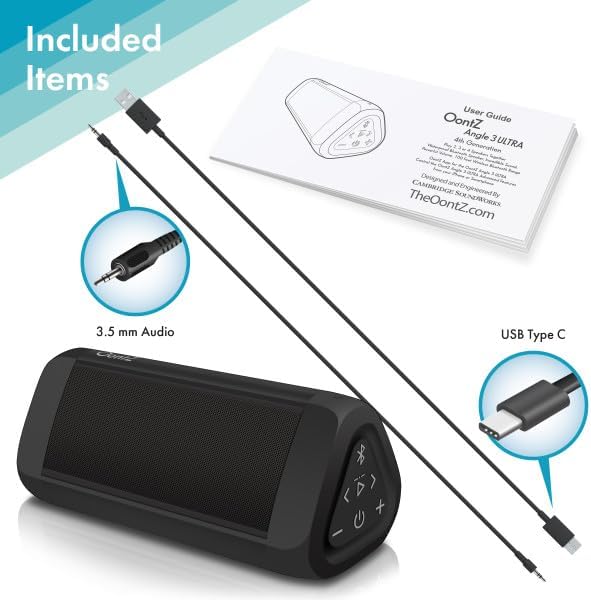
Image: The OontZ Angle 3 Ultra speaker along with its accessories: a Quick Start Guide, a 3.5mm audio cable, and a USB Type-C charging cable.
Antes do primeiro uso, asegúrese de que estean presentes todos os compoñentes:
- OontZ Angle 3 Ultra Bluetooth Speaker
- Quick Start Guide (Full manual available online)
- Cable de audio de 3.5 mm
- Cable de carga USB tipo C
2. Cargando o altofalante
The speaker comes with a built-in rechargeable Lithium-ion battery. For optimal performance, fully charge the speaker before first use.
- Locate the charging port on the side of the speaker, protected by a rubber flap.
- Connect the supplied USB Type-C charging cable to the speaker's charging port.
- Connect the other end of the USB cable to a USB wall charger (not included) or a computer USB port.
- The charging indicator light will illuminate. A full charge takes approximately 20 hours for the first charge, and subsequent charges will be faster.

Imaxe: Primeiro plano view of the speaker's side, showing the 3.5mm AUX input and the USB-C charging port, typically protected by a waterproof flap.
3. Emparellamento Bluetooth
Pair your OontZ Angle 3 Ultra with your Bluetooth-enabled device (smartphone, tablet, laptop).
- Acende o altofalante mantendo premido o botón de acendido (⏻) until the indicator light flashes blue.
- No teu dispositivo, vai á configuración de Bluetooth e asegúrate de que o Bluetooth estea activado.
- Look for "OontZ Angle 3 Ultra" in the list of available devices and select it.
- Once paired, the speaker will emit a confirmation tone, and the indicator light will turn solid blue.
4. Conexión a través da entrada AUX
You can connect non-Bluetooth devices using the 3.5mm audio cable.
- Connect one end of the 3.5mm audio cable to the AUX IN port on the speaker.
- Conecta o outro extremo á toma de auriculares ou á saída de audio do teu dispositivo.
- O altofalante cambiará automaticamente ao modo AUX.
5. Pairing Two Speakers for Stereo Sound (OontZ Dual Wireless Stereo)
Enhance your audio experience by wirelessly connecting two OontZ Angle 3 Ultra speakers for impressive stereo separation.

Image: Two OontZ Angle 3 Ultra speakers positioned to provide stereo sound, with two individuals enjoying music in an outdoor setting.
- Ensure both OontZ Angle 3 Ultra speakers are charged and powered on.
- Disconnect both speakers from any previously paired Bluetooth devices.
- On one speaker (this will be the Left Channel), press and hold the Bluetooth button (Ⓑ) for 3 seconds until you hear a tone.
- On the second speaker (this will be the Right Channel), press and hold the Bluetooth button (Ⓑ) for 3 seconds until you hear a tone.
- The speakers will automatically connect to each other. Once connected, you will hear a confirmation tone, and the indicator lights on both speakers will turn solid blue.
- Now, connect your audio device to the Left Channel speaker via Bluetooth as described in "Bluetooth Pairing" above.
- For video audio, connect your device or TV to the Left Channel speaker using the 3.5mm audio cable.
Instrucións de funcionamento
1. Controis sobreview
| Botón/Indicador | Función |
|---|---|
| ⏻ (Energía) | Manter premido para acender/apagar. |
| + (Subir volume) | Prema para aumentar o volume. |
| - (Baixar volume) | Prema para diminuír o volume. |
| ▷ (Reproducir/Pausa) | Preme para reproducir/pausar música. |
| < (Pista anterior) | Prema para ir á pista anterior. |
| > (Próxima pista) | Prema para ir á seguinte pista. |
| Ⓑ (Bluetooth) | Press to disconnect current Bluetooth device and enter pairing mode. Press and hold for 3 seconds to initiate OontZ Dual Wireless Stereo pairing. |
| Luz indicadora | Flashes blue for pairing, solid blue for connected, red for charging. |
2. Chamadas mans libres
The OontZ Angle 3 Ultra has a built-in microphone for hands-free calls.
- Cando entre unha chamada, a música pausarase. Prema o botón ▷ botón para responder á chamada.
- Para finalizar unha chamada, prema o botón ▷ botón de novo.
- Para rexeitar unha chamada, manteña premido o botón ▷ botón durante 2 segundos.
- To activate Siri or Google Assistant, press and hold the ▷ button for 2 seconds when not on a call.
3. Waterproof Features (IPX7)
The OontZ Angle 3 Ultra is IPX7 certified, meaning it is fully waterproof and can be immersed in water up to 1 meter (3.3 feet) for up to 30 minutes.
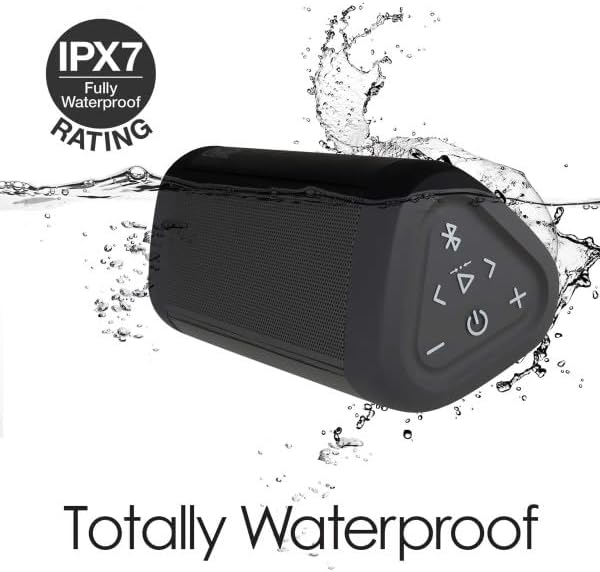
Image: The OontZ Angle 3 Ultra speaker shown partially submerged in water, illustrating its IPX7 waterproof capability.
- Ensure the rubber flap covering the charging and AUX ports is securely closed before exposing the speaker to water.
- Ideal for use by the pool, at the beach, or in the shower.
- Do not expose to salt water or chemicals. Rinse with fresh water after exposure to chlorinated water.
Mantemento
1. Limpeza
Para limpar o altofalante, use un pano suave eamp pano. Non use produtos de limpeza ou disolventes abrasivos.
2. Almacenamento
Garde o altofalante nun lugar fresco e seco, lonxe da luz solar directa e de temperaturas extremas.
3. Coidado da batería
Para prolongar a duración da batería:
- Evite descargar completamente a batería con frecuencia.
- Cargue o altofalante regularmente, mesmo se non o está a usar, para manter a batería en bo estado.
- Do not expose the speaker to temperatures above 60°C (140°F).
Resolución de problemas
| Problema | Solución |
|---|---|
| Speaker will not turn on. | Asegúrate de que a batería estea cargada. Conecta o altofalante a unha fonte de alimentación mediante o cable USB-C. |
| Sen son ou volume baixo. | Check the volume level on both the speaker and your connected device. Ensure the speaker is properly paired via Bluetooth or connected via AUX. |
| Non se pode emparellar por Bluetooth. | Ensure the speaker is in pairing mode (flashing blue light). Turn off and on Bluetooth on your device. Move the speaker closer to your device. Disconnect from other Bluetooth devices. |
| Distorsión do son a volume alto. | Reduce the volume on the speaker or your connected device. Ensure the audio source is not distorted. |
| OontZ Dual Wireless Stereo not connecting. | Ensure both speakers are disconnected from other Bluetooth devices. Follow the pairing steps carefully, ensuring both speakers are in pairing mode for stereo connection. |
Especificacións
Key technical specifications for the OontZ Angle 3 Ultra Portable Bluetooth Speaker:
- Número de modelo: SWOA3UBLK
- Dimensións (L x W x H): 16.26 x 7.11 x 7.11 cm (6.4 x 2.8 x 2.8 polgadas)
- Peso: 480 gramos (1.06 libras)
- Potencia de saída do altofalante: 14 vatios
- Versión Bluetooth: 4.2
- Alcance sen fíos: Ata 30 metros (100 pés) sen obstáculos
- Duración da batería: Up to 20 hours (at 2/3 volume)
- Clasificación impermeable: IPX7 (Sumerxible ata 1 metro durante 30 minutos)
- Conectividade: Bluetooth, 3.5mm AUX Input, USB-C Charging
- Compoñentes incluídos: Speaker, 3.5mm Audio Cable, USB-C Charging Cable, Quick Start Guide

Image: Diagram showing the dimensions of the OontZ Angle 3 Ultra speaker: 6.5 inches in length, 3 inches in width, and 2.75 inches in height.
Garantía e Soporte
For detailed warranty information and customer support, please visit the official OontZ website. The full localized manual is also available there.
Oficial Websitio: www.theoontz.com
Cambridge Soundworks is committed to providing high-quality audio products and customer satisfaction.