Introdución
This manual provides detailed instructions for the safe and efficient operation of your Delock 86108 Network Cable Tester. This device is designed to test various cable types, including RJ45, RJ12, BNC, and USB, for continuity and correct wiring, ensuring reliable network and data connections.
Instrucións de seguridade
- Read all instructions thoroughly before using the device.
- Do not expose the device to moisture, liquids, or extreme temperatures.
- Use only the specified 9V battery type. Incorrect battery usage may damage the device.
- Non intente abrir nin reparar o dispositivo vostede mesmo. Encargue calquera mantemento a persoal cualificado.
- Manteña o dispositivo fóra do alcance dos nenos.
Contido do paquete
- Delock 86108 Network Cable Tester (Main Unit)
- Unidade remota
- Manual de usuario (este documento)
Nota: As pilas non están incluídas e deben mercarse por separado.
Produto rematadoview
The Delock 86108 Network Cable Tester consists of a main unit and a detachable remote unit. It features an integrated LED display for indicating test results for various cable types.
Unidade principal
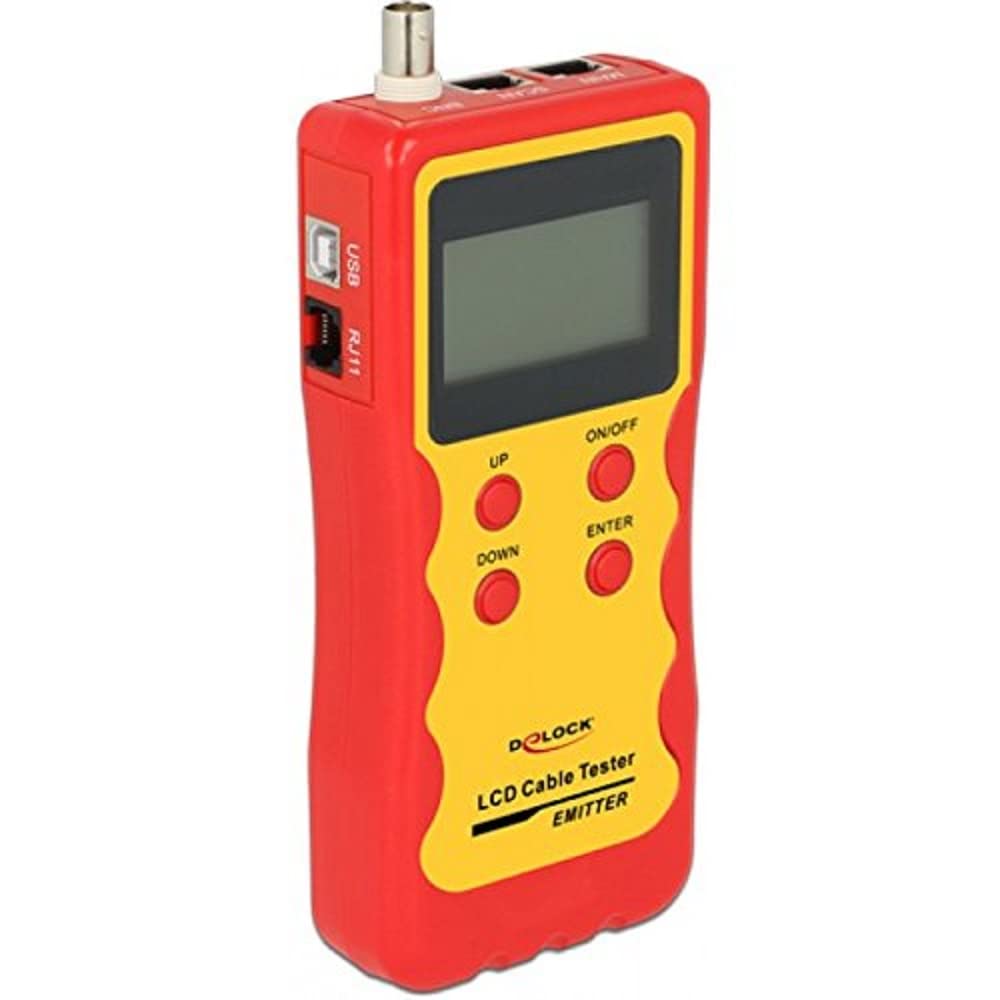
Image Description: A red and yellow Delock 86108 Network Cable Tester main unit, showing the various ports (RJ45, RJ12, BNC, USB) and the LED indicator panel. The device has a robust, handheld design.
Unidade remota
The remote unit detaches from the main unit, allowing for convenient testing of installed cables over longer distances. It typically features corresponding ports to connect the opposite end of the cable being tested.
Configuración
Instalación de baterías
- Localice o compartimento da batería na parte traseira da unidade principal.
- Abra a tapa do compartimento da batería.
- Insert one 9V battery, ensuring correct polarity (+/-) as indicated inside the compartment.
- Pecha a tapa do compartimento da batería de forma segura.
Encendido/apagado
To power on the device, slide the power switch to the "ON" position. The LED indicators will briefly illuminate as a self-test. To power off, slide the switch to the "OFF" position.
Instrucións de funcionamento
The Delock 86108 can test various cable types for continuity and correct wiring sequence. Always ensure the tester is powered on before connecting cables for testing.
Testing RJ45/RJ12 Cables
- Connect one end of the RJ45 or RJ12 cable to the corresponding port on the main unit.
- Connect the other end of the cable to the corresponding port on the remote unit. For installed cables, the remote unit can be detached and placed at the other end of the cable run.
- Acende o comprobador.
- Observe the LED indicators on both the main and remote units. Each LED corresponds to a specific wire. A sequential illumination of LEDs (1-8 for RJ45, 1-6 for RJ12) on both units indicates correct wiring and continuity.
- If an LED does not light up, it indicates an open circuit (broken wire).
- If LEDs light up out of sequence, it indicates a wiring fault (e.g., crossed pairs, short circuit).
Testing BNC Cables
- Connect one end of the BNC cable to the BNC port on the main unit.
- Connect the other end of the BNC cable to the BNC port on the remote unit.
- Acende o comprobador.
- The LED indicators will show continuity for the center conductor and the shield.
Testing USB Cables
- Connect one end of the USB cable (Type A or B, depending on the tester's ports) to the main unit.
- Connect the other end to the remote unit.
- Acende o comprobador.
- The LEDs will indicate continuity for the power, data+, data-, and ground lines of the USB cable.
Mantemento
Limpeza
Wipe the device with a soft, dry, lint-free cloth. Do not use abrasive cleaners, solvents, or harsh chemicals, as these can damage the casing ou compoñentes internos.
Almacenamento
Store the device in a cool, dry place, away from direct sunlight and extreme temperatures. If the device will not be used for an extended period, remove the battery to prevent potential leakage and damage.
Resolución de problemas
O dispositivo non se acende.
- Check if the 9V battery is correctly installed with the proper polarity.
- Ensure the battery has sufficient charge. Replace with a new 9V battery if necessary.
- Verify the power switch is firmly in the "ON" position.
LEDs do not light up or show inconsistent patterns.
- Ensure all cables are securely connected to both the main and remote units. Loose connections can cause false readings.
- Inspect the cable being tested for visible damage, kinks, or frayed connectors.
- Test with a known good cable to verify the tester's functionality. If the known good cable tests correctly, the issue lies with the original cable.
- Replace the battery if the LEDs appear dim, flicker, or behave erratically, indicating low power.
Especificacións
- Modelo: Delock 86108
- Conectores compatibles: BNC, RJ-12, RJ-45, USB
- Tipo de visualización: Indicadores LED
- Fonte de enerxía: 1 batería de 9 V (non incluída)
- Dimensións (L x W x H): 185 mm x 80 mm x 32 mm (7.28 x 3.15 x 1.26)
- Peso: 470 gramos (16.58 oz)
- Cor do produto: Vermello, Amarelo
Garantía e Soporte
For detailed warranty information, technical support, or service inquiries, please refer to the documentation provided with your original purchase or contact your authorized retailer. Please retain your proof of purchase for any warranty claims.


