Introdución
This manual provides comprehensive instructions for the CHERRY MX Keyboard 1.0 TKL. This wired keyboard features a compact design, allowing for more desk space. It includes nonslip mounting feet for adjustable height and a comfortable typing experience. Dimmable illumination ensures convenient visibility in dark settings. The abrasion-resistant, laser-etched key caps are designed to prevent fading through extended use, and anti-ghosting technology helps eliminate input errors for reliable performance.
Configuración
To set up your CHERRY MX Keyboard 1.0 TKL, follow these steps:
- Descomprimir o teclado: Retire con coidado o teclado da súa embalaxe.
- Conectar ao ordenador: Locate the USB-A connector on the keyboard's cable. Insert the USB-A connector into an available USB port on your computer. The keyboard is plug-and-play and should be recognized automatically by most operating systems.
- Axustar a altura do teclado: The keyboard features adjustable non-slip mounting feet. Gently flip out the feet located on the underside of the keyboard to raise its angle for a more comfortable typing position. Ensure both feet are extended evenly.

Figure 1: The CHERRY MX Keyboard 1.0 TKL with its USB cable, ready for connection.

Figure 2: Illustration of the adjustable non-slip feet on the underside of the keyboard, allowing for ergonomic height adjustment.
Instrucións de funcionamento
Basic Typing and Functionality
The CHERRY MX Keyboard 1.0 TKL operates as a standard QWERTY keyboard. Its tenkeyless (TKL) design provides a compact footprint while retaining all essential alphanumeric and function keys.
Iluminación regulable
The keyboard features dimmable white backlighting for enhanced visibility in various lighting conditions. You can adjust the brightness and lighting modes using the function keys in combination with the FN chave.
- FN+F5: Reducir o brillo da retroiluminación.
- FN+F6: Aumentar o brillo da retroiluminación.
- FN+F7: Cycle through backlight modes (e.g., static, breathing).
- FN+F8: Axusta a velocidade do efecto de retroiluminación.
- FN+F9: Tecla de bloqueo/desbloqueo de Windows.

Figure 3: Comparison showing the keyboard with its backlight off (left) and with the white backlight illuminated (right).

Figure 4: Diagram illustrating the multi-function keys and their combinations with the FN key for controlling multimedia, backlight, and Windows key lock.
Tecnoloxía Anti-Ghosting
The CHERRY MX Keyboard 1.0 TKL features full N-key rollover (NKRO) anti-ghosting technology. This ensures that every key press is registered accurately, even when multiple keys are pressed simultaneously, which is beneficial for fast typing and gaming.

Figure 5: Visual representation of the full key anti-ghosting feature, highlighting the keyboard's ability to register multiple simultaneous key presses accurately.
Mantemento
Proper maintenance will extend the lifespan of your CHERRY MX Keyboard 1.0 TKL.
- Limpeza:
- Desconecte o teclado do ordenador antes de limpalo.
- Use un pano suave e sen pelusa lixeiramente dampEnxágüe con auga ou unha solución de limpeza suave para limpar as teclas e a superficie do teclado.
- Para o po e os residuos entre as teclas, use aire comprimido.
- Evita o uso de produtos químicos agresivos, produtos de limpeza abrasivos ou humidade excesiva, xa que poden danar o acabado do teclado e os compoñentes internos.
- Coidado das teclas: The keycaps are abrasion-resistant and laser-etched to prevent fading. Avoid scratching or picking at the key legends.
- Almacenamento: Cando non o use durante períodos prolongados, garde o teclado nun lugar limpo e seco, lonxe da luz solar directa e de temperaturas extremas.

Figura 6: Primeiro plano view of the keyboard's keycaps, highlighting their texture and laser-etched legends.
Resolución de problemas
If you encounter issues with your CHERRY MX Keyboard 1.0 TKL, please refer to the following common troubleshooting steps:
- O teclado non responde:
- Asegúrate de que o cable USB estea conectado correctamente tanto ao teclado como ao ordenador. Proba cun porto USB diferente.
- Reinicia o teu ordenador.
- Check your computer's device manager to see if the keyboard is recognized and if there are any driver issues.
- A retroiluminación non funciona ou é tenue:
- Usa o FN + F5 e FN + F6 key combinations to adjust brightness.
- Ensure the backlight is not turned off via FN + F7 or FN + F8.
- Keys Not Registering or "Ghosting":
- While the keyboard has anti-ghosting, ensure no debris is lodged under the keycap preventing proper actuation.
- Proba o teclado noutro ordenador para descartar problemas específicos do sistema.
- Modifier Keys (Shift, Ctrl, Alt) Intermittent:
- Ensure no software conflicts are interfering with key inputs.
- Check for physical obstructions or damage to the key switch.
Especificacións
| Característica | Detalle |
|---|---|
| Marca | Cereixa |
| Nome do modelo | MX Keyboard 1.0 TKL |
| Número de modelo do artigo | G803811LYAE2 |
| Tecnoloxía de conectividade | Wired, USB-A |
| Descrición do teclado | Tenkeyless (TKL) |
| Cor | Negro |
| Peso do elemento | 1.43 libras |
| Dimensións do produto (LxWxH) | 14.92 x 5.83 x 1.18 polgadas |
| Característica especial | Iluminación |
| Dispositivos compatibles | PC |
| Compoñentes incluídos | Keyboard wired |
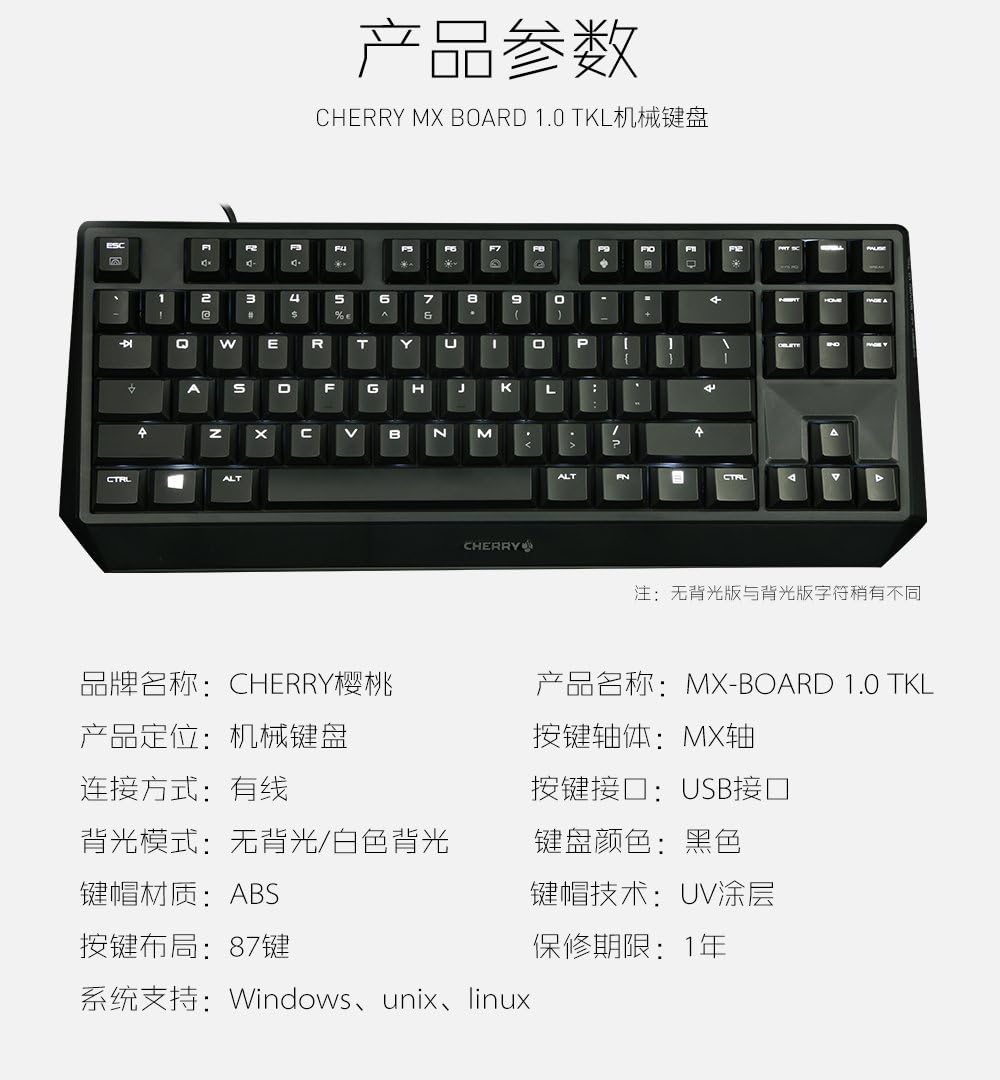
Figure 7: A detailed table outlining the technical specifications and parameters of the CHERRY MX Keyboard 1.0 TKL.
Garantía e Soporte
Información da garantía
The CHERRY MX Keyboard 1.0 TKL typically comes with a 1 ano de garantía limitada desde a data de compra. Esta garantía cobre defectos de fabricación en condicións de uso normal. Conserve o comprobante de compra para reclamacións de garantía.
For specific warranty terms and conditions, please refer to the documentation included with your product or visit the official Cherry websitio.
Atención ao cliente
If you require technical assistance, have questions about your product, or need to initiate a warranty claim, please contact Cherry customer support. Contact information can usually be found on the official Cherry websitio web ou na embalaxe do produto.
For more information, visit the official Cherry store: Cherry Store on Amazon.


