Introdución
Thank you for choosing the Capello Extra Large Display Digital Alarm Clock. This manual provides detailed instructions to help you set up, operate, and maintain your new alarm clock. Designed for clarity and ease of use, this clock features a large digital display and a stylish wood-grain finish, making it a perfect addition to any bedroom or living space.
Produto rematadoview
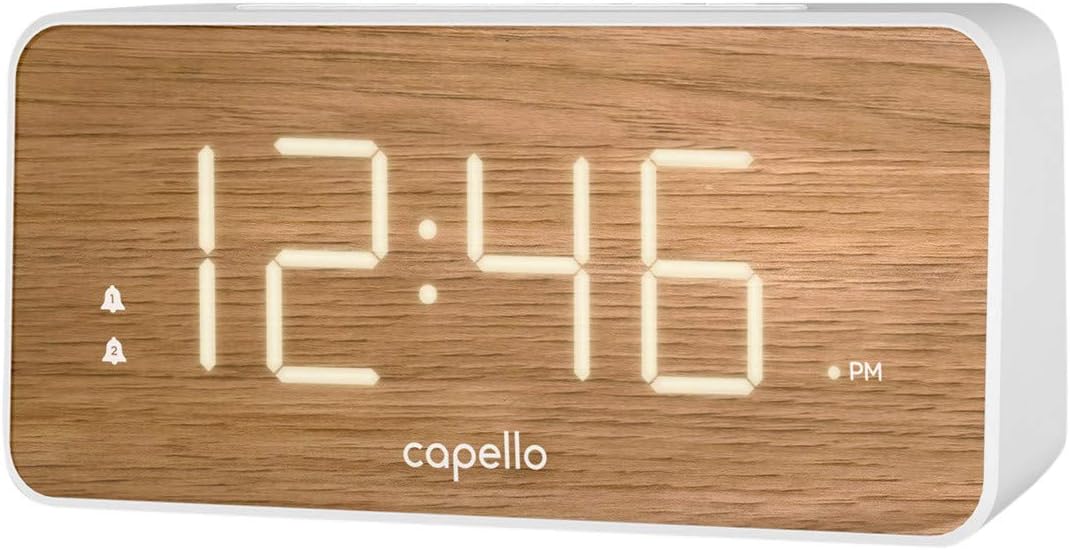
The Capello Digital Alarm Clock (Model: 43213-14795) features an extra-large digital display for easy readability from across the room. Its elegant white and pine D-frame design with a wood-grain finish complements various interior styles. The clock is equipped with intuitive controls for setting time and alarms, ensuring a user-friendly experience.
Configuración
Conexión de alimentación
The alarm clock requires a continuous power supply via its included AC adapter for full functionality. Insert the adapter into a standard wall outlet and connect it to the clock's power input port. For backup during power outages, install 2 AAA batteries (not included) into the battery compartment located on the underside of the unit. These batteries will preserve time and alarm settings but will not power the display or alarm functions during an outage.
Axuste da hora
- Manteña premido o HORARIO button (or similar button, refer to specific button labels on your unit) until the hour digits begin to flash.
- Usa o HORA button to adjust the hour. Pay attention to the AM/PM indicator.
- Preme o HORARIO de novo para pasar aos díxitos dos minutos.
- Usa o MIN botón para axustar os minutos.
- Preme HORARIO unha vez máis para confirmar e saír do modo de axuste da hora.
Configuración da alarma
This clock supports dual alarms.
- Manteña premido o ALARMA 1 botón ata que os díxitos da hora da alarma parpadeen.
- Usa o HORA e MIN botóns para axustar a hora de alarma desexada para a Alarma 1.
- Preme ALARMA 1 again to confirm. The alarm indicator for Alarm 1 will illuminate.
- Repita os pasos 1-3 para ALARMA 2 se se desexa unha segunda alarma.
- To activate/deactivate an alarm, simply press the corresponding ALARMA 1 or ALARMA 2 button. The alarm indicator will show its status.
Instrucións de funcionamento
Función de repetición
Cando soe a alarma, prema o botón grande AMORTAR button located on the top of the clock. This will temporarily silence the alarm for approximately 9 minutes, allowing for extra rest. The alarm will sound again after the snooze period ends.
Parar a alarma
To turn off the alarm completely after it sounds, press the corresponding ALARMA 1 or ALARMA 2 button. The alarm indicator will turn off, signifying that the alarm is deactivated for the next day.
Brillo da pantalla
The display brightness can be adjusted to suit your preference. Locate the LUZ or DIMMER button (often represented by a sun icon) on the top panel. Press this button repeatedly to cycle through different brightness levels (e.g., High, Medium, Low, Off).
Mantemento
To ensure the longevity and optimal performance of your Capello Digital Alarm Clock, follow these simple maintenance guidelines:
- Limpeza: Wipe the clock's surface with a soft, dry cloth. Do not use abrasive cleaners, waxes, or solvents as they may damage the finish.
- Colocación: Coloque o reloxo sobre unha superficie estable e plana, lonxe da luz solar directa, de fontes de calor e de humidade excesiva.
- Substitución da batería: Substitúa as baterías de reserva anualmente ou cando a pantalla mostre signos de escurecemento durante un corte de enerxíatage. Asegúrese de manter a polaridade correcta ao inserir pilas novas.
Resolución de problemas
Se tes algún problema co teu reloxo despertador, consulta os seguintes problemas e solucións comúns:
| Problema | Posible Solución |
|---|---|
| A pantalla está en branco ou escura. | Ensure the AC adapter is securely plugged into both the clock and a working wall outlet. Check the display brightness setting using the LIGHT/DIMMER button. |
| Non soa a alarma. | Verify that the alarm is activated (alarm indicator is lit). Ensure the alarm time is set correctly (AM/PM). Check if the volume is set to an audible level. |
| A hora é incorrecta. | Reset the time following the 'Setting the Time' instructions. If using backup batteries, ensure they are fresh and correctly installed. |
| Os botóns non responden. | Unplug the AC adapter, remove backup batteries, wait for 1 minute, then reconnect power. This performs a soft reset. |
Especificacións
- Marca: Capello
- Número de modelo: 43213-14795
- Cor: Branco
- Tipo de visualización: Dixital
- Estilo: Moderno
- Característica especial: Large Display, Alarm
- Dimensións do produto: 8.74" de ancho x 5.83" de alto
- Fonte de enerxía: AC Powered (with battery backup for settings)
- Material: Plástico
- Peso do artigo: 1.01 libras
Vídeos oficiais de produtos
Neste momento non hai vídeos oficiais do vendedor dispoñibles para este artigo.
Garantía e Soporte
For warranty information and customer support, please refer to the manufacturer's official documentation included with your product or visit the Capello websitio. Conserve o recibo de compra para reclamacións de garantía.


