Introdución
Thank you for choosing the Brookstone Big Blue True Wireless Earbuds. These earbuds are designed to provide a seamless audio experience, allowing you to enjoy music and manage calls wirelessly. This manual provides essential information on setting up, operating, maintaining, and troubleshooting your new earbuds.
Características principais:
- True wireless design for freedom of movement.
- Rich, full-range audio with deep bass.
- Integrated microphone with Qualcomm cVc noise-cancelling technology for clear calls.
- Bluetooth connectivity for easy pairing with your smartphone or device.

Image: Brookstone Big Blue True Wireless Earbuds in their black charging case.
Configuración
O que hai na caixa
- Brookstone Big Blue True Wireless Earbuds (Left and Right)
- Estuche de carga sen fíos
Cargando os auriculares e o estuche
- Coloca os dous auriculares na caixa de carga. Asegúrate de que estean correctamente asentados.
- Conecta a caixa de carga a unha fonte de alimentación USB usando o cable de carga incluído.
- The indicator lights on the case and earbuds will show charging status. Refer to the specific light patterns in your product packaging for details.
- Deixe o tempo suficiente para unha carga completa antes do primeiro uso.
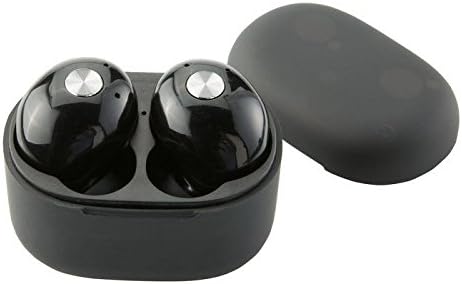
Imaxe: Primeiro plano view of the earbuds within the charging case, illustrating proper placement for charging.
Emparejamento Bluetooth
- Asegúrate de que os auriculares estean cargados.
- Remove both earbuds from the charging case. They will automatically enter pairing mode, indicated by flashing LED lights (refer to your product packaging for specific light patterns).
- No teu teléfono intelixente ou dispositivo con Bluetooth, vai á configuración de Bluetooth.
- Busca new devices and select "BIG BLUE" (or similar name) from the list.
- Once connected, the earbud indicator lights will change, typically turning solid or off.
- If pairing fails, place the earbuds back in the case, close it, and repeat the steps.
Instrucións de funcionamento
Encendido/apagado
- Encendido: Retira os auriculares da caixa de carga. Acenderanse automaticamente e tentarán conectarse ao último dispositivo emparellado.
- Apagado: Volve colocar os auriculares na caixa de carga e pecha a tapa. Apagaranse automaticamente e comezarán a cargar.
Reprodución de música e xestión de chamadas
The earbuds feature integrated controls for media playback and call handling. Specific functions may vary slightly; refer to your product's quick start guide for exact button presses.
- Reproducir/Pausa: Typically a single press on either earbud.
- Próxima pista: Often a double press on the right earbud.
- Pista anterior: Often a double press on the left earbud.
- Responder/Finalizar chamada: A single press on either earbud during an incoming call or active call.
- Rexeitar a chamada: A long press on either earbud during an incoming call.
- Activar o asistente de voz: A triple press or long press on an earbud (check specific model instructions).

Image: A man wearing a Brookstone Big Blue True Wireless Earbud, demonstrating typical use.
Mantemento
Limpeza
- Usa un pano suave, seco e sen fiapos para limpar os auriculares e a caixa de carga.
- Non empregue produtos de limpeza abrasivos, solventes nin aerosois en aerosol.
- Gently clean ear tips and speaker grilles with a dry cotton swab to remove earwax or debris.
Almacenamento
- Garda sempre os auriculares no seu estoxo de carga cando non os uses para protexelos e mantelos cargados.
- Gardar nun lugar fresco e seco, lonxe de temperaturas extremas e da luz solar directa.
Coidado da batería
- Para prolongar a duración da batería, evite descargar completamente os auriculares e a funda con frecuencia.
- Cargue o dispositivo regularmente, mesmo se non o usa con frecuencia.
Resolución de problemas
| Problema | Posible Solución |
|---|---|
| Os auriculares non se emparellan co dispositivo. |
|
| Sound skipping or cutting out. |
|
| Un auricular non ten son. |
|
| Os auriculares non cargan. |
|
Especificacións
| Característica | Detalle |
|---|---|
| Número de modelo | BIG BLUE |
| Tecnoloxía de comunicación sen fíos | Bluetooth |
| Compoñentes incluídos | Estuche de carga sen fíos |
| Material | Plástico |
| Tipo de control | Control de medios |
| Función de cable | Sen Cable |
| Peso do elemento | 2.4 onzas (0.15 libras) |
| Dimensións do produto | 3.35 x 1.57 x 5.71 polgadas |
| Características especiais | Microphone Included, Noise Cancellation, Wireless |
| Cor | Negro |
| Factor de forma | En Orella |
| UPC / GTIN | 883594061516 |
Información da garantía
Brookstone products are designed with quality and reliability in mind. For specific warranty details regarding your Big Blue True Wireless Earbuds, please refer to the warranty card included in your product packaging or visit the official Brookstone websitio. Garda o comprobante de compra para calquera reclamación de garantía.
Atención ao cliente
If you encounter any issues not covered in this manual or require further assistance, please contact Brookstone customer support. Contact information can typically be found on the product packaging or the official Brookstone websitio.


