1. Produto rematadoview
The CHACON 54661 Set provides a convenient solution for wirelessly controlling your electrical appliances and lighting. This set includes two remote-controlled sockets and one remote control, allowing you to switch devices on or off from a distance within your home.
- Control sen fíos: Operate devices without direct access to the wall socket.
- Fácil instalación: Configuración sinxela de conectar e usar.
- Ampla compatibilidade: Suitable for various household appliances.
- Frecuencia de funcionamento: 433.92 MHz.
- Potencia máxima: 2000 vatios.
- Rango de transmisión: Up to 25 meters in open field conditions.

Image: CHACON remote control and a socket in a typical home environment, demonstrating wireless control.
2. Información de seguridade
Lea e comprenda todas as instrucións de seguridade antes de usar este produto. O incumprimento destas instrucións pode provocar descargas eléctricas, incendios ou lesións graves.
- Só para uso en interiores: This product is designed for indoor use in dry locations. Do not expose to rain or moisture.
- Carga máxima: Do not exceed the maximum load of 2000 Watts. Overloading can cause overheating and fire.
- Ventilación: Ensure adequate ventilation around the sockets. Do not cover them.
- Nenos e animais: Manter fóra do alcance dos nenos e animais.
- Desmontaxe: Do not attempt to open, modify, or repair the device. Refer all servicing to qualified personnel.
- Limpeza: Desconecte da corrente antes de limpar. Use un pano seco e suave. Non empregue produtos de limpeza líquidos.
- Eliminación: Dispose of batteries and the product according to local regulations.
3. Contido do paquete
Verifica que todos os elementos estean presentes no paquete:
- 2 x CHACON Remote Controlled Sockets
- 1 x CHACON Remote Control
- 1 x Lithium-ion Battery (pre-installed in remote or supplied separately)
- 1 x Manual de usuario (este documento)
4. Configuración
4.1. Instalación da batería do control remoto
The remote control requires one Lithium-ion battery. If not pre-installed, follow these steps:
- Localice o compartimento da batería na parte traseira do control remoto.
- Abra a tapa do compartimento da batería.
- Insert the Lithium-ion battery, ensuring correct polarity (+ and -).
- Pecha a tapa do compartimento da batería de forma segura.

Imaxe: Primeiro plano view of the CHACON remote control, showing the ON/OFF buttons and channel selectors (1, 2, 3, 4).
4.2. Pairing Sockets with Remote Control
Each socket needs to be paired with the remote control to establish communication. The remote control has four channels (1, 2, 3, 4) which can be used to control individual sockets or groups of sockets.
- Plug one CHACON remote controlled socket into a standard wall outlet. The LED indicator on the socket may flash.
- Within 5 seconds of plugging in the socket, press and hold the small pairing button located on the side or front of the socket until the LED indicator starts flashing rapidly.
- While the socket's LED is flashing, press the desired "ON" button (e.g., "1 ON") on the remote control.
- The socket's LED indicator will stop flashing and remain solid for a moment, then turn off, indicating successful pairing.
- Repeat this process for the second socket, assigning it to a different channel (e.g., "2 ON") or the same channel if you wish to control both simultaneously.
- To unpair a socket, plug it in, then press and hold the pairing button until the LED flashes rapidly. Then, press the corresponding "OFF" button on the remote control.

Image: A CHACON remote controlled socket plugged into a wall outlet, ready for pairing.
5. Instrucións de funcionamento
Once your sockets are paired, you can easily control your connected devices.
- Plug the appliance you wish to control into the CHACON remote controlled socket.
- Ensure the appliance's own power switch is in the "ON" position (if applicable).
- To turn the appliance ON, press the corresponding "ON" button (1, 2, 3, or 4) on your remote control.
- To turn the appliance OFF, press the corresponding "OFF" button (1, 2, 3, or 4) on your remote control.
You can control devices individually or, if multiple sockets are paired to the same channel, control them simultaneously.
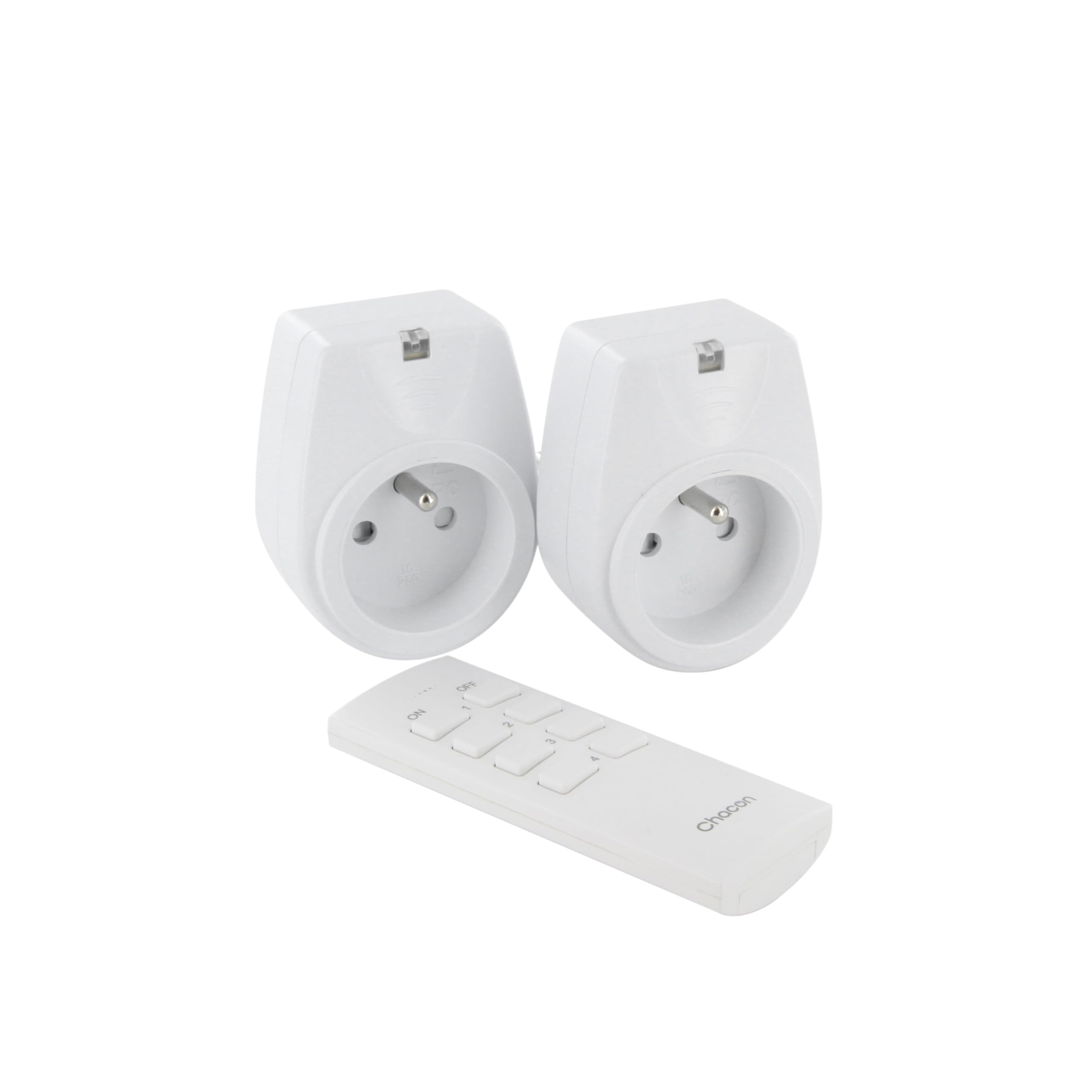
Image: A hand holding the CHACON remote control, demonstrating its use to switch on a lamp.
6. Mantemento
6.1. Limpeza
To clean the sockets and remote control, ensure they are disconnected from power. Use a soft, dry cloth. Do not use abrasive cleaners, solvents, or immerse in water.
6.2. Substitución da batería do control remoto
If the remote control's range decreases or it stops responding, the battery may need replacement. Follow the steps in Section 4.1 to replace the Lithium-ion battery with a new one of the same type.
7 Solución de problemas
| Problema | Causa posible | Solución |
|---|---|---|
| Socket does not respond to remote control. |
|
|
| Connected appliance does not turn on/off. |
|
|
| Reduced transmission range. |
|
|
8. Especificacións
| Marca | CHACON |
| Número de modelo | 54661 |
| Cor | Branco |
| Características especiais | Sen fíos |
| Dispositivos compatibles | Air conditioner, Game console, Iron, Speaker, Lamp, DVD player, MP3 player, E-reader, Coffee machine, Modem, Laptop, Heater, Router, Refrigerator, Set-top box, Smartphone, Smartwatch, Audio system, Hair dryer, Tablet, Television |
| Tipo de batería remoto | Ion de litio (1 incluído) |
| Potencia máxima | 2000 vatios |
| Distancia de transmisión | 25 m (campo aberto) |
| Frecuencia | 433.92 MHz |
| Voltage | 230 V |
| Número de Sockets | 2 |
| Tipo de enchufe | FR (Type E/F) |
| Material | Cloruro de polivinilo (PVC) |
| País de Orixe | China |
9. Garantía
This CHACON product is covered by a 2 ano de garantía from the date of purchase. This warranty covers manufacturing defects and material faults under normal use. It does not cover damage caused by misuse, accident, unauthorized modification, or improper installation.
Conserve o comprobante de compra para reclamacións de garantía.
10. Apoio
For technical assistance, troubleshooting not covered in this manual, or warranty inquiries, please contact CHACON customer support.
Visit the official CHACON websitio para obter a información de soporte e os datos de contacto máis actualizados.
Note: Specific contact information may vary by region.


