1. Rematadoview
The Digilent Zybo Z7-10 is a feature-rich, ready-to-use embedded software and digital circuit development board. It provides a comprehensive set of multimedia and connectivity peripherals, making it a versatile single-board computer solution.
Built around the Xilinx Zynq-7000 AP SoC, the board integrates a 650MHz dual-core Cortex-A9 processor with a DDR3 memory controller and 8 DMA channels. This combination of processing system and programmable logic offers a powerful platform for various applications.

Figure 1: Digilent Zybo Z7-10 Development Board and its packaging.
2. Configuración e configuración inicial
To begin using your Zybo Z7-10 development board, follow these steps for proper setup:
- Conexión de alimentación: Connect the board to a power source using either the USB port or a 5V barrel jack connector. Ensure the power supply meets the board's requirements.
- Conexión USB: For communication with a host computer, connect the board via a USB cable to an available USB port. This connection is typically used for programming and debugging.
- Saída de vídeo (opcional): If your application requires video output, connect an HDMI display to the board's HDMI TX port.
- Conexións de audio (opcionais): For audio input or output, connect appropriate audio devices to the MIC IN, LINE IN, or HPH OUT (headphone out) jacks.
- Pmod Connectors (Optional): Utilize the six Pmod connector ports for expanding functionality with various peripheral modules.
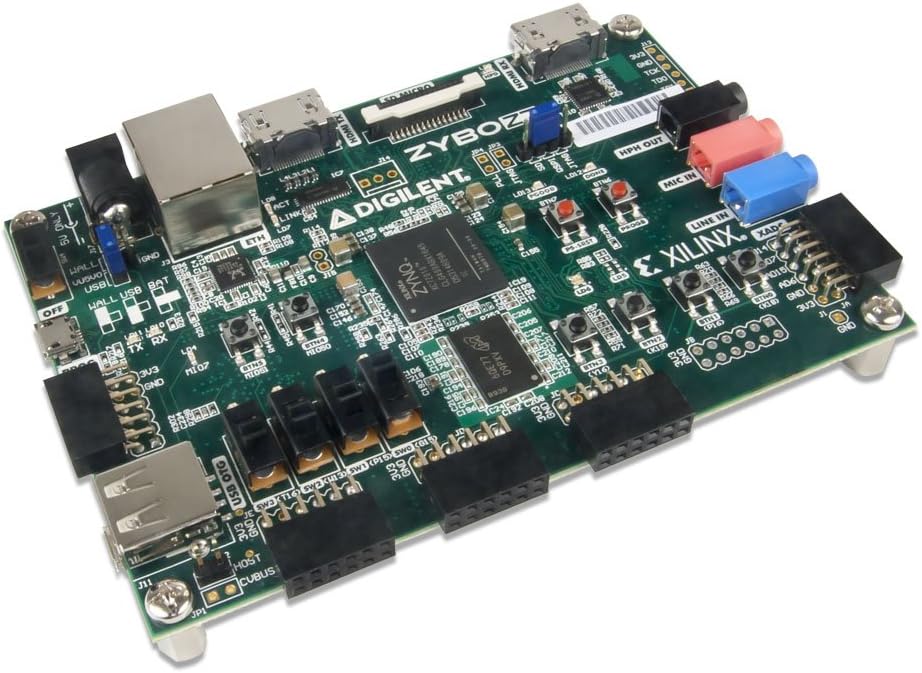
Figura 2: Lateral view of the Zybo Z7-10 board highlighting connectivity options.

Figura 3: De arriba abaixo view of the Zybo Z7-10 board, detailing component layout.
3. Operating the Board
The Zybo Z7-10 offers various on-board user interfaces and extensive I/O for development:
- Interfaces de usuario: The board includes 6 push buttons, 4 slide switches, 5 LEDs, and 2 RGB LEDs for direct user interaction and status indication.
- FPGA I/O: Over 30 FPGA I/O pins are available for custom connections and interfacing with external circuits.
- Conversión de analóxico a dixital: Four analog-capable 0-1.0V differential pairs connect to the XADC, enabling analog signal processing.
3.1. FPGA Programming
The Zynq-7000 AP SoC on the Zybo Z7-10 can be programmed via JTAG for volatile configuration or through the on-board QSPI flash memory for non-volatile storage of your designs. Development typically involves Xilinx Vivado Design Suite.
For detailed programming instructions and examples, refer to the official Digilent documentation and tutorials available on their websitio.
4. Especificacións técnicas
| Característica | Detalle |
|---|---|
| Procesador | Xilinx Zynq-7000 AP SoC (XC7Z010-1CLG400C) with 650MHz dual-core ARM Cortex-A9 |
| RAM | DDR3L, 1 GB installed size |
| Sistema Operativo | Linux (supported) |
| Tipo sen fíos | 802.11b |
| Peso do elemento | 4 onzas |
| Dimensións do produto | 6 x 8 x 3 polgadas |
| Fonte de enerxía | See product details (USB or barrel connector) |
| On-board User Interfaces | 6 push buttons, 4 slide switches, 5 LEDs, 2 RGB LEDs |
| Expansión | 6 Pmod connector ports, >30 FPGA I/O, 4 Analog capable 0-1.0V differential pairs to XADC |
5. Mantemento e coidados
To ensure the longevity and proper functioning of your Zybo Z7-10 board, observe the following maintenance guidelines:
- Manexo: Always handle the board by its edges to avoid touching components, especially the FPGA chip, which can be sensitive to electrostatic discharge (ESD).
- Almacenamento: Store the board in an anti-static bag when not in use, and keep it in a dry, dust-free environment.
- Limpeza: If necessary, gently clean the board with a soft, dry brush or compressed air to remove dust. Avoid using liquids or abrasive cleaners.
- Apagado: Always disconnect power before making or changing any connections to the board.

Figura 4: Abaixo view of the Zybo Z7-10 board, showing mounting points.
6 Solución de problemas
If you encounter issues with your Zybo Z7-10 board, consider the following common troubleshooting steps:
- Sen indicación de alimentación:
- Verify that the power supply is correctly connected and providing the specified 5V.
- Comprobe o cable de alimentación por se hai danos.
- Problemas de conexión USB:
- Ensure the USB cable is securely connected to both the board and the host computer.
- Proba cun porto ou cable USB diferente.
- Install or update the necessary USB drivers for the Zynq device.
- FPGA Not Programming:
- Confirm that the JTAG chain is correctly connected and recognized by your development software (e.g., Xilinx Vivado).
- Ensure the correct bitstream or programming file está seleccionado.
- Check for any error messages in the development software console.
- Software/Firmware Problems:
- Refer to Digilent's official support resources for specific software setup and known issues.
- Ensure your development environment (e.g., Vivado) is up to date.
7. Garantía e soporte
For warranty information, technical support, and additional resources, please visit the official Digilent website. Digilent provides extensive documentation, tutorials, and community forums to assist users with their development boards.
Fabricante: Digilent
Recursos en liña: www.digilentinc.com


