Introdución
Grazas pola compraasing the VONYX SPX-PA9210 Portable PA System. This manual provides essential information for the safe and efficient operation of your device. Please read it thoroughly before use and retain it for future reference.
Instrucións de seguridade
- Lea atentamente todas as instrucións antes de utilizar o dispositivo.
- Manteña a unidade lonxe da auga, da humidade e das temperaturas extremas.
- Non abras a c.asing; encomende todo o mantemento a persoal cualificado.
- Use só o adaptador de corrente especificado para cargar.
- Garantir unha ventilación adecuada para evitar o sobrequecemento.
- Evite a exposición prolongada a altos niveis de volume para evitar danos auditivos.
Contido do paquete
Verifica que todos os elementos estean presentes no paquete:
- VONYX SPX-PA9210 Portable PA System Unit
- 2 micrófonos sen fíos UHF
- Adaptador de corrente/cable de carga
- Manual de usuario (este documento)
Produto rematadoview
The VONYX SPX-PA9210 is a portable PA system designed for various audio applications. It features integrated speakers, media playback options, and wireless microphones for versatile use.
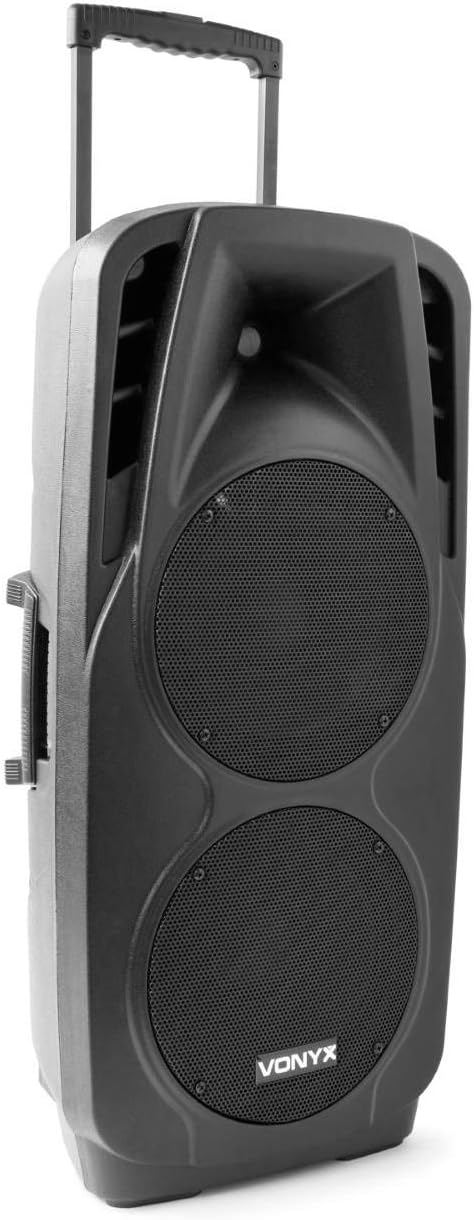
An image showing the VONYX SPX-PA9210 portable PA system. It features a black casing, two large speaker grilles on the front, and a retractable handle at the top for easy transport. A side handle is also visible.
Características principais:
- Integrated 2x 10-inch speakers with titanium tweeter controller.
- Built-in media player with USB and SD/MMC card slots.
- Conectividade Bluetooth para transmisión de audio sen fíos.
- High-performance 12V/7A rechargeable battery for 4-6 hours of autonomy.
- Two UHF wireless microphones with up to 50m range.
- Integrated trolley with telescopic handle and wheels for portability.
- LCD screen for media information display.
Configuración
1. Carga inicial
Before first use, fully charge the internal 12V/7A battery. Connect the provided power adapter to the charging port on the PA system and then to a suitable power outlet. The charging indicator will show the charging status. A full charge typically provides 4-6 hours of operation.
2. Acendido/apagado
- To power on the unit, locate the power switch (usually on the rear or control panel) and set it to the "ON" position.
- To power off, set the switch to the "OFF" position.
3. Configuración do micrófono
- Insert fresh batteries into the two UHF wireless microphones.
- Turn on the microphones. They should automatically connect to the PA system.
- Adjust the microphone volume on the PA system's control panel. The wireless range is up to 50 meters.
Instrucións de funcionamento
1. Media Playback (USB/SD/MMC)
- Insert a USB flash drive or an SD/MMC card into the corresponding slot on the control panel.
- The system will automatically detect the media and begin playback, or you may need to select the input source using the "Mode" button.
- Use the playback controls (Play/Pause, Next, Previous) on the control panel to manage your music.
- The LCD screen will display track information.
2. Emparellamento Bluetooth
- Press the "Mode" button on the PA system until "Mode" button on the PA system until "Bluetooth" is selected.
- No teu teléfono intelixente, tableta ou outro dispositivo con Bluetooth, activa Bluetooth e busca os dispositivos dispoñibles.
- Select "VONYX SPX-PA9210" (or similar name) from the list to pair.
- Unha vez emparellados, podes transmitir audio sen fíos desde o teu dispositivo ao sistema de PA.
3. Volume and Tone Controls
- Adjust the master volume knob to control the overall sound output.
- Separate volume controls are available for microphones and media playback.
- Use the bass and treble controls (if available) to adjust the tone of the audio.
Mantemento
1. Limpeza
Wipe the exterior of the unit with a soft, dry cloth. Do not use abrasive cleaners or solvents. Ensure no liquids enter the device.
2. Coidado da batería
- Para prolongar a duración da batería, evite descargala completamente con frecuencia.
- Charge the unit regularly, even if not in use, to maintain battery health.
- Store the unit in a cool, dry place when not in use for extended periods.
Resolución de problemas
- Sen enerxía: Ensure the unit is charged or connected to a power source, and the power switch is in the "ON" position.
- Sen son: Check all volume controls (master, microphone, media player). Ensure the correct input source is selected. Verify microphone batteries.
- Bluetooth non se conecta: Ensure the PA system is in Bluetooth mode and discoverable. Turn off and on Bluetooth on your device and try pairing again. Move closer to the PA system.
- Son distorsionado: Reduce the volume. Check audio cables if using wired inputs. Ensure microphones are not too close to the speakers (feedback).
Especificacións
| Marca | VONYX |
| Número de modelo | Sky-170.082 (SPX-PA9210) |
| Dimensións (L x W x H) | 27 x 38.5 x 81 cm |
| Peso | 16.25 kg |
| Tecnoloxía de conectividade | Bluetooth, USB |
| Uso recomendado do produto | Smartphones ou Tablets |
| Características especiais | Bluetooth, USB Port, Portable, LCD Screen |
| Fonte de enerxía | Wireless (Internal Battery) |
| Batería | 12V/7A, 4-6 hours autonomy |
| Material | Acrilonitrilo Butadieno Estireno (ABS) |
| Número de canles | 5 |
| Altofalantes | 2x 10-inch woofers, Titanium tweeter controller |
| Micrófonos | 2x UHF Wireless Microphones (up to 50m range) |
Garantía e Soporte
For warranty information and technical support, please refer to the documentation provided with your purchase or contact VONYX customer service directly.
Dispoñibilidade de pezas de reposición: A información relativa á dispoñibilidade de pezas de reposto para este produto non está dispoñible actualmente.
Actualizacións de software: Information regarding guaranteed software updates for this product is currently unavailable.


