Introdución
This manual provides detailed instructions for the safe and efficient operation of your Mikado MD-856 Multimedia Bluetooth Speaker system. Please read this manual thoroughly before using the product and retain it for future reference.
Información de seguridade
- Non expoña a unidade á choiva nin á humidade para evitar incendios ou descargas eléctricas.
- Non abras a c.asing. Encomende todo o mantemento a persoal cualificado.
- Garantir unha ventilación adecuada ao redor da unidade.
- Empregue só a fonte de alimentación especificada para este dispositivo.
- Manter lonxe da luz solar directa, de fontes de calor e de campos magnéticos fortes.
- Evite colocar obxectos pesados sobre a unidade.
Contido do paquete
Comprobe que todos os elementos que se indican a continuación estean incluídos no seu paquete:
- Main Subwoofer Unit
- Altofalantes satélite (5 unidades)
- Control remoto
- Usage Manual (this document)
- Certificado de garantía
- Cabo RCA
- Cable da antena
Produto rematadoview
The Mikado MD-856 is a 5.1 channel multimedia speaker system designed to deliver rich audio. It features multiple connectivity options including Bluetooth, USB, SD card, FM radio, and AUX input.
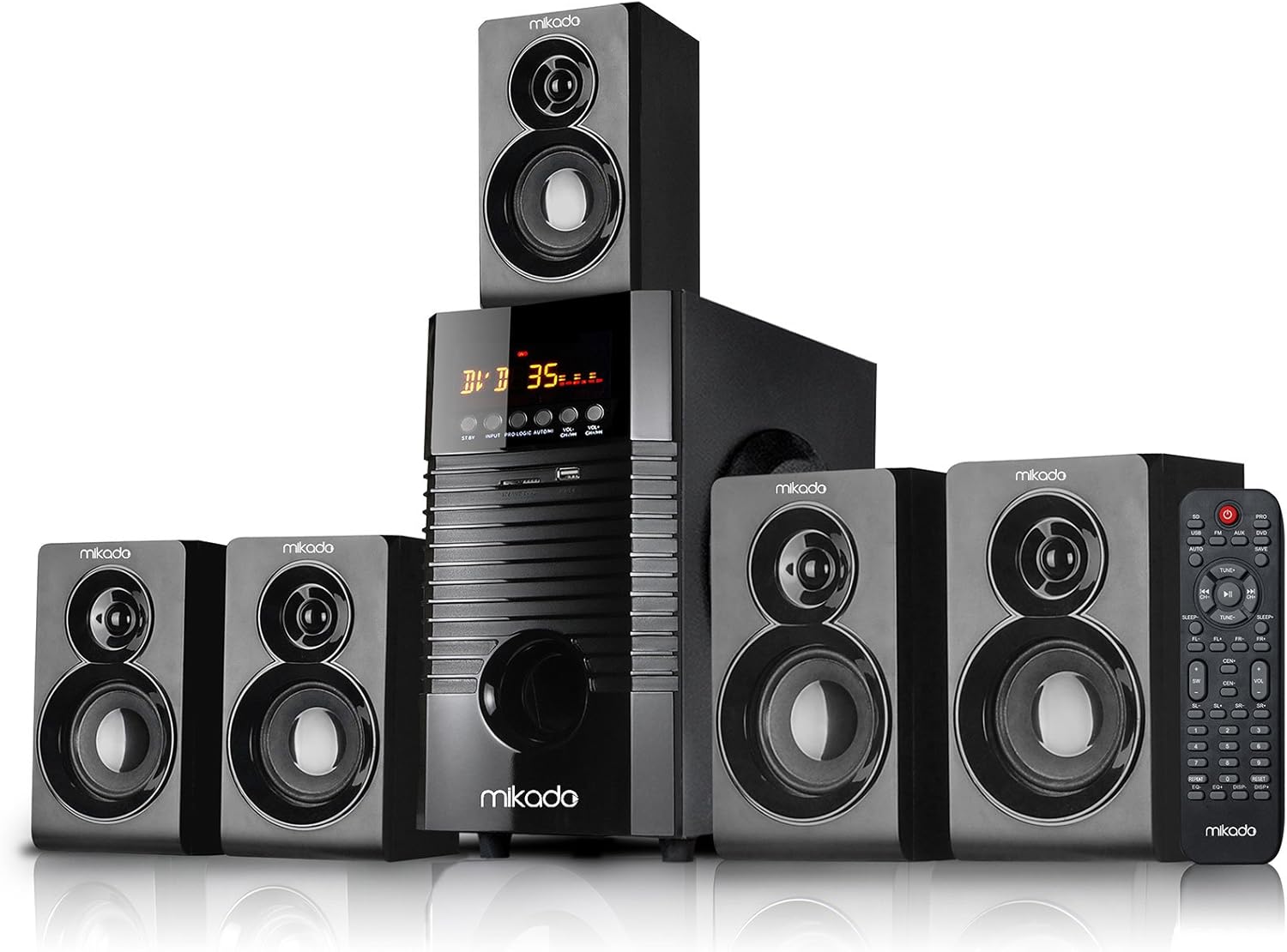
Figura 1: Fronte view of the Mikado MD-856 5.1 Multimedia Bluetooth Speaker system, showing the central subwoofer unit, five satellite speakers, and the remote control.

Figura 2: Rear panel of the Mikado MD-856 subwoofer, displaying various audio input and output ports, power switch, and power cable connection.
Configuración
1. Conexión de altofalantes
- Connect the five satellite speakers to the corresponding output ports on the rear panel of the main subwoofer unit. Ensure correct polarity (+ to + and - to -).
- Position the speakers for optimal 5.1 surround sound experience. Typically, one center speaker, two front speakers, and two rear speakers.
2. Conexión de alimentación
- Asegúrese de que o interruptor de alimentación do panel traseiro estea na posición de apagado.
- Connect the power cable to the main subwoofer unit and then plug it into a standard electrical outlet.
3. Conexións de entrada de audio
Escolla un dos seguintes métodos para conectar a súa fonte de son:
- RCA (AUX) Input: Use the provided RCA cable to connect your audio source (e.g., TV, PC, DVD player) to the "AUX AUDIO INPUT" ports on the rear panel. Match the red and white connectors.
- Tarxeta USB/SD: Insert a USB flash drive or SD card into the respective slots on the front panel of the subwoofer.
- Antena FM: Connect the included antenna cable to the FM antenna port on the rear panel for improved radio reception.
Instrucións de funcionamento
1. Acendido/apagado
Flip the power switch on the rear panel to the ON position. The display on the front panel will illuminate.
2. Selección de modo
Press the "MODE" button on the front panel or the remote control to cycle through available input modes: Bluetooth, USB, SD, FM, and AUX.
3. Control de volume
Adjust the master volume using the large knob on the front panel or the volume buttons on the remote control.
4. Emparellamento Bluetooth
- Switch the speaker system to Bluetooth mode. The display will show "BT" or a similar indicator.
- Activa o Bluetooth no teu dispositivo móbil (teléfono intelixente, tableta, etc.) e busca os dispositivos dispoñibles.
- Select "MD-856" from the list of devices. Once paired, you will hear a confirmation sound.
5. Reprodución por USB/SD
When a USB drive or SD card is inserted, the system will automatically switch to USB/SD mode and begin playing compatible audio files. Use the remote control for playback functions (play/pause, next/previous track).
6. Radio FM
In FM mode, press the "SCAN" button on the remote control to automatically scan and save available radio stations. Use the "PREV/NEXT" buttons to navigate through saved stations.
Mantemento
- Limpeza: Use a soft, dry cloth to clean the surfaces of the speakers. Do not use liquid cleaners or abrasive materials.
- Almacenamento: Se vai gardar a unidade durante un período prolongado, desconéctea da fonte de alimentación e gárdea nun lugar fresco e seco.
- Ventilación: Asegúrese de que as aberturas de ventilación do subwoofer non estean bloqueadas para evitar o sobrequecemento.
Resolución de problemas
| Problema | Causa posible | Solución |
|---|---|---|
| Sen poder | Power cable not connected; Power switch off; Power outlet faulty | Check power cable connection; Turn power switch ON; Try a different power outlet |
| Sen son | Volume too low; Incorrect input mode; Audio cables not connected properly; Source device not playing | Increase volume; Select correct input mode; Check audio cable connections; Ensure source device is playing audio |
| Bluetooth non se sincroniza | Speaker not in Bluetooth mode; Device too far; Bluetooth on device off | Switch to Bluetooth mode; Move device closer; Enable Bluetooth on your device |
| Mala recepción FM | Antena non conectada; sinal débil | Connect FM antenna; Adjust antenna position for better signal |
Especificacións
- Modelo: MD-856
- Marca: Mikado
- Tipo de altofalante: Multimedia 5.1 Channel
- Tecnoloxía de conectividade: Bluetooth, USB
- Potencia de saída máxima do altofalante: 25 vatios
- Configuración da canle de son envolvente: 5.1
- Usos recomendados: PC - TV
- Dimensións do produto: 35 x 35 x 44 cm
- Peso do artigo: 7.9 quilogramos
- Cor: Negro
- Compoñentes incluídos: Controller, Usage Manual, Warranty Certificate, RCA Cable, Antenna Cable
Garantía e Soporte
Your Mikado MD-856 speaker system comes with a Warranty Certificate. Please refer to the certificate for details regarding warranty coverage and terms. For technical support or service inquiries, please contact your local Mikado dealer or authorized service center.


