Introdución
This manual provides essential instructions for the Jam Audio Out There Active Noise Cancelling On-Ear Bluetooth Headphones. Please read this guide thoroughly to ensure proper use, maintenance, and to maximize your listening experience. These headphones offer active noise cancellation, Bluetooth connectivity, hands-free calling, and a comfortable on-ear design.
O que hai na caixa
Comprobe que todos os elementos estean presentes na embalaxe:
- Out There Headphones
- Cable auxiliar (3.5 mm)
- Cable de carga USB
- Guía de inicio rápido (consulte este manual para obter instrucións detalladas)

Image: Contents of the Jam Audio Out There headphone package, including the headphones, AUX cable, and USB charging cable.
Produto rematadoview e Controis
Familiarize yourself with the headphone's layout and controls for optimal use.
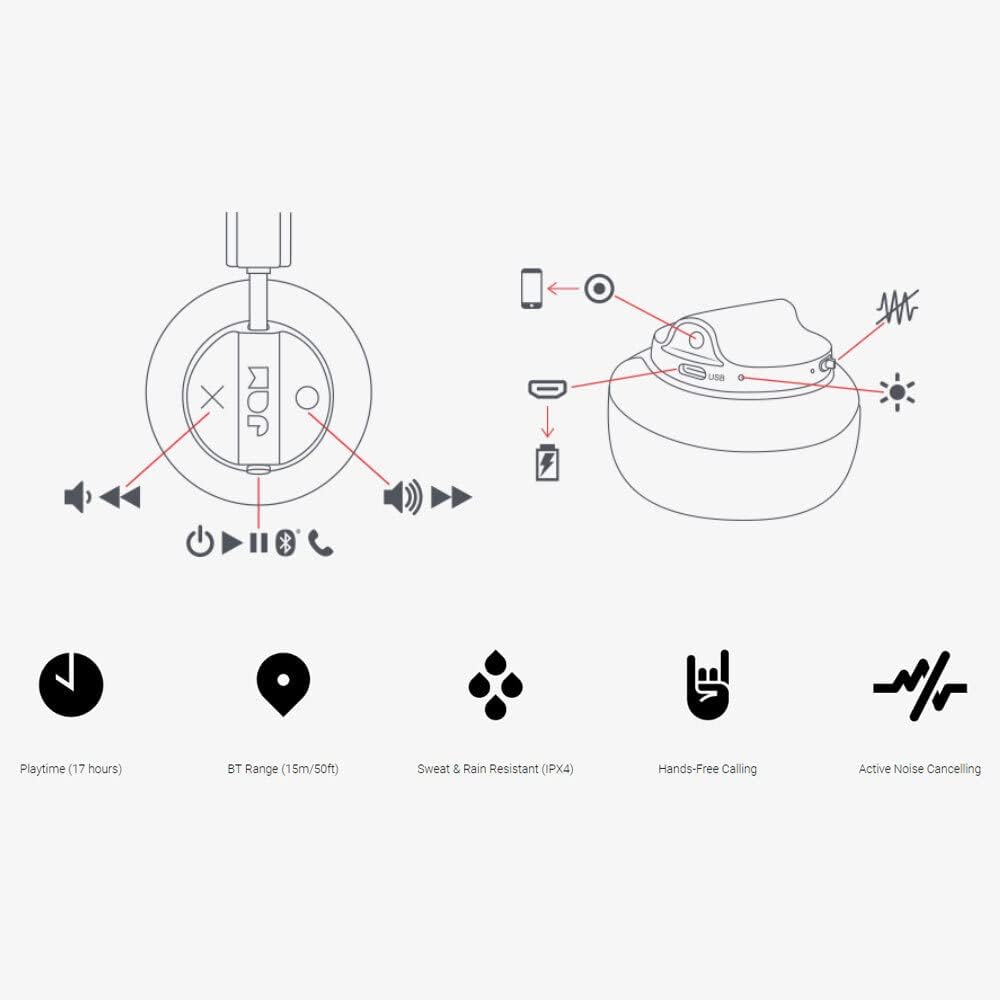
Image: Detailed diagram illustrating the control buttons and ports on the Jam Audio Out There headphones, including power, volume, track navigation, call management, and the charging port.
- Botón de encendido: Mantén premido para acender/apagar.
- Subir volume / seguinte pista: Prema brevemente para subir o volume, preme longa para a seguinte pista.
- Baixar volume / pista anterior: Presión curta para baixar o volume, presión longa para a pista anterior.
- Reproducir/Pausa/Responder chamadas: Single press to play/pause music or answer/end a call.
- Active Noise Cancelling (ANC) Switch: Toggle to activate or deactivate noise cancellation.
- Porto de carga: Porto micro USB para carga.
- Porto de entrada auxiliar: Conector de 3.5 mm para conexión de audio con cable.
Configuración
1. Carga dos auriculares
Before first use, fully charge your headphones. Connect the provided USB charging cable to the charging port on the headphones and the other end to a USB power source. The LED indicator will show charging status and turn off when fully charged. A full charge takes approximately 2 hours and provides up to 17 hours of playtime.

Image: The Jam Audio Out There headphones provide up to 17 hours of playtime on a single charge.
2. Acendido/apagado
- To power on: Press and hold the Power button for 3 seconds. The LED indicator will flash.
- To power off: Press and hold the Power button for 3 seconds. The LED indicator will turn off.
3. Emparellamento Bluetooth
- Asegúrese de que os auriculares estean apagados.
- Press and hold the Power button for 5 seconds until the LED indicator flashes red and blue, indicating pairing mode.
- No teu dispositivo (teléfono intelixente, tableta, ordenador), activa o Bluetooth e busca os dispositivos dispoñibles.
- Select "JAM Out There" from the list of devices.
- Once paired, the LED indicator on the headphones will turn solid blue.
- The headphones have a Bluetooth range of up to 15 meters (50 feet).

Image: The Jam Audio Out There headphones offer Bluetooth compatibility, allowing a range of up to 15 meters or 50 feet from your connected device.
Instrucións de funcionamento
Reprodución de música
- Reproducir/Pausa: Preme o botón Reproducir/Pausa unha vez.
- Próxima pista: Mantén premido o botón para subir volume.
- Pista anterior: Mantén premido o botón para baixar o volume.
- Axuste de volume: Prema brevemente os botóns Subir volume ou Baixar volume.
Chamadas mans libres
- Responder/Finalizar chamada: Preme o botón Reproducir/Pausa unha vez.
- Rexeitar a chamada: Manteña premido o botón Reproducir/Pausa durante 2 segundos.
- Facer unha chamada: Initiate the call from your connected device. The audio will automatically transfer to the headphones.
- Music will automatically pause during a call and resume after the call ends.
Cancelación activa de ruído (ANC)
- To activate ANC: Slide the ANC switch to the ON position. The ANC indicator light will illuminate.
- To deactivate ANC: Slide the ANC switch to the OFF position. The ANC indicator light will turn off.
- Using ANC can reduce ambient noise, enhancing your listening experience. Note that ANC can be used independently or with Bluetooth audio.
Wired Connection (AUX-in)
For a wired connection, use the provided 3.5mm AUX cable. Plug one end into the headphone's AUX-in port and the other into your audio device. This allows you to continue listening even if the headphone battery is depleted or if Bluetooth is not available.
Mantemento
- Limpeza: Limpe os auriculares cun pano suave e seco. Non empregue produtos químicos agresivos nin materiais abrasivos.
- Almacenamento: Garde os auriculares nun lugar fresco e seco, lonxe de temperaturas extremas.
- Resistencia á auga: These headphones are IPX4 rated, meaning they are resistant to sweat and light splashes of water. Do not submerge them in water or expose them to heavy rain. Ensure the charging port cover is securely closed when not charging to maintain water resistance.
- Coidado da batería: Para prolongar a duración da batería, evite descargar completamente os auriculares con frecuencia. Cárgueos regularmente, mesmo se non os usa durante períodos prolongados.
Resolución de problemas
| Problema | Solución |
|---|---|
| Os auriculares non se acenden | Asegúrate de que os auriculares estean cargados. Conéctaos a unha fonte de alimentación mediante o cable USB. |
| Non se pode emparellar por Bluetooth |
|
| Sen son nin baixo volume |
|
| Active Noise Cancelling not working | Ensure the ANC switch is in the ON position and the ANC indicator light is illuminated. |
| Headphones falling apart or breaking | While the product is designed for durability, excessive force or improper handling can cause damage. Handle with care. If issues persist, refer to warranty information. |
Especificacións
- Nome do modelo: Alí fóra
- Número de modelo: HX-HP303BK
- Conectividade: Bluetooth, 3.5 mm Jack (AUX-in)
- Alcance sen fíos: Ata 15 metros (50 pés)
- Duración da batería: Ata 17 horas
- Control de ruído: Cancelación activa de ruído
- Resistencia á auga: IPX4 Rated (Sweat and Rain Resistant)
- Colocación do oído: Na Orella
- Material: Goma, silicona
- Peso do artigo: 5.1 onzas (0.32 libras)
- Dimensións do produto: 8.58 x 3.19 x 8.66 polgadas
- Compoñentes incluídos: Headphones, Charging Cord, AUX Cable
Vídeo do produto máis aláview
Mira este vídeo oficial do produto para obter unha visión xeralview of the Jam Audio product line, including the Out There headphones.
Video: An official Jam Audio sizzle video showcasing various products, including the Out There headphones, highlighting their design and features.
Garantía e Soporte
For warranty information, product registration, or technical support, please refer to the official Jam Audio websitio web ou póñase en contacto co servizo de atención ao cliente. Garde o comprobante de compra para reclamacións de garantía.


