1. Introdución
This manual provides detailed instructions for the use and maintenance of your Jabra Elite 45e Wireless Earbuds. These earbuds are designed to deliver a superior wireless experience for both calls and music, featuring advanced 2-microphone technology for clear conversations and a flexible memory wire neckband for a secure fit. The Jabra Sound+ app allows for personalized audio settings, and the earbuds offer one-touch access to voice assistants like Amazon Alexa, Siri, and Google Assistant.
The Jabra Elite 45e is rated IP54 for water and dust resistance, ensuring durability for daily use. With up to 8 hours of battery life on a single charge, these earbuds are built to support your communication and entertainment needs throughout the day.
2. Que hai na caixa
Verifique que todos os compoñentes estean presentes na embalaxe do produto:
- Auriculares sen fíos Jabra Elite 45e
- Cable micro USB
- 3 sets of EarGels and Earwings (various sizes)
- Manual de usuario (este documento)
- Warranty and Warning Leaflets
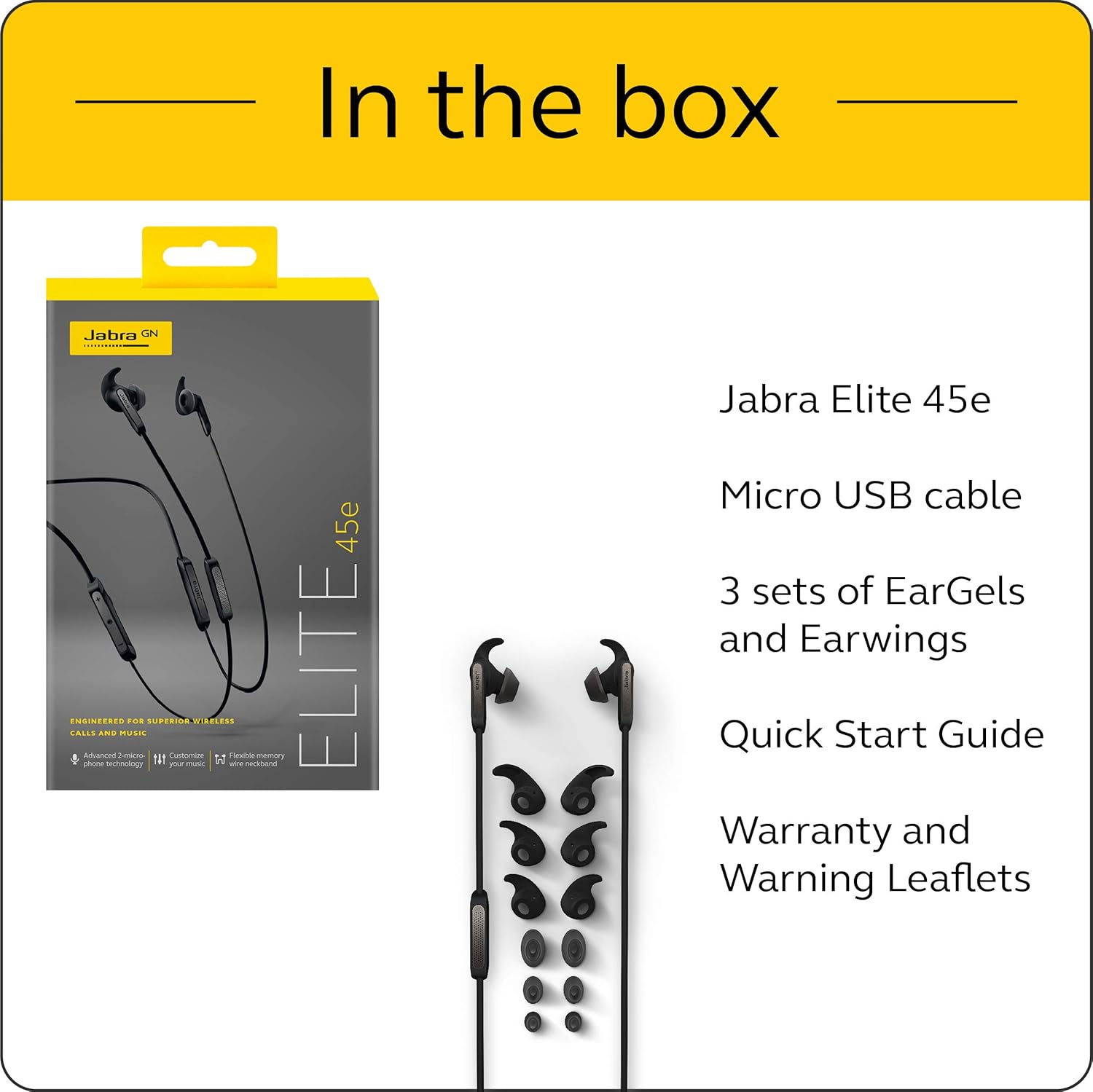
Image: The Jabra Elite 45e packaging and its contents, including the earbuds, Micro USB cable, and multiple sets of EarGels and Earwings.
3. Configuración
3.1 Carga dos auriculares
Before first use, fully charge your Jabra Elite 45e earbuds. Connect the included Micro USB cable to the charging port on the neckband and to a power source. A full charge takes approximately 2 hours and provides up to 8 hours of battery life for calls and music.

Image: The Jabra Elite 45e earbuds, highlighting the long battery life of up to 8 hours on a single charge.
3.2 Emparejamento Bluetooth
- Asegúrate de que os auriculares estean cargados.
- Turn on the earbuds by pressing and holding the Multi-function button until the LED indicator flashes blue.
- On your smartphone or device, go to the Bluetooth settings.
- Select 'Jabra Elite 45e' from the list of available devices.
- Unha vez vinculado, o indicador LED volverá azul fijo.
3.3 Conseguir un axuste seguro
The Jabra Elite 45e features a flexible memory wire neckband that conforms to the shape of your neck for a comfortable and secure fit. Experiment with the different sizes of EarGels and Earwings provided to find the best fit for your ears. A proper fit is crucial for optimal sound quality and call performance.

Image: The Jabra Elite 45e earbuds showcasing the flexible memory wire neckband designed for a secure and comfortable fit around the user's neck.
4. Funcionamento dos auriculares
4.1 Controis básicos
The integrated controls on the neckband allow you to manage calls, adjust volume, and control music playback. Refer to the quick start guide for a detailed diagram of button functions.
4.2 Voice Assistant Access
The Jabra Elite 45e provides one-touch access to your preferred voice assistant, including Amazon Alexa, Siri, and Google Assistant. Simply press the dedicated voice assistant button to activate and issue commands.

Image: A user interacting with the Jabra Elite 45e earbuds, demonstrating one-touch access to voice assistants like Alexa, Google Assistant, and Siri.
4.3 Xestión de chamadas
The advanced 2-microphone technology ensures crystal-clear calls by filtering out background noise. Use the integrated controls to answer, end, or reject calls.
4.4 Reprodución de música
Enjoy your music with personalized sound settings. Download the Jabra Sound+ app to customize your audio experience with the built-in equalizer.
Video: An official product video demonstrating the features of the Jabra Elite 45e Wireless Earbuds, including call quality, music personalization, and design.
5. Mantemento
5.1 Resistencia á auga e ao po
The Jabra Elite 45e earbuds are IP54-rated, meaning they are protected against dust ingress and splashing water from any direction. This makes them suitable for various environments, including workouts. However, they are not designed for submersion in water.
5.2 Limpeza
To maintain optimal performance and hygiene, regularly clean your earbuds. Use a soft, dry cloth to wipe the surfaces. For the EarGels and Earwings, you may gently clean them with a damp un pano e xabón suave, asegurándose de que estean completamente secos antes de volvelos colocar.
6 Solución de problemas
If you encounter issues with your Jabra Elite 45e earbuds, try the following steps:
- Sen enerxía: Ensure the earbuds are fully charged. Connect them to a power source using the Micro USB cable.
- Non se pode emparellar: Make sure Bluetooth is enabled on your device and the earbuds are in pairing mode (LED flashing blue). Try unpairing and re-pairing the device.
- Mala calidade de son: Check the fit of the EarGels and Earwings. Ensure they create a good seal in your ear. Adjust settings in the Jabra Sound+ app.
- Problemas de chamadas: Ensure the earbuds are connected to your phone. Check your phone's audio output settings to confirm the Jabra Elite 45e is selected.
- Controis que non responden: Try resetting the earbuds (refer to the Jabra support websitio web para obter instrucións específicas).
For more detailed troubleshooting or persistent issues, please visit the official Jabra support websitio.
7. Especificacións
| Característica | Especificación |
|---|---|
| Nome do modelo | Elite 45e |
| Tecnoloxía de conectividade | Bluetooth, Sen fíos |
| Versión Bluetooth | 5.0 |
| Duración da batería | Ata 8 horas |
| Tempo de carga | 2 horas |
| Nivel de resistencia á auga | IP54 (resistente á auga) |
| Tipo de control | Alexa, Siri, Google Assistant (Voice) |
| Colocación do oído | En Orella |
| Peso do elemento | 7.8 onzas (0.49 libras) |
| Dimensións do produto | 4.88 x 2.17 x 7.35 polgadas |
| Fabricante | Xabra |
| Número de modelo do artigo | 100-98900000-02 |
| UPC | 615822009461 |
8. Garantía e soporte
The Jabra Elite 45e Wireless Earbuds come with a 2-year warranty against sweat and dust. Registration is required through the Jabra Sound+ app to activate this warranty.
For further assistance, product registration, or to access the latest firmware updates and support resources, please visit the official Jabra support websitio ou póñase en contacto co seu servizo de atención ao cliente.


