1. Introdución
Thank you for choosing the ASAKUKI Smart Wi-Fi Essential Oil Diffuser. This device combines aromatherapy with smart technology, allowing you to control it via a mobile application or voice commands. It is designed to humidify and purify the air, creating a relaxing atmosphere in your home or office.
This manual provides detailed instructions for the safe and efficient use of your diffuser. Please read it thoroughly before operation and retain it for future reference.

Image: The ASAKUKI Smart Wi-Fi Essential Oil Diffuser is versatile for various environments, including nurseries, family rooms, bedrooms, yoga studios, and workspaces.
2. Precaucións de seguridade
Para garantir un funcionamento seguro e evitar danos, observe o seguinte:
- Always place the diffuser on a flat, stable surface.
- Do not exceed the maximum water fill line (500ml).
- Use only clean tap water or distilled water. Avoid using hot water.
- Add essential oils carefully to avoid spilling on the exterior of the unit.
- Manteña o difusor fóra do alcance dos nenos e das mascotas.
- Do not cover the mist outlet during operation.
- Unplug the device from the power outlet before cleaning or refilling.
- Non sumerxa a unidade en auga ou outros líquidos.
- If the unit is damaged, do not attempt to repair it yourself. Contact customer support.
- The diffuser features an automatic shut-off when water runs out, but it is recommended to monitor water levels.
3. Contido do paquete
Verifica que todos os elementos estean presentes no teu paquete:
- ASAKUKI Smart Wi-Fi Essential Oil Diffuser (Model DF010)
- Adaptador de alimentación
- Manual de usuario
- Measuring Cup (may be included)
4. Produto rematadoview
Familiarize yourself with the main components of your diffuser:

Image: The ASAKUKI Smart Wi-Fi Essential Oil Diffuser, showing its sleek design and the accompanying mobile app for control.
- Tapa: Top cover of the diffuser.
- Saída de néboa: Where the mist is released.
- Depósito de auga: Holds up to 500ml of water.
- Max Water Line: Indicates the maximum fill level.
- Ultrasonic Plate: Located at the bottom of the water tank, responsible for mist generation.
- Saída de aire: Located on the base.
- Drain Side: Indicated for proper water drainage.
- Botón de luz: Controls the LED light functions.
- Mist/Wi-Fi Button: Controls mist output and initiates Wi-Fi pairing.
- Toma de alimentación: Para conectar o adaptador de alimentación.
5. Instrucións de configuración
Siga estes pasos para a configuración inicial:
- Place the Diffuser: Position the diffuser on a flat, stable, and water-resistant surface.
- Retire a tapa: Gently lift the top lid off the diffuser.
- Engadir auga: Using a measuring cup, fill the water tank with clean tap water or distilled water up to the maximum water line (500ml). Do not overfill.
- Engade aceites esenciais: Add 3-5 drops of your preferred essential oil directly into the water tank. Adjust the amount based on personal preference and room size.
- Substituír a tapa: Securely place the lid back onto the diffuser.
- Conectar enerxía: Plug the power adapter into the power jack at the base of the diffuser, then plug the adapter into a wall outlet.
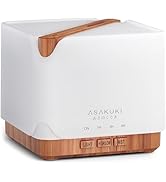
Image: Simple setup guide illustrating connecting power, app pairing, and wireless control.
6. Instrucións de funcionamento
6.1 Control manual
- Control da néboa: Preme o Mist/Wi-Fi button once for continuous mist. Press again for intermittent mist (30 seconds on, 30 seconds off). Press a third time to turn off the mist.
- Control de luz: Preme o Luz button once to turn on the LED light with automatic color cycling. Press again to fix the light to a specific color. Continue pressing to cycle through colors. Press and hold the Light button to turn off the light.
6.2 Smart Wi-Fi and App Control
The diffuser can be controlled remotely using the TuyaSmart app.
- Descarga a aplicación: Busca "TuyaSmart" in your smartphone's app store (iOS or Android) and download it.
- Rexistrarse/Iniciar sesión: Abre a aplicación e rexistra unha nova conta ou inicia sesión se xa tes unha.
- Entrar no modo de emparellamento: With the diffuser plugged in, press and hold the Mist/Wi-Fi button for 5 seconds until the indicator light flashes rapidly. This indicates the diffuser is in pairing mode.
- Engadir dispositivo: In the TuyaSmart app, tap "Add Device" or the "+" icon. Select "Small Home Appliance" > "Diffuser" (Wi-Fi).
- Conectar a wifi: Follow the in-app instructions to connect the diffuser to your 2.4GHz Wi-Fi network. Ensure your phone is also connected to the same 2.4GHz network during setup.
- Control: Once successfully paired, you can control the mist, light, set timers, and create schedules directly from the TuyaSmart app.

Image: The mobile app allows for convenient control of the diffuser's functions.
6.3 Control por voz con Alexa
The diffuser is compatible with Amazon Alexa for voice control.
- Activar habilidade: In the Alexa app, search for and enable the "TuyaSmart" skill.
- Vincular conta: Link your TuyaSmart account to your Alexa account.
- Descubra dispositivos: Ask Alexa to "Discover devices" or manually discover them in the Alexa app.
- Comandos de voz: Unha vez descuberto, podes usar comandos como:
- "Alexa, turn on the diffuser."
- "Alexa, turn off the diffuser."
- "Alexa, set the diffuser to red."
- "Alexa, set diffuser brightness to 50%."

Image: Voice control with Alexa allows hands-free operation of the diffuser.
7. Mantemento
Regular cleaning helps maintain optimal performance and extends the lifespan of your diffuser.
7.1 Limpeza
Clean the diffuser after every 5-6 uses or every 3-5 days, especially when changing essential oils.
- Desconectar: Disconnect the diffuser from the power outlet.
- Auga baleira: Remove the lid and carefully pour out any remaining water from the drain side of the water tank.
- Limpar: Use a soft cloth or cotton swab with a small amount of mild dish soap to gently wipe the inside of the water tank and the ultrasonic plate.
- Enxágüe: Rinse the water tank with clean water, being careful not to get water into the air outlet.
- Seco: Wipe all parts dry with a clean, soft cloth.
- Deep Clean (Optional): For stubborn residue, add a small amount of white vinegar to the water tank and let it sit for 10-15 minutes before wiping and rinsing.
7.2 Almacenamento
When not in use for an extended period, ensure the diffuser is clean and completely dry. Store it in a cool, dry place away from direct sunlight.
8 Solución de problemas
Se tes algún problema, consulta os seguintes problemas e solucións comúns:
| Problema | Causa posible | Solución |
|---|---|---|
| Sen néboa ou baixa saída de néboa |
|
|
| Diffuser does not power on |
|
|
| Non se pode conectar á wifi/aplicación |
|
|
| Fuga de auga |
|
|
9. Especificacións
| Característica | Detalle |
|---|---|
| Marca | ASAKUKI |
| Número de modelo | DF010 |
| Capacidade | 500 mililitros |
| Dimensións | 6 cm de longo x 7 cm de ancho x 6 cm de alto |
| Material | Acrylonitrile Butadiene Styrene (ABS), Polypropylene (PP) |
| Fonte de enerxía | Eléctrico con cable |
| Wattage | 10 vatios |
| Área de cobertura | Ata 323 pés cadrados |
| Características especiais | App Control, Automatic Shut-Off, Multiple Light Settings, Multiple Mist Settings, Voice Control (Alexa) |
| Nivel de ruído | Lower than 35 dB |
| Runtime (Full Capacity) | Up to 16 hours (on weak mist setting) |
10. Garantía e soporte
The ASAKUKI Smart Wi-Fi Essential Oil Diffuser comes with a 1-year technical support warrantyEsta garantía cobre os defectos de fabricación e os problemas derivados do uso normal.
For technical assistance, troubleshooting, or warranty claims, please contact ASAKUKI customer support through the retailer where you purchased the product or visit the official ASAKUKI websitio para información de contacto.
Please have your model number (DF010) and proof of purchase ready when contacting support.


