1. Introdución
O ViewSonic PX706HD is a 1080p short throw projector designed for versatile entertainment and gaming. It delivers large, immersive images in various environments, including smaller rooms, thanks to its short throw lens. This manual provides essential information for setting up, operating, and maintaining your projector.
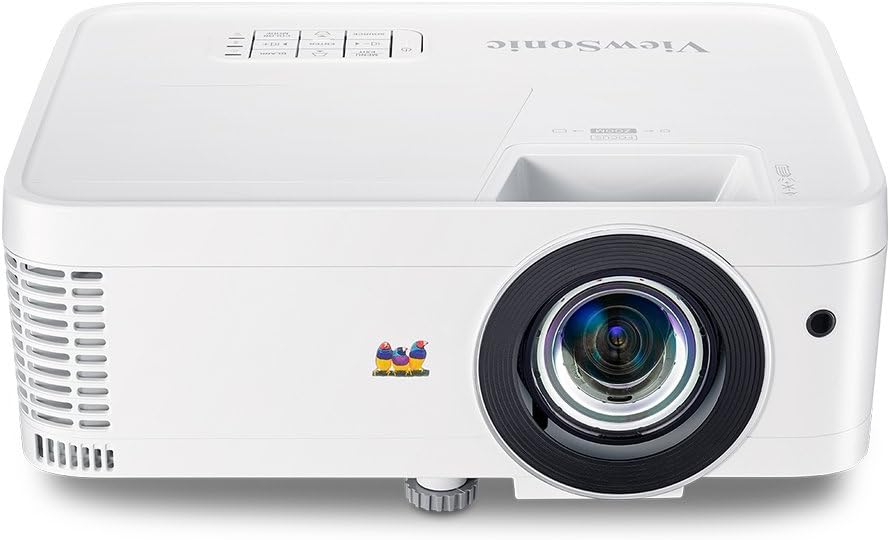
Figura 1.1: Fronte view da ViewSonic PX706HD Projector.
2. Contido do paquete
Verifique que todos os elementos que se indican a continuación estean incluídos no paquete do produto:
- Proxector PX706HD
- Cable de alimentación
- Cable USB tipo C.
- Control remoto
- Manual de usuario (este documento)

Figure 2.1: Items included in the PX706HD package.
3. Produto rematadoview
O ViewSonic PX706HD projector offers a range of features for an enhanced viewexperiencia de xogo e entretemento:
- Alto brillo e resolución: 3000 Lumens and Full HD 1920x1080 resolution for vivid, ultra-sharp images.
- Lente de tiro curto: Project large images (up to 100 inches) from a short distance, ideal for smaller rooms.
- Low Input Latency: 16ms input latency ensures faster frame-by-frame action for smooth gameplay without delay.
- Cinematic Colors: Exclusive Color technology provides a wide color gamut for accurate and vibrant image production.
- Conectividade flexible: Supports various devices via Dual HDMI, USB-C, and other inputs.
- Full HD 3D Compatibility: Enjoy 3D movies and games.
- Relator interno: Delivers room-filling sound for an immersive audiovisual experience.

Figure 3.1: High brightness and 1080p resolution for clear images.

Figure 3.2: Low input latency for responsive gaming.
4. Configuración
4.1 Colocación do proxector
The PX706HD features a short throw lens, allowing for large images from a close distance. Refer to the diagram below for typical projection distances and screen sizes.
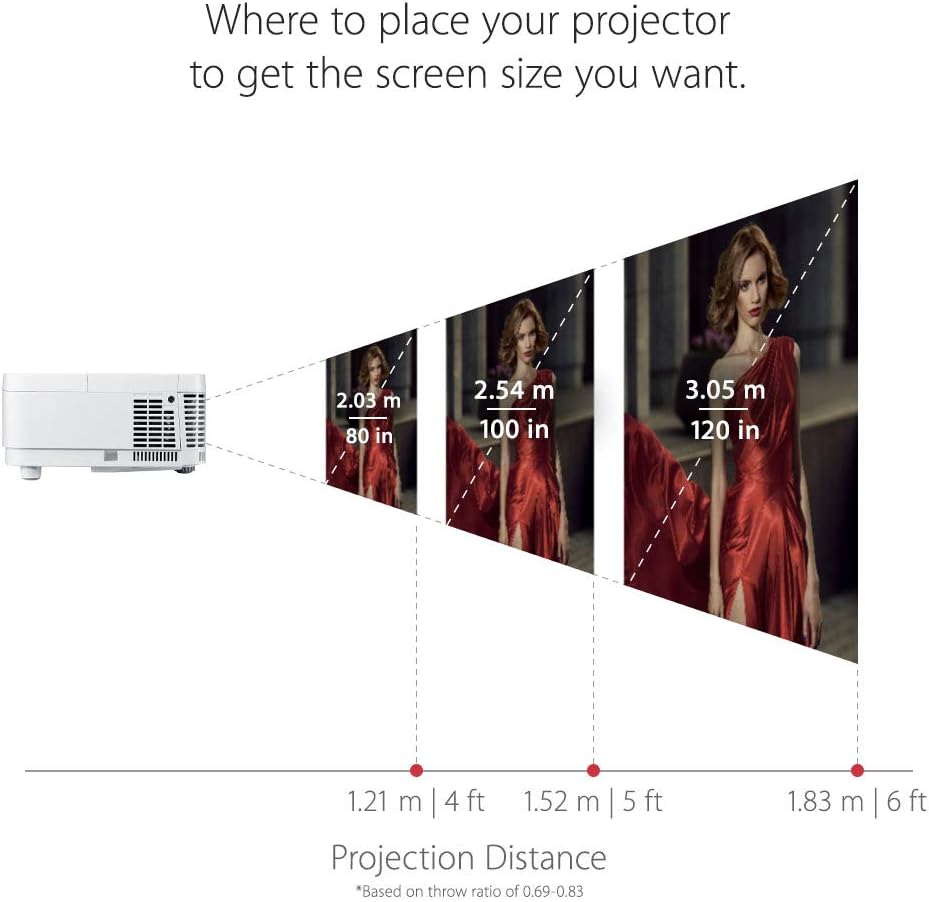
Figura 4.1: Distancias de proxección recomendadas para varios tamaños de pantalla.
4.2 Conexión de dispositivos
The projector offers multiple connectivity options. Identify the appropriate port for your device:
- HDMI: Connect media players, gaming consoles, PCs, and Macs.
- USB-C: Connect compatible mobile devices for video streaming and gaming.
- VGA: For older computer connections.
- Entrada/Saída de audio: Para sistemas de son externos.

Figura 4.2: Portos de conectividade do panel traseiro.
4.3 Encendido inicial
- Conecte o cable de alimentación ao proxector e a unha toma de corrente.
- Prema o botón de acendido do proxector ou do mando a distancia para acendelo.
- Adjust the focus and zoom using the rings on the projector lens.
- Use the menu to adjust keystone correction if the image is distorted.
5. Funcionamento do proxector
5.1 Encendido/apagado
Preme o Poder button once to turn the projector on. Press it twice to turn it off. The projector will go through a cool-down cycle before completely shutting down.
5.2 Selección da fonte
Usa o Fonte button on the remote control or the projector's control panel to cycle through available input sources (HDMI 1, HDMI 2, USB-C, VGA, etc.).
5.3 Axuste da imaxe
Access the On-Screen Display (OSD) menu by pressing the Menú/Saída button. Navigate using the arrow keys and confirm selections with the Entra button. Adjust settings such as:
- Brillo/Contraste: Fine-tune image luminance and distinction.
- Modo de cor: Select pre-set modes (e.g., Movie, Game, Standard) or customize.
- Keystone: Correct trapezoidal image distortion.
- Relación de aspecto: Adjust the image display ratio.
6. Características dos xogos
The PX706HD is optimized for gaming with features designed to enhance your experience:
- Ultra-Low Input Latency: A 16ms input latency minimizes delay between your input and the on-screen action, crucial for fast-paced games.
- Modo de xogo: Activates enhanced colors and contrast specifically tuned for gaming visuals.
- Conectividade USB-C: Directly connect compatible mobile devices for large-screen gaming.
Vídeo 6.1: Rematadoview da ViewSonic PX706HD's gaming capabilities, highlighting low input lag and immersive experience.
Video 6.2: Demonstrates an ultimate gaming setup using the PX706HD projector with an Xbox 360.
7. Mantemento
Regular maintenance ensures optimal performance and longevity of your projector:
- Lamp Vida: O proxector lamp has a life of up to 15,000 hours in SuperEco Mode. Replace the lamp when its brightness significantly diminishes.
- Limpeza: Regularly clean the projector lens with a soft, lint-free cloth. Ensure air vents are clear of dust and obstructions to prevent overheating.
- Almacenamento: Cando non o use durante períodos prolongados, garde o proxector nun lugar fresco e seco, protexido do po.
8 Solución de problemas
If you encounter issues with your projector, try the following basic troubleshooting steps:
- Sen enerxía: Ensure the power cord is securely connected and the power outlet is functional.
- Sen imaxe: Verify the input source is correctly selected and the connected device is powered on and outputting a signal. Check all cable connections.
- Imaxe borrosa: Axuste o anel de enfoque da lente do proxector. Asegúrese de que a superficie de proxección estea plana.
- Distorsión da imaxe: Use a función de corrección trapezoidal do menú OSD para corrixir imaxes trapezoidais.
- Sobrequecemento: Ensure the projector's air vents are not blocked and there is adequate ventilation around the unit.
For more detailed troubleshooting or persistent issues, please refer to the comprehensive user manual provided with your product or contact ViewAtención ao cliente de Sonic.
9. Especificacións
| Característica | Especificación |
|---|---|
| Dimensións do produto | 8.66 x 4.53 x 11.53 polgadas |
| Peso do elemento | 5.94 libras |
| Número de modelo do artigo | PX706HD |
| Baterías | 2 pilas AAA necesarias (para control remoto) |
| Data de primeira dispoñibilidade | 9 de abril de 2018 |
| Fabricante | ViewSonic |
| Marca | ViewSonic |
| Usos recomendados para o produto | Xogos |
| Característica especial | 3D integrado |
| Tecnoloxía de conectividade | USB, HDMI, VGA |
| Resolución de visualización | 1920 x 1080 (Full HD) |

Figure 9.1: Projector dimensions.
10. Garantía e soporte
For warranty information and technical support, please refer to the warranty card included in your product packaging or visit the official ViewSonic websitio. Conserve o recibo de compra para reclamacións de garantía.


