1. Introdución
This manual provides detailed instructions for the safe and efficient use of your Nillkin MC027 Magnetic Wireless Car Charger. Please read this manual thoroughly before using the product and retain it for future reference.
Características do produto
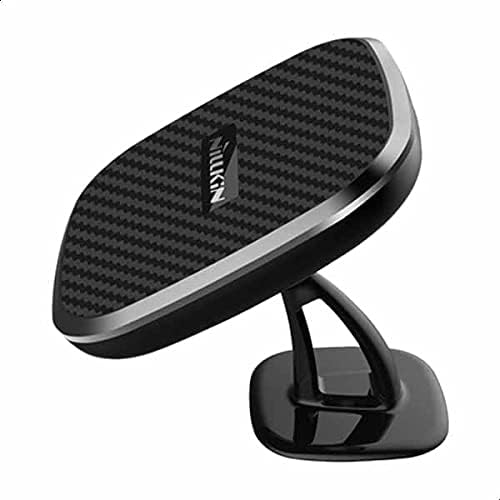
- High-quality carbon fiber panel for durability and aesthetics.
- Slim and lightweight design for discreet integration into your car's interior.
- Upgraded fast charging capability with a high conversion rate for efficient power delivery.
- Integrated strong magnets ensure secure attachment of your phone during travel.
- Standard Qi wireless charging compatibility for a wide range of devices.
- 360-degree stainless steel rotating ball joint for adjustable and comfortable viewángulos de inflexión.
- Blue indicator lights on both sides inform you of the current charging status.
- Single USB port for power input.
- Compatible with various mobile devices supporting wireless charging.
- Supports fast charging when paired with a compatible car adapter.
2. Contido do paquete
Verifica que todos os elementos estean presentes no paquete:
- Nillkin MC027 Magnetic Wireless Car Charger
- Magnetic metal plates (U-shaped and X-shaped)
- Adhesive pad(s) for mounting
- Manual de usuario (este documento)
3. Información de seguridade
Para garantir un funcionamento seguro e evitar danos, observe as seguintes precaucións:
- Non expoñas o dispositivo a temperaturas extremas, á luz solar directa nin á humidade.
- Evite deixar caer ou someter o dispositivo a fortes impactos.
- Do not attempt to disassemble or modify the charger. Unauthorized modifications may void your warranty and pose safety risks.
- Manter fóra do alcance dos nenos.
- Ensure proper ventilation around the charger during use to prevent overheating.
- Use only with compatible devices and power sources. Using incompatible accessories may cause damage or malfunction.
4. Configuración
4.1 Attaching the Magnetic Plate to Your Phone
For optimal magnetic hold and wireless charging, attach one of the provided magnetic metal plates to the back of your phone or phone case.

This image shows a smartphone with a magnetic plate attached to its back, ready for use with the car charger.
- Option 1 (U-shaped plate): Place the U-shaped plate on the outside of your phone case for a strong and direct hold.
- Option 2 (X-shaped plate): Place the X-shaped plate inside your phone case. Note that this plate is slightly thicker and may cause minor bumps. For best results, consider placing it on the outside of the case, especially for heavier phones.
Ensure the plate is centered on the charging coil area of your phone for efficient wireless charging. Refer to your phone's manual for the exact location of its wireless charging coil.
4.2 Installing the Car Charger
The Nillkin MC027 charger is designed for dashboard mounting.
This image displays the Nillkin MC027 car charger securely mounted on a car dashboard, ready for use.
- Clean the desired mounting surface on your dashboard thoroughly with an alcohol wipe and let it dry completely.
- Peel off the protective film from the adhesive pad on the charger base.
- Press the charger firmly onto the cleaned surface for at least 30 seconds to ensure a secure bond.
- Allow the adhesive to set for a few hours (ideally 24 hours) before attaching your phone to ensure maximum adhesion.
- Connect the charger to your car's USB power outlet using a compatible USB cable (not included). For fast charging, use a Quick Charge 3.0 compatible car adapter.
5. Instrucións de funcionamento
5.1 Cargando o seu dispositivo
Once the charger is installed and powered, simply place your phone (with the magnetic plate attached) onto the charging pad.
- The strong magnets will secure your phone in place.
- Blue indicator lights on the sides of the charger will illuminate to confirm that wireless charging has begun.

Esta imaxe mostra un lado view of the Nillkin MC027 car charger, highlighting the blue indicator lights that signal active charging.
5.2 Axuste Viewángulo ing
The charger features a 360-degree rotating ball joint. Gently rotate your phone or the charger head to achieve your preferred viewángulo de inclinación para navegación ou chamadas mans libres.
6. Mantemento
Un mantemento axeitado garante a lonxevidade e o rendemento óptimo do seu cargador:
- Clean the charger regularly with a soft, dry cloth.
- Non empregues produtos de limpeza abrasivos, solventes nin produtos químicos agresivos, xa que poden danar a superficie ou os compoñentes internos.
- Ensure the charging surface is free of dust, debris, and foreign objects for optimal charging efficiency.
- If the adhesive pad loses its stickiness, clean the mounting surface and replace the adhesive pad with a new one. Extra pads may be included or can be purchased separately.
7 Solución de problemas
If you encounter issues with your Nillkin MC027 charger, refer to the table below for common problems and solutions:
| Problema | Causa posible | Solución |
|---|---|---|
| O teléfono non se carga sen fíos. | Phone not aligned correctly with charging coil. | Reposition phone on the charging pad. Ensure the magnetic plate is centered over the phone's wireless charging coil. |
| O teléfono non se carga sen fíos. | Magnetic plate not properly attached or phone case is too thick. | Ensure the magnetic plate is securely attached and not obstructed by a very thick phone case. Try placing the plate on the outside of the case. |
| O teléfono non se carga sen fíos. | O cargador non recibe enerxía. | Check the USB cable connection to the charger and the car power outlet. Ensure the car is running or accessory power is on. |
| O teléfono cae do soporte. | Magnets too weak for phone weight or plate misalignment. | Ensure the magnetic plate is correctly positioned and securely attached to your phone/case. For heavier phones, consider a stronger magnetic plate or an alternative mounting solution. |
| O teléfono cae do soporte. | Adhesive pad losing grip. | Clean the dashboard surface thoroughly and replace the adhesive pad if necessary. |
| Carga lenta. | Incompatible car adapter or cable. | Use a Quick Charge 3.0 (or higher) compatible car adapter and a high-quality USB cable designed for fast charging. |
If problems persist after attempting these solutions, please contact Nillkin customer support for further assistance.
8. Especificacións
Detailed technical specifications for the Nillkin MC027 Magnetic Wireless Car Charger:
| Característica | Detalle |
|---|---|
| Marca | Nillkin |
| Modelo | MC027 |
| Número de modelo do artigo | 6902048154919 |
| Dimensións do produto | 7.1 x 7.1 x 5.3 cm |
| Peso | 150 gramos |
| Cor | Negro |
| Tipo de conector | USB |
| Dispositivos compatibles | Teléfonos móbiles |
| Características especiais | Lightweight design, Magnetic |
| Vol. De entradatage | 9 voltios |
| Total de portos USB | 1 |
| Wattage | 10 vatios |
| Número de elementos | 1 |
| Corrente de saída | 1 Ampere |
9. Garantía e soporte
Nillkin products are covered by a limited warranty. For specific warranty terms and conditions, please refer to the warranty card included with your purchase or visit the official Nillkin websitio.
For technical support, product inquiries, or warranty claims, please contact Nillkin customer service through their official websitio web ou a información de contacto que se inclúe na embalaxe do produto.


