Introdución
Thank you for choosing the Auna TT-30 BT Turntable. This manual provides essential information for the safe and efficient operation of your new device. Please read it thoroughly before use and keep it for future reference.
The Auna TT-30 BT is a belt-driven turntable designed for playing vinyl records, featuring an integrated Bluetooth receiver for wireless audio streaming from compatible devices.
Instrucións de seguridade
- Lea atentamente todas as instrucións antes de utilizar o dispositivo.
- Conserve o manual para futuras consultas.
- Non expoña o dispositivo á choiva nin á humidade para evitar incendios ou descargas eléctricas.
- Asegúrese de que haxa unha ventilación axeitada. Non bloquee ningunha das aberturas de ventilación.
- Coloque o dispositivo nunha superficie estable e nivelada.
- Use só accesorios/accesorios especificados polo fabricante.
- Desenchufe o dispositivo durante tormentas eléctricas ou cando non o use durante longos períodos.
- Encargue toda a reparación a persoal de servizo cualificado.
Contido do paquete
Please check that all items listed below are present in the packaging:
- Auna TT-30 BT Turntable Unit
- Platter (Metal)
- Funda antipolvo
- Adaptador de alimentación
- Instrucións de funcionamento (este manual)
Produto rematadoview
The Auna TT-30 BT Turntable features a robust design with a metal platter for stable playback. Key components include the tonearm with cartridge and stylus, speed selector, cueing lever, and an integrated Bluetooth receiver.
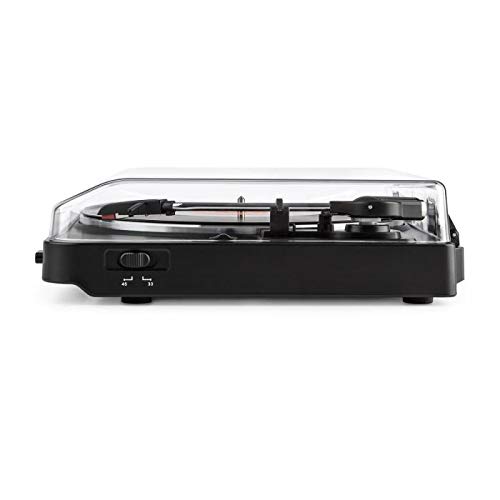
Image of the Auna TT-30 BT Turntable, showcasino seu deseño e compoñentes.
Configuración
1 Colocación
Place the turntable on a flat, stable, and vibration-free surface away from direct sunlight, heat sources, and strong magnetic fields. Ensure there is enough space around the unit for proper ventilation and operation of the dust cover.
2. Platter Assembly
- Carefully place the metal platter onto the center spindle.
- Locate the drive belt (usually pre-installed or found separately). Stretch the belt around the motor pulley and the inner rim of the platter.
- Place the felt mat (if included) on top of the platter.
3. Conexión de alimentación
Connect the power adapter to the DC input on the rear of the turntable, then plug the adapter into a suitable wall outlet.
4. Stylus Protection
Remove the stylus protector from the cartridge before playing any records. Ensure the tonearm is properly balanced and the tracking force is set according to the cartridge manufacturer's recommendations (if adjustable).
Instrucións de funcionamento
1. Playing Records
- Abra a tapa antipolvo.
- Coloca un disco no prato.
- Select the correct speed (33 1/3 or 45 RPM) using the speed selector switch. For 45 RPM records, place the 45 RPM adapter over the spindle if needed.
- Libere o bloqueo do brazo.
- Levante o brazo usando a palanca de sinalización.
- Mova o brazo sobre o suco inicial desexado do disco.
- Gently lower the tonearm using the cueing lever. The stylus will make contact with the record, and playback will begin.
- At the end of the record, the turntable may feature an auto-stop function, which will stop the platter rotation. Lift the tonearm and return it to its rest, then engage the tonearm lock.
2. Bluetooth Playback (Receiving Audio)
The Auna TT-30 BT Turntable features an integrated Bluetooth receiver, allowing you to stream audio wirelessly from your smartphone, tablet, or other Bluetooth-enabled devices to the turntable's output (e.g., connected speakers).
- Asegúrese de que o tocadiscos estea acendido.
- Activate Bluetooth on your external audio device (e.g., smartphone).
- Busca available Bluetooth devices. The turntable should appear as "Auna TT-30 BT" or similar.
- Select the turntable from the list to pair. Once paired, audio from your device will be routed through the turntable's audio output.
Nota: The turntable acts as a Bluetooth receiver, meaning it receives audio from other devices. It does not transmit audio wirelessly to Bluetooth headphones or speakers.
Mantemento
1. Cleaning the Turntable
- Desconecte sempre o prato xiratorio da toma de corrente antes de limpalo.
- Use a soft, dry cloth to wipe the exterior surfaces. Do not use abrasive cleaners or solvents.
- For the dust cover, use a soft cloth and a mild, non-abrasive cleaner if necessary.
- Regularly dust the stylus with a soft brush, moving from back to front.
2. Substitución do punteiro
The stylus (needle) is a delicate component and will wear out over time, typically after 300-500 hours of playback. A worn stylus can damage your records and degrade sound quality. Consult your retailer or Auna support for information on replacement styli compatible with your TT-30 BT turntable.
Resolución de problemas
| Problema | Causa posible | Solución |
|---|---|---|
| Sen poder | Adaptador de corrente non conectado; toma de corrente non activa. | Comprobe as conexións de alimentación; probe cunha toma de corrente diferente. |
| Sen son nin baixo volume | Externo amplifier/speakers not connected or turned on; volume too low; stylus dirty or damaged. | Ensure audio cables are connected; turn on amplifier/speakers and adjust volume; clean or replace stylus. |
| Son con saltos ou distorsión | Record dirty or damaged; stylus dirty or worn; turntable not level; excessive vibration. | Clean record; clean or replace stylus; ensure turntable is on a level, stable surface; reduce vibrations. |
| Fallo de sincronización de Bluetooth | Turntable not in pairing mode; device too far; interference. | Ensure turntable is discoverable; move device closer; restart both devices. |
Especificacións
| Marca | Auna |
| Número de modelo | TTS10-2300-plat |
| Dimensións (L x W x H) | 45.5 x 43 x 16.5 cm |
| Peso | 3.7 kg |
| Material | Metal |
| Característica especial | Receptor Bluetooth integrado |
| Tipo de conector | USB (for connectivity, not necessarily for audio output) |
Nota: as especificacións están suxeitas a cambios sen previo aviso.
Garantía e Soporte
For warranty information, please refer to the warranty card included with your product or contact your retailer. For technical support or service inquiries, please visit the official Auna websitio web ou póñase en contacto co seu departamento de atención ao cliente. Garde o comprobante de compra para calquera reclamación de garantía.
Auna Official Websitio: www.auna.de (Exampligazón, a ligazón real pode variar segundo a rexión)


