1. Introdución
This manual provides detailed instructions for the installation, operation, and maintenance of your Caliber RCD122BT Car Radio. Please read this manual thoroughly before using the product to ensure proper and safe operation. Keep this manual for future reference.
2. Información de seguridade
- Non opere a unidade dun xeito que o distraia da condución.
- Asegúrese de que todo o cableado estea conectado correctamente para evitar curtocircuítos ou danos.
- Non expoña a unidade á humidade nin a temperaturas extremas.
- Encargue todo o servizo a persoal cualificado.
3. Contido do paquete
Verifica que todos os elementos estean presentes no paquete:
- Caliber RCD122BT Car Radio Unit
- Control remoto
- Funda de montaxe
- Release Keys (2x)
- Cableado
- Manual de usuario
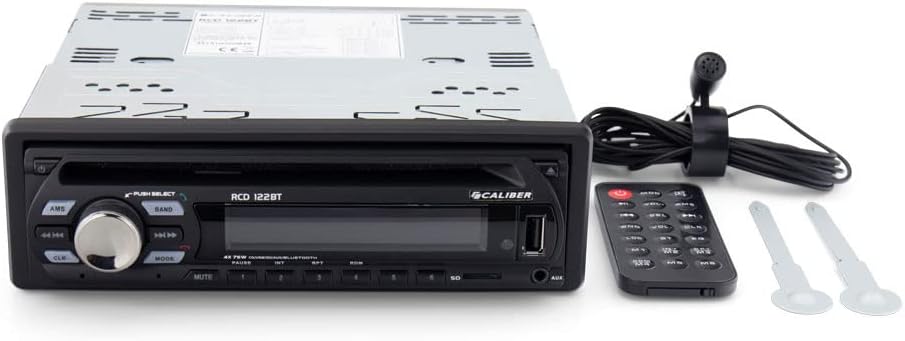
Image: Caliber RCD122BT Car Radio shown with its included remote control and two removal keys.
4. Características do produto
- Conectividade Bluetooth: Enjoy your favorite radio broadcasts and playlists. Easily stream music from your mobile phone up to 10 meters away without signal interruption.
- Bassboost Function: Equipped with a dedicated Bassboost feature for enhanced low-frequency audio output.
- Saída de alta potencia: Features 4 x 75 watts, delivering a total power output of 300 watts.
- Porto USB tipo A: Para a reprodución de contido multimedia.
- Reprodución MP3: Supports MP3 audio format.
- Conector para auriculares de 3.5 mm: Para saída de audio.

Imaxe: Fronte view of the Caliber RCD122BT Car Radio, showing the display indicating 'BLUETOOTH' mode and various control buttons.
5. Instalación
5.1 Lista de verificación previa á instalación
- Disconnect the vehicle's negative battery terminal before installation.
- Ensure the mounting location is suitable and provides adequate ventilation.
- Check your vehicle's wiring diagram for compatibility.
5.2 Montaxe da unidade
Insert the mounting sleeve into the dashboard opening. Bend the tabs on the sleeve outwards to secure it. Slide the car radio unit into the mounting sleeve until it clicks into place.
5.3 Conexións de cableado
Connect the wiring harness to the corresponding ports on the rear of the car radio and to your vehicle's electrical system. Ensure correct polarity for power, ground, and speaker connections. Refer to the diagram below for typical connections.
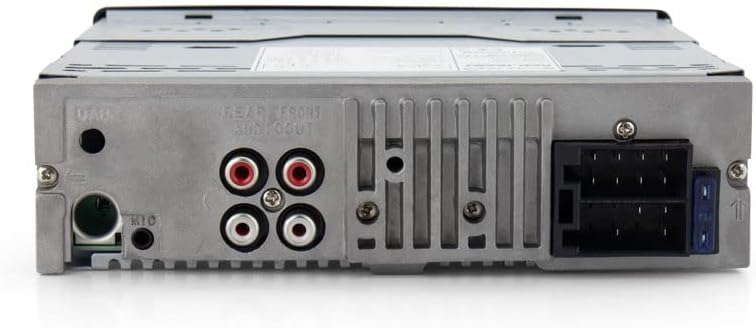
Imaxe: Traseira view of the Caliber RCD122BT Car Radio, highlighting the various connection ports including power, speaker outputs, and auxiliary inputs.
- Potencia (amarelo): 12V constantes+
- Ignition (Red): Switched 12V+
- Terra (negro): Chan do chasis do vehículo
- Antena (azul): Antena de potencia/AmpAcendido remoto do lifier
- Relatores: Connect according to vehicle's speaker wiring (e.g., White/White-Black for Front Left, Grey/Grey-Black for Front Right, Green/Green-Black for Rear Left, Purple/Purple-Black for Rear Right).
- Saídas RCA: Para conectar externamente amplevantadores.
- Entrada de micrófono: Para chamadas mans libres.
6. Funcionamento
6.1 Controis básicos

Imaxe: En ángulo view of the Caliber RCD122BT Car Radio, showing the main rotary knob and various function buttons.
- Botón de encendido: Prema para acender / apagar a unidade.
- Botón de volume: Rotate to adjust volume. Press to select menu options.
- Botón MODE: Press to cycle through available sources (Radio, Bluetooth, USB, AUX).
- AMS Button: Auto Memory Store (Radio mode).
- Botón de banda: Selects radio band (FM1, FM2, FM3, AM1, AM2).
- Botón de silencio: Silencia a saída de audio.
- Playback Controls (◀◀ / ▶▶): Skip tracks/stations.
- Botóns numéricos (1-6): Preset stations (Radio mode), direct track selection (USB mode).
6.2 Funcionamento da radio
- Preme o MODO botón para seleccionar o modo Radio.
- Preme o BANDA button to select your desired radio band (FM1, FM2, FM3, AM1, AM2).
- Press and hold ◀◀ or ▶▶ to automatically search for the next strong station. Press briefly to manually tune.
- To store a station, tune to the desired frequency, then press and hold one of the numeric preset buttons (1-6) until you hear a beep.
6.3 Funcionamento Bluetooth
- Preme o MODO button to select Bluetooth mode. The display will show "BLUETOOTH".
- No teu dispositivo móbil, activa o Bluetooth e busca os dispositivos dispoñibles.
- Select "Caliber RCD122BT" from the list. If prompted for a password, enter "0000".
- Once paired, you can stream audio from your device to the car radio. Use the playback controls on the radio or your device to manage music.
- For hands-free calling, ensure the external microphone is connected.
6.4 USB/AUX Operation
- USB: Insert a USB drive into the USB Type-A port. The unit will automatically switch to USB mode and begin playing compatible audio files (MP3).
- AUX: Connect an external audio device to the 3.5mm AUX input. Press the MODO botón para seleccionar o modo AUX.
6.5 Audio Settings (Bassboost)
To activate the Bassboost function, refer to the audio settings menu accessible via the volume knob. Navigate through the menu options to find and enable the Bassboost feature for enhanced bass response.
7. Mantemento
- Clean the unit's front panel with a soft, dry cloth. Do not use abrasive cleaners or solvents.
- Manteña o porto USB libre de po e residuos.
8 Solución de problemas
| Problema | Causa posible | Solución |
|---|---|---|
| Sen poder | Cableado incorrecto; fusible fundido | Comprobe as conexións de alimentación e terra; substitúa o fusible se é necesario. |
| Sen son | Cables do altofalante desconectados; Volume demasiado baixo; Silenciamento activado | Comprobar as conexións dos altofalantes; aumentar o volume; desactivar o silencio. |
| Bluetooth non se conecta | Device too far; Bluetooth not enabled on device; Incorrect pairing process | Move device closer; Enable Bluetooth; Re-attempt pairing. |
| Problemas de reprodución por USB | Incompatible file format; Damaged USB drive | Garantir files are MP3; Try a different USB drive. |
9. Especificacións
| Característica | Especificación |
|---|---|
| Nome do modelo | RCD122BT |
| Marca | Calibre |
| Potencia de saída | 4 x 75 Watts (300 Watts total) |
| Número de canles | 4 |
| Formato de audio compatible | MP3 |
| Tipo de conector | USB tipo A |
| Conector para auriculares | Jack de 3.5 mm |
| Tipo de formato multimedia | Dixital |
| Peso do elemento | 1100 gramos |
| Número de modelo | 8714505044972 |
10. Garantía e soporte
For warranty information and technical support, please refer to the warranty card included with your product or visit the official Caliber websitio. Garda o comprobante de compra para calquera reclamación de garantía.


