1. Introdución
This manual provides detailed instructions for the installation, operation, and maintenance of your Vibe Powerbox Micro Mono Amplifier, model POWERBOX400.1M-V7. Please read this manual thoroughly before attempting installation or operation to ensure proper use and to prevent damage to the unit or your vehicle's audio system.
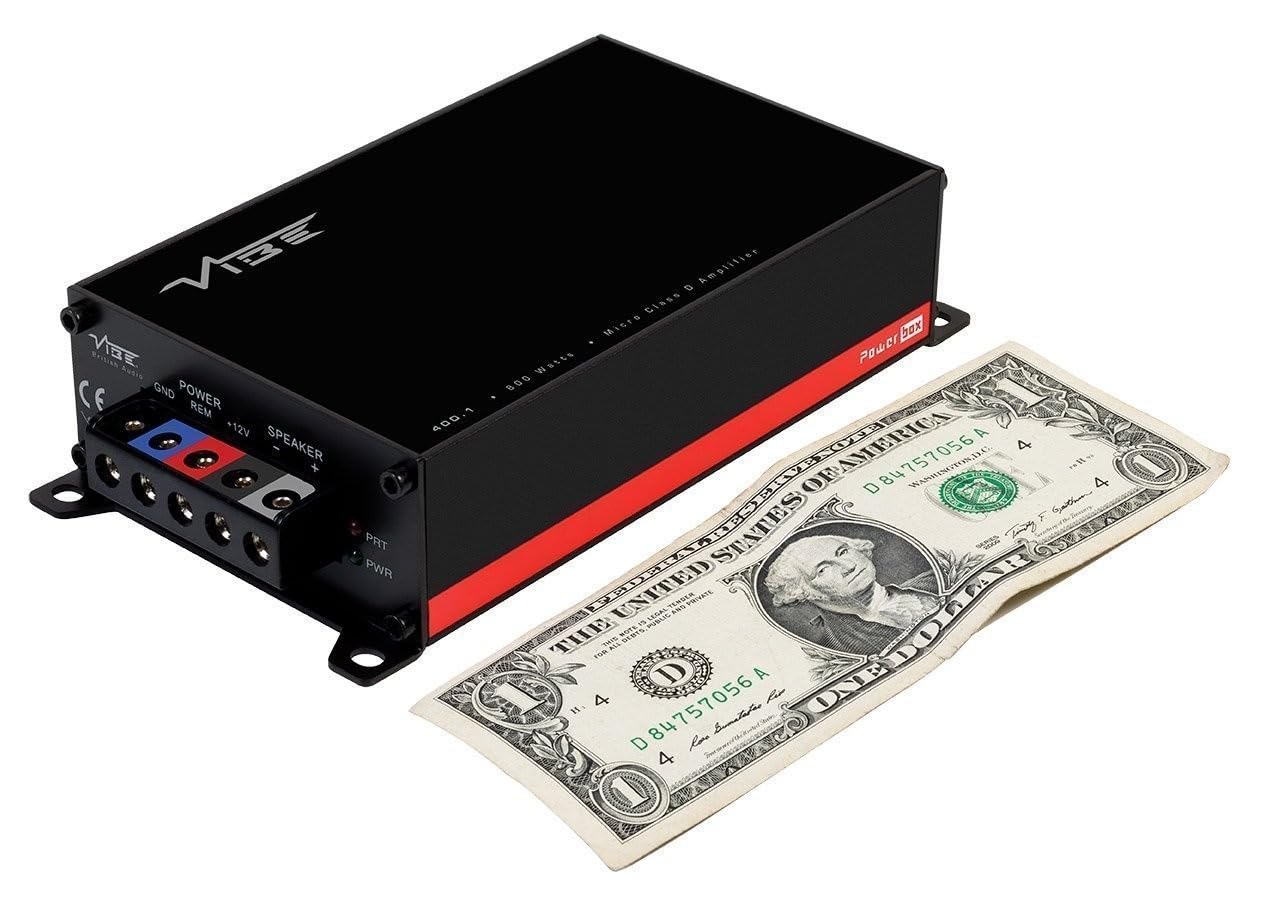
The Vibe Powerbox Micro Mono Amplifier is a compact, high-performance Class D amplifier designed for car audio systems. It delivers up to 400W RMS, making it suitable for powering subwoofers. Its small footprint allows for flexible installation options.
2. Información de seguridade
- Desconecte sempre o terminal negativo da batería do vehículo antes de comezar calquera traballo eléctrico.
- Ensure all wiring is correctly routed and secured to prevent damage from moving parts or sharp edges.
- Use appropriate gauge wiring for power and speaker connections as specified in this manual to prevent overheating and potential fire hazards.
- Non monte o amplifer en lugares expostos á luz solar directa, á calor excesiva, á humidade ou ao po.
- Consulta cun instalador profesional de audio para automóbiles se tes algunha dúbida sobre algunha parte do proceso de instalación.
- Operando o amplifier at excessively high volumes for prolonged periods can cause hearing damage.
3. Contido do paquete
Comprobe que todos os elementos estean presentes no paquete antes de continuar coa instalación:
- Vibe Powerbox Micro Mono Amplifier (POWERBOX400.1M-V7)
- Remote Gain Control Unit
- Cables de audio RCA
- Mounting Hardware (screws, connectors)
- Manual de usuario

4. Características do produto
- Class D Micro Amplifier design for high efficiency and compact size.
- Ultra-compact footprint for easy and discreet installation.
- Output: 1 x 400W RMS at 1 ohm, with a maximum output of 800W.
- Dimensions: 37 x 157 x 82mm (approximately 1.46 x 6.18 x 3.23 inches).
- Compatible with Critical Link Rapid kits for simplified integration.
- Features Deltabox™ Connectivity auto turn-on.
- VIBE Sound Studio™ Active crossovers.
- 1 Ohm Stable operation.
5. Identificación de compoñentes
5.1 Power and Speaker Terminals

The power input section includes terminals for Ground (GND), Remote Turn-On (REM), and +12V power. The speaker output section provides terminals for connecting your subwoofer.
5.2 Panel de entrada e control
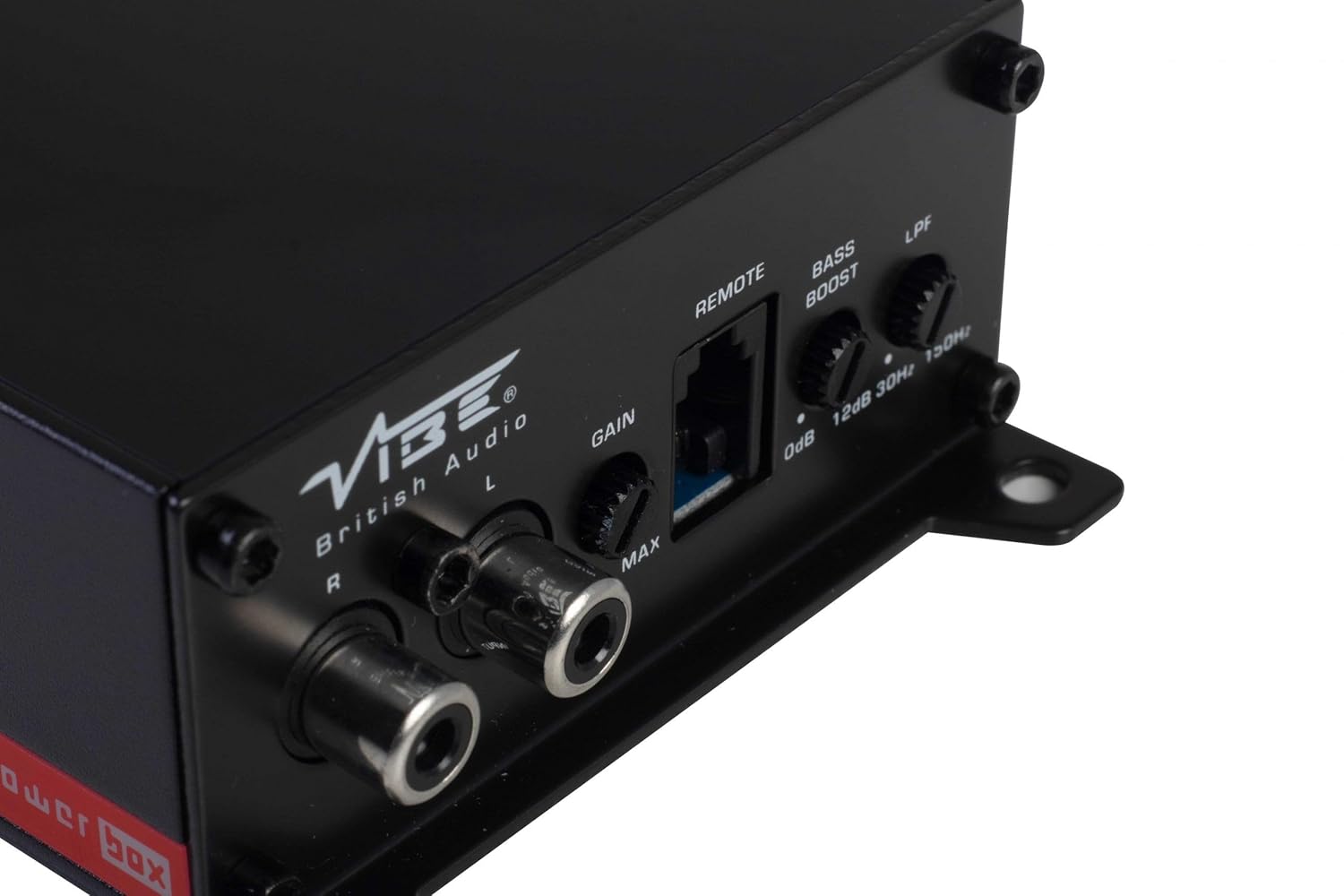
This panel features the RCA input jacks for audio signal, a Gain control knob to match the amplifier's input sensitivity to your head unit's output, a dedicated port for the remote gain control, a Bass Boost switch for enhancing low frequencies, and an LPF (Low Pass Filter) control to adjust the upper frequency limit for the subwoofer.
5.3 Remote Gain Control

The remote gain control unit connects to the amplifier via the 'REMOTE' port and allows for convenient adjustment of the subwoofer's output level from the vehicle's cabin.
6. Configuración e instalación
Proper installation is crucial for optimal performance and safety. If you are not confident in your ability to install the amplifier, seek professional assistance.
6.1 Localización de montaxe
Choose a mounting location that is dry, well-ventilated, and away from direct heat sources. The compact size of the Powerbox Micro allows for installation under seats, behind trim panels, or in other discreet locations. Ensure there is sufficient airflow around the amplifier para refrixeración.
6.2 Conexións de cableado
Cableado de alimentación:
- Conecta o +12 V terminal to the vehicle's positive battery terminal using a suitable gauge power cable (e.g., 8 AWG or 10 AWG). Install an in-line fuse holder within 18 inches (45 cm) of the battery.
- Conecta o GND terminal to a clean, unpainted metal surface on the vehicle's chassis. Ensure a good electrical connection. The ground cable should be of the same gauge as the power cable and as short as possible.
- Conecta o REM (Remote Turn-On) terminal to the remote output of your head unit. This wire signals the amplifier to turn on and off with your stereo. If your head unit lacks a remote output, you can use an accessory wire that turns on with the ignition, or utilize the amplifier's auto-sense feature if applicable.
Cableado do altofalante:
- Conecte o seu subwoofer ao Saída do altofalante terminals (+ and -). Ensure correct polarity. This amplifier is 1 Ohm stable, allowing flexibility in subwoofer impedance configurations. Refer to your subwoofer's specifications for optimal impedance matching.
Signal Input (RCA):
- Connect the RCA output from your head unit or signal processor to the ENTRADA (L/R) Conectores RCA no ampmáis vivo.
Control remoto de ganancia:
- Plug the remote gain control unit into the dedicated MANDO A DISTANCIA porto no amplifier. Route the cable to a convenient location for adjustment.
ISO T Harness / ISOAWK Kit:
- For simplified installation with existing stereo looms, an optional ISOAWK kit (available separately) can be used to make the amplifier compatible with an ISO T harness. This allows for plug-and-play integration for audio signal, power, and ground, potentially eliminating the need for separate battery connections.
7. Funcionamento
7.1 Encendido inicial
Despois de facer e verificar todas as conexións, volva conectar a batería do vehículo. Acenda a unidade principal. O amplifier's power indicator (PWR) should illuminate green. If the protection indicator (PRT) illuminates red, refer to the troubleshooting section.
7.2 Axuste de ganancia
O control de ganancia coincide co ampsensibilidade de entrada do lificador ao volume de saídatage of your head unit. To set the gain:
- Xire o amplifier's Gain control to its minimum (MIN) setting.
- Axusta o volume da unidade principal a aproximadamente o 75-80 % do seu máximo.
- Play a dynamic piece of music.
- Aumentar lentamente o amplifier's Gain control until you hear distortion, then back it off slightly until the sound is clear.
The remote gain control unit allows for real-time adjustment of the subwoofer level without affecting the main system volume.
7.3 Filtro paso baixo (LPF)
The LPF control sets the upper frequency limit for the amplifier's output. This is essential for subwoofers, ensuring they only reproduce low frequencies. Adjust the LPF knob (typically 30Hz to 150Hz) to blend the subwoofer's output seamlessly with your main speakers. A common starting point is around 80-100Hz.
7.4 Reforzo de graves
The Bass Boost switch provides an adjustable low-frequency enhancement. Use this feature sparingly, as excessive bass boost can lead to distortion and potential damage to your subwoofer. Adjust the boost level (0dB to 12dB) to your preference.
8. Mantemento
- Limpeza: Limpar periodicamente o ampo exterior do lifador cun pano suave e seco. Non empregue produtos químicos agresivos nin produtos de limpeza abrasivos.
- Conexións: Regularly check all power, ground, and speaker connections to ensure they are secure and free from corrosion. Loose connections can cause performance issues or damage.
- Ventilación: Asegúrese de que o amplifier's cooling fins are not obstructed to maintain proper heat dissipation.
9 Solución de problemas
| Problema | Causa posible | Solución |
|---|---|---|
| Sen alimentación (LED PWR apagado) | Fusible fundido, conexión de alimentación/terra solta, sen sinal do mando a distancia. | Check in-line fuse, verify +12V, GND, and REM connections. |
| Protection Mode (PRT LED on) | Sobrequecemento, curtocircuíto na fiação do altofalante, impedancia demasiado baixa. | Ensure proper ventilation, check speaker wiring for shorts, verify speaker impedance. |
| Sen saída de son | No input signal, gain too low, speaker wires disconnected. | Check RCA input connections, adjust gain, verify speaker wiring. |
| Son distorsionado | Gain set too high, LPF incorrectly set, poor ground connection. | Reduce gain, adjust LPF, check ground connection. |
10. Especificacións
- Número de modelo: POWERBOX 400.1M-V7
- AmpTipo máis vivo: Mono Clase D Ampmáis vivo
- Potencia de saída RMS: 1 x 400W RMS @ 1 Ohm
- Potencia máxima de saída: 800 W
- Dimensións do produto (L x W x H): Aproximadamente 157 x 82 x 37 mm (6.18 x 3.23 x 1.46 polgadas)
- Peso: Aproximadamente 1.54 libras
- Voltage: 12 voltios (nominais)
- Vol. Subministración máximatage: 12 voltios
- Tipo de montaxe: Montaxe en superficie
- Fabricante: Vibe Audio
- Data de primeira dispoñibilidade: 21 de xullo de 2018
11. Garantía e soporte
Vibe Audio products are designed and manufactured to the highest standards. For warranty information and technical support, please refer to the warranty card included with your product or visit the official Vibe Audio websitio. Garda o comprobante de compra para reclamacións de garantía.


