1. Introdución
This manual provides essential information for the safe and efficient operation of your Pyle 40 Inch LED TV with Built-in CD/DVD Player, Model PTVDLED40.5. Please read this manual thoroughly before using the product and retain it for future reference.

Imaxe: Fronte view of the Pyle 40 Inch LED TV, showing the screen displaying a landscape, a remote control, and a hand inserting a disc into the side-loading DVD player.
2. Información de seguridade
AVISO: PARA REDUCIR O RISCO DE DESCARGA ELÉCTRICA, NON ELIMINE A TAPA (NIN ATRÁS). SEN PARTES SERVICIABLES PARA O USUARIO DENTRO. REFERIR SERVICIO A PERSOAL DE SERVIZO CUALIFICADO.
- Le estas instrucións.
- Conserve estas instrucións.
- Presta atención a todas as advertencias.
- Siga todas as instrucións.
- Non use este aparello preto da auga.
- Limpar só cun pano seco.
- Non bloquee ningunha abertura de ventilación. Instáleo segundo as instrucións do fabricante.
- Non instale preto de fontes de calor como radiadores, rexistros de calor, cociñas ou outros aparellos (incluíndo amplificadores) que producen calor.
- Non derogue o propósito de seguridade do enchufe polarizado ou con conexión a terra. Un enchufe polarizado ten dúas láminas, unha máis ancha que a outra. Un enchufe con conexión a terra ten dúas láminas e unha terceira punta de conexión a terra. A folla ancha ou a terceira punta son proporcionadas para a súa seguridade. Se o enchufe proporcionado non encaixa na súa toma de corrente, consulte a un electricista para a substitución da toma obsoleta.
- Protexa o cable de alimentación para evitar que se pise ou se pinche, especialmente nos enchufes, tomas de corrente e no punto de saída do aparello.
- Use só anexos/accesorios especificados polo fabricante.
- Use só co carro, soporte, trípode, soporte ou mesa especificados polo fabricante ou vendidos co aparello. Cando se use un carro, teña coidado ao mover a combinación de carro/aparato para evitar feridas por envorco.
- Desenchufe este aparello durante tormentas eléctricas ou cando non se use durante longos períodos de tempo.
- Encargue toda a reparación a persoal de servizo cualificado. O mantemento é necesario cando o aparello resultou danado dalgún xeito, como o cable de alimentación ou o enchufe está danado, se derrama líquido ou caen obxectos no aparello, o aparello estivo exposto á choiva ou á humidade, non funciona normalmente. , ou foi abandonado.
3. Contido do paquete
Verifique que todos os elementos que se indican a continuación estean incluídos no seu paquete:
- Pyle 40 Inch HD LED TV (Model PTVDLED40.5)
- Control remoto de función completa
- (2) pilas AAA para control remoto
- (2) Base Stands
- Mounting Screws for Base Stands
- Cable de alimentación

Image: Included accessories for the Pyle 40 Inch LED TV, showing the remote control, power cord, two base stands, and screws.
4. Produto rematadoview
4.1 Fronte View
Imaxe: Fronte view of the Pyle 40 Inch LED TV, showcasing the screen and the Pyle logo.
- Visualización en pantalla: 40-inch D-LED Backlight display.
- Pyle Logo: Indicates brand.
- Sensor IR: Para sinais de control remoto.
- Indicador de potencia: Luz LED que indica o estado da alimentación.
4.2 Controis do panel lateral

Image: Close-up of the side panel controls on the Pyle 40 Inch LED TV, showing buttons for volume, channel, menu, input, and power.
- VOL +/-: Axusta o nivel de volume.
- CH +/-: Cambia de canle.
- MENÚ: Accesses the on-screen menu.
- ENTRADA: Selecciona a fonte de entrada (HDMI, AV, etc.).
- POTENCIA: Acende ou apaga o televisor.
4.3 Conexións do panel traseiro

Imaxe: Traseira view of the Pyle 40 Inch LED TV, highlighting the various input and output ports.

Image: Detailed close-up of the input/output ports on the Pyle 40 Inch LED TV, including HDMI, VGA, PC Audio, RF, Earphone, USB, Coaxial, Audio Out, Mini YPbPr, and Video/Audio In (RCA).
- HDMI (x3): High-Definition Multimedia Interface inputs for digital audio/video.
- YPbPr (Component Video): Analog video input (green, blue, red) for high-quality analog video.
- RCA (L/R Audio, Video): Analog audio (white, red) and composite video (yellow) inputs.
- VGA/PC: Video Graphics Array input for connecting a computer.
- Audio de PC: Entrada de audio para conexión VGA.
- RF (antena): Input for connecting an antenna or cable TV.
- Optical (Digital) Audio Out: Digital audio output for connecting to a soundbar or receiver.
- Auriculares: 3.5mm audio output for headphones.
- USB: For service or media playback (check manual for specific functionality).
- Coaxial: Saída de audio dixital.
4.4 Built-in CD/DVD Player
The TV features a side-loading CD/DVD player. Insert discs gently into the slot located on the side of the television.
Imaxe: Lateral view of the Pyle 40 Inch LED TV, clearly showing the slot for the built-in CD/DVD player.
5. Configuración
5.1 Attaching the Base Stands
- Coloque con coidado a pantalla do televisor sobre unha superficie suave e limpa para evitar rabuñaduras.
- Align each base stand with the corresponding slots on the bottom of the TV.
- Fixe cada soporte cos parafusos fornecidos. Asegúrese de que estean ben axustados.

Image: The Pyle 40 Inch LED TV shown with its two base stands securely attached, ready for placement on a flat surface.
5.2 Montaxe na parede (opcional)
The TV is VESA mounting compatible (200mm x 200mm). Remove the base stands if you intend to wall mount the television. Use a VESA-compatible wall mount kit (sold separately) and follow the instructions provided with the wall mount.
WARNING: Wall mounting should be performed by qualified personnel to prevent injury or damage.
5.3 Conexión de enerxía
- Connect the power cord to the AC input on the back of the TV.
- Plug the other end of the power cord into a standard electrical outlet (100-240V, 50/60Hz).
5.4 Conexión de dispositivos externos
Refer to the "Rear Panel Connections" section for port locations.
- Dispositivos HDMI: Connect HDMI cables from your devices (e.g., Blu-ray player, game console) to the HDMI ports on the TV.
- Component Video (YPbPr) Devices: Connect component video cables (green, blue, red) and RCA audio cables (white, red) from your device to the corresponding inputs.
- Composite Video (RCA) Devices: Connect composite video cable (yellow) and RCA audio cables (white, red) from your device to the corresponding inputs.
- Antena/Cable: Connect an RF coaxial cable from your antenna or cable wall outlet to the RF input.
- Conexión ao PC: Connect a VGA cable from your computer to the VGA port and an audio cable from your computer's audio output to the PC Audio input.
6. Funcionamento
6.1 Encendido/apagado
Preme o POTENCIA button on the remote control or the side panel to turn the TV on or off.
6.2 Control remoto
Insert two 'AAA' batteries into the remote control, observing polarity. Point the remote control towards the TV's IR sensor.
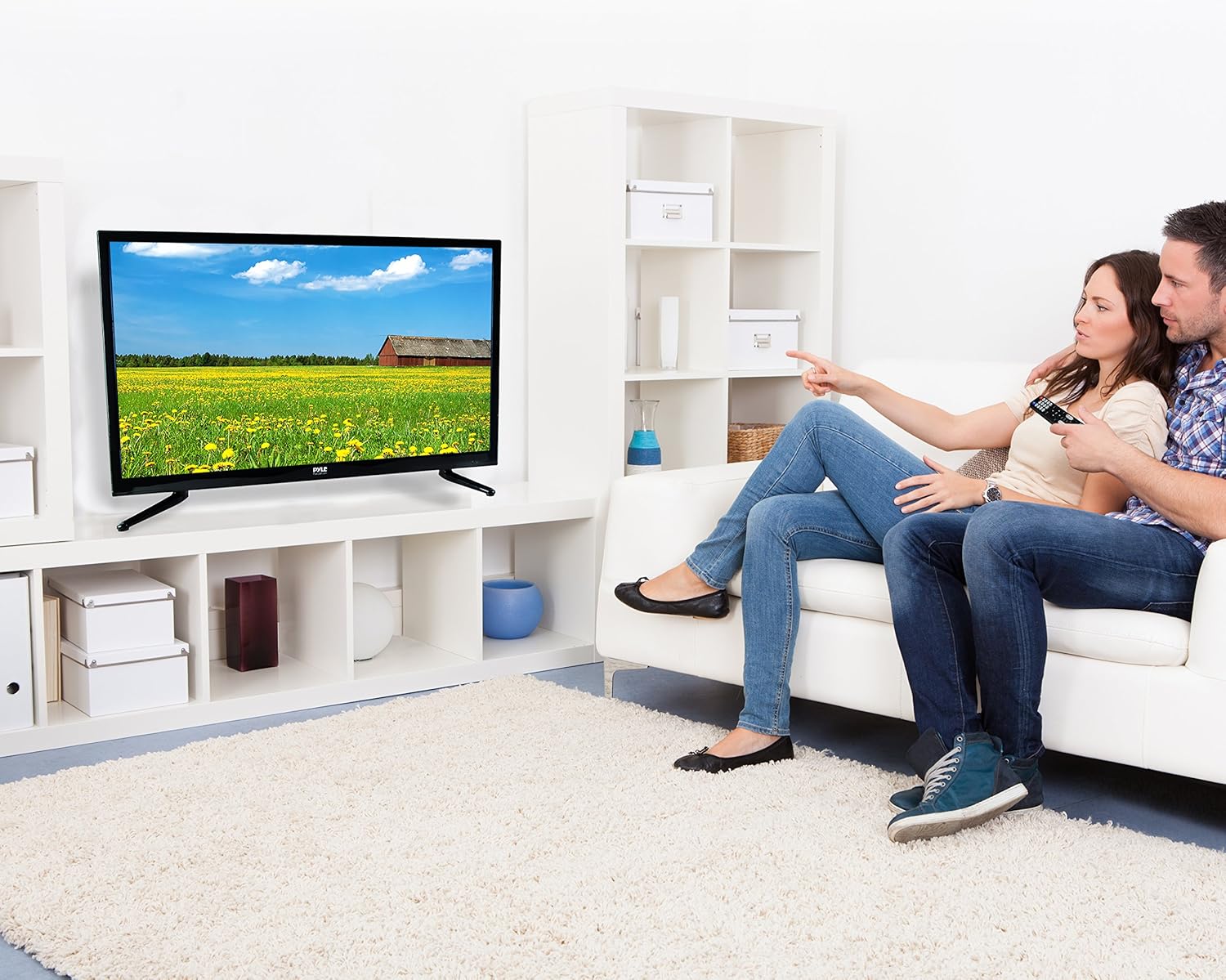
Image: The full-function remote control for the Pyle 40 Inch LED TV, showing various buttons for power, input, volume, channel, menu, and media playback.
- POTENCIA: Acende/apaga o televisor.
- ENTRADA: Selecciona a fonte de entrada.
- VOL +/-: Axusta o volume.
- CH +/-: Cambia de canle.
- MENÚ: Abre o menú principal.
- Botóns de navegación (Arriba/Abaixo/Esquerda/Dereita/Aceptar): Navega polas opcións do menú.
- EXIT/BACK: Exits current menu or goes back.
- MUTO: Activa/silencia o son.
- DVD Controls: Play, Pause, Stop, Fast Forward, Rewind, Next/Previous Track.
- V-CHIP: Accesses V-Chip settings for parental control.
- Subtítulos pechados: Activa/desactiva os subtítulos.
- DURMIR: Define o temporizador de sono.
6.3 Selección da fonte de entrada
Preme o ENTRADA button on the remote control to cycle through available input sources (TV, HDMI1, HDMI2, HDMI3, YPbPr, AV, VGA, DVD).
6.4 Using the Built-in CD/DVD Player
- Asegúrate de que a televisión estea acendida.
- Gently insert a compatible disc (DVD, DVD+/-R, DVD+/-RW, CD, CD-R, CD-RW, JPEG) into the side-loading slot with the label facing up.
- The TV should automatically switch to DVD mode. If not, press the ENTRADA botón e seleccione "DVD".
- Use the DVD control buttons on the remote control (Play, Pause, Stop, etc.) to manage playback.
6.5 Funcións do menú
Preme o MENÚ button to access the on-screen display (OSD) menu. Use the navigation buttons to select and adjust settings.
- Configuración da imaxe: Adjust brightness, contrast, color, sharpness, and picture modes (Standard, Dynamic, Movie, User).
- Configuración de son: Adjust bass, treble, balance, and sound modes (Standard, Music, Movie, User).
- Configuración da canle: Auto scan for channels, manual tuning, channel list.
- Configuración horaria: Set current time, sleep timer, auto power off.
- Configuración de opcións: Language, V-Chip (parental control), Closed Caption, display modes (16:9, 4:3, Zoom, Cinema).
7. Mantemento
- Limpeza da pantalla: Limpe a pantalla con suavidade cun pano suave e sen pelusa. Para marcas difíciles,ampEnxugue o pano cunha pequena cantidade de limpador de pantallas deseñado especificamente para dispositivos electrónicos. Non pulverice o limpador directamente sobre a pantalla.
- Limpeza do armario: Limpa o moble do televisor cun pano suave e seco. Evita o uso de produtos de limpeza abrasivos ou solventes.
- Ventilación: Asegúrate de que as aberturas de ventilación da parte traseira do televisor non estean bloqueadas para evitar o sobrequecemento.
- Cable de alimentación: Regularly check the power cord for any damage. If damaged, discontinue use and contact qualified service personnel.
8 Solución de problemas
| Problema | Causa posible | Solución |
|---|---|---|
| Sen poder | Cable de alimentación non conectado; non hai corrente na toma de corrente. | Ensure power cord is securely plugged in. Check if the outlet is working by plugging in another device. |
| Sen imaxe, pero hai son | Fonte de entrada incorrecta seleccionada; cable de vídeo solto. | Preme o ENTRADA button to select the correct source. Check video cable connections. |
| Sen son, pero si imaxe | Volume is muted or too low; incorrect audio cable connection. | Preme o MUTO botón ou aumentar o volume. Comprobe as conexións do cable de son. |
| O control remoto non funciona | As pilas están gastadas ou inseridas incorrectamente; hai unha obstrución entre o mando a distancia e o televisor. | Replace batteries. Ensure correct polarity. Remove any obstructions. Point remote directly at the TV's IR sensor. |
| O reprodutor de DVD non le o disco | Disc is dirty, scratched, or incompatible format; disc inserted incorrectly. | Clean the disc. Try a different, known-good disc. Ensure disc is inserted with the label facing up. |
| Poor picture quality from antenna | Weak signal; antenna not positioned correctly. | Adjust antenna position. Perform an auto channel scan. Consider a stronger antenna or signal ampmáis vivo. |
9. Especificacións
| Característica | Detalle |
|---|---|
| Número de modelo | PTVDLED40.5 |
| Tamaño da pantalla | 40.0 polgadas (diagonal) |
| Tipo de visualización | D-LED Backlight |
| Resolución de visualización | 1920 x 1080 (Full HD 1080p) |
| Soporte de sinal | 1080p, 1080i, 720p, 480p, 480i |
| Modos de visualización | 16:9, 4:3, Zoom, Cinema |
| Viewángulo ing | 178° Vertical, 178° Horizontal |
| Potencia do altofalante | (2) x 8 Watt, 8Ω |
| Taxa de actualización | 60 Hz |
| Sintonizador de TV | ATSC / NTSC |
| Tempo de resposta | 6 ms |
| Máx. Cor | 16.7 M |
| Contraste | 5000:1 (50,000:1 Dynamic) |
| Brillo | 250 cd/m2 |
| CD/DVD Disc Support | DVD, DVD+/-R, DVD+/-RW, CD, CD-R, CD-RW, JPEG |
| Montaxe VESA | 200 mm x 200 mm |
| Poder | 100-240 V, 50/60 Hz |
| Dimensións (L x W x H) | 36.5'' x 3.5'' x 21.9'' (Panel Only) |
| Peso do elemento | 16.32 libras |
| Compoñentes incluídos | 40'' HD LED TV, Full Function Remote Control |
| Tecnoloxía de conectividade | HDMI |
| Eficiencia Enerxética | Custo anual estimado da enerxía: $11.52 |
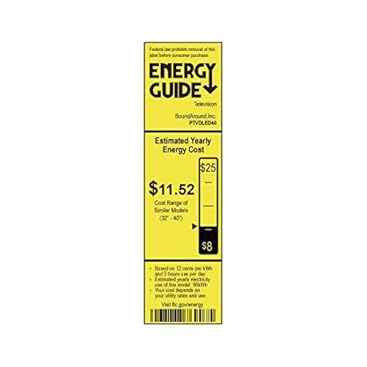
Image: Energy Guide label for the Pyle PTVDLED40 TV, showing an estimated yearly energy cost of $11.52.
10. Garantía e soporte
For warranty information and technical support, please refer to the warranty card included with your product or visit the official Pyle websitio. Garde o recibo da compra como proba de compra para calquera reclamación de garantía.
For customer support inquiries, you may also refer to the Páxina de atención ao cliente de Amazon.


