1. Introdución
This manual provides comprehensive instructions for the operation and maintenance of your QUIKCELL Morso Mini Portable Wireless Speaker. Please read this manual carefully before using the device to ensure proper function and longevity.
Características principais:
- IPX-4 Splash Proof Rating
- Built-in Microphone for Hands-free Calls
- 2 Watt Speaker with Enhanced Bass
- Ata 5 horas de tempo de reprodución
- Ata 24 horas de tempo de espera
2. Que hai na caixa
Ao desembalar, comproba que estean presentes todos os compoñentes:
- Morso Mini Portable Wireless Speaker (Red)
- Cable de carga
- Manual de usuario (este documento)
Note: The "Included Components" specification lists "Portable Mp3 Player Wireless Speaker Systems". This refers to the speaker unit itself.
3. Produto rematadoview
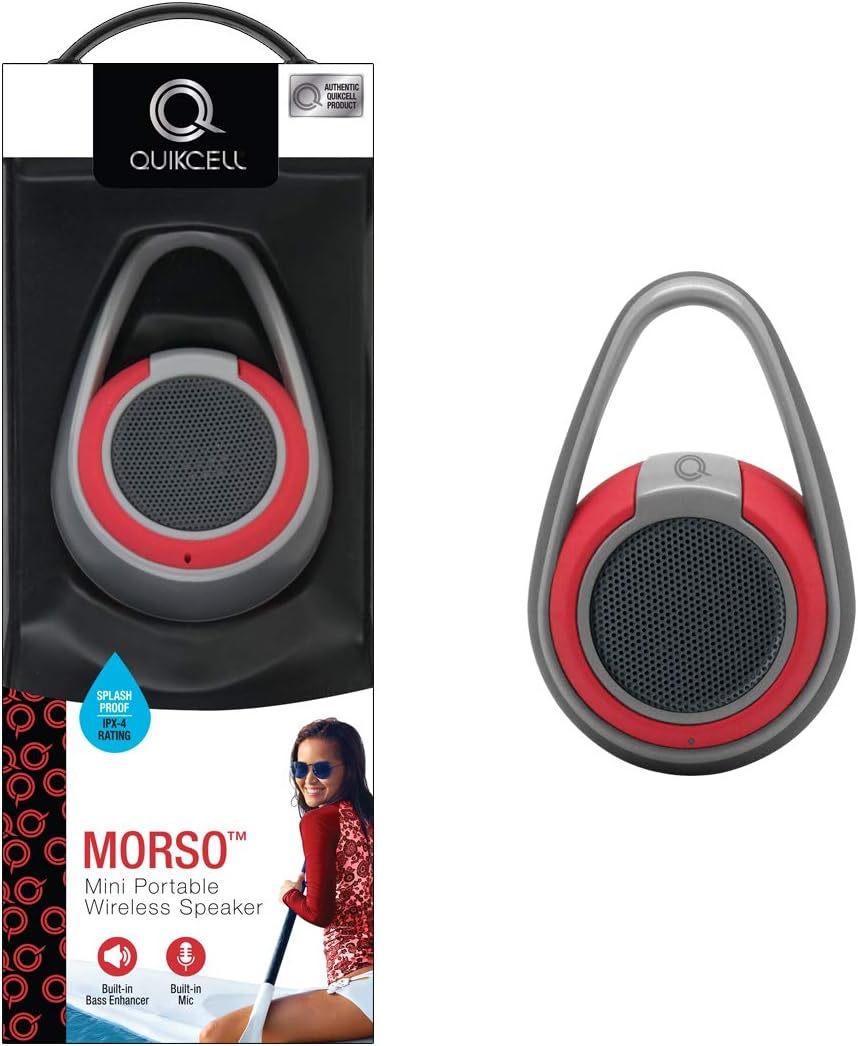
Figura 3.1: The Morso Speaker shown alongside its retail packaging, highlighting its compact design and integrated carrying loop.

Figura 3.2: Un profesional secundariofile view of the Morso Speaker, illustrating its ergonomic shape and the robust design of the carrying handle.
4. Configuración
4.1. Cargando o altofalante
Before first use, fully charge the Morso Speaker. Locate the charging port (usually covered by a rubber flap for water resistance) and connect the provided charging cable to a USB power source. The charging indicator light will illuminate during charging and turn off or change color when fully charged.
4.2. Acendido/apagado
- Para acender: Press and hold the power button (usually marked with a power symbol) for approximately 3 seconds until you hear an audible tone or see an indicator light.
- Para apagar: Press and hold the power button again for approximately 3 seconds until the indicator light turns off and an audible tone confirms shutdown.
5. Instrucións de funcionamento
5.1. Emparellamento Bluetooth
- Ensure the Morso Speaker is powered on and in pairing mode (indicated by a blinking blue LED, for example). If it doesn't automatically enter pairing mode, you may need to press a dedicated Bluetooth button.
- On your mobile device (smartphone, tablet, computer), navigate to the Bluetooth settings.
- Activa o Bluetooth e busca os dispositivos dispoñibles.
- Select "MORSO" or "QUIKCELL MORSO" from the list of found devices.
- Once paired, the speaker will emit a confirmation tone, and the LED indicator will typically turn solid blue.
Nota: O altofalante tentará volver conectarse automaticamente co último dispositivo emparellado ao acendelo.
5.2. Reprodución de audio
After successful pairing, you can play audio from your connected device. Use your device's volume controls to adjust the playback volume. The speaker may also have its own volume buttons.
5.3. Answering Calls (Built-in Mic)
Cando entra unha chamada mentres está conectado a través de Bluetooth:
- Para responder: Briefly press the multi-function button (often the power button or a dedicated call button).
- Para finalizar a chamada: Briefly press the multi-function button again.
- Para rexeitar chamada: Prema e manteña premido o botón multifunción durante aproximadamente 2 segundos.
O micrófono integrado do altofalante captará a túa voz.
6. Mantemento
6.1. Limpeza
To clean the speaker, use a soft, dry, lint-free cloth. For stubborn dirt, a slightly damp cloth can be used. Do not use abrasive cleaners, alcohol, or chemical solvents, as these may damage the surface or internal components.
6.2. Water Resistance (IPX-4)

Figura 6.1: The Morso Speaker demonstrating its IPX-4 splash-proof capability, shown with water droplets on its surface, suitable for outdoor use near water.
The Morso Speaker has an IPX-4 splash-proof rating, meaning it is resistant to splashing water from any direction. It is not designed to be submerged in water. Ensure all port covers are securely closed before exposing the speaker to water. Do not expose the speaker to salt water or other chemicals.
6.3. Almacenamento
When not in use for extended periods, store the speaker in a cool, dry place away from direct sunlight and extreme temperatures. It is recommended to charge the speaker periodically (e.g., every 3 months) to maintain battery health.
7 Solución de problemas
| Problema | Causa posible | Solución |
|---|---|---|
| O altofalante non se acende. | Batería baixa. | Cargue o altofalante completamente. |
| Non se pode emparellar co dispositivo. | Speaker not in pairing mode; Bluetooth off on device; device too far. | Ensure speaker is in pairing mode. Turn Bluetooth on/off on device. Move device closer to speaker. |
| Sen son ou volume baixo. | Volume demasiado baixo no altofalante ou dispositivo; o altofalante non está conectado. | Aumenta o volume tanto no altofalante como no dispositivo conectado. Volve emparellar o altofalante. |
| A calidade da chamada é mala. | Interference; speaker too far from user. | Move closer to the speaker. Reduce interference from other electronic devices. |
8. Especificacións
| Característica | Detalle |
|---|---|
| Número de modelo | MORSO- RED |
| Marca | QUIKCELL |
| Cor | Vermello |
| Dimensións (L x W x H) | 2.2 x 2.8 x 7.2 polgadas |
| Peso do elemento | 2.76 libras |
| Saída do altofalante | 2 Watt with enhanced bass |
| Clasificación impermeable | IPX-4 (Splash Proof) |
| Fonte de enerxía | Alimentado por batería |
| Tempo de reprodución | Ata 5 horas |
| Tempo de espera | Ata 24 horas |
| Características incorporadas | Micrófono para chamadas |
| UPC | 846537050664 |
9. Garantía e soporte
For warranty information and customer support, please refer to the warranty card included with your product or visit the official QUIKCELL websitio. Garda o comprobante de compra para calquera reclamación de garantía.
Fabricante: Quikcell
Data de primeira dispoñibilidade: 12 de xullo de 2018
For further assistance, please contact Quikcell customer service.


