Introdución
Grazas pola compraasing the VTech VT1091 Cordless Phone. This manual provides essential information for setting up, operating, and maintaining your new phone. Please read these instructions carefully to ensure proper use and to fully benefit from its features.
Contido do paquete
Antes de comezar, asegúrate de que todos os elementos estean presentes no teu paquete:
- Auricular sen fíos
- Unidade base
- Adaptador de corrente para a unidade base
- Cable de Liña Telefónica
- Baterías recargables (preinstaladas ou separadas)
- Manual de usuario (este documento)
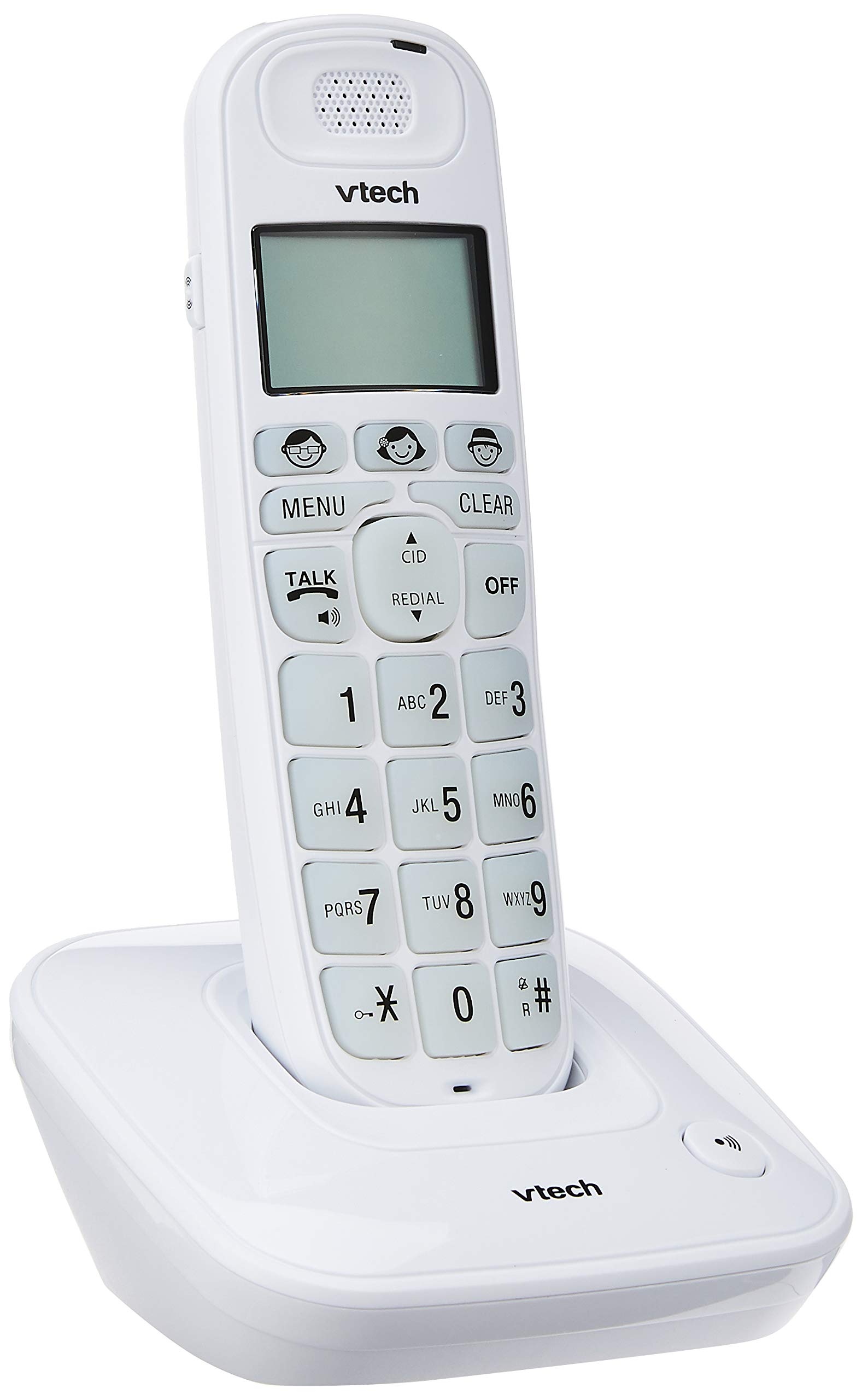
Image: The VTech VT1091 cordless phone handset resting in its base unit, showing the front view of the keypad and screen.
Configuración
1. Instalación da batería
- Localiza a tapa do compartimento da batería na parte traseira do teléfono.
- Deslice a tapa cara abaixo para abrir.
- Insira as baterías recargables subministradas, respectando a polaridade correcta (+ e -).
- Coloque a tapa do compartimento da batería.
2. Conexión da unidade base
- Connect one end of the telephone line cord to the TEL LINE jack on the back of the base unit.
- Conecta o outro extremo do cable da liña telefónica á toma de teléfono da parede.
- Connect the small end of the power adapter to the DC IN jack on the back of the base unit.
- Conecta o extremo grande do adaptador de corrente a unha toma de corrente estándar.

Imaxe: Traseira view of the VTech VT1091 base unit, showing the ports for the telephone line cord and the power adapter.
3. Cargando o auricular
Place the handset on the base unit with the display facing forward. The handset will begin charging. For optimal battery performance, allow the handset to charge for at least 16 hours before initial use.

Imaxe: Lateral view of the VTech VT1091 cordless phone handset securely placed in its charging base.
Características clave
- Amplificación: Amplification of incoming sounds by up to 30 decibels.
- Ultra-low Radiation Mode: Operates with reduced radiation levels.
- BOOSTER Button: One-touch button for easy sound amplificación.
- Teclado grande: Big buttons with backlit keypad for improved visibility.
- Pantalla LCD retroiluminada: Large display with orange backlight.
- Teléfono altofalante: Para a comunicación mans libres.
- Page/Handset Locator: Helps locate a misplaced handset.
- Auto Answer/Keypad Lock: Convenient call handling and security features.
- Alarm/Secrecy: Includes alarm function and call secrecy feature.
- GAP Compliant: Compatible with other GAP-enabled DECT devices.
- Directorio da axenda telefónica: 20 name and number entries.
- Identificador de chamada: Displays the last 10 caller numbers.
- Volver marcar: Stores the last 5 numbers dialed.
- Ringer Melodies: 10 selectable ringer melodies (5 polyphonic and 5 standard).
- Duración da batería: Approximately 10 hours talk time / 100 hours standby time.
- Memory Buttons: 3 one-touch memory buttons.
- Marcación rápida: 8 number (2-9) speed dial memories.
- Compatible con audífonos: Designed for use with hearing aids.
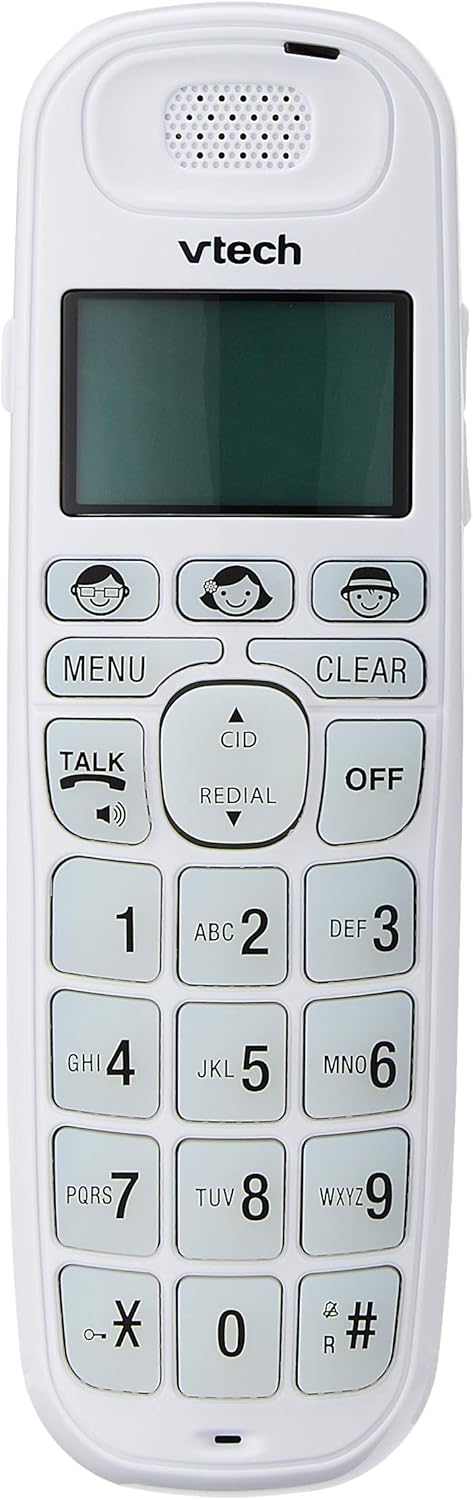
Image: Close-up of the VTech VT1091 handset, highlighting the large backlit keypad, LCD display, and dedicated function buttons.
Instrucións de funcionamento
Facendo unha chamada
- Preme o FALAR botón para obter o ton de marcación.
- Marque o número de teléfono desexado.
- Para finalizar a chamada, prema o botón DESACTIVADO botón ou volva colocar o auricular na unidade base.
Respondendo a unha chamada
Cando soe o teléfono, prema a tecla FALAR botón para responder á chamada.
Usando o altofalante
Durante unha chamada, prema o botón FALAR button again (with the speaker icon) to activate the speakerphone function. Press it again to switch back to the earpiece.
Axuste do volume
Durante unha chamada, use o UP e ABAIXO arrow buttons on the side of the handset to adjust the earpiece or speakerphone volume.
Directorio de axenda telefónica
- Preme o MENÚ botón.
- Navigate to "Phonebook" using the arrow buttons and press MENÚ para seleccionar.
- Follow the on-screen prompts to add, edit, or delete entries.
Función de remarcación
Preme o REMARCA botón para view a list of the last 5 dialed numbers. Use the arrow buttons to select a number and press FALAR para marcar.
Identificador de chamada
When the phone rings, the caller's number (if available) will be displayed on the screen. Press the CID botón para volverview the caller ID list. Use the arrow buttons to scroll through entries.
BOOSTER Function
Durante unha chamada, prema o botón dedicado IMPULSO button (if available, often integrated with volume or a specific key) to instantly amplify the incoming audio by up to 30 decibels. Press again to deactivate.
Localizador de teléfonos
To locate a misplaced handset, press the PÁX button on the base unit. The handset will ring.
Mantemento
Limpeza
Limpe o auricular e a unidade base cun pano suave eamp cloth. Do not use cleaning sprays or abrasive cleaners, as these can damage the finish or electrical components.
Coidado da batería
- Only use the supplied rechargeable batteries.
- Se non vai usar o teléfono durante un período prolongado, retire as baterías para evitar fugas.
- Non tire as pilas ao lume.
Resolución de problemas
| Problema | Solución |
|---|---|
| Sen ton de marcación |
|
| O teléfono non carga |
|
| Mala calidade de son |
|
| Non se mostra o ID de chamada |
|
Especificacións
| Marca | VTech |
| Modelo | VT1091 |
| Tipo de teléfono | Sen fíos |
| Cor | Branco |
| Material | Plástico |
| Fonte de enerxía | Cable eléctrico (para a unidade base) |
| Tipo de marcador | Teclado único |
| Tipo de contestador automático | Digital (Note: This model's primary features do not highlight an integrated answering machine, but refers to general digital phone capabilities.) |
| Operación multilínea | Solteiro |
| Tempo de conversación telefónica | 10 horas |
| Tempo de espera do teléfono | 100 horas |
| Identificador de chamada | Si |
| UPC | 735078026569 |

Image: The VTech VT1091 cordless phone in its base, with a measurement overlay indicating a height of 8.3 inches (21 cm).
Garantía e Soporte
This VTech VT1091 Cordless Phone comes with a 2 ano de garantía do fabricante local (Singapur). For warranty claims or technical support, please refer to the contact information provided with your purchase documentation or visit the official VTech Singapore websitio.
Para obter máis axuda, póñase en contacto co servizo de atención ao cliente de VTech.


