1. Introdución
This manual provides detailed instructions for the safe and efficient operation of your COSOOS MiBOXER C4-12 Universal 4-Bay Smart Battery Charger. This intelligent charger is designed to accommodate a wide range of rechargeable battery types and sizes, offering advanced features such as rapid charging, temperature control, and comprehensive display information. Please read this manual thoroughly before first use to ensure proper functionality and safety.

Image 1: The COSOOS MiBOXER C4-12 Smart Battery Charger and its included power adapter.
2. Información de seguridade
Lea todos os avisos e instrucións de seguridade antes de usar este produto. O incumprimento destas instrucións pode provocar descargas eléctricas, incendios ou lesións graves.
- Seguridade xeral: Always use the charger in a dry, well-ventilated area. Avoid exposure to water, high temperatures, or direct sunlight.
- Compatibilidade da batería: Only charge compatible rechargeable batteries as specified in this manual. Attempting to charge non-rechargeable batteries or incompatible types may cause explosion or leakage.
- Control de temperatura: The charger features intelligent temperature control. If the battery temperature exceeds 60℃ (140℉), the charging speed will be reduced. If it exceeds 70℃ (158℉), charging will stop automatically.
- Protección de sobrecarga: The charger automatically stops charging when batteries are fully charged to prevent overcharging.
- Reverse Polarity & Short Circuit Protection: The charger is equipped with protection against incorrect battery insertion and short circuits. An error symbol will be displayed if detected.
- Función de activación: The smart charger can activate over-discharged batteries.
- Supervisión: Do not leave the charger unattended during operation, especially when charging for the first time.
- Danos: If the charger or power adapter is damaged, discontinue use immediately and contact customer support.

Image 2: The charger features multiple protection mechanisms including flame-retardant materials, reverse battery protection, and short circuit protection.
3. Contido do paquete
Verifica que todos os elementos estean presentes no teu paquete:
- 1 x COSOOS MiBOXER C4-12 Smart Battery Charger (Batteries not included)
- 1 adaptador de corrente (12 V/5 A)
- 1 x Manual de usuario

Image 3: The package includes the C4-12 charger, power adapter, and user manual.
4. Especificacións
| Parámetro | Valor |
|---|---|
| Modelo | C4-12 |
| Dimensións | 6.2 polgadas x 4.7 polgadas x 1.7 polgadas (15.7 cm x 11.9 cm x 4.3 cm) |
| Peso | 485 g (1.07 lb) |
| Material | Fireproofing PC+ABS |
| Vol. De entradatage / Actual | DC 12V 5A |
| Output Current (Li-ion) | Maximum 4*3A |
| Output Current (Ni-MH/Ni-Cd) | Maximum 4*1A |
| Compatible Li-ion Batteries | 10340, 10350, 10440, 10500, 12340, 12500, 12650, 13450, 13500, 13650, 14350, 14430, 14500, 14650, 16500, 16340 (RCR123), 16650, 17350, 17500, 17650, 17670, 18350, 18490, 18500, 18650, 18700, 20700, 21700, 22500, 22650, 25500, 26500, 26650 (4.2V, 4.35V, 3.6V LiFePO4) |
| Compatible Ni-MH/Ni-Cd Batteries | AA, AAA, AAAA, C, SC (1.48V) |
| Mostrar | LCD multifuncional |
5. Configuración
- Desempaquetar: Retire con coidado o cargador e todos os accesorios da embalaxe.
- Conectar enerxía: Insert the DC plug of the power adapter into the input port on the back of the charger. Plug the AC end of the power adapter into a standard wall outlet (AC 90-260V). The LCD display will illuminate.
- Pantalla inicial: Upon power-up, the LCD will show a brief self-test, then display 'NULL' for empty slots.
6. Instrucións de funcionamento
The C4-12 charger features four independent charging bays, allowing simultaneous charging of different battery types.
6.1 Inserción das baterías
- Identify the correct polarity (+/-) on your battery and the charger slot.
- Gently slide the battery into an empty charging slot, ensuring proper contact with the positive and negative terminals. The spring-loaded negative pole slide track accommodates various battery lengths.
- The charger will automatically detect the battery type (Li-ion, Ni-MH/Ni-Cd) and begin charging. The LCD will display charging information for that slot.
6.2 Entendendo a pantalla LCD
The large LCD display provides real-time information for each charging slot:
- Tipo de batería: Indicates detected battery chemistry (e.g., Li-ion 4.2V, Ni-MH/Ni-Cd).
- Voltage (V): Batería actual voltage.
- Corrente (A): Carga actual ampera.
- Tempo de carga: Elapsed charging duration.
- Battery Capacity (mAh/mWh): Accumulated charge capacity.
- Internal Resistance (mΩ): Displays the battery's internal resistance.
- Temperatura (℃/℉): Real-time battery temperature.
- Batería Percentage: Estimated charge level.
- Charge Symbol: Indicates active charging.

Image 4: The LCD provides rich information including battery type, temperature, internal resistance, current, voltage, and charge status.
6.3 Mode and Slot Buttons
Use the 'SLOT' and 'MODE' buttons to interact with the charger:
- SLOT Button: Press to cycle through the display information for each individual charging slot.
- Botón MODE: After selecting a slot with the 'SLOT' button, press 'MODE' to change charging parameters (e.g., voltage for Li-ion batteries like 4.2V, 4.35V, or 3.6V LiFePO4). A long press may be required to enter mode selection.
The charger automatically selects the optimum charge current. For Li-ion batteries, the maximum is 3A per bay. For Ni-MH/Ni-Cd batteries, the maximum is 1A per bay.
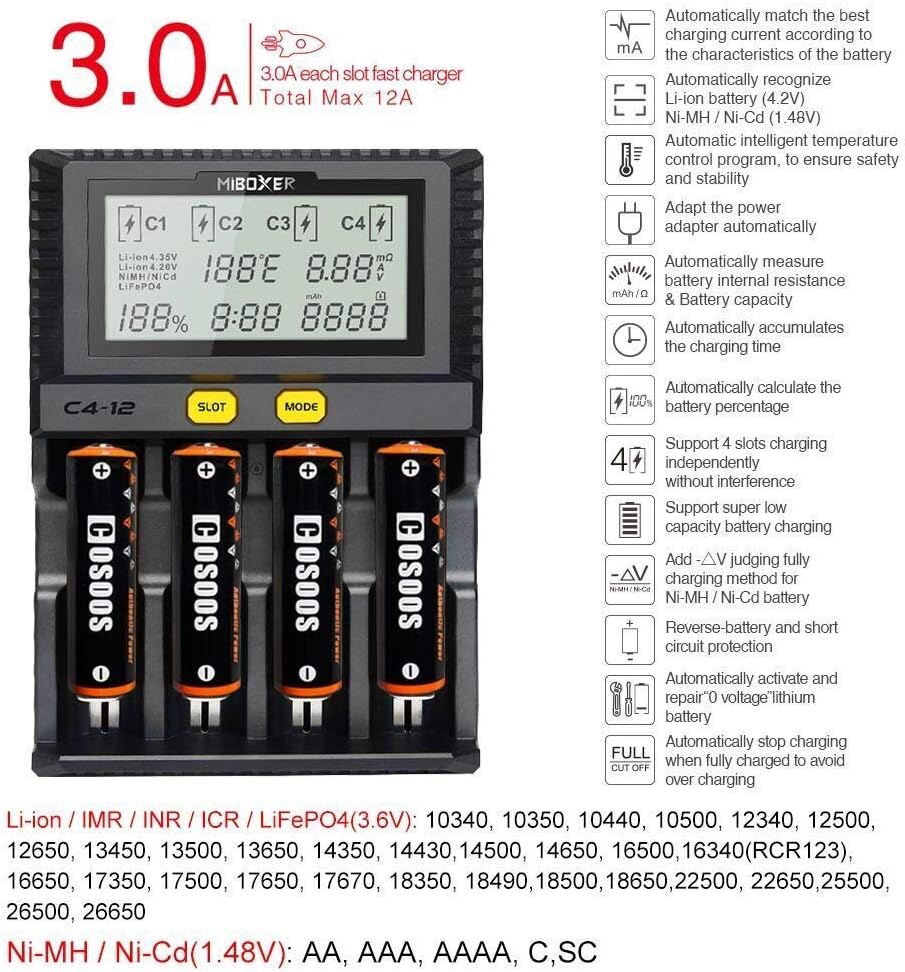
Image 5: Key features include 3A/bay charging for Li-ion, automatic battery recognition, intelligent temperature control, and support for various battery types.
7. Mantemento
To ensure the longevity and optimal performance of your COSOOS MiBOXER C4-12 charger:
- Limpeza: Desconecte o cargador da corrente antes de limpalo. Use un pano suave e seco para limpar a superficie. Non empregue produtos de limpeza abrasivos nin disolventes.
- Almacenamento: Garde o cargador nun lugar fresco e seco, lonxe da luz solar directa e da humidade cando non o estea a usar.
- Inspección: Periodically inspect the power adapter and charging slots for any signs of damage or wear.
8 Solución de problemas
Se tes problemas co cargador, consulta os seguintes problemas e solucións comúns:
| Problema | Causa posible | Solución |
|---|---|---|
| Display shows 'Error' or 'NULL' | Incorrect battery insertion, short circuit, or incompatible battery. | Ensure battery is inserted with correct polarity. Check for any foreign objects in the slot. Verify battery type is compatible. |
| A batería non se está cargando | Poor contact, battery too deeply discharged, or charger malfunction. | Re-insert battery, ensuring good contact. The charger may attempt to activate deeply discharged batteries automatically. If not, the battery may be beyond recovery. |
| Charger or battery becomes excessively hot | High ambient temperature, faulty battery, or internal issue. | Ensure adequate ventilation. The charger will reduce current or stop charging if temperature limits are exceeded. If overheating persists, remove battery and discontinue use. |
| LCD backlight dims after 1 minute | Funcionamento normal. | This is a power-saving feature. Press any button to re-illuminate. |
9. Garantía e soporte
COSOOS products are manufactured with quality and reliability in mind. For warranty information or technical support, please refer to the contact details provided on the product packaging or visit the official COSOOS websitio. Garde o recibo da compra como proba de compra para calquera reclamación de garantía.


