1. Introdución
Grazas pola compraasing the SENCOR SSS 3200 Kids Bluetooth Speaker with Karaoke Microphone. This portable speaker is designed to provide entertainment with its Bluetooth connectivity, karaoke function, and vibrant LED lighting. Please read this manual carefully before using the product to ensure proper operation and to maximize its lifespan. Keep this manual for future reference.
2. Instrucións de seguridade
- Non expoñas o dispositivo a temperaturas extremas, luz solar directa nin humidade elevada.
- Use only the supplied charger to recharge the product.
- Evite deixar caer ou someter o altofalante a fortes impactos.
- Non desmontes nin intentes reparar o dispositivo ti mesmo. Encarga todo o mantemento a persoal cualificado.
- Keep the speaker away from water or other liquids to prevent electric shock.
- Asegúrese de que haxa unha ventilación axeitada arredor do altofalante durante o seu uso.
3. Contido do paquete
Carefully unpack your SENCOR SSS 3200 Kids speaker and check that all items are present and in good condition. The package should include:
- SENCOR SSS 3200 Kids Bluetooth Speaker
- Micrófono con fíos
- Cable de audio de 3.5 mm (cable auxiliar)
- Cable de carga USB
- Adaptador de alimentación
- Correa de ombreiro
- Manual de usuario (este documento)

Image 3.1: Included accessories for the SENCOR SSS 3200 Kids speaker, including the wired microphone, various cables, power adapter, and shoulder strap.
4. Produto rematadoview
4.1 Panel frontal

Imaxe 4.1: Fronte view of the SENCOR SSS 3200 Kids Bluetooth Speaker, showcasing the main speaker grille with LED backlighting and the SENCOR logo.
The front of the speaker features the main speaker grille, which is equipped with multi-color flashing LED backlighting for an enhanced visual experience. The SENCOR brand logo is prominently displayed.
4.2 Panel traseiro e controis

Image 4.2: Rear panel of the SENCOR SSS 3200 Kids Bluetooth Speaker, showing various input ports, control buttons, and adjustment knobs.
The rear panel houses all the essential controls and connectivity ports:
- MIC-IN: Conector de 6.3 mm para conectar o micrófono con cable.
- GUITAR-IN: 6.3mm jack for connecting a guitar (if applicable).
- LINE IN EAR MIC: 3.5mm AUX input.
- Porto USB: Para a reprodución desde unha unidade flash USB.
- Ranura para tarxetas TF: For microSD card playback.
- DC 9 V: Power input for charging.
- Interruptor de alimentación: To turn the speaker ON/OFF.
- Visualización: Digital display for mode and track information.
- Botóns de control: Play/Pause, Skip tracks, Mode/Shift, Record/Delete.
- Mandos: VOLUME+, -TREBLE+, -ECHO+, -MIC VOL+ for audio adjustments.
- Indicador de batería: Mostra o estado da batería.
5. Configuración
5.1 Carga da batería
Before first use, fully charge the speaker's built-in rechargeable battery. Connect the supplied power adapter to the DC 9V input on the rear panel and plug it into a power outlet. The battery indicator will show charging status. A full charge typically takes 3-5 hours. Ensure the product is fully charged before initial operation to ensure proper functionality.
5.2 Conexión do micrófono
Insert the plug of the wired microphone into the MIC-IN jack on the rear panel of the speaker. Ensure the microphone's ON/OFF switch is in the 'ON' position when in use.
6. Instrucións de funcionamento
6.1 Encendido/apagado
To turn the speaker ON, slide the Power switch on the rear panel to the 'ON' position. To turn it OFF, slide the switch to the 'OFF' position.
6.2 Emparejamento Bluetooth
- Acenda o altofalante. Entrará automaticamente no modo de emparellamento Bluetooth, o que se indicará cunha icona de Bluetooth que parpadea na pantalla.
- Activa o Bluetooth no teu teléfono intelixente, tableta ou outro dispositivo compatible.
- Busca available Bluetooth devices and select "SSS 3200 Kids" from the list.
- Unha vez emparellado, o altofalante emitirá un son de confirmación e a icona de Bluetooth da pantalla deixará de parpadear.
- Agora podes reproducir audio desde o teu dispositivo a través do altofalante.
Reprodución de tarxetas USB/TF 6.3
Insert a USB flash drive or a TF (microSD) card into the respective port/slot on the rear panel. The speaker will automatically detect the storage device and begin playing audio files. Use the control buttons (Play/Pause, Skip tracks) to manage playback.
6.4 Entrada AUX
Connect an external audio device (e.g., MP3 player, laptop) to the LINE IN EAR MIC (3.5mm AUX) port using the supplied 3.5mm audio cable. Press the 'MODE/SHIFT' button to switch to AUX input mode. Audio will then play from your connected device.
6.5 Karaoke Function and Recording
With the microphone connected to the MIC-IN port, you can sing along to music playing from any source (Bluetooth, USB, TF, AUX). Adjust the microphone volume using the 'MIC VOL+' knob and add echo effects with the '-ECHO+' knob. The speaker also supports recording your karaoke performance. Refer to the 'REC/DEL' button for recording and deleting functions.
6.6 modos de luz LED
The speaker features multi-color flashing LED backlighting. These lights automatically activate when the speaker is on, enhancing the party atmosphere. There may be a dedicated button or a combination of buttons to cycle through different light modes or turn them off, if available (refer to specific product documentation for details).
6.7 Axustes de audio
Use the 'VOLUME+' knob to adjust the overall speaker volume. The '-TREBLE+' knob allows you to fine-tune the treble levels for clearer sound. The '-ECHO+' and '-MIC VOL+' knobs are specifically for microphone effects and volume, respectively.
7. Mantemento
7.1 Limpeza
Limpe o exterior do altofalante cun pano suave e seco. Non empregue produtos de limpeza abrasivos, ceras nin disolventes. Asegúrese de que non entren líquidos nas aberturas do altofalante.
7.2 Almacenamento
When not in use for extended periods, store the speaker in a cool, dry place, away from direct sunlight and extreme temperatures. It is recommended to fully charge the battery every few months to maintain its health.
8 Solución de problemas
- Sen enerxía: Ensure the speaker is charged. Connect the power adapter and allow it to charge for a few hours. Check the power switch is in the 'ON' position.
- Sen son: Check the volume levels on both the speaker and the connected device. Ensure the correct input mode (Bluetooth, USB, AUX) is selected.
- Bluetooth non se conecta: Make sure the speaker is in pairing mode. Disable and re-enable Bluetooth on your device. Move your device closer to the speaker.
- O micrófono non funciona: Ensure the microphone is securely plugged into the MIC-IN jack and its ON/OFF switch is in the 'ON' position. Adjust the 'MIC VOL+' knob.
- Son distorsionado: Reduce the volume on both the speaker and the connected device. Ensure audio files non están corrompidos.
9. Especificacións
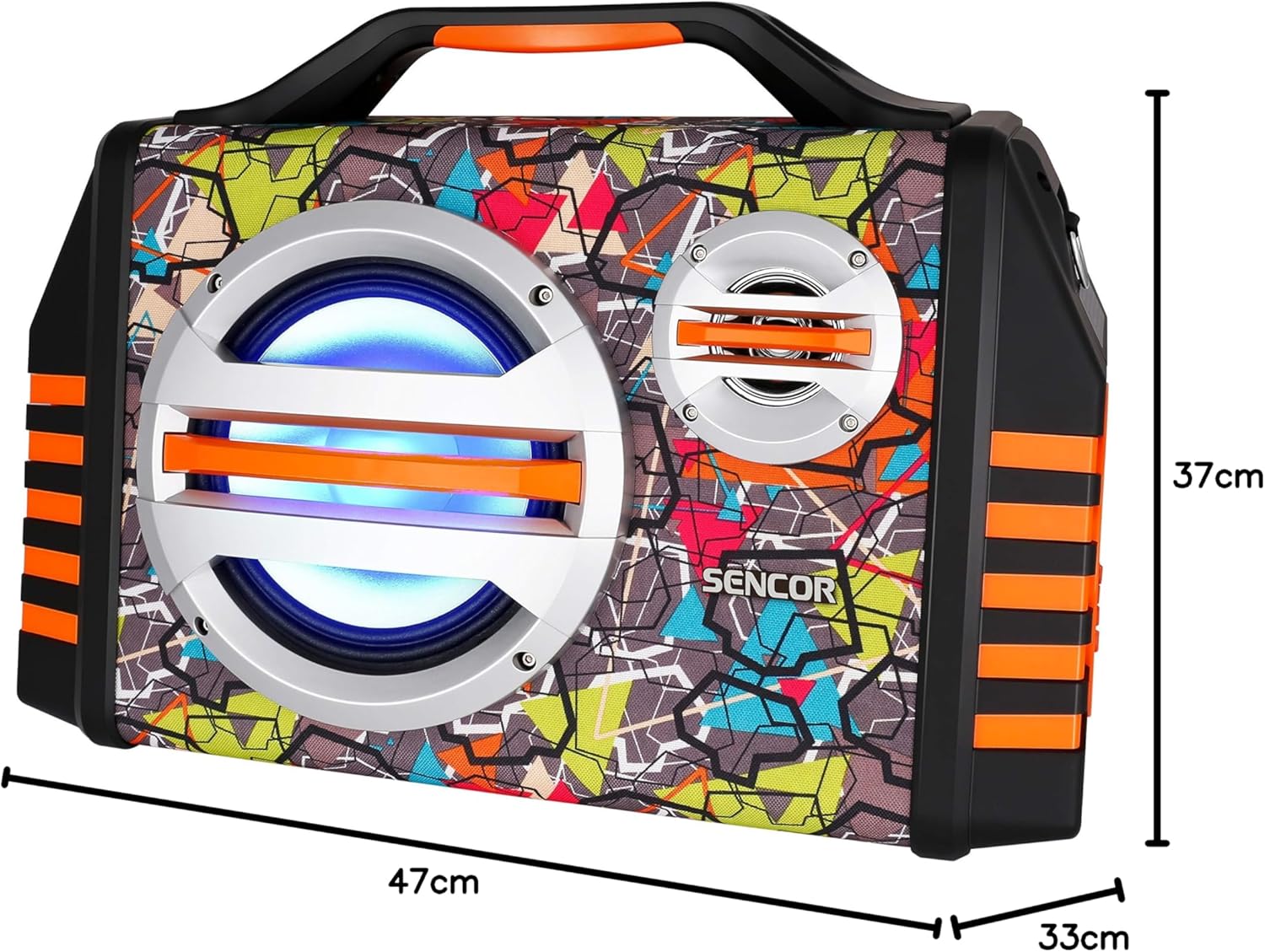
Image 9.1: Dimensions of the SENCOR SSS 3200 Kids Bluetooth Speaker, showing approximate measurements of 47cm (width), 37cm (height), and 33cm (depth).
| Característica | Especificación |
|---|---|
| Marca | SENSOR |
| Número de modelo | SSS3200KIDS |
| Cor | Multicolor |
| Tecnoloxía de conectividade | Bluetooth |
| Portos de conectividade | Conector de 3.5 mm, USB |
| Características especiais | Integrated Microphone, Multi-color LED Backlight |
| Total de portos USB | 1 |
| Impedancia | 4 ohmios |
| Dispositivos compatibles | portátil, teléfono intelixente, tableta |
| Usos recomendados | Children's Entertainment, Music Activities |
| Fonte de enerxía | Alimentado por batería |
| Número de falantes | 1 |
10. Garantía e soporte
SENCOR products are designed and manufactured to the highest quality standards. For warranty information, please refer to the warranty card included with your purchase or contact your local SENCOR distributor. For technical support or service inquiries, please visit the official SENCOR websitio ou póñase en contacto co seu departamento de atención ao cliente.