Introdución
Thank you for choosing the Yaheetech Multistore 2002 Computer Desk. This manual provides detailed instructions for assembly, operation, maintenance, and troubleshooting to ensure safe and efficient use of your new desk. Please read this manual thoroughly before beginning assembly or use, and retain it for future reference.
Información de seguridade
- Manteña todas as pezas e materiais de embalaxe fóra do alcance dos nenos.
- Monta a mesa sobre unha superficie suave e limpa para evitar rabuñaduras.
- Asegúrate de que todos os parafusos e elementos de fixación estean ben axustados antes do uso. Comprobe periodicamente e volva a axustalos segundo sexa necesario.
- Do not overload the desk. Refer to the "Specifications" section for weight capacities.
- Avoid placing hot items directly on the desk surface.
- Use caution when moving the desk, especially on uneven surfaces. Ensure casters are unlocked if moving.
Lista de pezas
Antes da montaxe, comproba que todos os compoñentes que se indican a continuación estean presentes e non estean danados. Se falta algunha peza ou está danada, ponte en contacto co servizo de atención ao cliente.

Figura 1: Explotou view of the desk showing main components and their names. This image highlights the heavy MDF boards, thickened frame, smooth steel ball drawer, open middle shelf, open bottom shelf, and lockable casters.
- A: Táboa superior (1 unidade)
- B: Estante do medio (1 unidade)
- C: Estante inferior (1 unidade)
- D: Marcos laterais (2 unidades)
- E: Drawer Front (1 pc)
- F: Drawer Sides (2 pcs)
- G: Drawer Back (1 pc)
- H: Drawer Bottom (1 pc)
- I: Drawer Slides (2 sets)
- J: Casters (4 pcs, 2 lockable)
- K: Hardware Pack (Screws, bolts, Allen wrench)
Instrucións de montaxe
Siga estes pasos atentamente para unha montaxe correcta. Recoméndase a montaxe por parte de dúas persoas.
- Step 1: Attach Casters to Side Frames.
Carefully attach the four casters (J) to the bottom of the two side frames (D). Ensure the two lockable casters are placed on the front side for easy access. Tighten securely with the provided wrench.

Figura 2: Detail of a caster wheel attached to the desk's metal frame. This shows the sturdy connection point and the wheel's design.
- Paso 2: Montar a estrutura principal.
Connect the bottom shelf (C) and middle shelf (B) to the side frames (D) using the appropriate screws from the hardware pack (K). Do not fully tighten screws until all parts are aligned.
- Step 3: Assemble the Drawer.
Assemble the drawer components (E, F, G, H) using the provided screws. Ensure the drawer bottom (H) slides into the grooves correctly. Attach the drawer slides (I) to the sides of the assembled drawer.

Figura 3: The desk's pull-out drawer, shown partially open, revealing its interior space. This image demonstrates the drawer's functionality and capacity.
- Step 4: Install Drawer Slides to Desk Frame.
Attach the other part of the drawer slides (I) to the designated points on the desk's main frame, just below where the top board will sit. Ensure they are level and aligned.

Figura 4: Un detallado view of the smooth steel ball drawer slide mechanism. This highlights the quality of the sliding components for the drawer.
- Step 5: Attach the Top Board.
Place the top board (A) onto the assembled frame and secure it with screws. Ensure all pre-drilled holes align.
- Step 6: Insert the Drawer.
Carefully slide the assembled drawer into the installed drawer slides until it clicks into place.
- Paso 7: Aperte final.
Once all components are in place and aligned, fully tighten all screws and fasteners. Do not overtighten.
Instrucións de funcionamento
The Yaheetech Multistore 2002 Computer Desk is designed for versatile use in various settings, including home offices, living rooms, or bedrooms.

Figura 5: The computer desk positioned next to a sofa in a living room, demonstrating its compact size and suitability for small spaces. A laptop is placed on the top surface.
- Colocación: Position the desk on a flat, stable surface. If using on carpet, ensure the casters can move freely.
- Mobilidade: To move the desk, unlock the two lockable casters by flipping their levers. Push or pull the desk gently to its desired location. Once in place, lock the casters to prevent accidental movement.
- Almacenamento:
- The top surface is suitable for laptops, monitors, or writing.
- The pull-out drawer provides enclosed storage for small items like pens, notebooks, or external hard drives.
- The open middle shelf is ideal for books, documents, or small electronic devices.
- The open bottom shelf can accommodate larger items such as a CPU tower, printer, or storage boxes.
- Capacidade de peso: Adhere to the maximum weight capacities specified in the "Specifications" section to prevent damage.
Mantemento
Regular maintenance will help prolong the life and appearance of your Yaheetech Multistore 2002 Computer Desk.
- Limpeza: Limpe as superficies cun suave, damp pano. Evite o uso de produtos químicos agresivos, produtos de limpeza abrasivos ou abrillantadores que poidan danar o acabado.
- Verquidos: Clean up spills immediately to prevent staining or damage to the MDF boards.
- Fixadores: Comprobe periodicamente todos os parafusos e elementos de fixación para asegurarse de que permanecen axustados. Volva apertalos segundo sexa necesario para manter a estabilidade.
- Rodízios: Keep casters free of debris (hair, dust, etc.) to ensure smooth movement.
- Luz solar/calor: Avoid prolonged exposure to direct sunlight or extreme heat, which can cause fading or warping.
Resolución de problemas
Se tes algún problema co teu escritorio, consulta os seguintes problemas e solucións comúns:
| Problema | Causa posible | Solución |
|---|---|---|
| O escritorio está inestable. | Fixadores soltos; chan irregular. | Ensure all screws are fully tightened. Move desk to a level surface or use shims if necessary. |
| O caixón non se desliza suavemente. | Guías do caixón desalinhadas; residuos nas guías. | Check that drawer slides are correctly installed and aligned. Clean tracks of any dust or debris. |
| As rodas non xiran libremente. | Casters locked; debris in wheels. | Unlock casters if they are engaged. Remove any hair or debris from the wheels. |
| Faltan pezas despois de desempaquetar. | Erro de empaquetado. | Contact Yaheetech customer support with your purchase details and the specific missing parts. |
Especificacións
Detailed dimensions and material information for the Yaheetech Multistore 2002 Computer Desk.
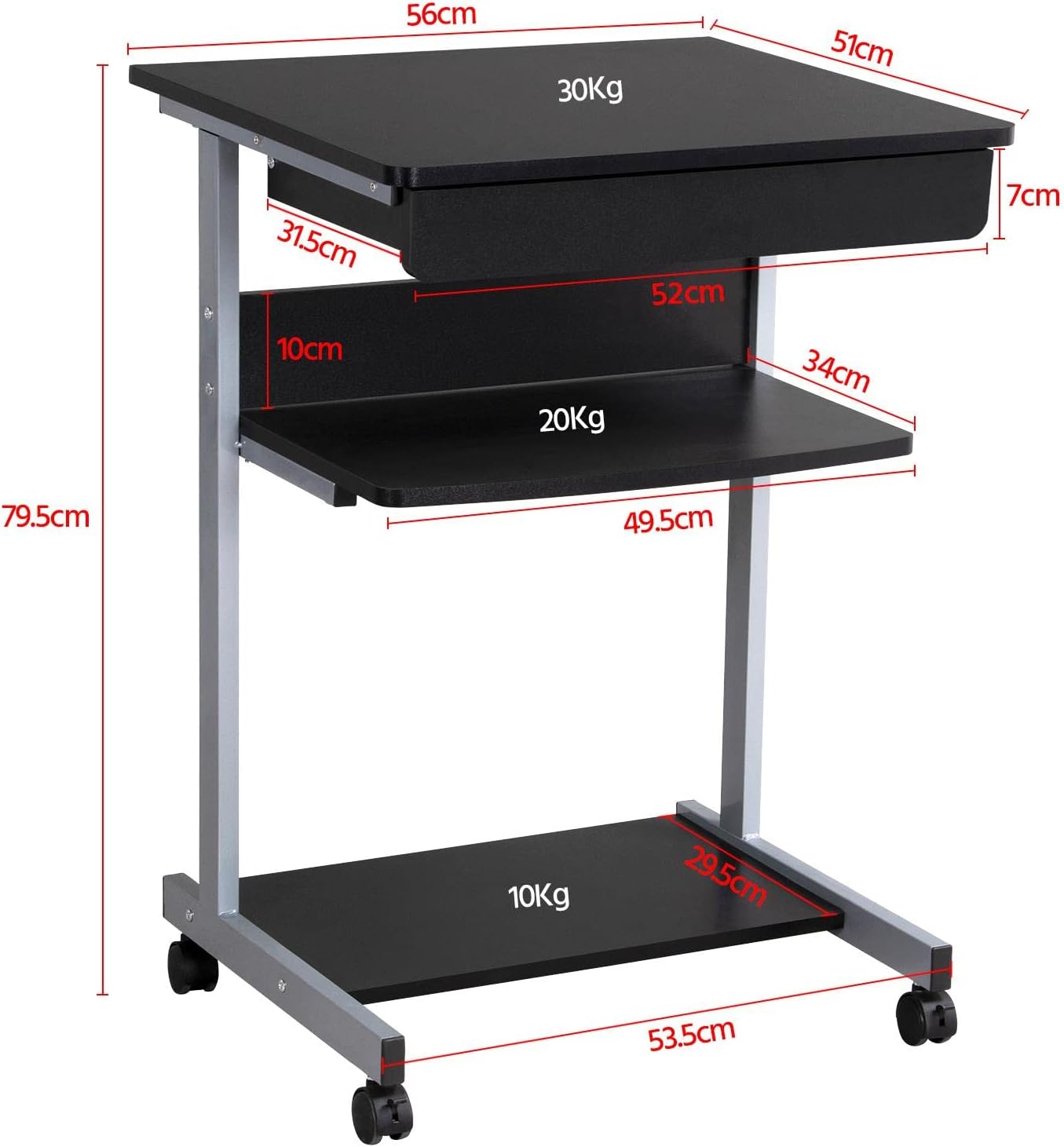
Figura 6: Detailed dimensional drawing of the desk, including measurements for overall height, width, depth, and individual shelf and drawer dimensions. Also shows weight capacities for each surface.
| Característica | Detalle |
|---|---|
| Número de modelo | YA-00097936 |
| Dimensións xerais (L x W x H) | 56 x 51 x 79.5 cm (22 x 20.1 x 31.3 polgadas) |
| Top Board Dimensions | 56 x 51 cm (22 x 20.1 polgadas) |
| Drawer Dimensions (Inner) | 45 x 30 x 6 cm (17.7 x 11.8 x 2.4 polgadas) |
| Middle Shelf Dimensions | 50 x 34 cm (19.7 x 13.4 polgadas) |
| Bottom Shelf Dimensions | 50 x 30.5 cm (19.7 x 12 polgadas) |
| Material | MDF (Medium Density Fiberboard) with Metal Frame |
| Cor | Negro |
| Peso neto | Aprox. 10.9 kg (24 libras) |
| Max. Load Capacity (Top Board) | 30 kg (66 lb) |
| Capacidade de carga máxima (estante central) | 20 kg (44 lb) |
| Capacidade de carga máxima (estante inferior) | 10 kg (22 lb) |
| Rodas | 4 (2 with locking mechanism) |
Garantía e Soporte
Yaheetech products are manufactured to high-quality standards. For specific warranty information, please refer to the warranty card included with your product or visit the official Yaheetech website. If you have any questions, require assistance with assembly, or need to report missing/damaged parts, please contact our customer support team:
- Websitio: www.yaheetech.com (Consulte as zonas rexionais) websitios)
- Correo electrónico: Refer to your purchase documentation for customer service email.
- Teléfono: Refer to your purchase documentation for customer service phone number.
When contacting support, please have your model number (YA-00097936) and purchase date ready.


