Introdución
The TP-Link TL-PoE4824G is a passive Power over Ethernet (PoE) adapter designed to supply power and transmit data simultaneously to compatible passive PoE devices. This includes devices such as TP-Link's EAP245 3.0, EAP225 3.0, and CPE610. Its design incorporates convenient wall-mounting brackets for easy installation.
Características principais:
- 48V passive PoE support for compatible devices.
- Automatic determination of necessary power requirements.
- Convenient wall-mounting design for flexible placement.
- Gigabit speed support for high-speed data transmission.
- Plug-and-Play functionality, requiring no complex configuration.
- Ethernet connectivity technology.
Contido do paquete
Verifique que o seu paquete conteña os seguintes elementos:
- 48V 24W Passive PoE Adapter (TL-PoE4824G)
- Cable de alimentación
- Kits de montaxe en parede
Produto rematadoview
The TL-PoE4824G PoE Injector features a compact design with essential ports and indicators for easy operation.

Figura 1: De arriba abaixo view of the TP-Link TL-PoE4824G Passive PoE Injector.
Portos e indicadores:
- Porto PoE: Connects to the passive PoE device to deliver both power and data.
- Porto LAN: Connects to your network device (e.g., router, switch) for data input.
- Entrada de enerxía: Connects to the provided power cord for electrical supply.
- Indicador LED: Provides status information (e.g., power, connection activity).
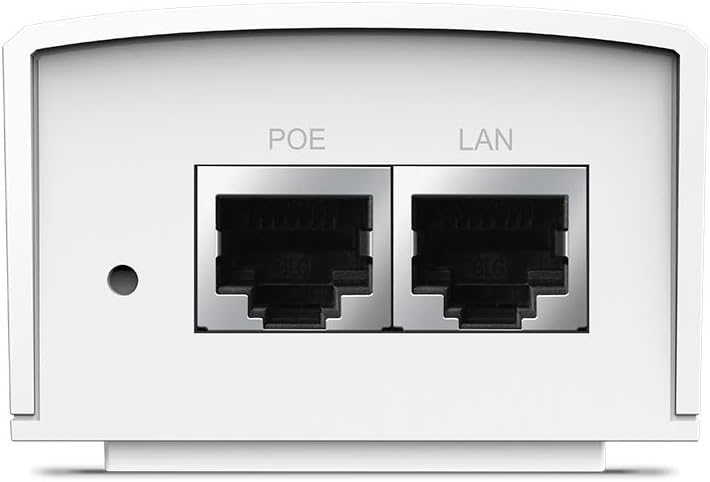
Imaxe 2: Primeiro plano view of the PoE and LAN data ports.

Imaxe 3: Primeiro plano view of the power input port.

Figura 4: Lateral view showing the LED indicator for device status.
Configuración
The TL-PoE4824G is designed for simple plug-and-play installation. Follow these steps to set up your PoE injector:
- Conectar á enerxía: Plug the provided power cord into the power input port of the TL-PoE4824G and then into a standard electrical outlet.
- Conectarse á rede: Connect an Ethernet cable from your network device (e.g., router, switch) to the LAN port on the TL-PoE4824G.
- Connect to PoE Device: Connect another Ethernet cable from the Poe port on the TL-PoE4824G to your passive PoE-compatible device (e.g., access point, IP camera).
- Verificar a conexión: Check the LED indicator on the TL-PoE4824G. A solid light typically indicates a successful power and data connection.

Figure 5: Connection diagram for the TL-PoE4824G, illustrating data and power flow to a passive PoE device.
Montaxe na parede:
The TL-PoE4824G includes wall-mounting kits for secure installation. Refer to the diagram below for the mounting process:

Figure 6: Wall-mounting steps for the TL-PoE4824G using the provided brackets.
En funcionamento
Once properly connected, the TL-PoE4824G operates automatically. It provides 48V DC passive PoE to the connected device, eliminating the need for a separate power adapter for the PoE device. Data transmission occurs at Gigabit speeds through the Ethernet connection.
The injector is designed to auto-determine the necessary power requirements for the connected passive PoE device, ensuring efficient and safe operation.
Mantemento
- Limpeza: Usa un pano suave e seco para limpar o dispositivo. Non empregues produtos de limpeza líquidos nin en aerosol.
- Colocación: Ensure the device is placed in a well-ventilated area, away from direct sunlight, heat sources, and moisture.
- Xestión de cables Keep all cables neatly organized to prevent damage and ensure proper airflow.
- Actualizacións de firmware: Consulta periodicamente a información oficial de TP-Link websitio web para ver se hai actualizacións de firmware dispoñibles para garantir un rendemento e unha seguridade óptimos.
Resolución de problemas
No Power/LED Indicator Off:
- Ensure the power cord is securely connected to both the injector and a working electrical outlet.
- Test the electrical outlet with another device to confirm it is supplying power.
Sen conexión de datos:
- Verify that the Ethernet cables are securely connected to the LAN port (from your network) and the PoE port (to your device).
- Ensure the connected passive PoE device is functioning correctly and is compatible with 48V passive PoE.
- Check the status of your network device (router/switch) to ensure it is providing an active network connection.
- Try using different Ethernet cables to rule out cable defects.
Device Not Receiving Power:
- Confirm that your end device is a passive PoE device and supports 48V DC input. This injector is not compatible with 802.3af/at active PoE standards.
- Ensure the cable length does not exceed 100 meters (325 feet) for optimal power and data delivery.
Especificacións
| Modelo | TL-PoE4824G |
| Marca | TP-Link |
| Estándar PoE | 48V DC Passive PoE |
| Taxa de transferencia de datos | 1000 Mbps (Gigabit Ethernet) |
| Tecnoloxía de conectividade | Ethernet |
| Portos | 1x LAN (Data In), 1x PoE (Data & Power Out) |
| Lonxitude máxima do cable | Ata 100 metros (325 pés) |
| Dimensións (LxWxH) | 4.33 x 2.24 x 1.41 polgadas |
| Peso | 5.6 onzas |
Garantía e Soporte
Para obter información sobre a garantía, asistencia técnica e rexistro do produto, visite a páxina oficial de TP-Link. websitio web ou póñase en contacto co servizo de atención ao cliente. Garde o recibo de compra para reclamacións de garantía.
- Soporte de TP-Link Websitio: www.tp-link.com/us/support/
- Contacto: Refer to the TP-Link websitio web para obter información de contacto rexional.


