Introdución
Thank you for choosing the MIFA A3 Soundbox Bluetooth Portable Speaker. This manual provides essential information for the safe and efficient use of your device. Please read it thoroughly before operating the speaker and retain it for future reference.
Información de seguridade
- Non expoñas o altofalante a temperaturas extremas, luz solar directa ou humidade elevada.
- Evite deixar caer ou someter o altofalante a fortes impactos.
- Do not disassemble or attempt to repair the speaker yourself. Contact qualified service personnel.
- Keep the speaker away from water and liquids, despite its waterproof rating, to prevent damage to charging ports or internal components.
- Use só o cable de carga e o adaptador especificados.
Contido do paquete
Comprobe se o paquete contén os seguintes elementos:
- MIFA A3 Bluetooth Portable Speaker
- Cable de carga USB
- Cable de audio AUX
- Manual de usuario (este documento)
Produto rematadoview
The MIFA A3 speaker features intuitive touch controls and multiple connectivity options. Familiarize yourself with the speaker's layout:
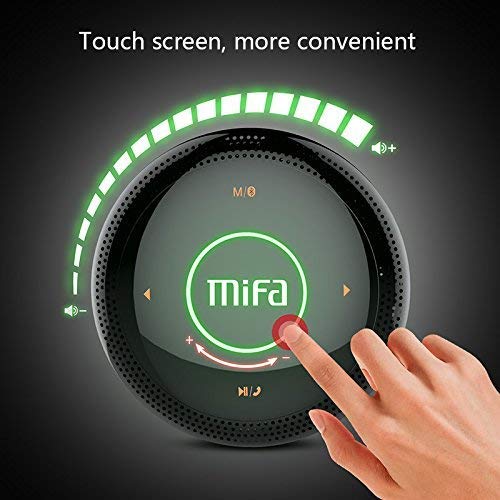
Figura 1: Arriba view of the MIFA A3 speaker, highlighting the touch-sensitive control panel. The panel displays volume indicators, play/pause, and track navigation buttons. A central 'Mifa' logo is also visible.
- Panel de control táctil: Located on the top surface for volume adjustment, playback control, and mode selection.
- Micrófono: Para chamadas mans libres.
- Porto de carga: Porto micro USB para carga.
- Entrada AUX: Conector de audio de 3.5 mm para conexión por cable.
- Ranura para tarxeta Micro SD: Para reproducir música directamente desde unha tarxeta de memoria.
Configuración
1. Cargando o altofalante
Before first use, fully charge the speaker. Connect the provided USB charging cable to the speaker's charging port and the other end to a USB power adapter (not included) or a computer's USB port.
- A luz indicadora de carga acenderase durante a carga.
- The indicator will turn off or change color once fully charged.
- A full charge provides approximately 8 hours of continuous playtime.
2. Acendido/apagado
- Para acender: Press and hold the Power button (usually integrated into the touch panel or a dedicated button) for 2-3 seconds until you hear an audible prompt or see an indicator light.
- Para apagar: Press and hold the Power button again for 2-3 seconds.
Instrucións de funcionamento
1. Emparellamento Bluetooth
- Ensure the speaker is powered on and in Bluetooth pairing mode (indicated by a flashing blue light or audible prompt).
- No teu dispositivo (teléfono intelixente, tableta, PC), activa o Bluetooth e busca os dispositivos dispoñibles.
- Seleccione "MIFA A3" na lista de dispositivos.
- Once paired, the speaker will provide an audible confirmation, and the indicator light will become solid blue.
- The speaker will automatically connect to the last-paired device when powered on, if that device's Bluetooth is active and within range.
2. Conexión AUX
For devices without Bluetooth, use the provided 3.5mm AUX audio cable:
- Conecte un extremo do cable AUX á porta de entrada AUX do altofalante.
- Conecte o outro extremo á toma de auriculares do dispositivo de audio.
- O altofalante cambiará automaticamente ao modo AUX.
3. Reprodución de tarxetas Micro SD
Insert a Micro SD card (up to 32GB, FAT32 format) with music files na ranura designada. O altofalante detectará automaticamente a tarxeta e comezará a reprodución.
4. Touch Control Operations
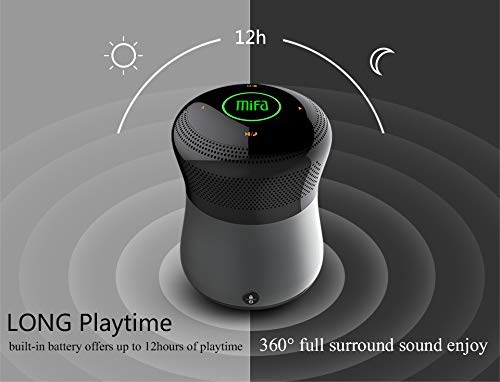
Figura 2: The MIFA A3 speaker shown with an overlay indicating "LONG Playtime" (up to 12 hours) and "360° full surround sound enjoy." This image emphasizes the speaker's battery life and audio dispersion.
- Control de volume: Slide your finger clockwise on the touch panel to increase volume, counter-clockwise to decrease.
- Reproducir/Pausa: Tap the central Play/Pause icon.
- Próxima pista: Tap the "Next" arrow icon.
- Pista anterior: Tap the "Previous" arrow icon.
- Interruptor de modo: Tap the "M/O" icon to cycle between Bluetooth, AUX, and Micro SD card modes.
- Botón de bloqueo: Press the lock icon to prevent accidental touch inputs.
5. Call Handling (Bluetooth Mode)
- Responder chamada: Tap the Play/Pause icon when a call comes in.
- Finalizar a chamada: Tap the Play/Pause icon again.
- Rexeitar a chamada: Press and hold the Play/Pause icon for 2 seconds.
Mantemento
- Limpa o altofalante cun pano suave e seco. Non empregues produtos de limpeza abrasivos nin disolventes.
- Garde o altofalante nun lugar fresco e seco cando non o use durante períodos prolongados.
- Charge the battery at least once every three months to maintain battery health.
Resolución de problemas
| Problema | Posible Solución |
|---|---|
| O altofalante non se acende. | Asegúrate de que a batería estea cargada. Conéctaa a unha fonte de alimentación e inténtao de novo. |
| Non se pode emparellar por Bluetooth. |
|
| Sen son. |
|
| Mala calidade de son. |
|
Especificacións
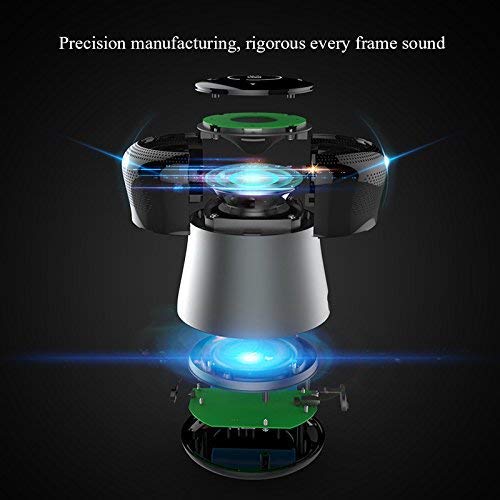
Figura 3: An exploded diagram of the MIFA A3 speaker, illustrating its internal components and structural design, emphasizing precision manufacturing.
| Modelo | MIFA A3 |
| Potencia de saída | 10 W |
| Conectividade | Bluetooth 4.2, AUX, Micro SD Card |
| Batería | 1800 mAh Li-ion |
| Hora de xogo | Ata 8 horas (ao 60 % do volume) |
| Tempo de carga | Aproximadamente 3-4 horas |
| Micrófono | Integrado para chamadas mans libres |
| Impermeable | Yes (as per product specifications, but general caution advised for ports) |
| Método de control | Toca |
| Dispositivos compatibles | Portátil, PC, teléfono intelixente, tableta |
Garantía e Soporte
MIFA products are designed to provide reliable performance. For warranty information or technical support, please refer to the warranty card included with your purchase or visit the official MIFA websitio. Garda o comprobante de compra para reclamacións de garantía.
For further assistance, you may contact MIFA customer support through their official channels.


