1. Produto rematadoview
The MIFA A20 is a portable Bluetooth speaker designed to deliver high-quality audio with powerful bass and True Wireless Stereo (TWS) capabilities. Its robust aluminum alloy housing ensures durability and a premium aesthetic. This manual will guide you through its features, setup, and operation.


2. Características
- Exceptional Wireless Stereo: Connect two A20 speakers via a single device for huge stereo sound and double the volume; two exposed radiators let you see the sound.
- Impressive Bass: Dual drivers, triple radiators and Class-D chips ensure distortion-free crystal loud sound and strong bass with 30W peak power output.
- Long Playback: 4000 mAh rechargeable Li-ion battery offers 12 hours playtime at 70% volume; LED indicators to tell you the battery remaining; can play while charging.
- Endless Audio Options: Aux capability for non-Bluetooth devices; 32GB Micro SD card supported to save your phone's battery; built-in microphone for HD hands-free calls.
- Bluetooth 4.2: Instantly pairs with your Smartphone, Tablet, Laptop, iPhone, Samsung, etc.; auto-reconnects to the last used device within 66 feets away.
3. Contido do paquete
Marque a caixa para os seguintes elementos:
- Altofalante Bluetooth MIFA A20
- Cable de carga USB
- Cable de audio de 3.5 mm (AUX)
- Manual de usuario
4. Diagrama e controis do produto
Familiarize yourself with the speaker's layout and control buttons.
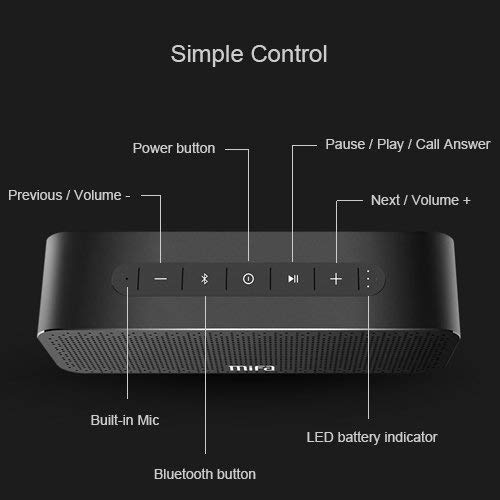
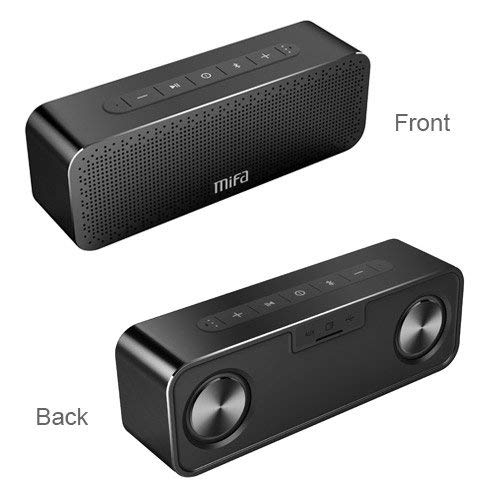
Botóns de control:
- Botón de encendido: Mantén premido para activar/desactivar.
- Botón Bluetooth: Prema para entrar no modo de vinculación Bluetooth.
- Play/Pause / Call Answer Button: Press to play/pause music; press to answer/end calls.
- Previous / Volume - Button: Press to go to previous track; press and hold to decrease volume.
- Next / Volume + Button: Press to go to next track; press and hold to increase volume.
Indicators and Ports:
- Micrófono incorporado: Para chamadas mans libres.
- Indicador LED de batería: Mostra o estado da batería.
- Porto de carga: Porto USB para cargar.
- Entrada AUX: Conector de 3.5 mm para conexión de audio con cable.
- Ranura para tarxeta Micro SD: For playing music directly from a Micro SD card (up to 32GB).
5. Configuración
5.1 Carga do altofalante
Before first use, fully charge the speaker. Connect the provided USB charging cable to the speaker's charging port and the other end to a USB power adapter (not included) or a computer's USB port. The LED indicator will show charging status and turn off when fully charged.
5.2 Emparejamento Bluetooth
- Turn on the MIFA A20 speaker by pressing and holding the Power button.
- The speaker will automatically enter Bluetooth pairing mode, indicated by a flashing blue LED. If not, press the Bluetooth button.
- No teu dispositivo (teléfono intelixente, tableta, portátil), activa o Bluetooth e busca os dispositivos dispoñibles.
- Seleccione "MIFA A20" na lista de dispositivos.
- Unha vez emparellado, o indicador LED acenderase en azul fixo e escoitarás un son de confirmación.
- The speaker will automatically reconnect to the last paired device when turned on, if within range.
5.3 Emparellamento estéreo sen fíos verdadeiro (TWS)
To achieve a wider stereo soundstage, you can pair two MIFA A20 speakers together.
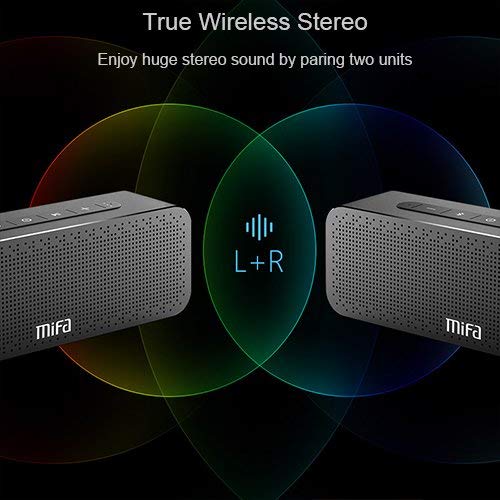
- Ensure both MIFA A20 speakers are turned on and not connected to any Bluetooth device.
- On one speaker (this will be the primary speaker), press and hold the Bluetooth button until you hear a prompt indicating TWS pairing mode.
- The two speakers will automatically search for and connect to each other. This may take a few seconds.
- Once connected, you will hear a confirmation sound, and the LED indicators on both speakers will change to reflect the TWS connection.
- Agora, conecta o teu dispositivo ao altofalante principal mediante Bluetooth como se describe na sección 5.2. O son reproducirase a través dos dous altofalantes en estéreo.
5.4 Using Micro SD Card
Insert a Micro SD card (up to 32GB, formatted to FAT32) with your music files into the Micro SD card slot. The speaker will automatically switch to Micro SD card mode and begin playing music.
5.5 Uso da entrada AUX
Connect one end of the 3.5mm audio cable to the AUX input port on the speaker and the other end to the audio output jack of your non-Bluetooth device. The speaker will automatically switch to AUX mode.
6. Funcionamento do altofalante
6.1 Reprodución de música
- Reproducir/Pausa: Preme o botón Reproducir/Pausa.
- Subir volume: Manteña premido o botón Volume +.
- Baixar volume: Manteña premido o botón de Volume -.
- Próxima pista: Short press the Next / Volume + button.
- Pista anterior: Short press the Previous / Volume - button.
6.2 Chamadas mans libres
Cando se conecta mediante Bluetooth, o altofalante pódese usar para chamadas de mans libres.
- Responder chamada: Press the Play/Pause / Call Answer button.
- Finalizar a chamada: Press the Play/Pause / Call Answer button during a call.
- Rexeitar a chamada: Press and hold the Play/Pause / Call Answer button when a call comes in.
7. Mantemento
- Limpeza: Usa un pano suave e seco para limpar o altofalante. Non empregues produtos de limpeza abrasivos nin solventes.
- Coidado da batería: Para prolongar a duración da batería, evite descargar completamente o altofalante con frecuencia. Cárgueo regularmente, mesmo se non o usa durante períodos prolongados.
- Almacenamento: Garde o altofalante nun lugar fresco e seco, lonxe da luz solar directa e de temperaturas extremas.
- Resistencia á auga: The speaker is designed to be waterproof (as per specifications). However, avoid submerging it in water for extended periods or exposing it to high-pressure water jets. Ensure charging port cover is securely closed when near water.
8 Solución de problemas
| Problema | Causa posible | Solución |
|---|---|---|
| O altofalante non se acende | Batería baixa | Cargue o altofalante completamente. |
| Sen son | Volume demasiado baixo; Dispositivo non conectado; Modo de entrada incorrecto | Increase volume on speaker and device; Ensure successful Bluetooth pairing or AUX connection; Check if correct input mode (Bluetooth/AUX/SD card) is selected. |
| Non se pode emparellar por Bluetooth | Speaker not in pairing mode; Device Bluetooth off; Too far from speaker; Interference | Ensure speaker is in pairing mode (flashing blue LED); Turn on Bluetooth on your device; Move device closer to speaker; Turn off other Bluetooth devices nearby. |
| Son distorsionado | Volume too high; Low battery; Device too far | Reduce volume; Charge speaker; Move device closer to speaker. |
| Fallou o emparellamento TWS | Speakers already connected to a device; Not in TWS pairing mode | Disconnect both speakers from any Bluetooth devices; Ensure both speakers are in TWS pairing mode. |
9. Especificacións

| Característica | Detalle |
|---|---|
| Nome do modelo | A20 |
| Material | Aluminio |
| Tipo de altofalante | Woofer |
| Tecnoloxía de conectividade | Bluetooth, Auxiliary, Wireless |
| Versión Bluetooth | 4.2 |
| distancia wireless | Ata 66 pés (20 metros) |
| Potencia de saída máxima do altofalante | 30 vatios |
| Modo de saída de audio | Estéreo |
| Configuración da canle de son envolvente | 2.0 |
| Capacidade da batería | 4000 mAh |
| Duración da batería | Ata 12 horas (ao 70 % do volume) |
| Soporte para tarxetas Micro SD | Ata 32 GB |
| Micrófono incorporado | Si |
| É Impermeable | Si |
| Cor | Negro |
10. Garantía e soporte
Información da garantía
The MIFA A20 Bluetooth Speaker comes with a Garantía de 30 días desde a data de compra, cubrindo defectos de fabricación. Conserve o comprobante de compra para reclamacións de garantía.
Atención ao cliente
For any questions, technical assistance, or warranty inquiries, please contact MIFA customer support through the retailer's platform or the official MIFA websitio. Teña a man o modelo do produto e os detalles da compra ao contactar co servizo de asistencia.


