Produto rematadoview
The MIFA X1 True Wireless Earbuds offer a seamless audio experience with Bluetooth 5.0 connectivity, stereo sound, and a portable charging case. Designed for comfort and durability, these earbuds are sweatproof and suitable for various activities.
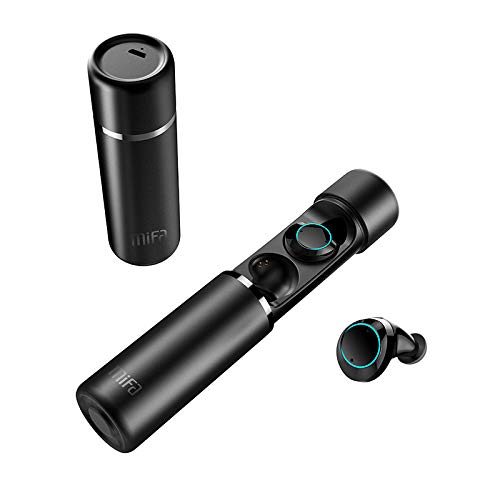
An image displaying the MIFA X1 True Wireless Earbuds. The cylindrical charging case is shown both closed and open, revealing the earbuds inside. One earbud is also shown outside the case.
Contido do paquete
- MIFA X1 True Wireless Earbuds
- Estuche de carga portátil
- Multi-sized Ear Gels (S, M, L)
- Cable de carga USB
- Manual de usuario (este documento)
Configuración
1. Carga inicial
Before first use, ensure both the earbuds and the charging case are fully charged. Remove any protective films from the earbud charging contacts if present.
- Coloque os auriculares na caixa de carga.
- Connect the charging case to a power source using a standard USB charging cable.
- Charging indicators on the case and/or earbuds will show charging status.
2. Emparejamento cun dispositivo
The MIFA X1 earbuds feature one-step pairing.
- Ensure Bluetooth is enabled on your smartphone or other device.
- Saca os dous auriculares da caixa de carga. Acenderanse automaticamente e entrarán no modo de emparellamento.
- On your device, search for Bluetooth devices and select "MIFA X1" from the list.
- Unha vez conectado, unha mensaxe de voz confirmará o emparellamento correcto.
Note: If only one earbud connects, place both back into the case, then remove them again to re-initiate pairing.
Instrucións de funcionamento
Usando os auriculares
- Choose the ear gels that provide the most comfortable and secure fit for optimal sound quality and stability.
- Gently insert the earbuds into your ears and rotate them slightly to ensure a snug fit.
Controis básicos (control táctil)
| Función | Acción |
|---|---|
| Encender | Take out of charging case (automatic) |
| Apagado | Place into charging case (automatic) |
| Reproducir/Pausa música | Toca un só auricular en calquera dos auriculares |
| Próxima pista | Toca dúas veces no auricular dereito |
| Pista anterior | Double tap on left earbud |
| Responder/Finalizar chamada | Toca un só auricular en calquera dos auriculares |
| Rexeitar a chamada | Mantén premido calquera dos auriculares durante 2 segundos |
| Activar o Asistente de voz (Siri, Asistente de Google) | Toque tres veces en calquera dos auriculares |
Mantemento
- Limpeza: Limpa regularmente os auriculares e a funda de carga cun pano suave, seco e sen pelusa. Non empregues produtos químicos agresivos nin materiais abrasivos.
- Contactos de carga: Asegúrate de que os contactos de carga tanto dos auriculares como da funda estean limpos e libres de residuos para manter unha carga axeitada.
- Almacenamento: Cando non estean en uso, garde os auriculares no seu estoxo de carga para protexelos e mantelos cargados.
- Resistencia á auga: The earbuds are sweatproof, but not fully waterproof. Avoid submerging them in water or exposing them to heavy rain.
Resolución de problemas
- Auriculares que non se emparellan entre si: Place both earbuds back into the charging case, then remove them simultaneously. This should force them to re-sync.
- Os auriculares non se conectan ao dispositivo:
- Asegúrate de que o Bluetooth estea activado no teu dispositivo.
- Forget "MIFA X1" from your device's Bluetooth settings and attempt to pair again.
- Asegúrate de que os auriculares estean cargados.
- Sen son dun auricular:
- Comproba se os dous auriculares están cargados.
- Tenta volver colocar os dous auriculares na funda e sacalos de novo.
- Perform a factory reset (if applicable, consult MIFA support for specific instructions if this manual doesn't detail it).
- Problemas de carga:
- Asegúrate de que o cable de carga estea conectado correctamente tanto á carcasa como á fonte de alimentación.
- Limpa os contactos de carga dos auriculares e do interior da funda.
- Proba cun cable de carga USB e un adaptador de corrente diferentes.
Especificacións
| Característica | Detalle |
|---|---|
| Nome do modelo | X1 |
| Tecnoloxía de conectividade | Bluetooth 5.0 |
| Tecnoloxía de comunicación sen fíos | Bluetooth |
| Modo de saída de audio | Estéreo |
| Formato de micrófono | Integrado |
| Método de control | Toca |
| Colocación do oído | En Orella |
| Duración da batería (auriculares) | Ata 4 horas |
| Duración total da batería (con caixa de carga) | Ata 12 horas |
| Material | Plástico |
| Características especiais | Micrófono incluído, resistente ao suor |
| Fabricante | MIFA INNOVATIONS LLC |
Información da garantía
This product typically comes with a manufacturer's warranty. Please refer to the warranty card included in your product packaging or visit the official MIFA website for detailed warranty terms and conditions. A 30-day warranty is generally provided.
Atención ao cliente
For further assistance, technical support, or inquiries regarding your MIFA X1 True Wireless Earbuds, please visit the official MIFA website or contact their customer service department. Contact information can usually be found on the product packaging or the official brand websitio.


