Jabra Evolve 20 MS Stereo Headset Instruction Manual
Model: Evolve 20 (GSA4999-823-109)
1. Introdución
The Jabra Evolve 20 MS Stereo Headset is a professional wired headset designed for clear communication and music listening. It features a noise-canceling microphone to reduce background distractions and an intuitive control unit for easy call management. This manual provides essential information for setting up, operating, and maintaining your headset.
2. Contido do paquete
Comprobe se o paquete contén os seguintes elementos:
- Jabra Evolve 20 MS Stereo Headset with integrated control unit
3. Produto rematadoview
3.1 Compoñentes dos auriculares
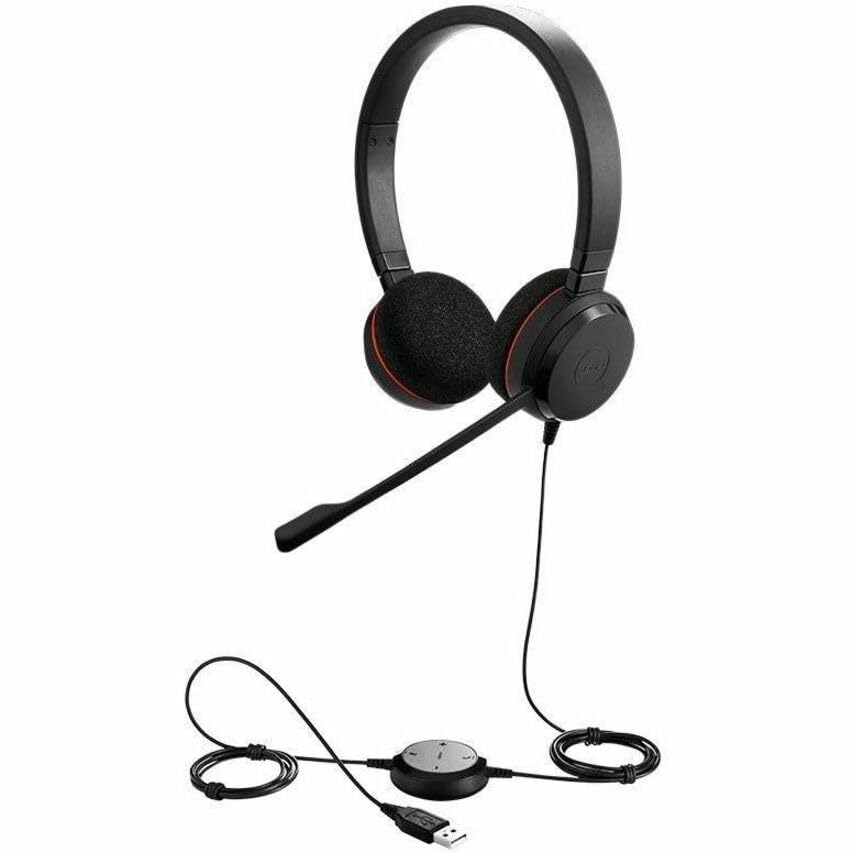
The Jabra Evolve 20 MS Stereo Headset features an adjustable headband, foam ear cushions for comfort, and a flexible microphone boom arm that can be positioned for optimal voice pickup.
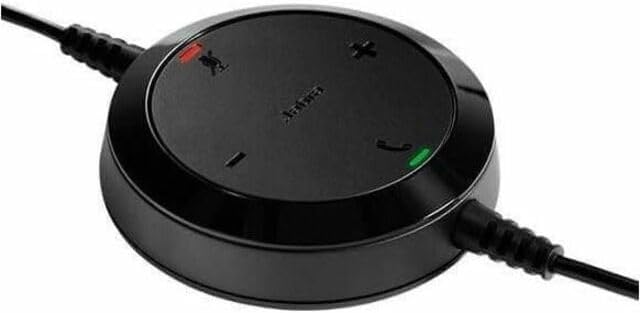
The inline control unit provides easy access to essential call management functions, including volume adjustment, microphone mute, and answer/end call buttons.
4. Configuración
4.1 Conexión ao teu ordenador
- Localiza un porto USB dispoñible no teu ordenador (de sobremesa ou portátil).
- Plug the USB connector of the Jabra Evolve 20 headset into the USB port.
- O teu ordenador debería detectar e instalar automaticamente os controladores necesarios. Isto pode tardar uns intres.
- Once installed, the headset will be ready for use. You may need to select the Jabra Evolve 20 as your default audio device (microphone and speaker) in your operating system's sound settings or your communication software (e.g., Microsoft Teams, Skype for Business).
5. Instrucións de funcionamento
5.1 Como usar os auriculares
- Adjust the headband to ensure a comfortable and secure fit on your head.
- Position the microphone boom arm so that the microphone is approximately 2-3 cm (1 inch) from your mouth.
5.2 Using the Control Unit
- Subir volume (+): Prema para aumentar o volume de escoita.
- Baixar o volume (-): Prema para diminuír o volume de escoita.
- Silenciar micrófono: Press the microphone icon button to mute or unmute your microphone during a call. An indicator light on the control unit may show the mute status.
- Responder/Finalizar chamada: Press the phone icon button to answer an incoming call or end an active call.
6. Mantemento
Proper maintenance ensures the longevity and performance of your headset.
- Limpeza: Gently wipe the headset and control unit with a soft, dry cloth. For ear cushions, use a slightly damp cloth if necessary, but avoid excessive moisture. Do not use harsh chemicals or abrasive cleaners.
- Almacenamento: When not in use, store the headset in a clean, dry place, away from extreme temperatures and direct sunlight. Avoid tangling the cable.
- Coidado do cable: Do not pull on the cable to disconnect the headset. Always grasp the USB connector.
7 Solución de problemas
If you encounter issues with your Jabra Evolve 20 headset, refer to the table below for common problems and solutions.
| Problema | Solución |
|---|---|
| Non hai son dos auriculares |
|
| O micrófono non funciona |
|
| Call control buttons not responding |
|
8. Especificacións
Key technical specifications for the Jabra Evolve 20 MS Stereo Headset:
| Característica | Descrición |
|---|---|
| Nome do modelo | Evolución 20 |
| Tecnoloxía de conectividade | Con cable (USB) |
| Control de ruído | Cancelación activa de ruído, cancelación pasiva de ruído |
| Micrófono | Cancelación de ruído |
| Colocación do oído | Sobre orella |
| Factor de forma | Na Orella |
| Material (Ear Cushions) | Espuma |
| Peso do elemento | 4.6 onzas (0.29 libras) |
| Dimensións do produto | 8 x 7 x 1.5 polgadas |
| Dispositivos compatibles | Desktops, Laptops, Softphones, Web Clients, Desk Phones |
| Tipo de controlador | Answer/End, Mute, Volume |
9. Garantía e soporte
For detailed warranty information, please refer to the warranty card included with your product or visit the official Jabra websitio. Os termos e condicións da garantía poden variar segundo a rexión e o vendedor.
For technical support, product registration, or to access additional resources, please visit the official Jabra support websitio web ou póñase en contacto directamente co servizo de atención ao cliente. Garde o comprobante de compra para reclamacións de garantía.