Introdución
This manual provides comprehensive instructions for the Anderic RRLC16.2 Universal Replacement Remote Control. Designed specifically for Sharp Roku TVs, this remote offers immediate functionality for compatible Sharp models without requiring any initial programming. It features dedicated shortcut keys for popular streaming services and a secure battery compartment for enhanced durability and safety. For other Roku TV brands or Roku Boxes, programming may be required.
Características do produto
- Fully Universal: Compatible with all Roku TVs. Note: Not for Roku Streaming Sticks.
- Calidade sen concesións: Engineered for superior performance and durability compared to original remotes.
- Operación sen esforzo: Works identically to the original remote for Sharp Roku TVs without complex setup. (Some shortcut keys may differ).
- Quick Access to Streaming Services: Dedicated shortcut keys for NETFLIX, AMAZON, RDIO, and MGO provide instant access to these streaming platforms.
- Compartimento seguro da batería: Includes an optional screw to secure the battery cover, preventing accidental opening.
Configuración
1. Instalación de baterías
The Anderic RRLC16.2 remote requires two AAA batteries (not included). To install:
- Localice o compartimento da batería na parte traseira do control remoto.
- Deslice a tapa da batería cara abaixo para abrila.
- Introduza dúas pilas AAA, asegurándose de manter a polaridade correcta (+ e -).
- Replace the battery cover by sliding it upwards until it clicks into place. For added security, use the optional screw to fasten the cover.

Image: Back of the remote control, highlighting the battery compartment and optional screw.
2. Initial Use (Sharp Roku TVs)
For Sharp Roku TV models (e.g., LC-43LB371U, LC-43LB371UA, LC-43LB371UB, LC-50LB371U), the Anderic RRLC16.2 remote is pre-programmed and ready to use immediately after battery installation. No additional setup is required.
3. Programming for Other Roku TVs or Roku Boxes
If you are using the remote with other Roku TV brands (Hisense, Insignia, TCL, Hitachi) or a Roku Box, programming may be necessary. Refer to the "Programming Instructions (via Learning)" section below for detailed steps.
Instrucións de funcionamento

Imaxe: Fronte view of the Anderic RRLC16.2 remote control.
- Botón de encendido (●): Located at the top, press to turn your TV on or off.
- Directional Pad (Purple Arrows) & OK Button: Use the arrow buttons to navigate menus and select options. Press the central "OK" button to confirm selections.
- Botón Atrás (←): Volve á pantalla ou menú anterior.
- Botón de inicio (⌂): Volve á pantalla de inicio de Roku.
- Volume & Mute Buttons: Located on the side of the remote. Use the volume up/down buttons to adjust audio levels and the mute button to silence audio.
- Reproducir/Pausar, Rebobinar, Avanzar rápido: Standard media control buttons for content playback.
- Teclas de atallo: Dedicated buttons for NETFLIX, AMAZON, RDIO, and MGO provide instant access to these streaming platforms.
Compatibilidade
The Anderic RRLC16.2 remote control is designed for broad compatibility with Roku TVs. Please review the compatibility details below:
- Pre-Programmed for Sharp Roku TV Models: LC-43LB371U, LC-43LB371UA, LC-43LB371UB, LC-50LB371U.
- Compatible with Other Roku TV Brands (Requires Programming): Hisense, Insignia, TCL, Hitachi.
- Compatible with Roku Box (Requires Programming).
- NOT Compatible with Roku Streaming Sticks.
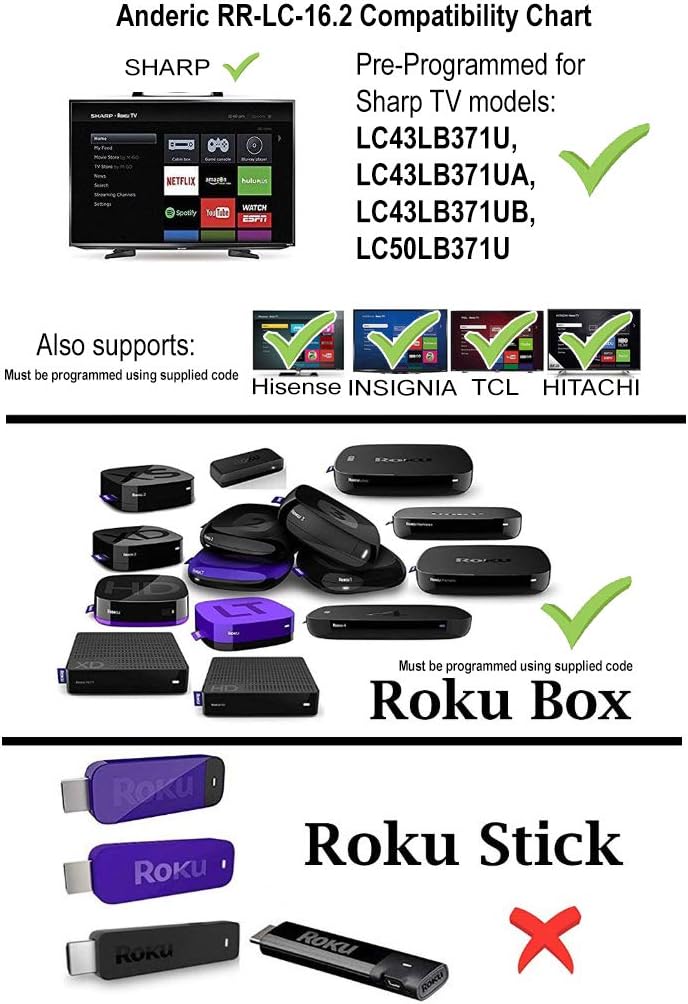
Image: Anderic RR-LC-16.2 Compatibility Chart.
Programming Instructions (via Learning)
This remote can be programmed to work with any TV via the learning method. This method does not require codes. Note: All keys on the RR-LC-16.2 may be learned. Original remote is needed.
- Manteña premido o ⌂ (Casa) e ← (Back) keys simultaneously for about 3 seconds. The indicator light will light up and remain on. Release the keys.
- Press and release the key to be learned. The indicator light will flash slowly.
- Point the original remote control head-to-head with the RR-LC-16.2, making sure the IR (infrared) light bulb at the top edge of the remote aligns directly with the lens on the front of the RR-LC-16.2, with a distance of about 3cm.
- Press and hold the key on the original remote that you want the RR-LC-16.2 to learn. The indicator light will flash 3 times to confirm and then remain on, waiting for the next entry.
- Repita os pasos 2-4 para aprender outras claves.
- Preme ⌂ (Home) to save and exit, or the remote will exit automatically after 20 seconds.
Restablecer ao estado predeterminado de fábrica
Mantén premido ⌂ (Casa) e ← (Back) keys simultaneously for 3 seconds. The indicator will flash 3 times to confirm. Remote has successfully been reset to factory default status.
Eliminar todas as claves aprendidas
Mantén premido ⌂ (Casa) e ★ (Star) keys simultaneously for 3 seconds. The indicator will flash 3 times to confirm. All learned keys have been successfully deleted.

Image: Anderic RR-LC-16.2 Advanced Universal Operating Guide with programming details.
Especificacións
| Dimensións do produto | 5.75 x 1.75 x 1 polgadas |
| Peso do elemento | 1.76 onzas |
| Número de modelo do artigo | RRLC16.2 |
| Baterías | 2 pilas AAA necesarias |
| Marca | Anderico |
| Característica especial | Universal |
| Cor | Negro |
| Número máximo de dispositivos compatibles | 2 |
| Dispositivos compatibles | Streaming Device, Television |
Resolución de problemas
- O control remoto non responde: Asegúrate de que as baterías estean instaladas correctamente e que non estean esgotadas. Substitúeas se é necesario.
- Liña de visión: The remote operates using infrared (IR) technology. Ensure there is a clear line of sight between the remote and your TV's IR receiver.
- Funcionalidade incorrecta: If buttons are not performing as expected, verify compatibility with your specific Roku TV model. For non-Sharp Roku TVs or Roku Boxes, ensure the remote has been correctly programmed using the learning method.
- Shortcut Keys Not Working: While the remote is universal, some shortcut keys may differ from your original remote. Ensure your streaming apps are installed and updated on your Roku TV.
Garantía e Soporte
Anderic products are designed for quality and reliability. For any issues or support inquiries, please refer to the manufacturer's official websitio web ou póñase en contacto co servizo de atención ao cliente. Garde o recibo de compra para reclamacións de garantía.
Anderic is a registered trademark of Dan's Electronics Etc., Inc. All Rights Reserved. We are not affiliated with Roku. Roku is a registered trademark of Roku Inc.
Para obter asistencia, visite: www.anderic.com


