Introdución
This manual provides instructions for the Elekpia CT-RC2US-17 remote control. This remote is designed for use with various Toshiba Smart LED HDTV models, offering a direct replacement experience without complex setup.
Compatible Toshiba Smart LED HDTV Models: 32L221U, 43L621U, 49L621U, 55L421U, 55L621U, 65L621U.
Configuración
The Elekpia CT-RC2US-17 remote control requires two AAA batteries (not included) for operation. No programming or pairing is necessary; the remote is ready for use once batteries are installed.
Instalación de baterías
- Localice o compartimento da batería na parte traseira do control remoto.
- Deslice a tapa da batería cara abaixo para abrila.
- Insert two AAA batteries, ensuring correct polarity (+ and - ends align with the markings inside the compartment).
- Deslice a tapa da batería de novo no seu lugar ata que faga clic de forma segura.

Image: Back of the remote control, illustrating the battery compartment.
Instrucións de funcionamento
The CT-RC2US-17 remote control features standard buttons for navigating your Toshiba Smart LED HDTV. Below is a general overview of common button functions.
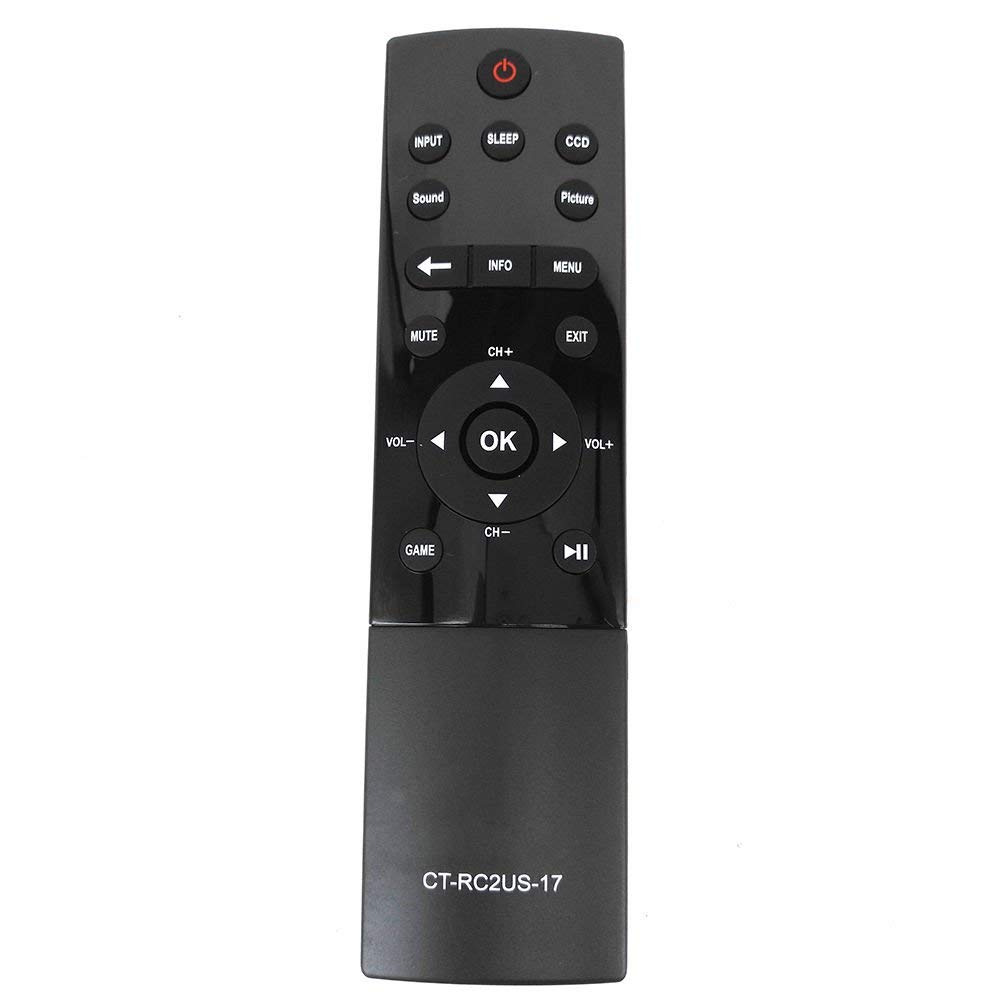
Image: Front of the remote control, displaying button layout.
Funcións dos botóns
- Botón de encendido: Acende ou apaga o televisor.
- Botón de entrada: Selects the input source (e.g., HDMI 1, HDMI 2, AV).
- Botón de durmir: Activates the TV's sleep timer function.
- CCD Button: Controls Closed Captioning display.
- Botón de imaxe: Adjusts picture modes or settings.
- Botón de son: Adjusts sound modes or settings.
- Botón de silencio: Silencia ou activa o son do televisor.
- Botón de información: Displays on-screen information about the current program or input.
- Botón de menú: Accede ao menú principal do televisor.
- Panel de navegación (Arriba, Abaixo, Esquerda, Dereita, Aceptar): Úsase para navegar polos menús e confirmar as seleccións.
- Botóns CH+ / CH-: Cambia de canle cara arriba ou cara abaixo.
- Botóns VOL+ / VOL-: Aumenta ou diminúe o volume.
- Botón de saída: Sae do menú ou da pantalla actual.
- Game Button: May activate a specific game mode or input.
- Playback Controls (Play/Pause, Rewind, Fast Forward): Used for media playback functions.
Mantemento
To ensure optimal performance and longevity of your remote control, follow these maintenance guidelines:
- Substitución da batería: Replace batteries when the remote's response becomes sluggish or stops working. Always replace both batteries simultaneously with new AAA batteries.
- Limpeza: Wipe the remote control with a soft, dry cloth. Avoid using liquid cleaners or abrasive materials, as they may damage the remote's surface or internal components.
- Almacenamento: Garda o mando a distancia nun lugar fresco e seco, lonxe da luz solar directa e de temperaturas extremas. Se o gardas durante un período prolongado, retira as pilas para evitar fugas.
Resolución de problemas
If you encounter issues with your Elekpia CT-RC2US-17 remote control, refer to the following common problems and solutions:
- Remote is unresponsive:
- Ensure there is a clear line of sight between the remote and the TV's infrared sensor.
- Comprobe se as pilas están inseridas correctamente coa polaridade correcta.
- Substitúa as pilas vellas por pilas AAA novas.
- Limited functionality (e.g., only power and volume work):
- Some users have reported that this replacement remote may have limited functionality on certain Toshiba Smart LED HDTV models, primarily controlling power, volume, and basic menu access. Full navigation or advanced smart TV features might require the original TV remote or a universal remote specifically programmed for those functions.
- Verify your TV model is listed as compatible. If issues persist, consult the TV's original manual for remote control compatibility details.
- Os botóns están pegañentos ou non responden:
- This may indicate dirt or debris under the buttons. Gently clean around the buttons with a dry cotton swab. Do not attempt to disassemble the remote.
Especificacións
| Característica | Detalle |
|---|---|
| Número de modelo | CT-RC2US-17 |
| Marca | Elekpia |
| Dimensións do produto | 6.5 x 1.5 x 0.5 polgadas |
| Peso do elemento | 2.08 onzas |
| Pilas necesarias | 2 pilas AAA (non incluídas) |
| Tecnoloxía de conectividade | Infravermello |
| Dispositivos compatibles | Toshiba Smart LED HDTVs |
| Característica especial | Deseño ergonómico |
| Número máximo de dispositivos compatibles | 1 |
Información de apoio
For product support related to your Toshiba TV, please refer to the official Toshiba support channels:
- Websitio: www.toshiba.com
- Phone (US & Canada Market): 855-527-2411
Note: This remote control is a compatible replacement manufactured by Elekpia. For specific TV features or advanced troubleshooting, consult your Toshiba TV's original user manual.


