1. Introdución
This manual provides essential information for the safe and efficient operation of your Intex SH4004 40-inch HD Ready LED Smart TV. Please read these instructions carefully before using the product and retain them for future reference. Your Intex SH4004 TV features a 40-inch HD Ready LED display, smart TV capabilities with Android OS, built-in Wi-Fi, and multiple connectivity options.
2. Información de seguridade
Siga sempre as precaucións de seguridade básicas ao usar este televisor para reducir o risco de incendio, descarga eléctrica e lesións.
- Fonte de enerxía: Ensure the TV is connected to a power supply within the specified voltage range. Do not overload power outlets.
- Ventilación: Non bloquee as aberturas de ventilación. Deixe espazo suficiente arredor do televisor para unha correcta circulación do aire e evitar o sobrequecemento.
- Auga e humidade: Non expoñas o televisor á choiva nin á humidade. Non coloques obxectos cheos de líquidos, como vasos, enriba do televisor.
- Limpeza: Desconecte o televisor da toma de corrente antes de limpalo. Use un pano suave e seco. Non empregue produtos de limpeza líquidos nin produtos de limpeza en aerosol.
- Colocación: Coloque o televisor sobre unha superficie estable e nivelada. Evite colocalo baixo a luz solar directa ou preto de fontes de calor.
- Servizo: Non intente atender este produto vostede mesmo. Remita todo o servizo a persoal de servizo cualificado.
3. Contido do paquete
Verifica que todos os elementos estean presentes no paquete:
- Intex SH4004 40-inch HD Ready LED Smart TV
- Control remoto
- Soporte para TV (2 pezas)
- Tornillos para soporte de TV
- Cable de alimentación
- Manual de usuario
4. Produto rematadoview
4.1 Fronte View
The front of the Intex SH4004 TV features the 40-inch LED display and the Intex brand logo at the bottom center.

Figura 4.1: Fronte view of the Intex SH4004 Smart TV.
4.2 Traseira View and Connectivity Ports
The rear panel houses various input and output ports for connecting external devices.

Figura 4.2: Traseira view of the Intex SH4004 Smart TV, highlighting port locations.
Portos dispoñibles:
- Portos HDMI (x2): For connecting set-top boxes, Blu-ray players, gaming consoles, and other HDMI-enabled devices.
- Porto USB (x1): For connecting USB hard drives, flash drives, and other USB devices for media playback.
- Entrada de antena: For connecting an aerial for terrestrial TV channels.
- Entradas de audio/vídeo: Para conectar dispositivos antigos mediante cables compostos.
- Porto Ethernet: Para unha conexión a internet por cable.
4.3 Dimensións
The physical dimensions of the TV are important for placement and installation.
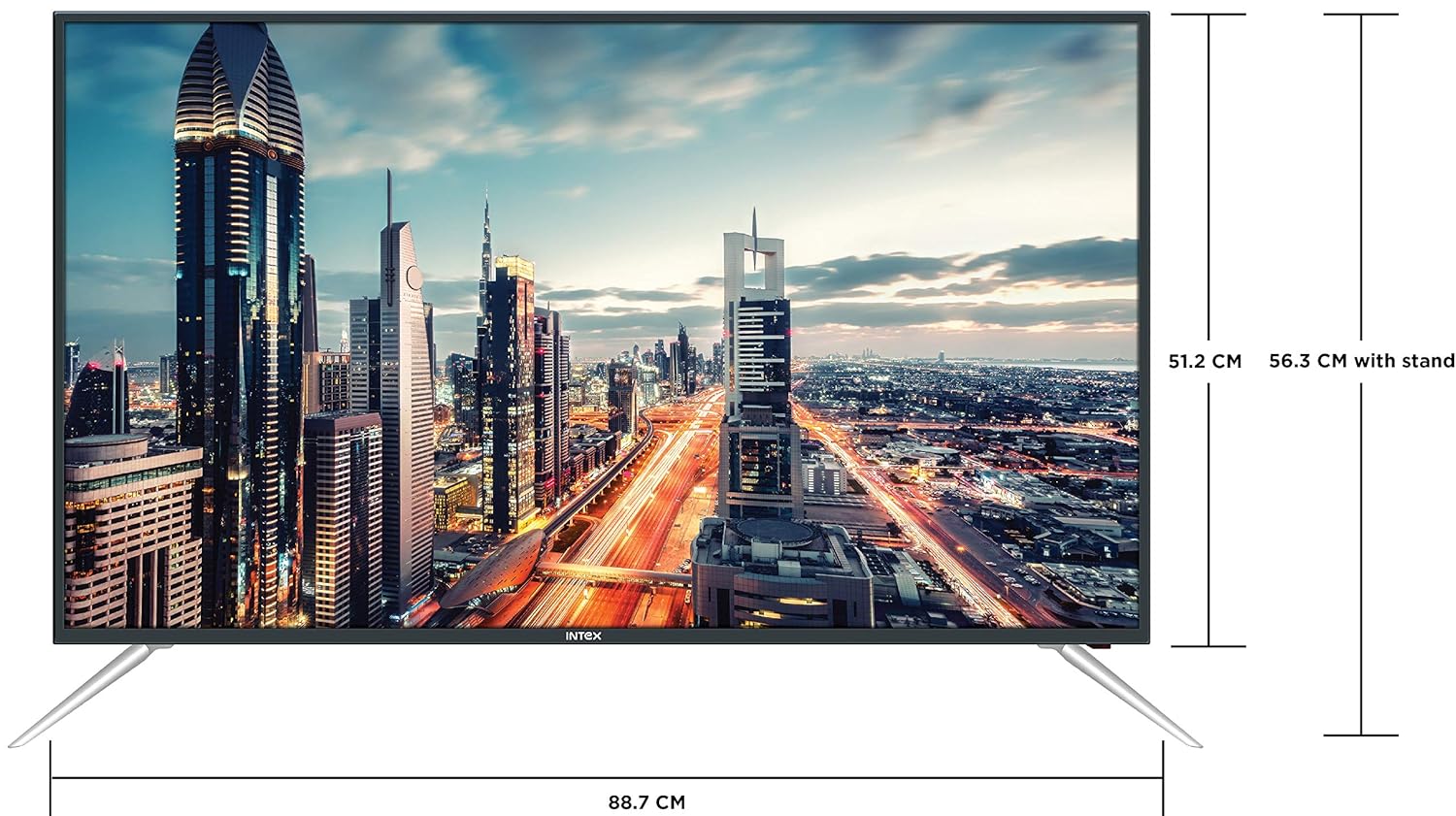
Figure 4.3: Intex SH4004 Smart TV dimensions.
- Tamaño da pantalla: 40 polgadas (98 cm)
- Ancho: Aproximadamente 88.7 cm
- Altura (sen soporte): Aproximadamente 51.2 cm
- Altura (con soporte): Aproximadamente 56.3 cm
- Dimensións do paquete: 102 x 60.5 x 16 cm
- Peso do artigo: 10.8 kg
5. Configuración
5.1 Fixación do soporte para TV
- Coloque con coidado o televisor boca abaixo sobre unha superficie suave e limpa para evitar danar a pantalla.
- Align the stand pieces with the corresponding slots at the bottom of the TV.
- Fixe as pezas do soporte cos parafusos proporcionados. Asegúrese de que estean ben apertadas.
5.2 Montaxe na parede
If you prefer to wall mount your TV, please contact Intex support for professional installation. Refer to the Warranty and Support section for contact details. Ensure you use a compatible VESA wall mount kit (not included) and follow its instructions carefully.
5.3 Conexión de enerxía
Connect the power cable to the TV's power input and then plug the other end into a wall outlet.
5.4 Conexión de dispositivos externos
- HDMI: Use an HDMI cable to connect devices like set-top boxes, gaming consoles, or Blu-ray players to the HDMI ports on the TV's rear panel.
- USB: Insert USB flash drives or external hard drives into the USB port for media playback.
- Antena: Connect your antenna cable to the ANTENNA IN port for receiving broadcast channels.
5.5 Asistente de configuración inicial
Ao acendelo por primeira vez, o televisor guiarache a través dun proceso de configuración inicial:
- Selección do idioma: Escolle o teu idioma preferido.
- Configuración da rede: Conéctate á túa rede Wi-Fi ou usa unha conexión Ethernet con cable. Introduce o teu contrasinal Wi-Fi se se che solicita.
- Escaneo de canles: O televisor buscará as canles de emisión dispoñibles.
- Zona horaria: Define a túa zona horaria local.
6. Instrucións de funcionamento
6.1 Funcións de control remoto
The remote control allows you to navigate the TV's features. Common buttons include Power, Volume Up/Down, Channel Up/Down, Input Source, Menu, Navigation (Up/Down/Left/Right), OK, Back, Home, and Smart TV app shortcuts.
6.2 Funcións básicas da televisión
- Encendido/apagado: Prema o botón de acendido/apagado no mando a distancia ou no televisor.
- Axuste de volume: Usa os botóns para subir/baixar o volume.
- Selección de canles: Use os botóns Canle arriba/abaixo ou introduza os números de canle directamente.
- Fonte de entrada: Press the Input/Source button to switch between HDMI, USB, AV, and TV inputs.
6.3 Funcións da Smart TV (sistema operativo Android)
Your Intex SH4004 runs on Android OS, providing access to various smart features:
- Conectividade Wi-Fi: Conéctate á túa rede doméstica para acceder a internet.
- App Store: Download and install applications. Supported internet services include Sony, TV Store, YouTube, and Zee5.
- Reprodución multimedia: Play videos, music, and view photos from connected USB devices.
- Motion Sensor Gaming: The TV supports motion sensor gaming. An in-built tennis game is included for entertainment.
- Aforro de enerxía intelixente: Features designed to optimize energy consumption.
- Eye Safe-T Matrix: Display technology aimed at reducing eye strain.
7. Mantemento
7.1 Limpeza do televisor
- Desconecte sempre o televisor antes de limpalo.
- Usa un pano suave, seco e sen fiapos para limpar con coidado a pantalla e a carcasa.
- Para marcas difíciles na pantalla, lixeiramenteampen the cloth with water or a specialized screen cleaner (ensure it's suitable for LED screens) and wipe gently. Do not spray liquid directly onto the screen.
- Evite o uso de limpadores abrasivos, ceras ou disolventes.
7.2 Coidados xerais
- Manteña o televisor lonxe da luz solar directa e de fontes de calor.
- Asegúrese de ventilar adecuadamente o televisor.
- Se non vai usar o televisor durante un período prolongado, desconécteo da toma de corrente.
8 Solución de problemas
Before contacting support, try these basic troubleshooting steps for common issues.
| Problema | Causa posible | Solución |
|---|---|---|
| Sen Poder | Power cable disconnected; Power outlet fault. | Check power cable connection; Try a different outlet; Press power button on TV/remote. |
| Sen imaxe, pero hai son | Fonte de entrada incorrecta seleccionada; problema co dispositivo externo. | Press the 'Input/Source' button to select the correct input; Check external device connections. |
| Sen son, pero hai imaxe | Volume silenciado ou demasiado baixo; Problema co sistema de son externo. | Unmute volume or increase level; Check audio cables to external sound system. |
| Problemas de conexión Wi-Fi | Incorrect password; Router too far; Router issue. | Re-enter Wi-Fi password; Move TV closer to router or use Ethernet; Restart router. |
| O control remoto non funciona | Batteries depleted; Obstruction between remote and TV. | Replace remote batteries; Remove any obstructions; Point remote directly at TV sensor. |
9. Especificacións
Detailed technical specifications for the Intex SH4004 Smart TV.
| Característica | Especificación |
|---|---|
| Marca | Intex |
| Nome do modelo | SH4004 |
| Tecnoloxía de visualización | LED |
| Tamaño da pantalla | 40 polgadas (98 cm) |
| Resolución | HD Ready (1366 x 768 píxeles) |
| Taxa de actualización | 60 Hz |
| Viewángulo ing | 178 graos |
| Relación de aspecto | 16:9 |
| Sistema Operativo | Android |
| Procesador | 1.2GHz Quad core Mali 450 |
| RAM | 512 MB |
| Memoria interna | 4 GB |
| Conectividade | 2 HDMI ports, 1 USB port, Built-In-Wifi, Ethernet |
| Saída de son | 20 Watts (2 speakers, Stereo) |
| Servizos de Internet compatibles | Sony, TV Store, Youtube, Zee5 |
| Tipo de montaxe | Soporte de parede / sobremesa |
| Peso do elemento | 10.8 kg |
10. Garantía e soporte
Información da garantía:
- The product comes with a 1-year manufacturer warranty from the date of purchase.
- An additional 2 years of extended warranty is provided by Intex.
Installation and Support:
For requesting installation, wall mounting, or a product demonstration after delivery, please contact Intex support directly.
Intex Support Contact:
- Teléfono: 0120-4895555
When contacting support, please provide the product's model name (SH4004) and seller's details as mentioned on your invoice.