1. Produto rematadoview
The Leupold LTO-Tracker 2 is a compact and lightweight thermal viewer designed to enhance your outdoor experience, whether for hunting, tracking, or general observation. It allows you to detect heat signatures from game, blood trails, and other objects, both day and night. Its robust design and advanced features make it a reliable companion in various conditions.
A key feature is the new Modo de baliza, which recalibrates the screen to improve daytime use, making it easier to identify objects with similar heat signatures to their backgrounds. Built with a durable aluminum housing and a Gorilla Glass display, the LTO-Tracker 2 is designed for rugged field use.

Figure 1: The Leupold LTO-Tracker 2 Thermal Viewer, a compact and durable device for detecting heat signatures.
2. Características clave
- Número de modelo: 177187
- Durabilidade: 100% waterproof, fog proof, and shockproof construction.
- Rango de detección: Up to 600-yard detection range.
- Visualización: 240 x 204 resolution display with Gorilla Glass for enhanced durability.
- Construción: Lightweight and rugged aluminum housing.
- Zoom: 7x digital zoom for improved identification at longer distances.
- Paletas de cores: Six different thermal color palette options.
- Orixe: Designed, machined, and assembled in the USA.
- Modo especial: Beacon mode for improved daytime visibility.
3. Configuración
The LTO-Tracker 2 is designed for quick and easy setup, allowing you to get it ready for use in minimal time.
3.1. Instalación da batería
The LTO-Tracker 2 operates on a single CR123 battery. To install the battery:
- Locate the battery cap, typically at the rear or side of the device.
- Desenrosque a tapa da batería en sentido antihorario.
- Insert a fresh CR123 battery with the positive (+) end facing inward, as indicated by the diagram near the battery compartment.
- Screw the battery cap back on clockwise until it is finger-tight to ensure a waterproof seal.
3.2. Acendido inicial
After battery installation, press and hold the power button (refer to the device's physical buttons for exact location) for approximately 2-3 seconds until the display illuminates. The device will perform a brief startup sequence, typically taking about 5 seconds, before displaying the thermal image.

Figure 2: The LTO-Tracker 2 in use, demonstrating its compact size and clear thermal display.
4. Instrucións de funcionamento
The LTO-Tracker 2 features intuitive controls for easy operation in the field.
4.1. Acendido/apagado
- Para acender: Manteña premido o botón de acendido ata que se active a pantalla.
- Para apagar: Press and hold the power button until the display shuts down.
4.2. Selección de modo
The LTO-Tracker 2 typically has buttons for navigating menus and selecting modes. Consult the physical buttons on your device for specific functions (e.g., a central button for menu, and directional buttons for navigation).
4.3. Zoom dixital
The device features a 7x digital zoom. Use the designated zoom buttons (often marked with '+' and '-') to magnify or reduce the thermal image. Note that digital zoom may reduce image clarity at higher magnifications.
4.4. Beacon Mode
Activate Beacon mode to recalibrate the screen, which helps improve visibility and object identification during daylight hours, especially when heat signatures are subtle or blend with the background.
4.5. Paletas de cores
The LTO-Tracker 2 offers six distinct color palettes to optimize viewing for different environments and preferences. Cycle through these palettes using the dedicated palette selection button to find the best contrast for your situation.

Figure 3: The six selectable color palettes available on the LTO-Tracker 2, including Hi-Black, Hi-White, Hi/Lo Green, Black, White, and Green.
5. Mantemento
Proper maintenance ensures the longevity and optimal performance of your LTO-Tracker 2.
5.1. Limpeza
- Lentes: Use a soft, lint-free cloth specifically designed for optics. Gently wipe away dust and debris. For stubborn smudges, use a small amount of lens cleaning solution applied to the cloth, not directly to the lens.
- Corpo: Limpe o corpo do dispositivo cun pano limpo,amp pano. Evite produtos de limpeza abrasivos ou solventes.
5.2. Almacenamento
- Store the LTO-Tracker 2 in a cool, dry place away from direct sunlight and extreme temperatures.
- If storing for extended periods, remove the battery to prevent leakage and potential damage to the device.
5.3. Coidado da batería
- Always use high-quality CR123 batteries.
- Replace batteries when the low battery indicator appears to ensure consistent performance.
- Elimina as baterías usadas de forma responsable segundo a normativa local.
6 Solución de problemas
If you encounter issues with your LTO-Tracker 2, refer to the following common troubleshooting steps:
- O dispositivo non se acende:
- Asegúrate de que a batería estea instalada correctamente coa polaridade correcta.
- Substitúe a batería por outra nova.
- Check that the battery cap is securely tightened.
- Imaxe borrosa ou distorsionada:
- Clean the objective lens and eyepiece with a suitable lens cloth.
- Power the device off and then on again to reset the display.
- Ensure the device is operating within its specified temperature range (-40°F to 572°F).
- Poor Thermal Detection:
- Adjust the color palette to one that provides better contrast for your environment.
- Asegúrate de que non haxa obstáculos diante da lente.
- Consider the distance to the target; detection range is up to 600 yards, but identification clarity decreases with distance.
- Botóns que non responden:
- Apague o dispositivo.
- Asegúrate de que non haxa residuos aloxados arredor dos botóns.
If problems persist after attempting these steps, please contact Leupold customer support for further assistance.
7. Especificacións técnicas

Figure 4: Detailed technical specifications for the LTO-Tracker 2.
| Especificación | Valor |
|---|---|
| Nome do modelo | 177187 |
| Paletas de cores | 6 |
| Duración da batería | 10 horas (aprox.) |
| Distancia de detección | 600 iardas |
| Zoom dixital | 7x |
| Mostrar | 1.2" Flat Bottom AMOLED |
| Resolución de visualización | 240 x 204 píxeles |
| Campo de View | 14° |
| Velocidade de cadros | 30 Hz |
| Temperatura de funcionamento | -40°F - 572°F |
| Hora de inicio | 5 segundos |
| Sensor térmico | 206 x 156 píxeles |
| Peso | 7 onzas (aprox. 0.44 libras) |
| Material | Aluminio |
| Visión Nocturna | Si |
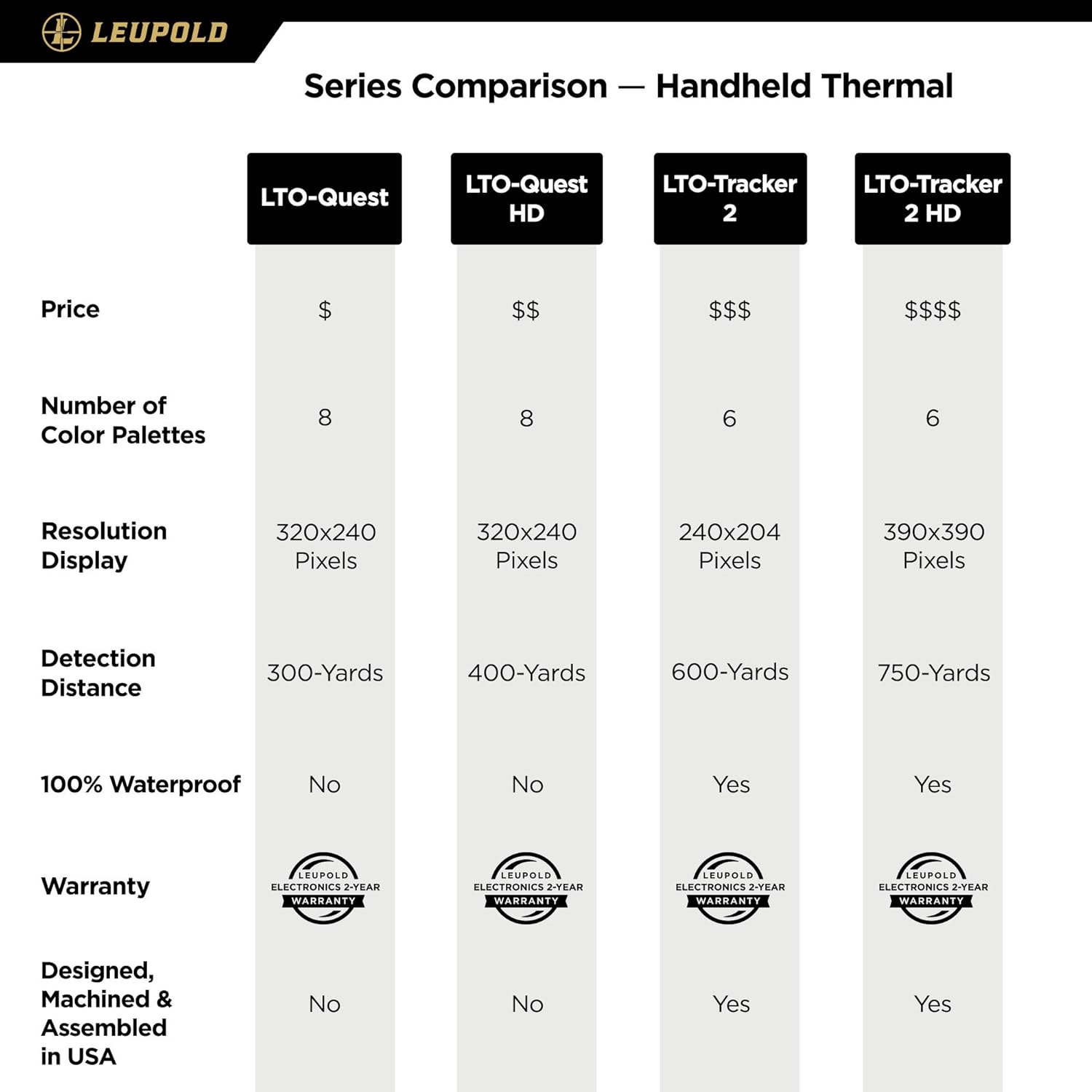
Figure 5: Comparison of LTO-Tracker series handheld thermal devices, highlighting differences in resolution, detection distance, and features.
8. Garantía e soporte
8.1. Información da garantía
O Leupold LTO-Tracker 2 térmico Viewer is covered by Leupold's Gold Ring 2-Year Electronics Warranty. This warranty covers defects in materials and workmanship for a period of two years from the date of purchase. Please retain your proof of purchase for warranty claims.
8.2. Atención ao cliente
For technical assistance, service, or warranty claims, please contact Leupold customer support. You can find contact information and additional resources on the official Leupold websitio:
Visit the Official Leupold Store on Amazon
Teña á man o número de modelo do produto (177187) e os detalles da compra cando contacte co servizo de asistencia.


