1. Introdución
This manual provides instructions for the Altec Lansing Mini LifeJacket Jolt Bluetooth Speaker. This portable speaker features Bluetooth connectivity, Qi wireless charging, a built-in USB charging port, and a durable, waterproof design. Please read this manual thoroughly before using the device to ensure proper operation and longevity.

Figura 1: Fronte view of the Altec Lansing Mini LifeJacket Jolt Bluetooth Speaker.
2. Contido do paquete
Verifica que todos os elementos estean presentes no teu paquete:
- Altec Lansing Mini LifeJacket Jolt Bluetooth Speaker
- Cable de carga (USB-C a USB-A)
- Guía de inicio rápido (non incluída neste manual dixital)
3. Produto rematadoview
Familiarízate cos compoñentes e controis do altofalante.

Figura 2: Arriba view of the speaker, highlighting control buttons and the Qi wireless charging pad.
3.1. Botóns de control
- Botón de encendido: Mantén premido para acender/apagar.
- Botón de sincronización Bluetooth: Inicia o modo de emparellamento Bluetooth.
- Subir volume (+): Aumenta o volume.
- Baixar o volume (-): Diminúe o volume.
- Botón Reproducir/Pausa: Plays or pauses audio. Also answers/ends calls.
- Botón do asistente de voz: Activates your device's voice assistant (Siri, Google Assistant).
- House Party Pairing Button: Connects multiple Altec Lansing speakers.
3.2. Portos e indicadores

Figura 3: Lateral view of the speaker, showing the protected charging port.
- Porto de carga USB-C: Para cargar a batería interna do altofalante.
- Porto de saída USB-A: Para cargar dispositivos externos.
- Indicador LED: Mostra o estado da batería, da carga e do Bluetooth.
- Pad de carga sen fíos Qi: Located on the top surface for wireless charging compatible devices.
4. Configuración
4.1. Cargando o altofalante
Before first use, fully charge the speaker. The speaker provides up to 16 hours of playback on a single charge.

Figure 4: The speaker offers up to 16 hours of play time.
- Open the protective flap on the side of the speaker to access the USB-C charging port.
- Conecta o cable USB-C fornecido ao porto de carga do altofalante.
- Conecta o outro extremo do cable USB-C a un adaptador de corrente USB (non incluído) ou a un porto USB dun ordenador.
- O indicador LED mostrará o estado de carga e apagarase cando estea completamente cargado.
4.2. Acendido/apagado
- Para acender, manteña premido o botón Botón de encendido until you hear an audible prompt and the LED indicator illuminates.
- Para apagalo, manteña premido o botón Botón de encendido again until you hear an audible prompt and the LED indicator turns off.
4.3. Emparellamento Bluetooth
The speaker can connect to your device via Bluetooth 4.2, offering a range of up to 100 feet.
- Ensure the speaker is powered on. The LED indicator will flash, indicating it is in pairing mode.
- No teu teléfono intelixente, tableta ou outro dispositivo compatible con Bluetooth, vai á configuración de Bluetooth.
- Select "Mini LifeJacket Jolt" from the list of available devices.
- Once paired, the LED indicator will glow solid, and you will hear a confirmation tone.
- Se o emparellamento falla, desactiva o altofalante e o Bluetooth do dispositivo e, a seguir, repite os pasos.
5. Instrucións de funcionamento
5.1. Reprodución de audio
- Reproducir/Pausa: Preme o Botón Reproducir/Pausa unha vez.
- Control de volume: Preme o Subir volume (+) or Baixar volume (-) botóns.
- Saltar pista: Mantén premido Subir volume (+) for next track, or Baixar volume (-) para a pista anterior.
5.2. Qi Wireless Charging
The speaker features a Qi wireless charging pad on its top surface to charge compatible devices.
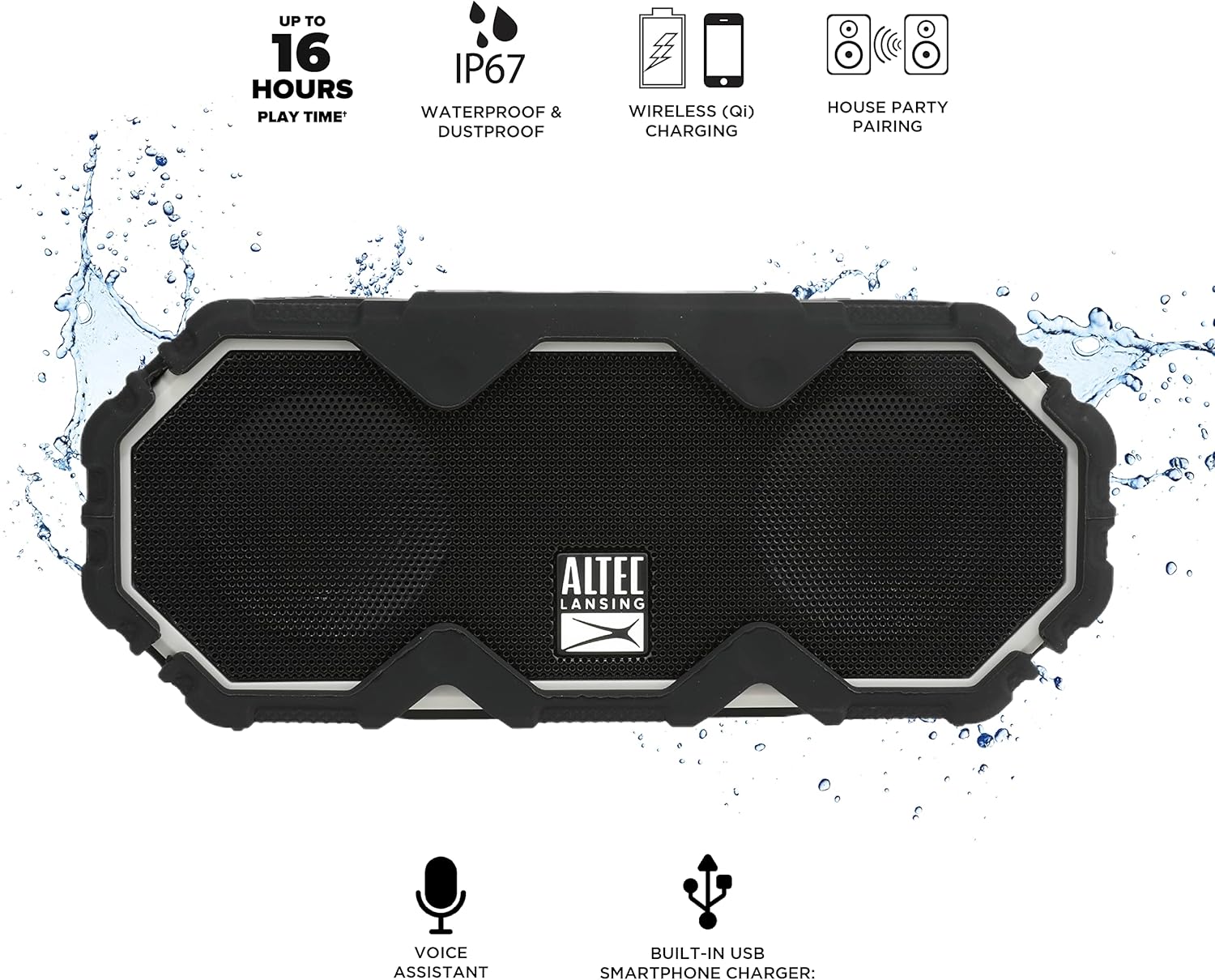
Figure 5: A smartphone being charged wirelessly on the speaker's Qi pad.
- Asegúrate de que o altofalante estea acendido.
- Place your Qi-enabled device directly on the charging pad located on the top of the speaker.
- The device should begin charging automatically. Adjust its position if charging does not start immediately.
5.3. Carga de dispositivos USB
Use the built-in USB-A port to charge other devices via a cable.

Figure 6: The speaker's USB-A port can charge external devices.
- Asegúrate de que o altofalante estea acendido.
- Abra a tapa protectora que hai no lateral do altofalante.
- Connect your device's USB charging cable to the USB-A output port on the speaker.
- O teu dispositivo comezará a cargarse.
5.4. Integración do asistente de voz
Access your smartphone's voice assistant directly through the speaker.

Figure 7: The speaker supports voice assistant integration.
- Asegúrate de que o altofalante estea emparellado co teu teléfono intelixente.
- Preme o Botón do Asistente de voz no altofalante.
- Speak your command into the speaker's microphone.
5.5. House Party Pairing
Connect multiple Altec Lansing speakers for a synchronized audio experience.

Figure 8: Multiple speakers can be paired for a wider sound experience.
- Asegúrate de que ambos altofalantes estean acendidos e non conectados a ningún dispositivo Bluetooth.
- On the first speaker, press the House Party Pairing Button. The LED indicator will flash.
- No segundo altofalante, prema o botón House Party Pairing Button.
- The speakers will connect automatically. Once connected, the LED indicators will glow solid.
- Now, connect your device to one of the paired speakers via Bluetooth. Audio will play through both speakers.
6. Características de durabilidade
The Mini LifeJacket Jolt is designed for rugged use with an IP67 rating, making it waterproof, shockproof, snowproof, and dustproof.

Figure 9: The speaker is designed to withstand water exposure.
- Impermeable: Can be submerged in water up to 1 meter for 30 minutes. Ensure all port covers are securely closed before exposure to water.
- A proba de golpes: Designed to withstand drops and impacts.
- Snowproof: Operates reliably in snowy conditions.
- A proba de po: Protexido contra a entrada de po.
Important: Always ensure the protective flap covering the charging ports is securely closed when using the speaker near water or in dusty environments.
7. Mantemento
- Limpeza: Use un suave, damp cloth to clean the speaker. Avoid abrasive cleaners or solvents.
- Almacenamento: Garde o altofalante nun lugar fresco e seco, lonxe da luz solar directa e de temperaturas extremas.
- Coidado da batería: Para prolongar a duración da batería, evite descargala completamente con frecuencia. Cargue o altofalante regularmente, mesmo se non o usa durante períodos prolongados.
8 Solución de problemas
8.1. Speaker Not Powering On or Charging
If your speaker stops working or does not charge, a connection issue or a system freeze might be the cause. This procedure requires careful handling and may void your warranty if not performed correctly. Proceed with caution.
- Remove the Rubber Exterior: Gently pry off the rubberized outer casing. It is designed to snap off at the seams around the speaker mesh.
- Acceder aos compoñentes internos: Using a small flat-head tool, carefully insert it between the speaker mesh and the main body, particularly on the back of the speaker. Slowly work your way around to loosen the mesh.
- Locate and Remove Screws: You will find six small Phillips head screws deep inside the holes. Use a long, thin Phillips screwdriver to remove them. Keep track of these screws.
- Separate the Casing: Gently pull the front and back sections of the speaker apart along the seam that becomes visible after removing the rubber protector.
- Inspect Internal Connections: Inside, you will see the motherboard, buttons, wires, and the cylindrical battery. Locate the battery holder and remove any screw securing it.
- Reset Battery Connection: Carefully disconnect the battery's wiring connector from the motherboard. Ensure you pull the entire plastic insert, not just the wires, to avoid damage.
- Volver conectar e probar: Reconnect the battery connector firmly. Press the power button. If you hear the "Welcome to Altec Lansing!" prompt, the issue may be resolved.
- Remontar: If the speaker functions, carefully re-adjust any wires to ensure they have sufficient slack and are not pinched. Ensure the battery is centered and not clinging to speaker magnets. Re-secure the battery holder, then carefully align and re-screw the casing. Finally, reattach the speaker mesh and the rubber exterior.
This process can reset the motherboard and address issues caused by loose internal connections. If the problem persists after these steps, contact customer support.
8.2. Problemas de conexión Bluetooth
- Ensure the speaker is within the 100-foot Bluetooth range of your device.
- Verify that the speaker is in pairing mode (flashing LED).
- Forget the speaker from your device's Bluetooth settings and attempt to re-pair.
- Reinicia tanto o altofalante como o dispositivo Bluetooth.
9. Especificacións

Figura 10: Dimensións do produto.
| Característica | Detalle |
|---|---|
| Nome do modelo | Mini LifeJacket Jolt |
| Marca | Altec Lansing |
| Tecnoloxía de conectividade | Bluetooth, USB |
| Comunicación sen fíos | Bluetooth 4.2 |
| Alcance Bluetooth | Ata 100 pés |
| Fonte de enerxía | Alimentado por batería (1 batería de ións de litio, incluída) |
| Duración da batería | Ata 16 horas |
| Características especiais | Waterproof (IP67), Shockproof, Snowproof, Dustproof, Qi Wireless Charging, USB Charging Output, Voice Assistant Integration, House Party Pairing |
| Tipo de altofalante | Ao aire libre |
| Modo de saída de audio | Estéreo |
| Dimensións do produto | 7.2" D x 3" W x 4.3" H |
| Peso do elemento | 1.52 libras |
| Material | Goma ou silicona |
10. Garantía e soporte
The Altec Lansing Mini LifeJacket Jolt Bluetooth Speaker comes with a Limited Warranty. For specific warranty terms and conditions, please refer to the documentation included with your product or visit the official Altec Lansing websitio.
Para obter máis axuda ou soporte técnico, visite o Altec Lansing Brand Store on Amazon ou consultar co funcionario Manual do usuario (PDF).