1. Produto rematadoview
The EPEVER TRIRON 4210N is a 40A Maximum Power Point Tracking (MPPT) solar charge controller designed for 12V/24V DC systems. It efficiently manages power from solar panels to charge various battery types, including lead-acid (Sealed, Gel, Flooded, User) and lithium (LiFePO4, Li-NiCoMn, Lithium User). This set includes the TRIRON 4210N controller and the MT50 Remote Meter for enhanced monitoring and control.
Características principais:
- Advanced MPPT technology for high tracking efficiency.
- Modular design for flexible configuration with different display and interface modules.
- Supports multiple battery types: Sealed (AGM), Gel, Flooded, Lead-acid User, LiFePO4 Lithium, Li(NiCoMn)O2 Lithium, Lithium User (9~34V).
- Negative ground design for broad application compatibility.
- Dual 5V DC USB output interface (Max 2.2A) for charging electronic devices.
- Catro stage charging (bulk, absorption, float, equalization) to prolong battery life.
- Comprehensive electronic protection features.
- Función de estatísticas de enerxía en tempo real.
Contido do paquete:
O paquete normalmente inclúe:
- EPEVER TRIRON 4210N MPPT Solar Charge Controller
- Medidor remoto EPEVER MT50
- Remote Temperature Sensor (RT-S)
- USB to RS485 Communication Cable
- Manual de usuario

Image: Contents of the EPEVER TRIRON 4210N and MT50 Remote Meter package, including the controller, remote meter, temperature sensor, and cables.
2. Información de seguridade
Lea atentamente todas as instrucións e advertencias antes da instalación e o funcionamento. O incumprimento destas instrucións pode provocar descargas eléctricas, incendios ou lesións graves.
- Ensure all wiring is correctly polarized and securely connected. Loose connections can cause overheating and fire.
- Conecta sempre primeiro a batería ao controlador de carga, despois ao panel solar e, finalmente, á carga. Desconecta na orde inversa.
- Do not attempt to repair or modify the controller. Refer servicing to qualified personnel.
- Instale o controlador nunha zona ben ventilada, lonxe de materiais inflamables e gases corrosivos.
- Wear appropriate personal protective equipment (PPE), including eye protection and insulated gloves, when working with batteries and solar panels.
- Asegúrese de que o sistema voltage is compatible with the controller's specifications (12V/24V auto work).
- Use appropriate circuit breakers or fuses for all connections to prevent overcurrent.
3. Instalación
3.1 Montaxe do controlador
Mount the controller vertically on a flat, non-flammable surface in a dry, well-ventilated indoor area. Ensure there is sufficient clearance around the controller for heat dissipation. The recommended clearances are 150mm (5.9 inches) above and below the unit.

Image: Controller dimensions and recommended mounting clearances for proper ventilation.
3.2 Conexións de cableado
Follow the wiring sequence carefully to prevent damage to the controller or other components. Always ensure all power sources are disconnected before making or breaking connections.
- Conecte a batería: Connect the battery cables to the controller's battery terminals (marked with '+' and '-'). Ensure correct polarity. Always connect the battery first.
- Conecta o panel solar: Connect the solar panel cables to the controller's PV terminals (marked with solar panel icon and '+' and '-'). Ensure correct polarity.
- Conecta a carga de CC: Connect the DC load cables to the controller's load terminals (marked with light bulb icon and '+' and '-'). Ensure correct polarity.
- Connect Remote Temperature Sensor: Plug the remote temperature sensor into the designated port on the controller. Secure the sensor to the battery case for accurate temperature compensation.
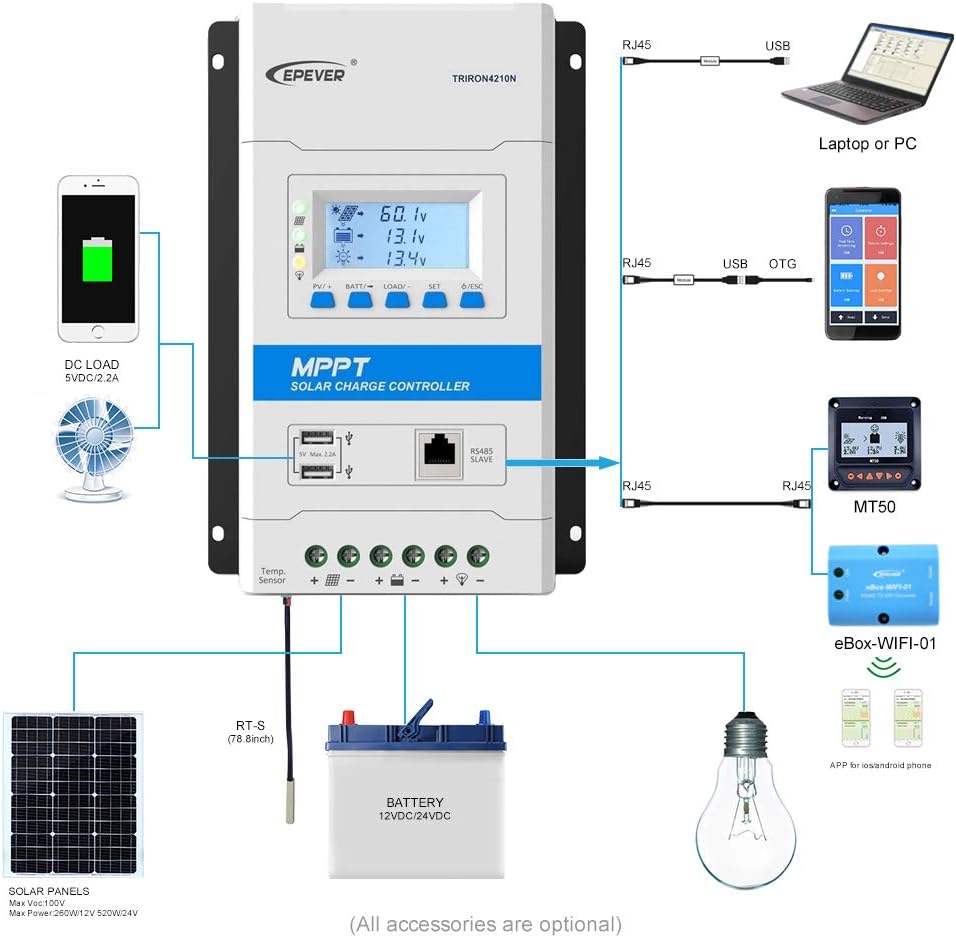
Image: Detailed wiring diagram showing connections for solar panels, battery, and DC load to the TRIRON 4210N controller.
Video: This video demonstrates the unboxing, component identification, and step-by-step installation process for the EPEVER TRIRON 4210N solar charge controller, including wiring the battery, solar panel, and remote temperature sensor.
3.3 Connecting the MT50 Remote Meter
The MT50 Remote Meter connects to the controller via an RJ45 communication cable. This allows for remote monitoring of system status and parameter settings.
- Connect one end of the RJ45 cable to the RS485 port on the TRIRON 4210N controller.
- Connect the other end of the RJ45 cable to the corresponding port on the MT50 Remote Meter.
3.4 Interfaces de comunicación
The TRIRON 4210N features an RS485 communication port, allowing connection to various accessories for extended functionality:
- Software para PC: Connect via an RS485 to USB adapter cable for monitoring and parameter configuration using PC software.
- Aplicación móbil: Connect via an eBox-WIFI-01 or eBox-BLE-01 module for wireless monitoring and control through a mobile application.
4. Funcionamento
4.1 Pantalla LCD e botóns
The controller features an LCD display and five buttons for viewing system parameters and making adjustments.

Image: Various screens displayed on the TRIRON 4210N LCD, showing PV voltage, current, battery status, and load information.
- Botón PV/+: Used to navigate forward through display screens or increase parameter values.
- BATT/→ Button: Used to navigate right through display screens or move cursor during parameter setting.
- Botón CARGAR/-: Used to navigate backward through display screens or decrease parameter values.
- Botón SET: Used to enter parameter setting mode or confirm a setting.
- Botón ESC: Used to exit parameter setting mode or return to the previous screen.
4.2 Configuración de parámetros
To adjust parameters such as battery type, capacity, and temperature unit, use the navigation buttons to access the setting menus. Press the SET button to enter edit mode, use PV/+ and LOAD/- to change values, and SET again to confirm. Refer to the detailed instructions in the included user manual for specific parameter adjustments.
4.3 Saída USB
The controller is equipped with dual 5V DC USB ports (Max 2.2A) for charging compatible electronic devices. These ports are active when the controller is powered by the battery.
5. Mantemento
Un mantemento regular garante un rendemento óptimo e unha maior duración do seu controlador de carga solar.
- Comproba as conexións: Periodically inspect all wiring connections for tightness and corrosion. Tighten any loose connections.
- Limpar o controlador: Keep the controller clean and free from dust and debris. Ensure the heat sink fins are not obstructed to allow for proper cooling.
- Inspeccionar cables: Check all cables for signs of wear, damage, or insulation degradation. Replace damaged cables immediately.
- Inspección da batería: For lead-acid batteries, check electrolyte levels and terminal condition as per battery manufacturer guidelines.
- Actualizacións de software: Consulte o do fabricante website for any available firmware updates for your controller.
6 Solución de problemas
This section provides basic troubleshooting steps for common issues. For more complex problems, consult the full user manual or contact EPEVER technical support.
Problemas comúns e solucións:
- Sen pantalla/Sen alimentación:
- Comprobe as conexións da batería e asegúrese de que estean firmes e polarizadas correctamente.
- Verifique o vol. da bateríatage está dentro do rango de funcionamento do controlador.
- Sen carga desde o panel solar:
- Comprobe as conexións e a polaridade dos paneis solares.
- Ensure sufficient sunlight is reaching the solar panels.
- Verify solar panel open circuit voltage (Voc) is within the controller's input range.
- Carga non funciona:
- Comprobe as conexións da carga e a polaridade.
- Ensure the load is not exceeding the controller's rated load current.
- Comprobar vol. bateríatage; the load may be disconnected if the battery voltage é demasiado baixo.
- Incorrect Battery Readings:
- Verify the remote temperature sensor is correctly connected and placed near the battery.
- Ensure the correct battery type and capacity are set in the controller's parameters.
7. Especificacións
| Parámetro | Valor |
|---|---|
| Modelo | TRIRON4210N-mppt |
| Sistema Voltage | 12/24VDC Auto Work |
| Corrente de carga nominal | 40A |
| Vol. de entrada de bateríatage Alcance | 8-32 V |
| Máx. Circuito aberto PV Voltage | 100V (Min operating environment temp); 92V (25℃ environment temp) |
| MPP Voltage Alcance | (Vbat+2V) ~ 72V |
| Max. PV Array Power Support | 520W (12V battery); 1040W (24V battery) |
| Temperatura do ambiente de traballo | -25℃ ~ +55℃ (with LCD) / -30℃ ~ +55℃ (without LCD) |
| Lithium Battery Types Supported | LiFePO4 (4 series; 8 series) / Li-NiCoMn (3 series; 6 series) / User (Lithium battery setting requires RS485 or WIFI BOX) |
| Lead-acid Battery Types Supported | Sealed (AGM), Gel, Flooded, Lead-acid User |
| Autoconsumo | ≤14mA (12V); ≤15mA (24V) |
| Compensación de temperatura | -3mV / ℃ / 2V |
| Conexión a terra | Negativo común |
| Terminals/Wire Size | 6 AWG (16 mm²) |
| Saída USB | Dual 5V DC, Max 2.2A |
| Peso do elemento | 6.69 libras |
| Dimensións do paquete | 17.56 x 8.43 x 4.88 polgadas |
| UPC | 655160074776 |
8. Garantía e soporte
For warranty information and technical support, please refer to the documentation included with your product or visit the official EPEVER websitio. Garde o recibo da compra como xustificante de compra para reclamacións de garantía.


