1. Introdución e finalview
The ARGO Milo Plus is a versatile portable air conditioner designed to provide optimal climate control for your indoor spaces. Featuring both cooling and heating capabilities, along with ventilation and dehumidification modes, it ensures comfort throughout the year. Its compact design, multi-directional wheels, and integrated Wi-Fi connectivity make it a convenient and efficient solution for various environments. This manual provides essential information for safe operation, installation, maintenance, and troubleshooting.
2. Información de seguridade
Before operating the ARGO Milo Plus, carefully read all safety instructions to prevent injury or damage. Keep this manual for future reference.
- Asegúrese de colocar a unidade nunha superficie estable e nivelada.
- Do not block air inlets or outlets. Maintain at least 30 cm of clear space around the unit.
- Always unplug the unit from the power outlet before cleaning, maintenance, or moving.
- Do not operate the unit with a damaged cord or plug. Contact qualified service personnel for repairs.
- Keep out of reach of children and pets. This appliance is not intended for use by persons with reduced physical, sensory or mental capabilities unless supervised.
- Use só co volume especificadotage (230 V).
- Non introduza obxectos nas ventilacións.
- Do not use the unit in wet environments or near water.
- The unit contains R290 refrigerant. Do not attempt to service the refrigerant circuit yourself.
3. Compoñentes do produto
The ARGO Milo Plus package includes the following components:
- ARGO Milo Plus Main Unit
- Mangueira de escape flexible
- Adaptador de fiestra
- Kit for Fixed Glass Installation
- Multifunction Remote Control with LED Display
- Manual de usuario (este documento)

Figura 3.1: Fronte view of the ARGO Milo Plus portable air conditioner.

Figure 3.2: ARGO Milo Plus highlighting key features such as Wi-Fi connectivity, memory function, sleep mode, timer, remote control, energy efficiency, and cooling/heating capacity.

Figura 3.3: Lateral view of the unit, illustrating the air intake and exhaust grilles.

Figure 3.4: Close-up of the digital control panel on the top of the unit.

Figure 3.5: Included accessories: exhaust hose, window kit components, and remote control.
4. Configuración e instalación
Proper setup is crucial for the efficient operation of your ARGO Milo Plus.
4.1 Desembalaxe e colocación
- Retire con coidado a unidade e todos os accesorios da embalaxe.
- Position the air conditioner on a flat, stable surface, ensuring at least 30 cm of clear space around the unit for proper airflow. The unit is equipped with multi-directional wheels for easy movement.
4.2 Instalación da mangueira de escape
The exhaust hose expels hot air (during cooling) or cold air (during heating) from the room. Proper installation is essential for efficiency.
- Connect one end of the flexible exhaust hose to the air outlet on the rear of the main unit. Twist clockwise until secure.
- Attach the window adapter or the fixed installation kit components to the other end of the exhaust hose.
- Extend the hose to the nearest window or pre-installed vent. Use the provided window adapter or fixed installation kit to seal the opening and prevent hot air (or cold air in heating mode) from re-entering the room.
- Ensure the hose is as straight and short as possible to maximize efficiency. Avoid sharp bends or kinks, as this can reduce performance and potentially damage the unit.

Figura 4.1: Example placement of the ARGO Milo Plus in a room.

Figure 4.2: Dimensional diagram of the unit.

Figure 4.3: Unit dimensions in centimeters.
5. Instrucións de funcionamento
Your ARGO Milo Plus can be operated via the control panel on the unit, the remote control, or through the dedicated Wi-Fi app.
5.1 Panel de control e control remoto
The control panel on the top of the unit and the remote control share similar functions.
- Botón On/Off: Prema para acender ou apagar a unidade.
- Botón de modo: Cycle through operating modes: Cooling (Cool), Heating (Heat), Fan (Ventilation), Dehumidification (Dry), and Auto.
- Axuste da temperatura (+/-): Axuste a configuración de temperatura desexada.
- Botón de velocidade do ventilador: Select fan speed (Low, Medium, High, Auto).
- Botón de balance: Activates or deactivates the automatic oscillation of the upper air flap.
- Botón do temporizador: Set a 24-hour timer for automatic power on or off.
- Función de sono: Optimizes operation for quiet night-time use.
- Función de memoria: Recalls previous settings after power interruption.
- Función X-Fan: Continues fan operation after shutdown to dry internal components and prevent mold.
- Intelligent Pre-heating: In heating mode, the unit pre-heats before blowing air to prevent cold drafts.
5.2 Conectividade Wi-Fi e control de aplicacións
The ARGO Milo Plus features integrated Wi-Fi for remote control via a smartphone app.
- Download the official ARGO app from your smartphone's app store.
- Follow the in-app instructions to pair your device with the air conditioner. This typically involves putting the unit into pairing mode (often by pressing the Wi-Fi button on the control panel) and connecting to your home Wi-Fi network.
- Once connected, you can control all functions of the unit remotely, including mode selection, temperature, fan speed, and timer settings.
6. Mantemento e Limpeza
Un mantemento regular garante un rendemento óptimo e prolonga a vida útil da túa unidade.
6.1 Limpeza do filtro de aire
The air filter should be cleaned regularly, ideally every two weeks or more frequently depending on usage and air quality.
- Desenchufe a unidade da toma de corrente.
- Localice e retire o filtro de aire da parte traseira da unidade.
- Lava o filtro con auga morna e un deterxente suave. Enxáguao ben.
- Allow the filter to dry completely in a shaded area before reinserting it into the unit. Do not expose to direct sunlight.
6.2 Drenaxe da auga
In dehumidification mode or during heating, the internal water tank may accumulate condensate. When full, the unit will stop operating and indicate a full tank.
- Drenaxe manual: Place a shallow pan or container under the drainage port located at the bottom rear of the unit. Remove the drainage plug to allow water to flow out. Replace the plug securely once drained.
- Drenaxe continua (modo de deshumidificación): For continuous dehumidification, connect a drainage hose (not always included, check accessories) to the continuous drainage outlet. Ensure the hose is sloped downwards to allow gravity drainage.
6.3 Limpeza xeral
Limpe o exterior da unidade cun suave, damp pano. Non empregue produtos químicos agresivos, abrasivos nin disolventes, xa que poden danar a superficie.
7 Solución de problemas
Antes de contactar co servizo de atención ao cliente, consulta a seguinte guía de resolución de problemas para coñecer os problemas máis habituais.
| Problema | Causa posible | Solución |
|---|---|---|
| A unidade non se acende | No power supply; Timer function active; Power cord not fully inserted. | Check power connection and wall outlet; Deactivate timer; Ensure plug is securely inserted. |
| Refrixeración/quecemento insuficiente | Windows/doors open; Exhaust hose improperly installed/sealed; Dirty air filter; Room size too large. | Close all windows and doors; Ensure exhaust hose is short, straight, and sealed; Clean air filter; Consider unit capacity for room size. |
| Ruído excesivo | Unit not on a flat surface; Obstructions in air vents. | Place unit on a stable, level surface; Check and remove any obstructions from vents. |
| Fuga de auga | Drainage plug not securely closed; Drainage hose kinked/blocked (if used). | Ensure drainage plug is tightly closed; Check drainage hose for kinks or blockages. |
| Problemas de conexión wifi | Contrasinal Wi-Fi incorrecto; Unidade demasiado lonxe do router; Problemas co router. | Verify Wi-Fi password; Move unit closer to router; Restart router and unit. |
8. Especificacións
Key technical specifications for the ARGO Milo Plus portable air conditioner:
- Modelo: MILO PLUS
- Capacidade de refrixeración: 13000 BTU/H
- Capacidade de calefacción: 13000 BTU/H (with heat pump)
- Fonte de alimentación: 230 V
- Wattage (Cooling): 1083 W
- Dimensións (ancho x profundo x alto): 40.5 x 38.5 x 83.5 cm
- Peso: 36 kg
- Nivel de ruído: 65 dB
- Clase de eficiencia enerxética (refrixeración): A
- Energy Efficiency Class (Heating): A++
- Refrigerante: R290
For detailed energy information and product fiche, please refer to the EPREL database:
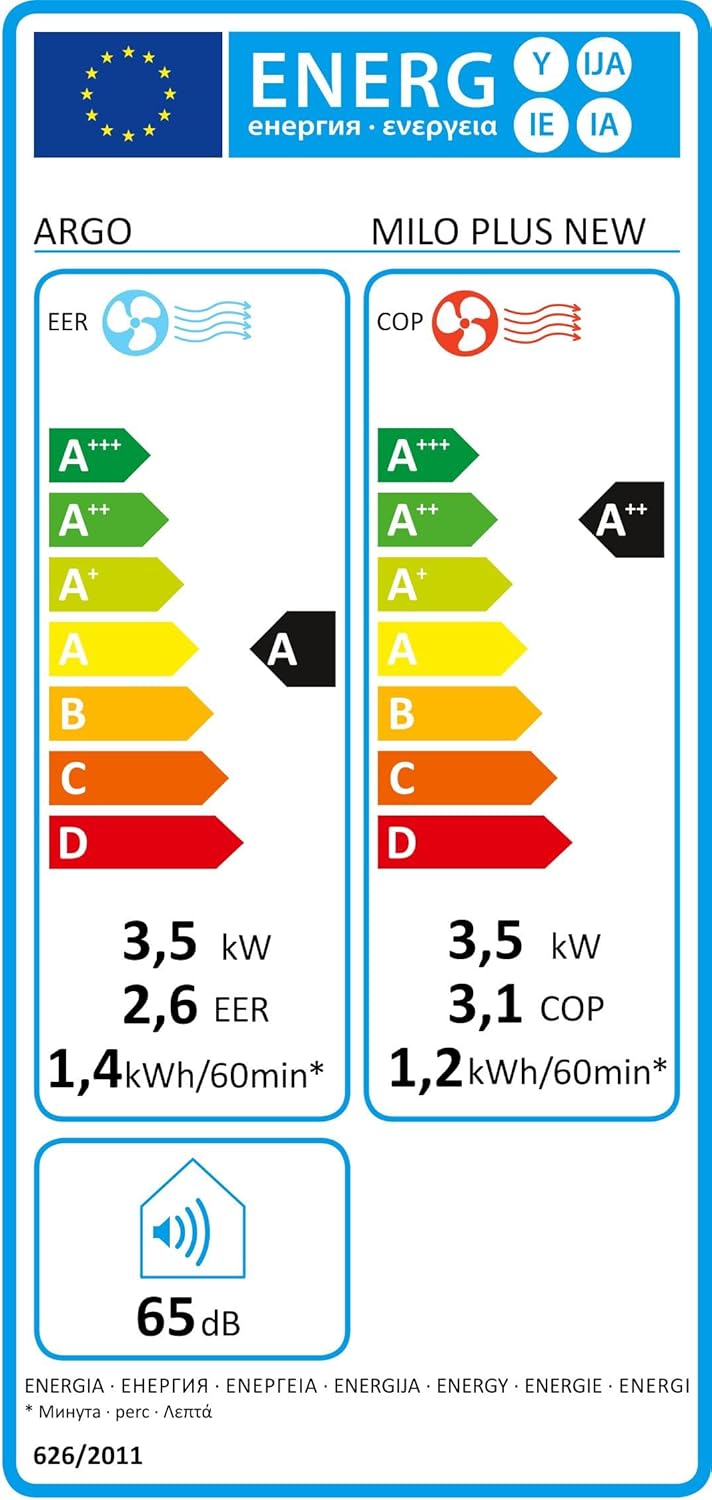
Figure 8.1: Energy Label (Cooling).

Figure 8.2: Energy Label (Heating).
9. Garantía e soporte
This product comes with a standard manufacturer's warranty. Please refer to the warranty card included in the packaging for specific terms and conditions, including the warranty period and coverage details.
For technical assistance, spare parts, or warranty claims, please contact your local authorized service center or the retailer where the product was purchased. Always keep your purchase receipt as proof of purchase.


