1. Introdución
This manual provides detailed instructions for the setup, operation, and maintenance of your Ipega PG-9076 Wireless Game Controller. Please read this manual carefully before use to ensure proper functionality and to maximize your gaming experience. This controller is designed for compatibility with Android, iOS, and Windows devices.
2. Produto rematadoview
The Ipega PG-9076 controller features a design similar to an Xbox controller, incorporating standard gaming buttons along with additional multimedia controls. It includes a retractable phone holder for mobile gaming.
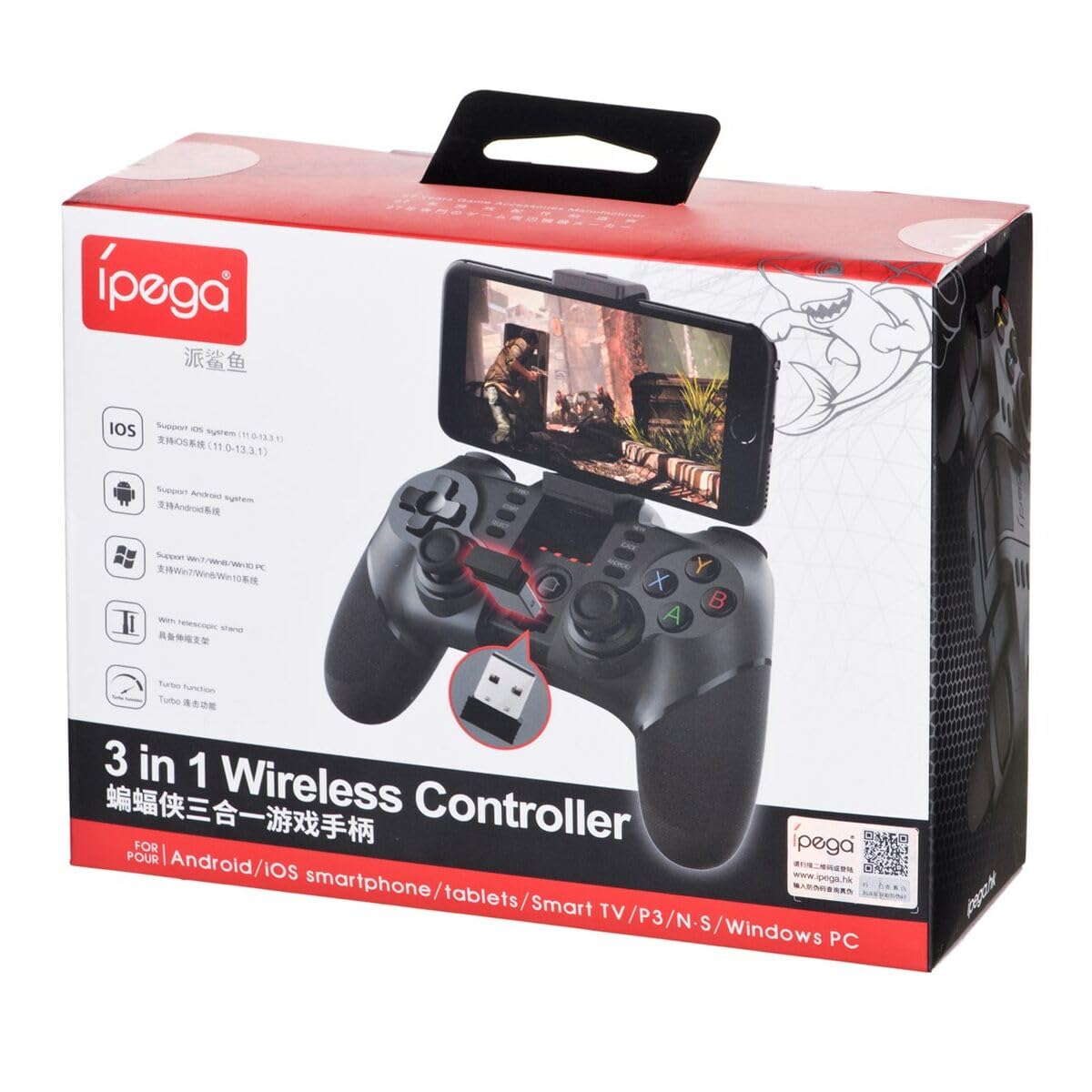
Figure 2.1: Ipega PG-9076 controller with a smartphone mounted, showcasing its mobile gaming capability.

Figura 2.2: Fronte view of the controller, highlighting the dual analog sticks, D-pad, action buttons (A, B, X, Y), and mode selection buttons (SELECT, START, ANDROID, IOS, TURBO, CLEAR).

Figura 2.3: Traseira view of the controller, displaying the product label with model number, input specifications, and a QR code for additional information or support.
Características principais:
- Bluetooth 3.0 connectivity for wireless operation.
- Integrated multimedia buttons (volume, play/pause, track control).
- Retractable phone holder, accommodating devices up to 9 cm wide.
- Compatible with Android (3.2+), iOS (4.3+), and Windows.
- Built-in 380 mAh rechargeable battery.
3. Configuración e conexión
Before first use, ensure the controller is fully charged. Refer to Section 5 for charging instructions.
3.1. Emparellamento con dispositivos Android
- Asegúrate de que o Bluetooth do teu dispositivo Android estea activado.
- No controlador, manteña premido o botón ANDROID botón simultaneamente co FOGAR button until the indicator light flashes rapidly.
- On your Android device, search for Bluetooth devices and select "PG-9076" to pair.
- Unha vez emparellado, a luz indicadora do controlador permanecerá fixa.
3.2. Pairing with iOS Devices
- Ensure your iOS device's Bluetooth is enabled.
- No controlador, manteña premido o botón IOS botón simultaneamente co FOGAR button until the indicator light flashes rapidly.
- On your iOS device, search for Bluetooth devices and select "PG-9076" to pair.
- Unha vez emparellado, a luz indicadora do controlador permanecerá fixa.
3.3. Conexión a un PC con Windows
The controller can be connected to a Windows PC via Bluetooth or USB cable.
3.3.1. Bluetooth Connection (PC)
- Asegúrate de que o teu PC teña o Bluetooth activado.
- No controlador, manteña premido o botón INICIO botón simultaneamente co FOGAR button until the indicator light flashes rapidly.
- On your PC, go to Bluetooth settings, search for devices, and select "PG-9076" to pair.
- Unha vez emparellado, a luz indicadora do controlador permanecerá fixa.
3.3.2. USB Cable Connection (PC)
- Connect the controller to your PC using the provided USB cable.
- O PC debería detectar e instalar automaticamente os controladores necesarios.
- Configuration within the operating system and individual games may be required for optimal performance.

Figure 3.1: The USB dongle (if included with your model) can be inserted into the controller for wireless connection to devices that do not have built-in Bluetooth, such as some PCs or Smart TVs.

Figure 3.2: The included USB cable is used for charging the controller and can also be used for a wired connection to a PC.
4. Modos de funcionamento
The PG-9076 supports various gaming modes depending on the connected device and game type.
4.1. Android Gaming
- Supports most games with 'Arcade Mode' (often indicated by a controller symbol).
- Compatible with various simulator games.
- Ensure your Android OS is version 3.2 or newer.
4.2. iOS Gaming
- Compatible with games that support 'iCade' mode.
- Ensure your iOS is version 4.3 or newer.
4.3. Windows PC Gaming
- Can be used via Bluetooth or USB cable.
- System and in-game configuration may be necessary for full compatibility and optimal control mapping.
4.4. Funcións multimedia
The controller includes dedicated multimedia buttons for:
- Volume control (up/down)
- Reproducir/Pausa
- Fast forward/Rewind
5. Carga e batería
The controller is equipped with a rechargeable internal battery.
5.1. Instrucións de carga
- Connect the provided USB cable to the micro-USB port on the controller.
- Connect the other end of the USB cable to a USB power source (e.g., PC, USB wall adapter).
- A luz indicadora de carga acenderase durante a carga e apagarase cando estea completamente cargada.
5.2. Especificacións da batería
- Capacidade da batería: 380 mAh
- Charging Time: Approximately 2 to 5 hours (may vary based on charger output).
- Operating Autonomy: Up to 12 hours of continuous gameplay.
- Standby Time: Up to 30 days when fully charged.
6. Mantemento
Para garantir a lonxevidade e o rendemento óptimo do seu controlador, siga estas pautas de mantemento:
- Manteña o controlador seco e lonxe da humidade.
- Evite expoñer o controlador a temperaturas extremas.
- Limpa o controlador cun pano suave e seco. Non empregues produtos químicos agresivos nin produtos de limpeza abrasivos.
- Store the controller in a safe place when not in use to prevent physical damage.
7 Solución de problemas
If you encounter issues with your Ipega PG-9076 controller, refer to the following common problems and solutions:
7.1. Controller Does Not Turn On
- Ensure the battery is charged. Connect the controller to a power source and allow it to charge for at least 30 minutes.
- Press and hold the HOME button for a few seconds to attempt to power on.
7.2. Non se pode emparellar por Bluetooth
- Asegúrate de que o controlador estea no modo de emparellamento correcto para o teu dispositivo (Android, iOS ou PC).
- Asegúrate de que o Bluetooth estea activado no teu dispositivo e que sexa detectable.
- Move the controller closer to your device (within 8 meters).
- Desactiva e activa o Bluetooth do teu dispositivo e, a seguir, tenta emparellalo de novo.
- Clear any previous pairings of the controller from your device's Bluetooth list.
7.3. Buttons or Joysticks Not Responding Correctly
- Ensure the controller is fully charged. Low battery can affect performance.
- Reinicia o controlador e o teu dispositivo.
- For PC, check in-game settings and system controller configurations.
- Some games, especially those designed for touchscreens, may not fully support external controllers.
8. Especificacións
| Característica | Especificación |
|---|---|
| Modelo | PG-9076 |
| Marca | Ipega |
| Tecnoloxía de conectividade | Bluetooth 3.0 |
| Distancia de operación | Ata 8 metros (sen barreiras) |
| Entrada de enerxía | DC 5V 500 mAh |
| Vol. Operativotage | DC 3.7 V |
| Corrente de funcionamento | 30 mAh |
| Capacidade da batería | 380 mAh |
| Tempo de carga | 2-5 horas |
| Battery Autonomy (Gameplay) | Ata 12 horas |
| Tempo de espera | Ata 30 días |
| Dispositivo Clamp Anchura | Ata 9 cm |
| Dimensións do produto | 19.1 x 7.5 x 7.4 cm |
| Peso do produto | 304 g |
| Plataformas compatibles | Android, iOS, Windows |
9. Garantía e soporte
For warranty information, please refer to the terms provided by your retailer at the time of purchase. Extended warranty options may be available from third-party providers.
For technical support or further inquiries, you may scan the QR code located on the back of your controller or visit the official Ipega support channels. The QR code on the product label links to http://weixin.qq.com/r/uUUHHyPERX46rWd89xCr.


