Introdución
The Plugable Performance Onyx Gaming Headset is designed to provide an immersive audio experience and clear communication for gamers across multiple platforms. Featuring 53mm dynamic drivers, a retractable microphone, and comfortable memory foam ear cushions, this headset is built for extended gaming sessions. This manual provides detailed instructions for setting up, operating, maintaining, and troubleshooting your headset.
O que hai na caixa
Your Plugable Performance Onyx Gaming Headset package includes the following components:
- Plugable Performance Onyx Headset
- 30cm 3.5mm TRRS extension with in-line volume and mute control
- 250cm 3.5mm TRRS to TRS Y-cable extension
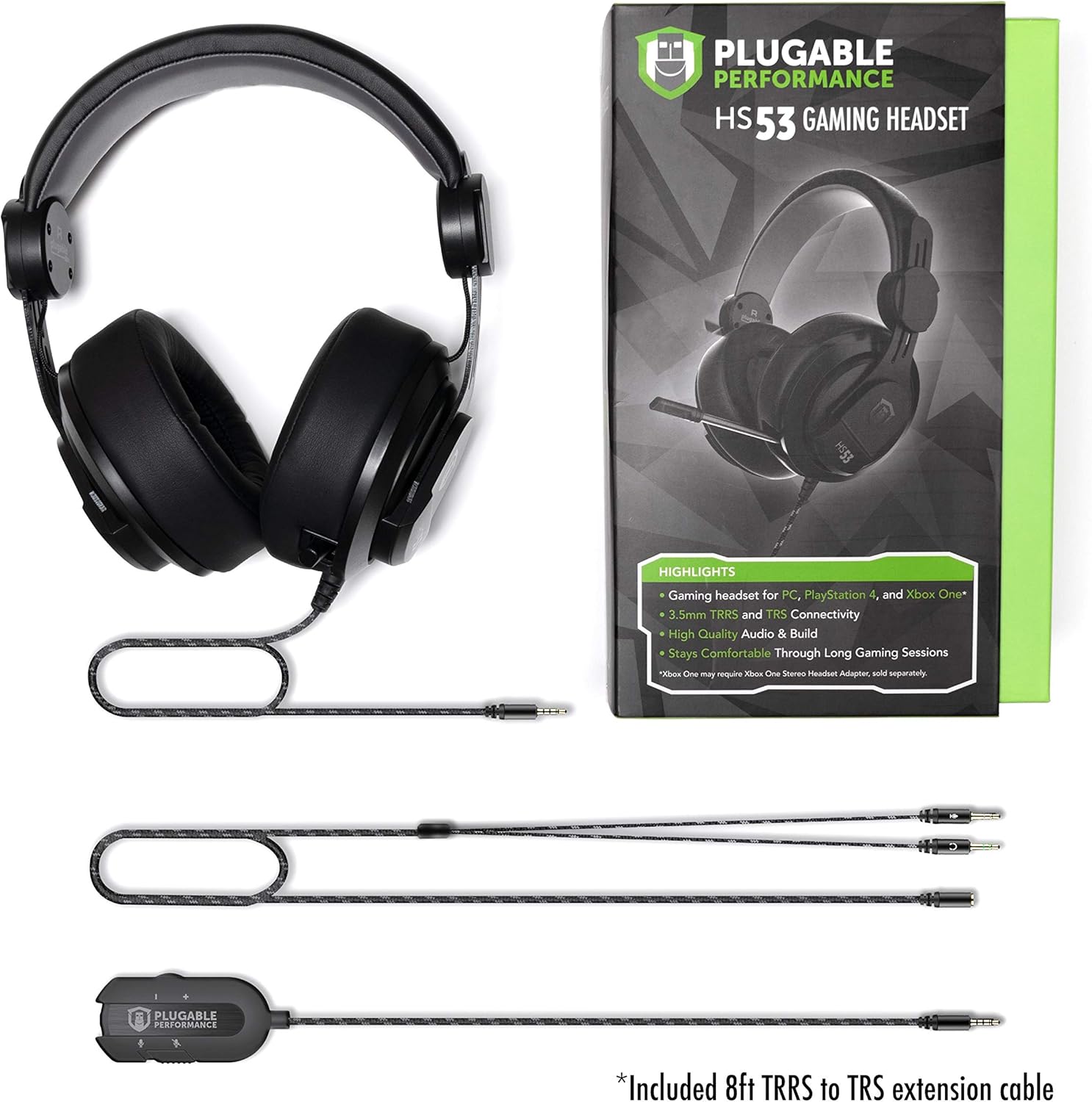
Image: All components included with the Plugable Performance Onyx Gaming Headset.
Configuración
Follow these steps to connect your Plugable Performance Onyx Gaming Headset to your device.
Connecting to PCs, Gaming Consoles, Tablets, and Smartphones
The headset offers versatile connectivity options using its 3.5mm jack and included adapters.
- For devices with a single 3.5mm TRRS port (combined audio/mic): Connect the headset's 3.5mm TRRS plug directly to your device. For added convenience and control, you can use the 30cm 3.5mm TRRS extension with in-line volume and mute control.
- For devices with separate 3.5mm TRS audio and microphone ports (e.g., many desktop PCs): Connect the headset's 3.5mm TRRS plug to the 250cm 3.5mm TRRS to TRS Y-cable extension. Then, plug the green connector (headphone) into your device's audio output jack and the pink connector (microphone) into your device's microphone input jack.

Image: Modular connectivity options for the headset.
Axuste dos auriculares
Adjust the headband for a comfortable and secure fit. The sturdy brushed aluminum framing allows for precise adjustments.

Image: Detail of the headset's quality fit and adjustable headband.
Posicionamento do micrófono
The microphone is retractable and flexible. Pull it out and bend it to position it optimally for clear voice capture. When not in use, it can be retracted back into the earcup.

Image: The retractable microphone extended for use.

Image: Headset connected and ready for gaming.
Funcionamento dos auriculares
Funcións de audio
The headset features 53mm large surface area diaphragm drivers, delivering 2.0 stereo sound quality. This design reproduces audio elements with accuracy and clarity, true to the developer's intent. The closed-back dynamic design provides passive noise isolation.

Image: Memory foam padding and dynamic audio features.

Image: Noise isolating design of the earcups.
Uso do micrófono
The high-precision unidirectional microphone ensures clear communication with your teammates. Extend the microphone from the left earcup and adjust its flexible arm to position it near your mouth.
Controis en liña
When using the 30cm TRRS extension cable, you have access to convenient in-line volume and microphone mute controls. Use the scroll wheel to adjust audio volume and the switch to mute or unmute the microphone.
Mantemento
Un coidado axeitado prolongará a vida útil dos seus auriculares.
- Limpeza das almofadas para as orellas: Gently wipe the memory foam ear cushions with a soft, damp pano. Evite o uso de produtos químicos agresivos ou materiais abrasivos.
- Limpeza xeral: Use a dry, soft cloth to wipe down the rest of the headset. Keep the connectors clean and free of dust.
- Almacenamento: Garde os auriculares nun lugar fresco e seco, lonxe da luz solar directa e de temperaturas extremas.
Resolución de problemas
Se tes problemas cos auriculares, consulta as seguintes solucións habituais:
Sen son ou volume baixo
- Ensure all 3.5mm connections are fully inserted into the correct ports on your device and the headset.
- Check the in-line volume control (if used) and ensure it is turned up.
- Verify the audio output settings on your computer or console. Make sure the headset is selected as the default audio device.
- Proba os auriculares con outro dispositivo para descartar un problema específico do dispositivo.
O micrófono non funciona
- Check the in-line mute switch (if used) and ensure the microphone is not muted.
- Confirm the microphone connection is secure, especially if using the Y-splitter cable.
- Verify the microphone input settings on your computer or console. Ensure the headset microphone is selected and its input volume is not set to zero.
- Asegúrate de que o micrófono estea completamente estendido e colocado correctamente.
Distorsión sonora ou estática
- Comprobe se todas as conexións dos cables están soltas ou danadas.
- Try connecting the headset to a different audio port or device to see if the issue persists.
- Ensure your audio source is not overdriven or set to an excessively high volume.
Especificacións
| Nome do modelo | TRRS-HS53 |
| Tecnoloxía de conectividade | Con cable (conector de 3.5 mm) |
| Tipo de controlador de audio | Driver dinámico |
| Forma do auricular | Sobre orella |
| Rango de frecuencias | 20 Hz - 20 kHz |
| Impedancia | 32 ohmios |
| Tipo de micrófono | Unidirectional, Retractable |
| Tipo de control | Volume Control, Mic Mute (in-line) |
| Material | Plastic, Metal (headband) |
| Peso do elemento | 2.05 libras |
| Dimensións do produto | 5 x 8.75 x 10 polgadas |
Garantía e Soporte
Plugable products are designed and tested for quality and reliability. The Plugable Performance Onyx Gaming Headset is backed by a 2-Year Warranty, certified to exceed standards.
For technical support, troubleshooting assistance, or warranty claims, please visit the official Plugable support website or contact their customer service. Refer to the product packaging or Plugable's official websitio para obter a información de contacto máis actualizada.


