1. Introdución
Thank you for choosing the EMPIRE GAMING Hellhounds Gaming Pack. This comprehensive kit includes a semi-mechanical gaming keyboard, a high-precision gaming mouse, and a durable mousepad, designed to enhance your gaming experience. This manual provides detailed instructions for setup, operation, maintenance, and troubleshooting to ensure optimal performance of your new gaming peripherals.

Figure 1: EMPIRE GAMING Hellhounds Gaming Mouse lineup.
2. Contido do paquete
Asegúrate de que todos os artigos estean presentes no teu paquete:
- EMPIRE GAMING Hellhounds Semi-Mechanical Gaming Keyboard
- EMPIRE GAMING Hellhounds Gaming Mouse
- EMPIRE GAMING Hellhounds Mousepad
- Manual de usuario (este documento)
3. Guía de configuración
3.1 Conexión do teclado e do rato
- Localiza un porto USB dispoñible no teu ordenador.
- Plug the USB connector of the EMPIRE GAMING Hellhounds Keyboard into the USB port.
- Plug the USB connector of the EMPIRE GAMING Hellhounds Mouse into another available USB port.
- O teu sistema operativo debería detectar e instalar automaticamente os controladores necesarios.
3.2 Mouse Weight Adjustment
The Hellhounds Gaming Mouse features adjustable weights for personalized feel and control.
- Carefully open the weight compartment located on the underside of the mouse.
- Add or remove weights as desired to achieve your preferred mouse balance and feel.
- Close the weight compartment securely.

Figure 2: Hellhounds Gaming Mouse with adjustable weights.
3.3 Instalación de software
To unlock the full customization potential of your Hellhounds Gaming Pack, including macro programming and advanced RGB lighting effects, download and install the dedicated software from the official EMPIRE GAMING websitio: www.empiregaming.eu.
- Visita www.empiregaming.eu.
- Navigate to the 'Support' or 'Downloads' section.
- Locate the software for the Hellhounds Gaming Pack (Model OE-KB-88DE3).
- Descarga e executa o instalador, seguindo as instrucións en pantalla.
- Reinicie o ordenador se se lle solicita.

Figure 3: EMPIRE GAMING Macro Manager software interface.
4. Instrucións de funcionamento
4.1 Características do teclado
The Hellhounds Keyboard offers advanced features for gaming and productivity.
- Macros programables: The keyboard supports up to 33 configurable macros across three distinct profiles. Use the dedicated software to record and assign complex key sequences to the macro keys (M1, M2, M3, G1-G5).
- Atallos multimedia: Access multimedia controls directly using function key combinations (e.g., Fn + F5-F11 for music settings).
- Bloqueo de teclas de Windows: Prevent accidental interruptions during gaming by disabling the Windows key.
- Adjustable Wrist Rest: The integrated wrist rest and adjustable feet provide comfort during extended gaming sessions.
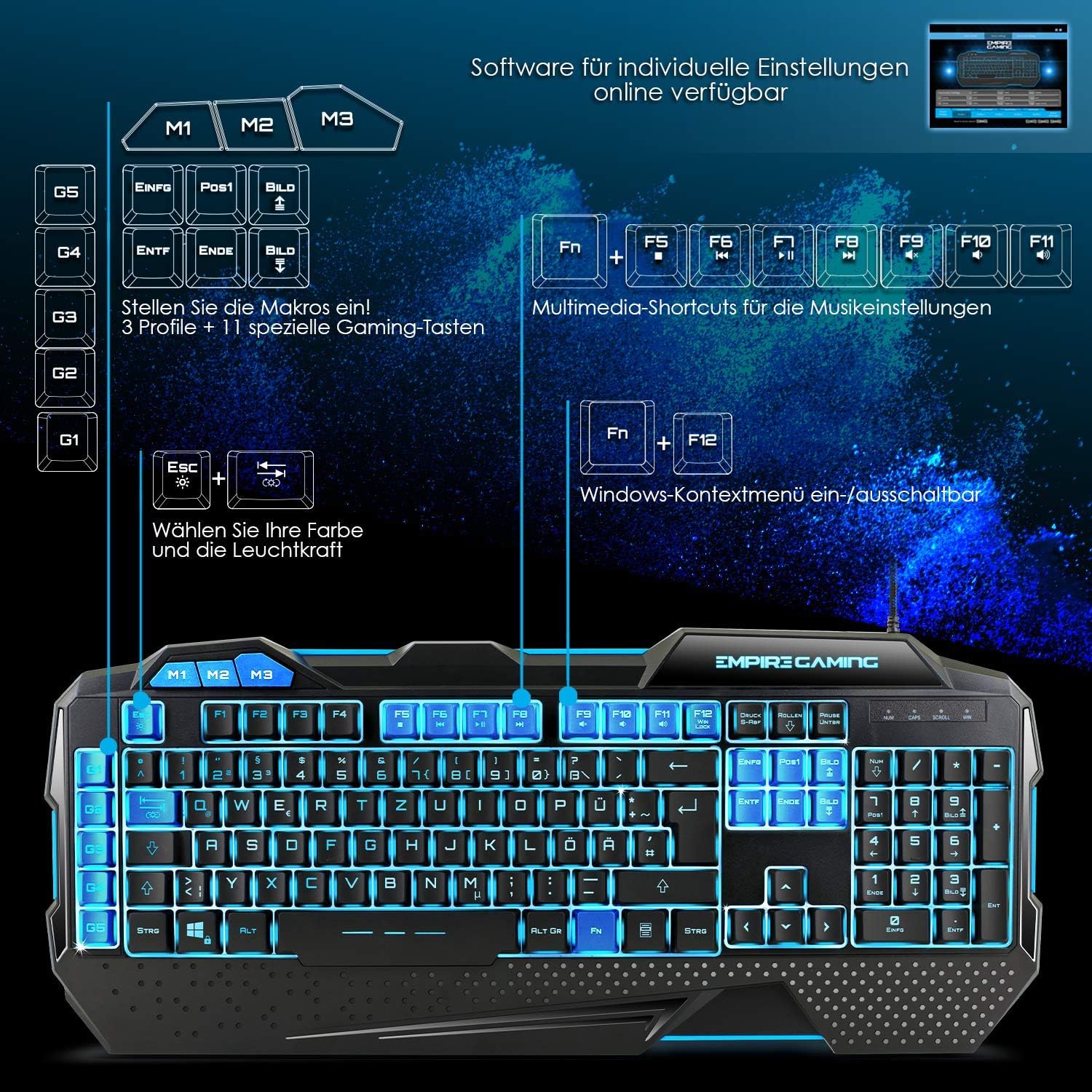
Figure 4: Hellhounds Keyboard layout highlighting macro and multimedia keys.
4.2 Características do rato
The Hellhounds Mouse is designed for precision and comfort.
- DPI axustable: Cycle through DPI settings up to 7200 DPI for precise cursor control. DPI levels can be adjusted via dedicated buttons on the mouse or through the software.
- Botóns programables: The mouse features 7 programmable buttons. Utilize the software to assign custom functions, macros, or rapid-fire commands to these buttons.
- Deseño ergonómico: Ergonomic finger rests and adjustable weights contribute to comfortable handling during long gaming sessions.
4.3 Control de iluminación RGB
Both the keyboard and mouse feature customizable RGB LED backlighting.
- Retroiluminación do teclado: The keyboard offers seven colors and various lighting effects. Adjustments can be made directly on the keyboard using function key combinations (e.g., Fn + Esc for brightness, Fn + PrtSc for mode) or through the dedicated software.
- Mouse Backlight: Customize the mouse's LED backlight colors and effects using the dedicated software.

Figure 5: Hellhounds Keyboard showcasing various RGB lighting options.

Figure 6: Software interface for assigning custom functions to keys.
5. Mantemento
Proper maintenance ensures the longevity and performance of your gaming pack.
- Limpeza: Use a soft, dry cloth to wipe down the keyboard, mouse, and mousepad regularly. For deeper cleaning, a slightly damp Pódese usar un pano con xabón suave, garantindo que non entre líquido nos dispositivos.
- Eliminación de po: Use compressed air to remove dust and debris from between keyboard keys and mouse sensors.
- Evitar líquidos: Non expoñas os dispositivos a unha humidade excesiva nin os mergulles na auga.
- Almacenamento: Garde os dispositivos nun lugar fresco e seco, lonxe da luz solar directa e de temperaturas extremas cando non os estea a usar.
6 Solución de problemas
If you encounter issues with your EMPIRE GAMING Hellhounds Pack, refer to the following common solutions:
- Dispositivo non recoñecido:
- Ensure the USB cables are securely plugged into your computer's USB ports.
- Try plugging the devices into different USB ports.
- Reinicie o ordenador.
- Check your operating system's Device Manager to see if the devices are listed and drivers are installed correctly. - As teclas do teclado non responden:
- Check for any physical obstructions under the keys.
- Ensure the keyboard is not in a locked mode (e.g., gaming mode disabling certain keys).
- Reinstall the keyboard software. - Mouse Cursor Lag or Inaccuracy:
- Clean the mouse sensor with a soft cloth.
- Ensure the mousepad surface is clean and free of debris.
- Adjust the DPI settings of the mouse.
- Try the mouse on a different surface.
- Reinstall the mouse software. - A iluminación RGB non funciona:
- Ensure the software is installed and running.
- Check the lighting settings within the software.
- For the keyboard, try cycling through lighting modes and brightness levels using the dedicated function key combinations. - Problemas de software:
- Ensure you have downloaded the correct software version for your model (OE-KB-88DE3) from www.empiregaming.eu.
- Run the software as an administrator.
- Temporarily disable antivirus software during installation if issues persist.
7. Especificacións
Technical specifications for the EMPIRE GAMING Hellhounds Gaming Pack:
| Característica | Especificación |
|---|---|
| Marca | EMPIRE GAMING |
| Número de modelo | OE-KB-88DE3 |
| Cor | Negro |
| Tecnoloxía de conectividade | USB |
| Dispositivos compatibles | PC, Laptop |
| Sistema Operativo | Windows 10, Windows XP (and newer versions) |
| Tipo de teclado | Semi-mechanical, Gaming |
| Disposición do teclado | QWERTZ (German layout) |
| Keyboard Macros | 33 configurable macros across 3 profiles |
| Rato DPI | Ata 7200 DPI (axustables) |
| Botóns do rato | 7 teclas programables |
| Retroiluminación | RGB LED (7 colors, various effects) |
| Características especiais | Ergonomic design, adjustable mouse weights, dedicated software |

Figure 7: Dimensions of the Hellhounds Keyboard and Mouse.
8. Garantía e soporte
For warranty information, technical support, and to download the latest software and drivers, please visit the official EMPIRE GAMING websitio:
EMPIRE GAMING is committed to providing high-quality products and customer satisfaction. If you have any questions or require further assistance, please do not hesitate to contact our support team through the websitio.


