Introdución
This manual provides detailed instructions for the proper use and maintenance of your OneDer V06 Bluetooth Speaker. Please read this manual thoroughly before operating the device to ensure optimal performance and longevity. The OneDer V06 is a versatile audio device featuring Bluetooth connectivity, FM radio, USB/TF card playback, a digital clock, and an integrated mobile stand.
Información importante de seguridade
- Non expoñas o dispositivo a temperaturas extremas, luz solar directa nin humidade elevada.
- Evite deixar caer ou someter o dispositivo a fortes impactos.
- Non desmontes nin intentes reparar o dispositivo ti mesmo. Encarga todo o mantemento a persoal cualificado.
- Manteña o dispositivo lonxe da auga e doutros líquidos.
- Use só o cable de carga e o adaptador de corrente especificados.
- Elimina as baterías segundo a normativa local.
Contido do paquete
Comprobe se o paquete contén os seguintes elementos:
- OneDer V06 Bluetooth Speaker
- Cable de carga USB
- Cable de son (AUX)
- Manual de usuario (este documento)
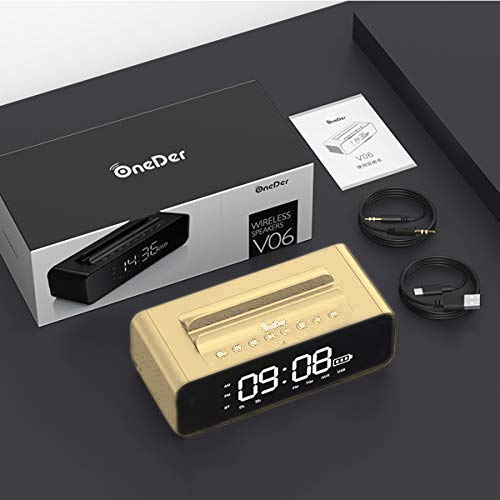
Image: The OneDer V06 speaker, USB charging cable, and audio cable neatly packaged in its box, alongside the user manual.
Produto rematadoview
Familiarize yourself with the various parts and controls of your OneDer V06 speaker.
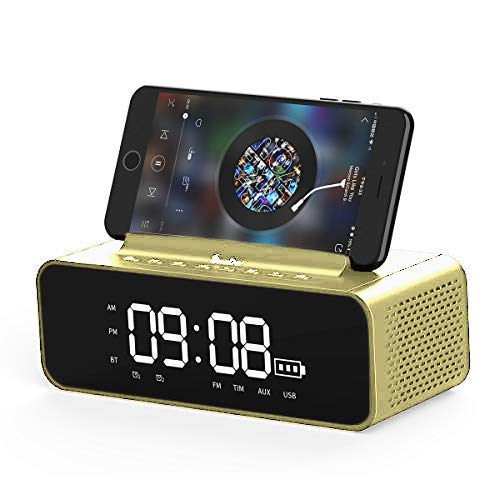
Imaxe: Fronte view of the OneDer V06 Bluetooth Speaker in gold, displaying the digital clock, battery indicator, and a mobile phone placed in its integrated stand.
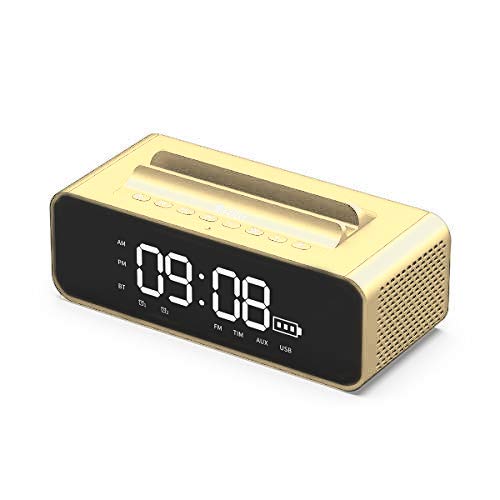
Imaxe: Fronte view of the OneDer V06 Bluetooth Speaker in gold, showing the digital clock display and control buttons on top, without a phone in the stand.
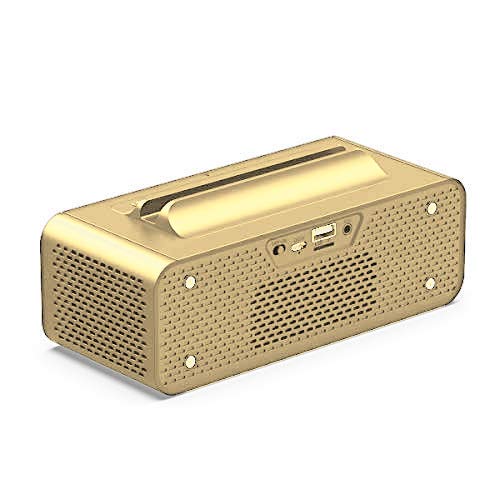
Imaxe: Traseira view of the OneDer V06 Bluetooth Speaker, highlighting the various input ports including USB, TF card slot, and AUX input.
Botóns de control (panel superior)
- Botón de encendido: Press and hold to power on/off. Short press to switch modes (Bluetooth, FM, AUX, USB/TF).
- Botón Reproducir/Pausa: Play or pause audio. In FM mode, short press to auto-scan stations.
- Subir volume (+)/Pista seguinte: Prema curta para a seguinte canción/emisora. Prema longa para aumentar o volume.
- Baixar volume (-)/Pista anterior: Prema curta para a canción/emisora anterior. Prema longa para baixar o volume.
- M Button (Mode/Menu): Short press to cycle through modes. Long press to enter clock/alarm settings.
Portos do panel traseiro
- Porto USB: For USB flash drive playback or charging external devices (if supported).
- Ranura para tarxetas TF: Para reprodución de tarxetas TF/MicroSD.
- Entrada AUX: Para conectar dispositivos de audio externos mediante un cable de audio de 3.5 mm.
- Porto de carga DC 5V: Para cargar a batería interna do altofalante.
Configuración
1. Cargando o altofalante
- Connect the provided USB charging cable to the DC 5V charging port on the rear of the speaker.
- Conecta o outro extremo do cable USB a un adaptador de corrente USB (non incluído) ou ao porto USB dun ordenador.
- The charging indicator on the display will show charging status. A full charge typically takes 3-4 hours.
- Disconnect the cable once fully charged to preserve battery life.
2. Acendido/apagado
- Para acender, manteña premido o botón Botón de encendido ata que se ilumine a pantalla.
- Para apagalo, manteña premido o botón Botón de encendido de novo ata que a pantalla se apague.
3. Axustar o reloxo
- En calquera modo, mantén presionado o botón Botón M to enter clock setting mode. The hour digits will flash.
- Usa o Subir volume (+) e Baixar volume (-) botóns para axustar a hora.
- Prema brevemente o Botón M to switch to minute setting. The minute digits will flash.
- Usa o Subir volume (+) e Baixar volume (-) botóns para axustar os minutos.
- Prema brevemente o Botón M again to confirm and exit clock setting.
Instrucións de funcionamento
1. Modo Bluetooth
- Power on the speaker. It will automatically enter Bluetooth pairing mode, indicated by a flashing "BT" icon on the display.
- No teu dispositivo móbil, activa o Bluetooth e busca os dispositivos dispoñibles.
- Seleccionar "OneDer V06"da lista.
- Once paired, the "BT" icon will stop flashing and a confirmation tone may sound.
- You can now play audio from your device through the speaker. Use the speaker's Reproducir/Pausa, Pista seguinte/anterior, e Volume botóns para controlar a reprodución.
2. Modo de radio FM
- Prema brevemente o Botón de encendido or Botón M to switch to FM mode. The display will show "FM" and a frequency.
- To auto-scan and save available stations, short press the Botón Reproducir/PausaO altofalante buscará e almacenará emisoras automaticamente.
- Usa o Pista seguinte/anterior botóns para navegar entre as emisoras gardadas.
- For better reception, ensure the speaker is placed in an open area.
3. Reprodución de tarxetas USB/TF
- Insert a USB flash drive or TF (MicroSD) card into the corresponding slot on the rear panel.
- O altofalante cambiará automaticamente ao modo USB ou tarxeta TF e comezará a reproducir audio files. Se non, prema brevemente o botón Botón de encendido or Botón M para seleccionar o modo correcto.
- Usa o Reproducir/Pausa, Pista seguinte/anterior, e Volume botóns para controlar a reprodución.
4. Modo de entrada AUX
- Conecta un extremo do cable de audio de 3.5 mm ao porto de entrada AUX do altofalante.
- Connect the other end to the headphone jack of your external audio device (e.g., MP3 player, laptop).
- Prema brevemente o Botón de encendido or Botón M to switch to AUX mode. The display may show "AUX".
- Controla a reprodución e o volume desde o teu dispositivo de son externo.
5. Using the Mobile Stand
The integrated groove on top of the speaker serves as a convenient stand for your smartphone or small tablet, allowing for hands-free viewing while enjoying audio.
Image: The OneDer V06 speaker with a smartphone securely placed in its top-mounted stand, demonstrating its dual functionality.
6. Configurar unha alarma
- Mantén presionado Botón M to enter clock setting mode. Continue pressing Botón M until the alarm time digits flash (e.g., "AL").
- Usa o Subir volume (+) e Baixar volume (-) botóns para axustar a hora da alarma.
- Prema brevemente o Botón M to switch to alarm minute setting.
- Usa o Subir volume (+) e Baixar volume (-) botóns para axustar os minutos da alarma.
- Prema brevemente o Botón M again to confirm and activate the alarm. An alarm icon may appear on the display.
- To disable the alarm, repeat the process and set the alarm time to "--:--" or press a specific button (refer to device display for specific icon).
Mantemento
- Limpeza: Use a soft, dry cloth to wipe the surface of the speaker. Do not use abrasive cleaners, alcohol, or chemical solvents.
- Almacenamento: Cando non o use durante períodos prolongados, garde o altofalante nun lugar fresco e seco, lonxe da luz solar directa e de temperaturas extremas.
- Coidado da batería: Para prolongar a duración da batería, evite descargala completamente con frecuencia. Cargue o dispositivo regularmente, mesmo se non o está a usar.
Resolución de problemas
| Problema | Causa posible | Solución |
|---|---|---|
| O altofalante non se acende. | Batería baixa. | Cargue o altofalante durante polo menos 30 minutos. |
| Sen son. | Volume demasiado baixo; modo incorrecto; dispositivo non emparellado. | Increase volume. Ensure correct mode is selected. Re-pair Bluetooth device. |
| Falla o emparellamento Bluetooth. | O altofalante non está en modo de emparellamento; o dispositivo está demasiado lonxe; interferencias. | Ensure speaker is in Bluetooth mode and "BT" is flashing. Move devices closer. Turn off other Bluetooth devices. |
| A recepción da radio FM é deficiente. | Sinal débil; interferencias ambientais. | Relocate the speaker to an open area. Perform auto-scan again. |
| A tarxeta USB/TF non se reproduce. | Incorrecto file format; card not inserted correctly; corrupted files. | Garantir files are in supported formats (MP3/WAV/WMA). Reinsert card. Try another card/USB drive. |
Especificacións
| Característica | Detalle |
|---|---|
| Modelo | OneDer V06 |
| Versión sen fíos | 4.2 |
| Soporte Profile | MP3/WMA/WAV |
| distancia wireless | 10 metros |
| Batería | 2400 mAh |
| Saída do altofalante | 2 x 5 W (10 W en total) |
| Fonte de enerxía | Battery, AC (via USB charging) |
| Material | Metal |
| Tipo de visualización | Dixital |
| Características especiais | Bluetooth, Wireless, FM Radio, USB/TF Card Playback, Mobile Stand, Digital Clock, Alarm Clock |
| Dimensións do produto | L180mm x W78mm x H73mm (approx.) |
| Peso do produto | 632 g (aprox.) |
| Dimensións do paquete | 23.6 x 11.2 x 8.3 cm |
| Peso do artigo (paquete) | 880 g |
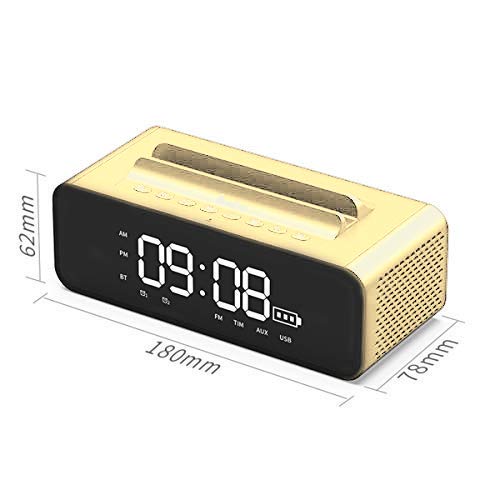
Image: Diagram illustrating the dimensions of the OneDer V06 Bluetooth Speaker: 180mm length, 78mm width, and 62mm height.
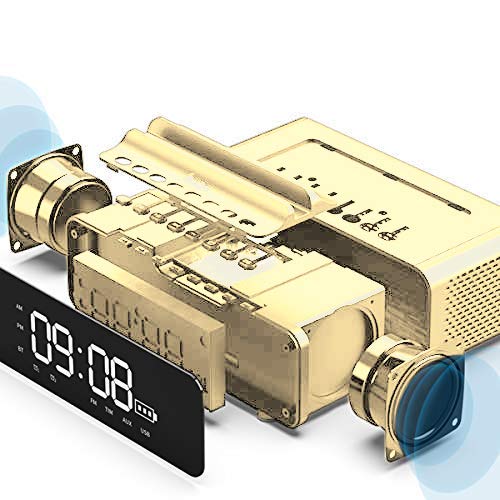
Image: An exploded diagram showing the internal components of the OneDer V06 speaker, including the main circuit board, battery, and speaker drivers.
Garantía e Soporte
The OneDer V06 Bluetooth Speaker comes with a standard manufacturer's warranty. Please refer to the warranty card included in your package for specific terms and conditions, including warranty duration and coverage details.
For technical support, troubleshooting assistance, or warranty claims, please contact OneDer customer service through the contact information provided on the product packaging or the official OneDer websitio.
Nota: Garde o recibo da compra como xustificante de compra para efectos da garantía.


