1. Introdución
This manual provides comprehensive instructions for the setup, operation, maintenance, and troubleshooting of your Canyon CNS-SW71SS Smartwatch. Please read this manual carefully before using your device to ensure proper function and longevity.
The Canyon CNS-SW71SS Smartwatch is designed to help you monitor your fitness activities and stay connected. It features a 1.22-inch color screen, multi-sport modes, heart rate monitoring, sleep tracking, and notification alerts. Its IP68 water resistance makes it suitable for various environments.
2. Produto rematadoview
2.1 Características principais
- 1.22-inch color touch screen display.
- Multi-sport mode for tracking various activities.
- Daily activity monitoring: calories, steps, heart rate, and sleep.
- Notifications for incoming calls, SMS, emails, calendar events, and social media.
- Music control and remote camera function.
- Smart alarm and weather data display.
- Duración da batería de ata 7 días.
- IP68 water resistance (submersible up to 1 meter for 30 minutes).
- Conectividade Bluetooth 4.0.
- Compatible with iOS and Android operating systems.
- Comes with two interchangeable wristbands: metal and TPU.
2.2 Compoñentes
The Canyon CNS-SW71SS Smartwatch consists of the main watch unit, interchangeable wristbands, and a charging cable.

Figura 1: Fronte view of the Canyon CNS-SW71SS Smartwatch, showing the display with steps, distance, calories, and heart rate data.

Figura 2: En ángulo view of the Canyon CNS-SW71SS Smartwatch, featuring a silver metal mesh strap and a round display.
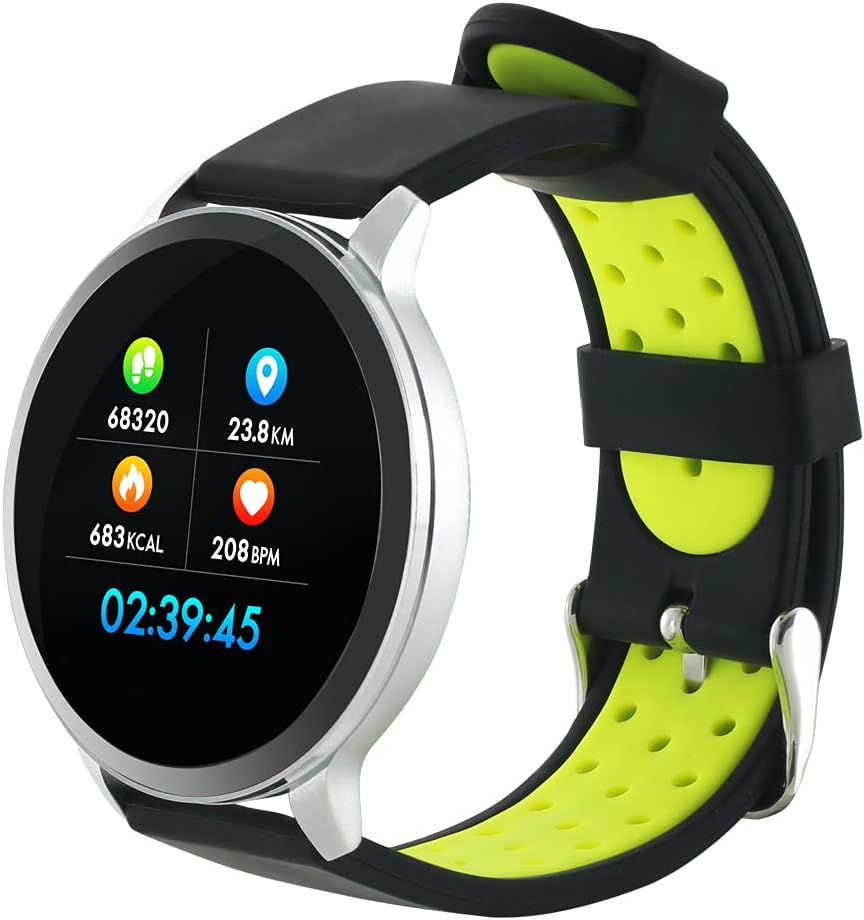
Figure 3: The Canyon CNS-SW71SS Smartwatch shown with an alternative black and lime green TPU strap, highlighting its interchangeable design.

Figura 4: Traseira view of the Canyon CNS-SW71SS Smartwatch, displaying the optical heart rate sensor and magnetic charging contacts.

Figure 5: The retail packaging for the Canyon CNS-SW71SS Smartwatch, illustrating key features and the included two straps.
3. Configuración
3.1 Cargar o reloxo intelixente
- Connect the charging cable to a USB power adapter (not included) or a computer's USB port.
- Align the magnetic charging pins of the cable with the charging contacts on the back of the smartwatch. The watch will vibrate and display a charging icon.
- Allow approximately 2-3 hours for a full charge. A full charge provides up to 7 days of usage.
3.2 Installing the Canyon Fit Application
- Scan the QR code provided in the packaging or search for "Canyon Fit" in your smartphone's app store (Google Play Store for Android, Apple App Store for iOS).
- Descarga e instala a aplicación.
- Open the Canyon Fit app and follow the on-screen instructions to create an account and set up your profile.
3.3 Emparellamento co teu teléfono intelixente
- Asegúrate de que o teu reloxo intelixente estea cargado e acendido.
- Activa o Bluetooth no teu smartphone.
- Open the Canyon Fit application.
- Navigate to the device pairing section within the app (usually found under 'Device' or 'Profile').
- Select your smartwatch (e.g., "CNS-SW71SS") from the list of available devices.
- Confirm the pairing request on both your smartphone and smartwatch if prompted.
3.4 Attaching/Changing Wristbands
The smartwatch comes with two wristbands (metal and TPU) that can be interchanged. To attach or change a wristband, locate the quick-release pins on the underside of the strap. Slide the pin to detach the current strap and then align and slide the pin of the new strap into the corresponding holes on the watch body until it clicks into place.
4. Instrucións de funcionamento
4.1 Navegación básica
- Pantalla táctil: Swipe left/right to navigate through different functions and menus. Swipe up/down to view notificacións ou configuracións rápidas.
- Botón lateral: Press the side button to return to the main watch face or to wake up the screen. A long press may access power options or specific features depending on the context.
4.2 Seguimento da actividade física
- Modo multideporte: Access the 'Workout' or 'Sport' menu on your watch. Select your desired activity (e.g., running, cycling, walking) to start tracking. The watch will record duration, distance, calories burned, and heart rate.
- Actividade diaria: The watch automatically tracks your steps, distance, and calories burned throughout the day. View these statistics on the watch face or in the Canyon Fit app.
- Monitorización da frecuencia cardíaca: The watch continuously monitors your heart rate. You can also manually initiate a heart rate measurement from the heart rate interface.
- Seguimento do sono: Wear the smartwatch to bed, and it will automatically track your sleep patterns, including deep sleep, light sleep, and wake times. View detailed sleep analysis in the Canyon Fit app.
4.3 Notificacións
Once paired with your smartphone and with notification permissions granted in the Canyon Fit app, your smartwatch will display alerts for:
- Chamadas entrantes
- Mensaxes SMS
- Correos electrónicos
- Calendario de eventos
- Social Media Apps (e.g., WhatsApp, Facebook, InstagRAM)
Desliza o dedo cara arriba na esfera do reloxo para view recent notifications. You can dismiss notifications from the watch.
4.4 Funcións adicionais
- Control de música: While music is playing on your phone, you can use the watch to play/pause, skip tracks, and adjust volume.
- Cámara remota: Open the camera function in the Canyon Fit app. Use your smartwatch as a remote shutter button to take photos on your phone.
- Alarma intelixente: Set alarms through the Canyon Fit app. The watch will vibrate to wake you up gently.
- Datos meteorolóxicos: Once connected to your phone, the watch will display current weather conditions and forecasts for your location.
5. Mantemento
5.1 Limpeza
- Limpa a pantalla e a carcasa do reloxo cun pano suave eamp pano.
- For the metal strap, use a soft brush to gently clean any debris. For the TPU strap, wash with mild soap and water.
- Asegúrate de que os contactos de carga estean limpos e secos antes de cargar.
- Evite o uso de produtos químicos agresivos ou materiais abrasivos para a limpeza.
5.2 Resistencia á auga (IP68)
The Canyon CNS-SW71SS Smartwatch is IP68 rated, meaning it is resistant to dust and can be immersed in water up to 1 meter deep for a maximum of 30 minutes. While it can withstand splashes, rain, and brief immersion, it is not recommended for hot showers, saunas, or diving, as steam and high water pressure can compromise the seals.
- Do not press any buttons while the watch is submerged.
- Seque ben o reloxo despois de expoñelo á auga.
5.3 Coidado coa batería
- Evite descargar completamente a batería con frecuencia.
- Cargue o dispositivo regularmente, mesmo se non o está a usar, para manter a batería en bo estado.
- Garde o reloxo nun lugar fresco e seco cando non o use durante períodos prolongados.
6 Solución de problemas
- O reloxo non se acende: Asegúrate de que o reloxo estea completamente cargado. Conéctao ao cargador durante polo menos 30 minutos.
- Non se pode emparellar co teléfono intelixente:
- Asegúrese de que o Bluetooth estea activado no seu teléfono.
- Ensure the Canyon Fit app has necessary permissions.
- Reinicia tanto o teléfono como o reloxo intelixente.
- Tenta desvincular e volver vincular o dispositivo a través da aplicación.
- Non aparecen as notificacións:
- Check notification settings in the Canyon Fit app and your phone's system settings.
- Asegúrate de que o reloxo estea conectado por Bluetooth.
- Datos de frecuencia cardíaca/actividade inexactos:
- Asegúrate de levar o reloxo ben axustado ao pulso, nin demasiado axustado nin demasiado solto.
- Limpa o sensor que está na parte traseira do reloxo.
- Environmental factors or certain movements can affect accuracy.
- A pantalla non responde: Try restarting the smartwatch by holding down the side button. If unresponsive, allow the battery to fully drain and then recharge.
7. Especificacións
| Nome do modelo | CNS-SW71SS |
| Marca | CANÓN |
| Tamaño de visualización | 1.22 polgadas |
| Compatibilidade do sistema operativo | Android, iOS |
| Tecnoloxía de conectividade | Bluetooth 4.0 |
| Clasificación de resistencia á auga | IP68 |
| Características especiais | Wireless Charging (implied by product data), Multi-Sport Mode, Heart Rate Monitor, Sleep Tracker, Notifications |
| Dispositivos compatibles | Teléfono intelixente |
| Batería | Recargable (1 incluídas) |
| Opcións de cor | Black, Lime Green, Silver |
8. Garantía e soporte
For warranty information and technical support, please refer to the documentation included with your purchase or visit the official Canyon website. You can also contact Canyon customer service for assistance with product issues or inquiries.
Soporte en liña: https://canyon.eu/support/ (Example link, please verify official support page)


