1. Introdución e finalview
Thank you for choosing the Lorex Analog 4K Weatherproof Indoor/Outdoor HD Wired Add-On Security Camera. This manual provides essential information for the proper installation, operation, and maintenance of your new security camera. This camera is designed as an add-on unit and requires a compatible Lorex recorder (DVR/NVR) for full functionality.
This camera features 4K resolution for superior image clarity, robust weatherproof construction for reliable indoor and outdoor use, and advanced deterrence features such as motion-activated lights and remote-triggered sirens. Its long-range night vision ensures comprehensive surveillance even in low-light conditions.
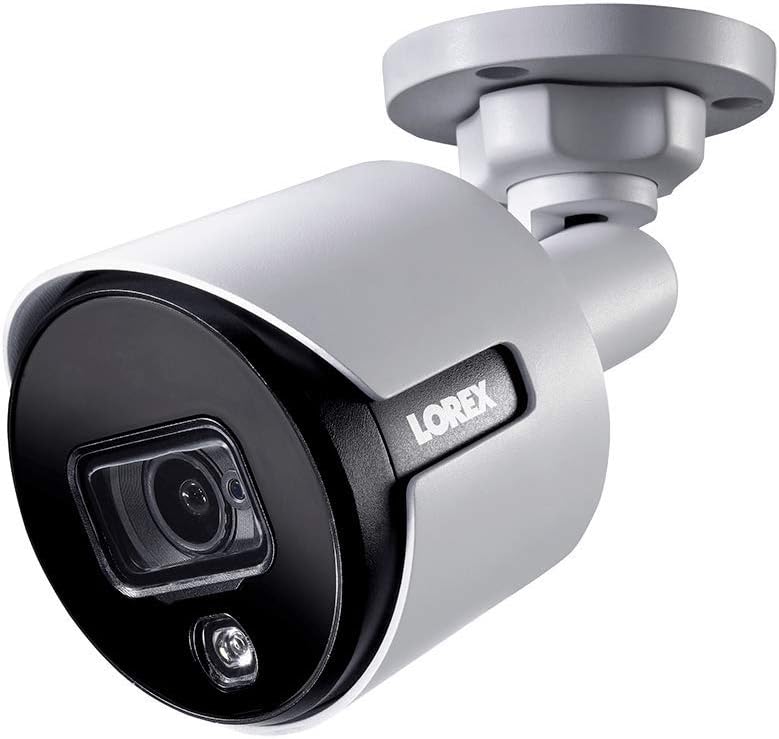
Figura 1.1: Ángulo frontal view of the Lorex 4K Weatherproof Security Camera. This image shows the camera's bullet form factor, lens, and integrated light.
2. Contido do paquete
The Lorex Analog 4K Weatherproof Indoor/Outdoor HD Wired Add-On Security Camera package includes:
- 1 x Lorex Analog 4K Weatherproof Indoor/Outdoor HD Wired Add-On Security Camera (Model: LBV8543XW)
- Kit de montaxe (parafusos e tacos)
- Allen Key (for adjustment)
Note: This is an add-on camera. Video cables, power adapters, and a compatible Lorex recorder are sold separately and are required for operation.
3. Características clave
- Resolución 4K Ultra HD: Provides exceptional detail and clarity with an 8MP effective still resolution.
- Deseño resistente ás inclemencias meteorolóxicas (IP67): Durable metal housing ensures reliable performance in various weather conditions, suitable for both indoor and outdoor installation.
- Long Range Night Vision: See clearly up to 150 feet (45m) in ambient night conditions and up to 98 feet (30m) in total darkness. Features Color Night Vision for enhanced detail in low light.
- Motion-Activated Warning Light: Integrated LED light can be triggered by motion to deter intruders.
- Sirena activada a distancia: Activate a loud siren directly from your Lorex recorder or connected app to scare away unwanted visitors.
- Wired Connectivity (BNC): Ensures a stable and secure connection to your Lorex DVR/NVR system.
- Amplia temperatura de funcionamento: Functions reliably in temperatures up to 60 degrees Celsius.
4. Configuración e instalación
Before installation, ensure you have a compatible Lorex recorder (DVR/NVR) and necessary video/power cables.
4.1 Elixir unha localización
Escolla unha localización que proporcione o desexado viewing angle and is within reach of your Lorex recorder and a power source. Consider areas prone to intrusion, such as entry points or vulnerable perimeters. The camera is suitable for ceiling mount and wall mount applications.

Figura 4.1: Lateral view of the Lorex 4K Weatherproof Security Camera, showing its adjustable mounting base.
4.2 Montaxe da cámara
- Marcar os buratos: Empregue o modelo de montaxe (se se inclúe) ou a base da cámara para marcar as posicións para a perforación.
- Perforación: Drill pilot holes for the mounting screws. If mounting on drywall or masonry, insert the provided wall plugs.
- Cámara segura: Aliña a base da cámara cos orificios perforados e fíxaa cos parafusos proporcionados.
- Axustar ángulo: Loosen the adjustment screws on the camera body using the Allen key to position the camera for the optimal viewángulo de inglete. Aperte os parafusos unha vez axustados.
4.3 Conectando a cámara
- Conectar o cable de vídeo: Connect one end of the BNC video cable (not included) to the camera's BNC port and the other end to an available video input channel on your Lorex recorder.
- Conectar enerxía: Connect the camera's power input to a compatible power adapter (not included). Ensure the power adapter is connected to a power outlet.
- Power On Recorder: Ensure your Lorex recorder is powered on and properly configured.
5. Instrucións de funcionamento
Once the camera is physically installed and connected to your Lorex recorder, you can begin operation.
5.1 Viewen directo
Access your Lorex recorder's interface (via monitor, Lorex Home app, or client software) to view the live video feed from the camera. Ensure the correct channel is selected.

Imaxe 5.1: Primeiro plano view of the Lorex 4K Weatherproof Security Camera's lens and integrated light.
5.2 Motion Detection and Smart Deterrence
Your Lorex recorder manages motion detection settings. Refer to your recorder's manual for detailed instructions on configuring motion zones and sensitivity.
- Motion-Activated Light: The camera's integrated light can be set to activate automatically upon motion detection. This setting is typically configured within your Lorex recorder's deterrence or alarm settings.
- Sirena activada a distancia: You can manually activate the camera's siren through your Lorex recorder's interface or the Lorex Home app. This feature is useful for immediate deterrence.

Figure 5.2: The Lorex 4K Weatherproof Security Camera mounted on a brick wall at night, demonstrating its motion-activated light feature.
5.3 Visión nocturna
The camera automatically switches to night vision mode in low-light conditions. The infrared (IR) LEDs provide illumination for clear black and white video. Color Night Vision (CNV) may be available if there is sufficient ambient light, providing full-color video in low-light scenarios.
6. Mantemento
Un mantemento regular garante un rendemento óptimo e unha maior duración da súa cámara de seguridade.
- Limpeza: Limpe periodicamente a lente e a carcasa da cámara cun pano suave eamp pano. Evite produtos de limpeza abrasivos ou solventes que poidan danar o acabado ou a lente.
- Comproba as conexións: Ensure all cable connections (BNC and power) are secure and free from corrosion, especially for outdoor installations.
- Actualizacións de firmware: Regularly check the Lorex website or your recorder's settings for available firmware updates for your camera and recorder to ensure the latest features and security enhancements.
- Condicións ambientais: While weatherproof, extreme conditions outside the specified operating temperature range (up to 60°C) may affect performance.
7 Solución de problemas
If you encounter issues with your Lorex camera, refer to the following common troubleshooting steps:
| Problema | Causa posible | Solución |
|---|---|---|
| Sen transmisión de vídeo da cámara | Conexión de cable solta Sen alimentación á cámara Incorrect channel selected on recorder | Check BNC and power connections. Ensure power adapter is working and connected. Verify the correct input channel on your Lorex recorder. |
| Mala calidade de imaxe / vídeo borroso | Lente sucia Improper focus (if adjustable) Cable interference/damage | Limpe a lente da cámara cun pano suave. Ensure the camera is properly focused (if applicable). Check video cable for damage or interference. Use high-quality cables. |
| A visión nocturna non funciona | IR LEDs obstructed Potencia insuficiente Configuración da cámara | Ensure nothing is blocking the IR LEDs. Verificar unha subministración de enerxía estable. Check night vision settings on your Lorex recorder. |
| A detección de movemento non se activa | Incorrect motion zone setup Sensibilidade moi baixa Obstrución en view | Review and adjust motion detection zones on your recorder. Aumentar a sensibilidade ao movemento. Clear any obstructions from the camera's field of view. |
For more advanced troubleshooting, consult your Lorex recorder's user manual or visit the Lorex support websitio.
8. Especificacións
| Característica | Especificación |
|---|---|
| Número de modelo | LBV8543XW |
| Resolución de captura de vídeo | 4K (resolución fixa efectiva de 8 MP) |
| Tecnoloxía de conectividade | BNC (Wired) |
| Uso interior/exterior | Interior, Exterior |
| Clasificación de protección internacional | IP67 (resistente á intemperie) |
| Range de visión nocturna | 150 pés (45 m) |
| Características especiais | Motion Sensor, Night Vision, Motion Activated Lights, Remote-Triggered Siren |
| Factor de forma | Bala |
| Material | Metal |
| Operating Temperature (Upper) | 60 graos centígrados |
| Dimensións do produto (L x W x H) | 16 x 6 x 6 polgadas |
| Peso do elemento | 0.01 onzas |
| UPC | 695529017136 |
| Método de control | App, Remote (via compatible Lorex recorder) |
9. Garantía e soporte
Lorex products are designed for reliability and performance. For information regarding your product's warranty, please refer to the warranty policy available on the official Lorex website or the documentation included with your Lorex recorder.
For technical support, product registration, or to download the latest software and firmware updates, please visit the official Lorex support page or the Lorex Store:
- Lorex Store: Visit the Lorex Store on Amazon
- Guía do usuario (PDF): A comprehensive user guide in PDF format is also available for download: Descargar guía de usuario
When contacting support, please have your product model number (LBV8543XW) and serial number ready.


