1. Introdución
This manual provides essential information for the safe and efficient installation, operation, and maintenance of the IFM D100/DY34-A Speed Controller. This device is designed for pulse rate and rotational speed control in industrial applications, operating on 110/120 VAC power. Please read this manual thoroughly before attempting to install or operate the unit.
2. Información de seguridade
ADVERTENCIA: Perigo de descarga eléctrica. A instalación e o mantemento só deben ser realizados por persoal cualificado.
- Desconecte sempre a alimentación antes de instalar, conectar ou realizar mantemento no dispositivo.
- Asegúrese de conectar a terra adecuada para evitar descargas eléctricas.
- Comprobar que a subministración voltage matches the device's specified voltage (110/120 VAC).
- Do not operate the device in environments exceeding its specified temperature or humidity limits.
- Protexa o dispositivo da humidade e das substancias corrosivas.
- Refer to local and national electrical codes for all wiring and installation procedures.
3. Produto rematadoview
The IFM D100/DY34-A is a compact speed controller designed for precise monitoring and control of rotational speeds or pulse rates. It features robust construction suitable for industrial environments.
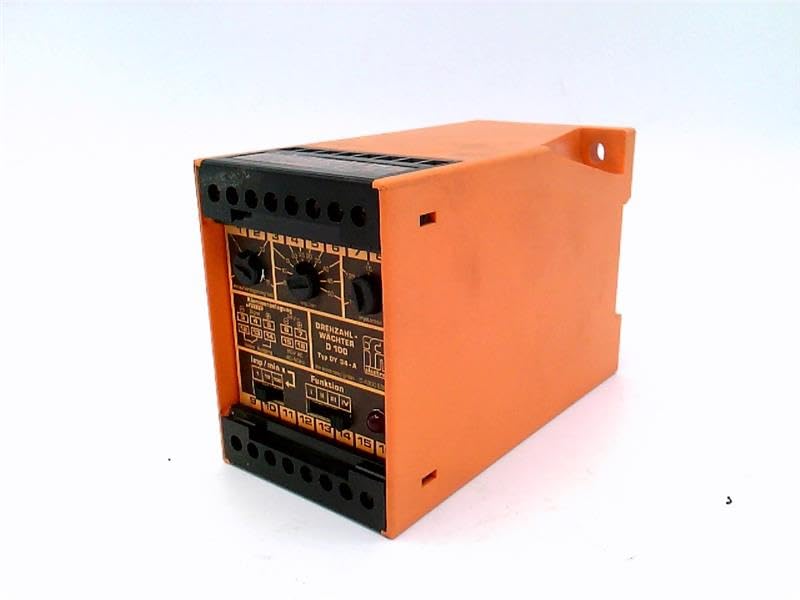
Figura 1: Fronte view of the IFM D100/DY34-A Speed Controller. The image shows the orange casing, black terminal blocks at the top and bottom, and control dials on the front panel labeled for functions like "DREHZAHL-WACHTER D 100" (Rotational Speed Monitor D 100) and "Funktion" (Function).
Os compoñentes clave inclúen:
- Bloques de terminais: For power input, sensor connections, and output signals.
- Diales de control: Used for setting parameters such as speed thresholds and operating modes.
- Luces indicadoras: (If visible/implied) For status indication (e.g., power, output active, error).
4. Configuración
4.1 Montaxe
The controller is typically mounted on a DIN rail within an electrical enclosure. Ensure adequate ventilation around the unit to prevent overheating.
- Securely attach the unit to a standard DIN rail.
- Ensure sufficient clearance for wiring and heat dissipation.
4.2 Cableado
Refer to the wiring diagram provided on the unit or in the detailed technical documentation for specific connections. General wiring steps include:
- Fonte de alimentación: Connect the 110/120 VAC power supply to the designated terminals. Observe correct polarity if applicable.
- Entrada do sensor: Connect the pulse or rotational speed sensor to the input terminals. Ensure the sensor type (e.g., NPN, PNP) is compatible with the controller.
- Conexións de saída: Connect the control output(s) to the driven device (e.g., motor contactor, alarm).
- Conexión a terra: Connect the protective earth ground to the designated ground terminal.
CAUTION: Incorrect wiring can damage the device or connected equipment. Double-check all connections before applying power.
5. Instrucións de funcionamento
5.1 Encendido inicial
- After completing all wiring, apply power to the unit.
- Observe any power indicator lights to confirm the unit is receiving power.
5.2 Configuración de parámetros
The D100/DY34-A features adjustable parameters via its front panel dials. These typically include:
- Set Point (Threshold): Adjust this dial to set the desired speed or pulse rate at which the output will activate or deactivate.
- Hysteresis/Window: (If available) Adjust to prevent rapid switching of the output when the input signal fluctuates around the set point.
- Selector de funcións: Select the operating mode (e.g., overspeed, underspeed, window function).
Consult the detailed technical manual for precise instructions on calibrating and setting each parameter for your specific application.
5.3 Funcionamento
Once configured, the controller continuously monitors the input signal from the connected sensor. When the monitored speed or pulse rate crosses the set threshold, the corresponding output will change state according to the selected function.
6. Mantemento
The IFM D100/DY34-A Speed Controller is designed for reliable operation with minimal maintenance. However, periodic checks are recommended.
- Limpeza: Manteña a unidade limpa e libre de po e residuos. Use un pano suave e seco para a limpeza. Non empregue produtos de limpeza abrasivos nin solventes.
- Conexións: Inspeccione periodicamente as conexións dos cables para comprobar se están ben apertadas e se presentan signos de corrosión.
- Condicións ambientais: Asegúrese de que o ambiente de funcionamento se manteña dentro dos rangos de temperatura e humidade especificados.
WARNING: Disconnect all power before performing any maintenance or cleaning.
7 Solución de problemas
If the speed controller is not functioning as expected, consider the following common issues:
| Problema | Causa posible | Solución |
|---|---|---|
| Sen luz indicadora de enerxía | Sen subministración eléctrica; cableado incorrecto; fusible fundido. | Check power source; verify wiring connections; replace fuse if necessary. |
| Saída sen activación/desactivación | Incorrect set point; faulty sensor; incorrect function setting; wiring error. | Adjust set point; check sensor operation; verify function selector; inspect output wiring. |
| Lecturas erráticas | Sensor interference; loose connections; faulty sensor. | Check sensor cabling for shielding; tighten connections; test or replace sensor. |
If problems persist after attempting these solutions, contact IFM technical support or a qualified service technician.
8. Especificacións
The following specifications are for the IFM D100/DY34-A Speed Controller:
- Modelo: D100/DY34-A
- Vol. De entradatage: 110 / 120 VAC
- Función: Pulse Rate/Rotational Speed Control
- Peso do artigo: 1.84 libras
- Fabricante: EFECTOR (IFM)
- ASIN: B07RRL4XY3
- Primeiro dispoñible: 21 de febreiro de 2025
9. Garantía e soporte
For information regarding warranty coverage, technical support, or service, please refer to the official IFM website or contact your local IFM distributor. Keep your purchase receipt and product serial number handy when contacting support.
Nota: Os termos e condicións específicos da garantía poden variar segundo a rexión e a data de compra.


