Introdución
Thank you for choosing the DEWENWILS Wireless Light Switch Kit. This kit provides a convenient and flexible solution for controlling your lighting fixtures without the need for complex in-wall wiring. It is designed for easy installation and offers a reliable remote control experience for various applications, including ceiling lights, fans, and lamps.
This manual provides detailed instructions for the safe installation, operation, and maintenance of your wireless light switch kit. Please read it thoroughly before installation and keep it for future reference.
Información de seguridade
- Always turn off power at the circuit breaker before installing or servicing the receiver.
- Installation should be performed by a qualified electrician or a person with electrical knowledge.
- Ensure all wire connections are secure to prevent short circuits or electrical hazards.
- Non exceda as capacidades de carga máximas especificadas nas especificacións do produto.
- Este dispositivo está pensado só para uso en interiores.
- Keep the switch and receiver away from water and high humidity.
Contido do paquete
- 1 x Wireless Switch Transmitter
- 1 x Receiver (10A/1000W)
- Mounting Bracket for Switch
- 2 x Parafusos
- 1 x 12V (23A) Alkaline Battery (pre-installed in switch)
- Manual de instrucións
Especificacións
| Característica | Especificación |
|---|---|
| Número de modelo | HRLS11D |
| Modo de operación | OFF-NONE-ON |
| Tipo de contacto | Normalmente aberto |
| Tipo de conector | Sen fíos |
| Marca | DEWENWILS |
| Terminal | SPDT |
| Dimensións do artigo L x W x H | 7.48 x 6.3 x 11.02 polgadas |
| Tipo de circuíto | 2 vías |
| Tipo de actuador | Pulsador |
| Material de contacto | Plástico |
| Clasificación de protección internacional | IP54 |
| Número de postos | 2 |
| Tipo de controlador | Control remoto |
| Método de control | Mando a distancia |
| Protocolo de conectividade | X-10 |
| Cor | Brancaneves |
| Wattage | 1200 vatios |
| Número de unidades | 1 Conta |
| Número de elementos | 1 |
| Fabricante | Dewenwils |
| Peso do elemento | 1 libras |
| Baterías | Necesítanse 1 batería de 12 V (incluídas) |
Instalación
1. Receiver Installation (No In-Wall Wiring Required)
The DEWENWILS receiver is installed between the power source and your lighting fixtures. A neutral wire is required for the receiver to function. This setup allows you to control your lights remotely without affecting your existing electrical system, saving labor and material costs compared to traditional switches.
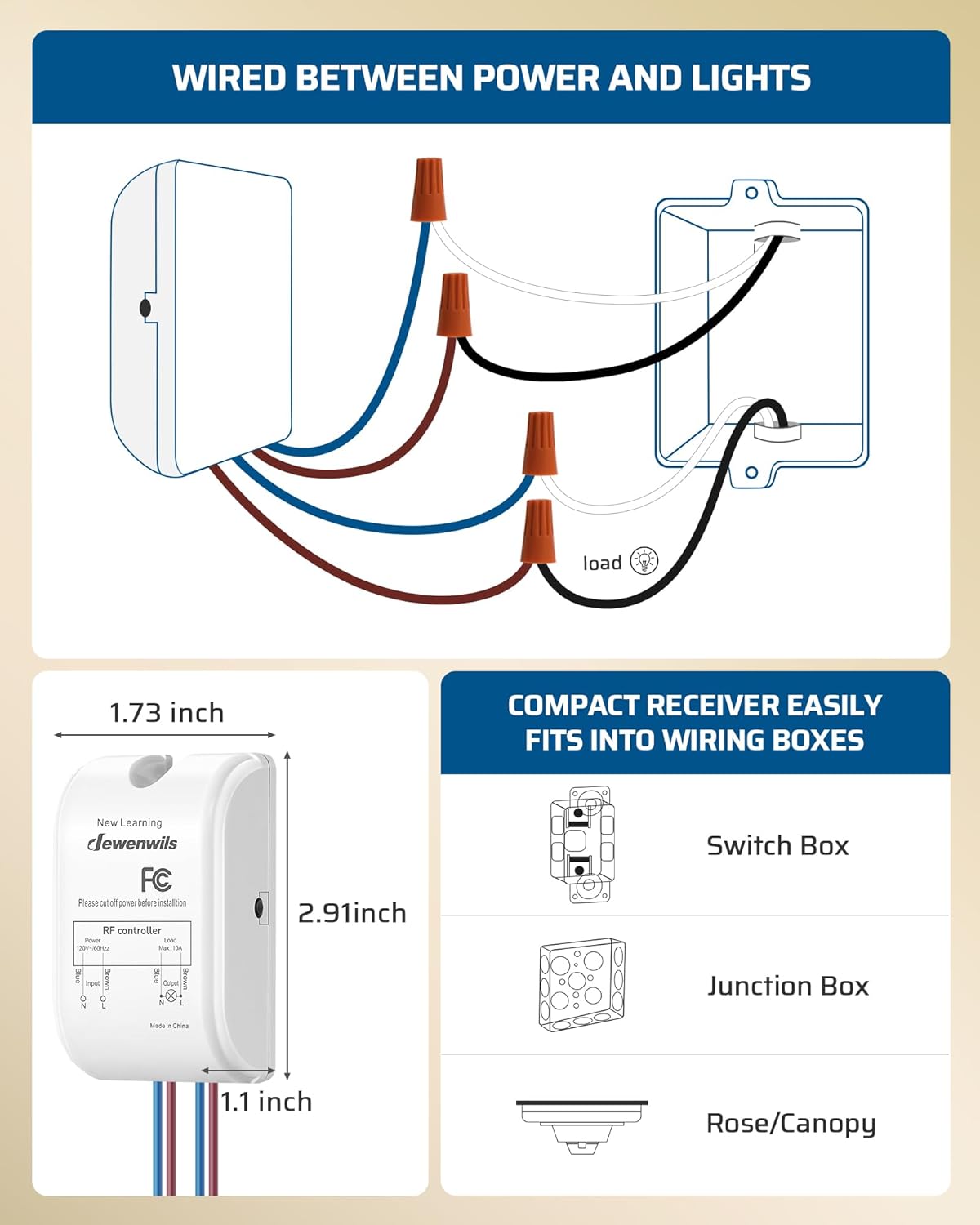
Image: Wiring diagram for the DEWENWILS wireless receiver. The diagram illustrates how to connect the receiver's input (Live, Neutral) and output (Load, Neutral) wires to a power source and a light fixture. The compact receiver is shown fitting into various wiring boxes like a switch box, junction box, or rose/canopy.
2. Wireless Switch Installation
The wireless switch can be mounted anywhere using the provided mounting bracket. It offers flexibility in placement, allowing you to create a switch location where traditional wiring is not feasible or desired. The switch is detachable from its mounting bracket for greater convenience.

Image: A four-step visual guide demonstrating the simple installation of the wireless switch. It shows screwing the mounting bracket to a wall, then attaching the switch to the bracket. The image also highlights the included screws and the location of the 12V (23A) alkaline battery inside the switch.
3. Pairing and Programming
The DEWENWILS transmitter wall switch and receiver are pre-programmed for immediate use. If re-pairing is needed or if you wish to add more switches/receivers, follow the specific pairing instructions provided in the full product manual (not included here). This kit is programmable and expandable, allowing one switch to control multiple receivers or multiple switches to control one receiver (only with the same model).

Image: A diagram titled 'Pair Freely' showing various DEWENWILS wireless products, including switches, receivers, and smart plugs, connected in a network. This illustrates the system's expandability, allowing users to customize their control setup.
Operación
Once installed and paired, simply press the ON or OFF button on the wireless switch to control your connected lights or appliances. The switch provides instant control over your devices.
Rango de control remoto
This remote control light switch kit features a strong RF signal that operates through walls and doors without interference. It does not require a direct line of sight and has an effective range of up to 100 feet in open areas. This allows you to control any light in your home with ease.

Image: A floor plan diagram demonstrating the 'Strong RF Signal' and 'Long Distance Remote Control' capabilities of the DEWENWILS wireless switch. It shows a hand holding the switch, controlling lights across a multi-room layout with a stated range of 100 feet, indicating operation through walls.
Aplicacións versátiles
The DEWENWILS Wireless Light Switch Kit is widely used with multiple appliances. One switch can control a group of lights (up to 1000W tungsten, 600W fluorescent, or 200W LED). It is ideal for remotely turning on/off indoor lighting fixtures, ceiling lights, plug-in pendants, lamps, hard-to-reach lights, and other electric appliances. This system is particularly convenient for individuals with limited mobility, such as the elderly, pregnant women, or those with disabilities.

Imaxe: Unha exposición de colaxeasing various applications for the DEWENWILS wireless light switch kit. It displays a ceiling fan, recessed lighting, a wall sconce, and a chandelier, all controllable by the wireless switch and receiver unit shown in the center.
Mantemento
- Limpeza: Wipe the switch and receiver with a soft, dry cloth. Do not use harsh chemicals or abrasive cleaners.
- Substitución da batería: The wireless switch uses a 12V (23A) alkaline battery. Replace the battery when the switch's performance degrades or it stops responding. To replace, carefully open the switch casing, remove the old battery, and insert a new one with the correct polarity.
- Condicións ambientais: Ensure the device is used within its specified operating temperature and humidity ranges to maintain optimal performance and longevity.
Resolución de problemas
- Light not responding:
- Check if the power to the receiver is on at the circuit breaker.
- Ensure the receiver is correctly wired (Live, Neutral, Load connections).
- Verify the battery in the wireless switch is functional and correctly inserted. Replace if necessary.
- Re-pair the switch and receiver according to the pairing instructions.
- Reduced RF range or intermittent control:
- Ensure there are no major metal obstructions between the switch and the receiver.
- Check for strong interference sources (e.g., other wireless devices, large electrical appliances) nearby.
- The 100ft range is for open areas; actual range may vary indoors due to walls and other structures.
- Switch feels loose on the wall:
- Ensure the mounting bracket is securely fastened to the wall.
- Check that the switch is properly snapped onto the mounting bracket.
Garantía e Soporte
DEWENWILS products are designed for quality and reliability. For specific warranty information, please refer to the warranty card included with your product or visit the official DEWENWILS website. If you encounter any issues or require technical assistance, please contact DEWENWILS customer support through their official channels.


