1. Introdución
Thank you for choosing the Soundmaster Eliteline IR300SI Internet DAB+ FM Radio. This device offers a wide range of audio entertainment options, including Internet Radio, DAB+ digital radio, FM radio, Bluetooth connectivity, and USB playback. It also features Amazon Alexa compatibility for voice control and can be managed via the UNDOK app. This manual provides essential information for setting up, operating, and maintaining your radio.
2. Información de seguridade
- Lea todas as instrucións atentamente antes do uso e gárdeas para futuras consultas.
- Non expoñas o dispositivo á choiva, á humidade nin a temperaturas extremas.
- Asegúrese de que haxa unha ventilación axeitada; non obstrua ningunha das aberturas de ventilación.
- Use só o adaptador de alimentación que se proporciona coa unidade.
- Non intente abrir nin reparar a unidade vostede mesmo. Encargue calquera mantemento a persoal cualificado.
- Manteña o dispositivo lonxe de campos magnéticos fortes.
3. Contido do paquete
Comprobe que estean presentes todos os elementos:
- Soundmaster Eliteline IR300SI Internet DAB+ FM Radio
- Adaptador de alimentación
- Control remoto
- Manual de usuario (este documento)
- Installation material (e.g., antenna, if separate)
4. Produto rematadoview
Familiarize yourself with the various parts and controls of your Soundmaster IR300SI radio.

Figura 4.1: Ángulo frontal view of the Soundmaster IR300SI radio, showing the display, speakers, and control buttons.
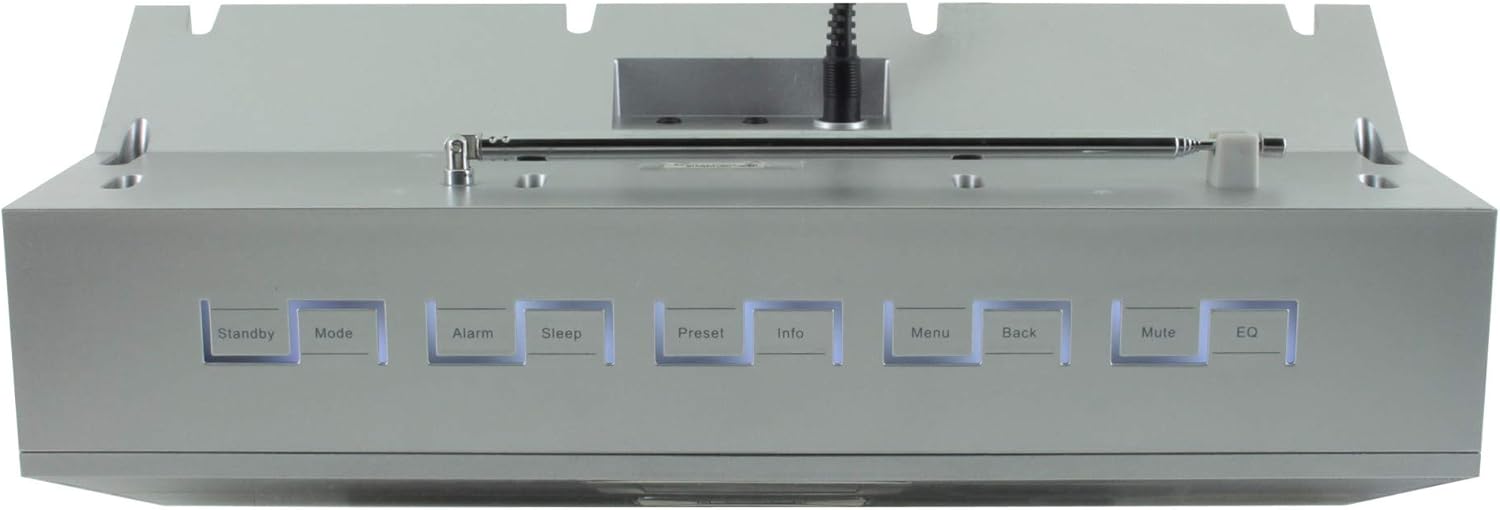
Figura 4.2: Arriba view of the Soundmaster IR300SI radio, highlighting the control buttons: Standby, Mode, Alarm, Sleep, Preset, Info, Menu, Back, Mute, and EQ.
Panel frontal
- 2.4" / 6 cm TFT Color Display: Shows station information, menus, and time.
- Relatores: Stereo sound output.
- Dial/botóns de control: Para a navegación e a selección.
Controis do panel superior
- Modo de espera: Encendido/apagado.
- Modo: Switch between Internet Radio, DAB+, FM, Bluetooth, USB, AUX.
- Alarma: Configurar e xestionar alarmas.
- Durmir: Activate sleep timer.
- Predefinido: Access and save favorite stations.
- Información: Display additional information about the current broadcast.
- Menú: Access system settings and options.
- Volver: Volver ao menú anterior.
- Silenciar: Activar/silenciar o son.
- EQ: Seleccione presets do ecualizador.
Rear/Side Panel Connections
- Entrada de enerxía: Conecte o adaptador de alimentación subministrado.
- Antena telescópica: For DAB+ and FM reception.
- Porto USB: For MP3 playback from USB storage devices.
- 3.5mm Aux-In Port: Conecta fontes de son externas.
- Jack para auriculares: Para escoita privada.
5. Configuración
5.1 Conexión de alimentación
- Connect the power adapter to the DC input on the rear of the radio.
- Enchufe o adaptador de alimentación a unha toma de corrente.
- Preme o Modo de espera button on the top panel or remote control to turn on the radio.
5.2 Configuración da antena
Estenda a antena telescópica completamente para unha recepción óptima de radio DAB+ e FM.
5.3 Initial Wi-Fi Network Setup
Upon first power-on, the radio will guide you through the initial setup wizard:
- Select your preferred language using the control dial and confirm.
- A radio buscará as redes Wi-Fi dispoñibles.
- Seleccione a súa rede na lista.
- Enter your Wi-Fi password using the on-screen keyboard and control dial. Confirm to connect.
- Once connected, the radio will display the main menu.
6. Instrucións de funcionamento
Usa o Modo button to switch between different audio sources.
6.1 Radio por Internet
- Preme Modo to select "Internet Radio".
- Navigate through categories (e.g., Location, Genre, Popular) using the control dial.
- Selecciona unha emisora para comezar a reprodución.
- Para gardar unha emisora como predefinida, manteña premido o botón Predefinido button, then select a preset number.
Radio DAB+ 6.2
- Preme Modo to select "DAB+ Radio".
- A radio buscará automaticamente as emisoras DAB+ dispoñibles.
- Use the control dial to browse and select stations.
- Mantén premido Predefinido to save a station.
6.3 Radio FM
- Preme Modo to select "FM Radio".
- A radio buscará automaticamente as emisoras de FM dispoñibles.
- Use the control dial to browse and select stations.
- Mantén premido Predefinido to save a station.
6.4 Conectividade Bluetooth
- Preme Modo to select "Bluetooth". The radio will enter pairing mode.
- No teu dispositivo móbil (teléfono intelixente, tableta), activa o Bluetooth e busca os dispositivos dispoñibles.
- Select "Soundmaster IR300SI" from the list to pair.
- Once connected, you can stream audio from your device to the radio.
Reprodución por USB 6.5
- Insert a USB storage device (formatted as FAT32) containing MP3 files no porto USB.
- Preme Modo to select "USB".
- Navigate through folders and select tracks using the control dial.
6.6 Entrada AUX
- Connect an external audio device (e.g., MP3 player) to the 3.5mm Aux-In port using an audio cable (not supplied).
- Preme Modo to select "AUX".
- Controla a reprodución desde o teu dispositivo externo.
6.7 Alarms and Sleep Timer
- Alarmas: Preme o Alarma button to set up to two alarms. Configure time, source (buzzer, radio), and frequency (daily, weekdays, weekends).
- Temporizador de sono: Preme o Durmir button to set a countdown timer (e.g., 15, 30, 60 minutes) after which the radio will automatically turn off.
6.8 Ecualizador (EQ)
Preme o EQ button to cycle through pre-programmed sound settings (e.g., Normal, Jazz, Rock, Classical, Pop, News) to optimize audio output for different content.
6.9 Amazon Alexa and UNDOK App Control
- Amazon Alexa: The radio is compatible with Amazon Alexa. Follow the instructions in the Alexa app to link your Soundmaster IR300SI for voice control functionalities.
- UNDOK App: Download the UNDOK app from your mobile device's app store. Ensure your mobile device and the radio are on the same Wi-Fi network. The app allows you to control the radio, browse stations, and manage settings remotely.
7. Mantemento
7.1 Limpeza
- Desconecte sempre a radio da toma de corrente antes de limpala.
- Use un pano suave e seco para limpar as superficies exteriores.
- Non empregues produtos de limpeza abrasivos, ceras ou disolventes, xa que poden danar o acabado.
7.2 Almacenamento
If you plan to store the radio for an extended period, unplug it from the power source and store it in a cool, dry place, away from direct sunlight and extreme temperatures.
8 Solución de problemas
Se tes algún problema, consulta os seguintes problemas e solucións comúns:
| Problema | Causa posible | Solución |
|---|---|---|
| Sen poder | O adaptador de corrente non está conectado ou a toma de corrente está defectuosa. | Comproba as conexións de alimentación. Proba cunha toma de corrente diferente. |
| Sen son | Volume too low, muted, or incorrect source selected. | Increase volume. Press Silenciar. Ensure correct mode (Internet Radio, DAB+, etc.) is selected. |
| Non se pode conectar á wifi | Contrasinal incorrecto, sinal débil ou problema co enrutador. | Verify password. Move radio closer to router. Restart router. |
| Mala recepción DAB+/FM | Antena non estendida ou sinal deficiente na zona. | Fully extend the telescopic antenna. Reposition the radio. |
| O emparejamento por Bluetooth falla | Radio not in pairing mode, or device too far. | Ensure radio is in Bluetooth mode. Move devices closer. Restart Bluetooth on both devices. |
9. Especificacións
| Característica | Especificación |
|---|---|
| Nome do modelo | IR300SI |
| Marca | Mestre de son |
| Tecnoloxía de conectividade | Bluetooth, USB, Wi-Fi |
| Características especiais | Integrated Clock, Internet Radio, DAB+, FM, Bluetooth, USB MP3 Playback, AUX-In, Headphone Jack, 2 Alarms with Weekend Function, Sleep Timer, Equalizer, Amazon Alexa Compatible, UNDOK App Control, Network Music Player (DLNA) |
| Modo de saída de audio | Estéreo |
| Potencia máxima de saída do altofalante | 2 x 10 vatios RMS |
| Mostrar | 2.4" / 6 cm TFT Color Display |
| Método de control | Remote Control, UNDOK App, On-device Buttons |
| Fonte de enerxía | AC Powered (100 Volts input) |
| Dimensións do produto (L x W x H) | 17 x 18 x 15 cm |
| Peso do elemento | 2.3 quilogramos |
| Cor | Prata |
| Dispositivos compatibles | Personal Computer, Television, Tablet, Smartphone, Laptop |
| Tipo de montaxe | Mesa |
10. Garantía e soporte
The Soundmaster Eliteline IR300SI comes with a spare parts availability period of 1 year from the date of purchase. For technical support, warranty claims, or further assistance, please contact your retailer or the Soundmaster customer service department. Refer to the contact information provided with your purchase documentation.


