1. Introdución
This manual provides detailed instructions for the installation, operation, and maintenance of your Antec NX210 Mid-Tower ATX Computer Cabinet. Please read this manual thoroughly before beginning assembly or use to ensure proper functionality and safety.
The Antec NX210 is designed to accommodate ATX, Micro-ATX, and ITX motherboards, offering ample space for components and efficient cooling with pre-installed ARGB fans.
2. Información de seguridade
Observe as seguintes precaucións de seguridade durante a instalación e o funcionamento:
- Always disconnect the power supply from the wall outlet before installing or removing any components to prevent electric shock.
- Handle components with care to avoid damage from static electricity. Consider using an anti-static wrist strap.
- Keep the cabinet away from direct sunlight, heat sources, and moisture.
- Ensure proper ventilation to prevent overheating. Do not block air vents.
- Manteña as pezas e ferramentas pequenas fóra do alcance dos nenos.
3. Contido do paquete
Verifica que todos os elementos estean presentes no paquete:
- Antec NX210 Mid-Tower ATX Computer Cabinet
- 4 x 120mm ARGB Fans (3 pre-installed in front, 1 pre-installed in rear)
- Accessory Box (screws, cable ties, etc.)
- Manual de usuario (este documento)
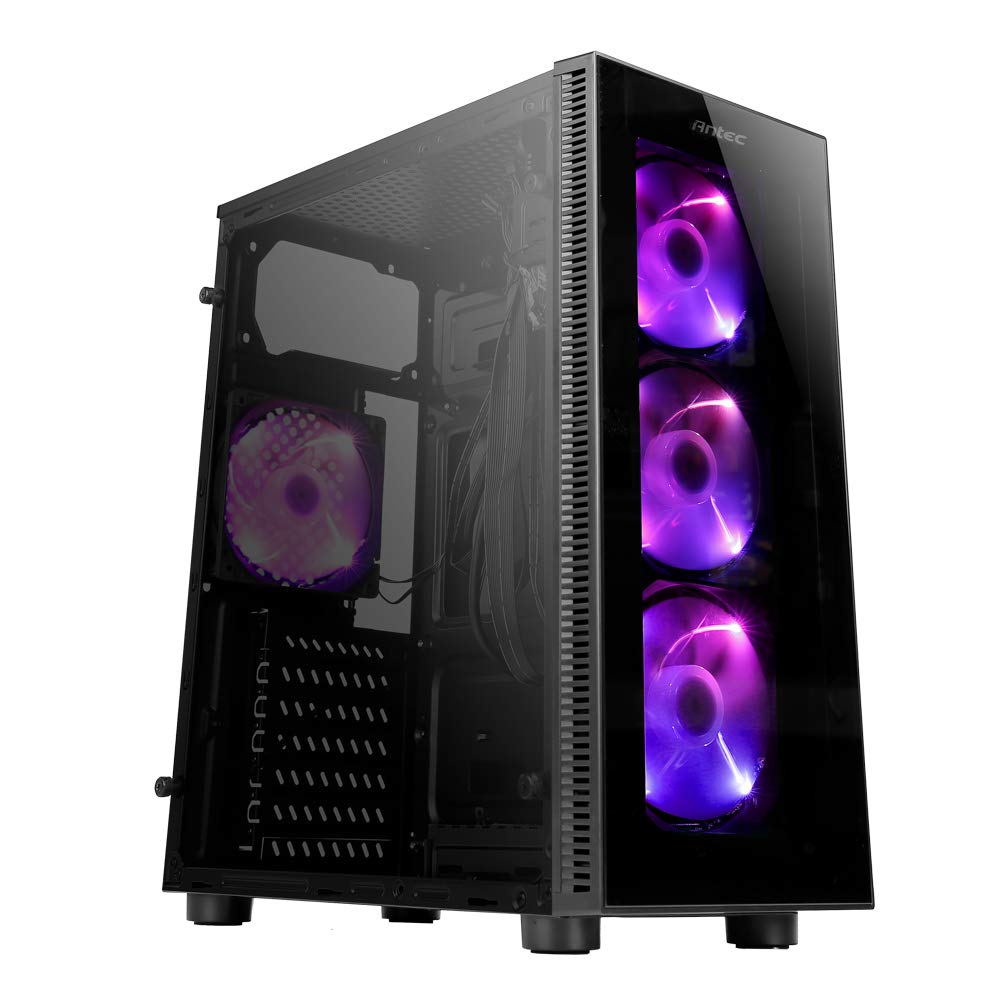
Image: Antec NX210 Mid-Tower ATX Computer Cabinet, showcasing its tempered glass side panel and front ARGB fans.
4. Product Features and Layout
4.1 Externo Views

Imaxe: Anverso e reverso views of the Antec NX210 cabinet, highlighting the tempered glass front panel with ARGB fans and the rear I/O panel layout.

Image: Left side (tempered glass) and right side (solid panel) views of the Antec NX210 cabinet.
4.2 Top I/O Panel
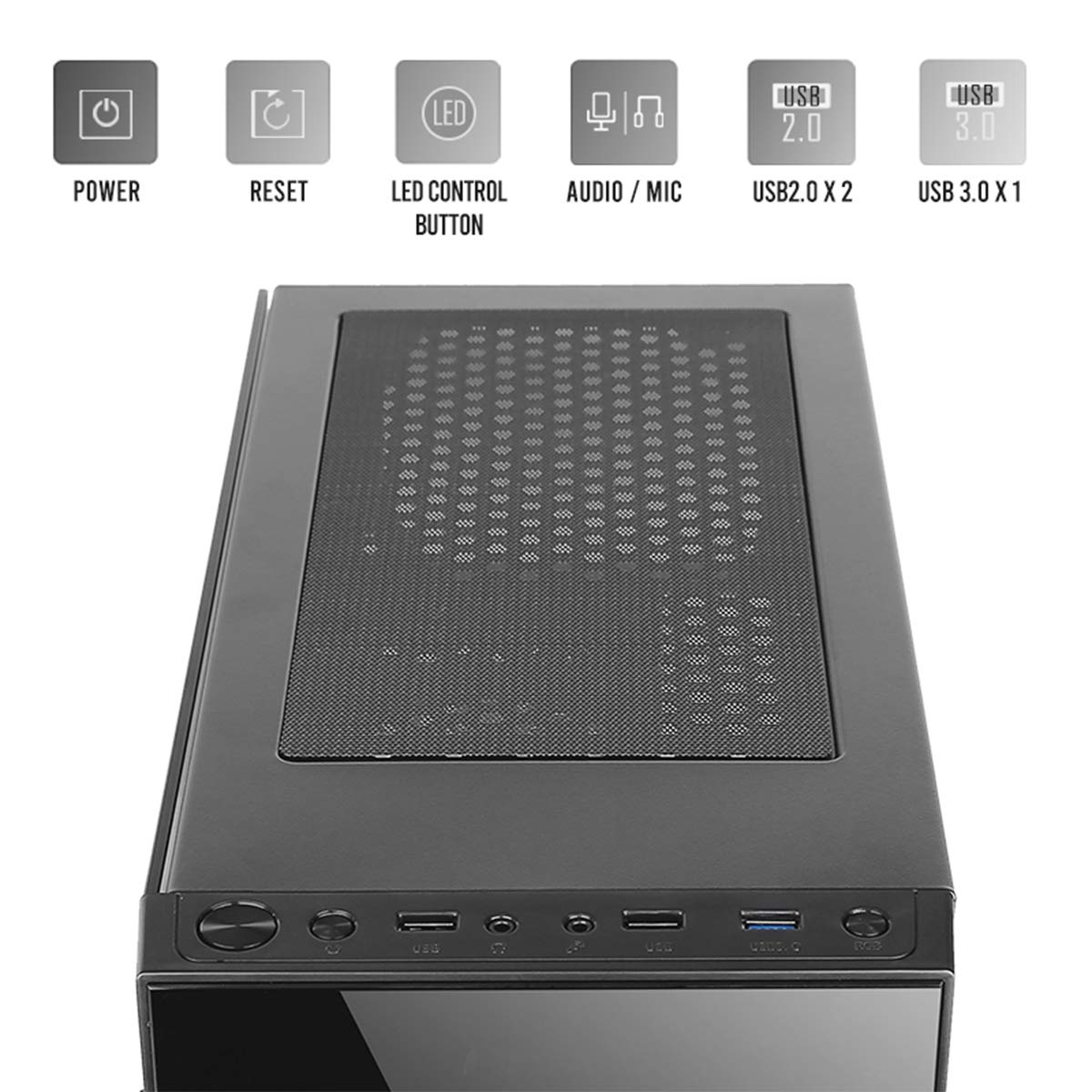
Image: Close-up of the top I/O panel, showing the Power button, Reset button, LED Control button, Audio/Mic jacks, 2x USB 2.0 ports, and 1x USB 3.0 port.
- Botón de encendido: Para activar ou desactivar o sistema.
- Botón de reinicio: Para reiniciar o sistema.
- Botón de control LED: To cycle through ARGB lighting effects for the pre-installed fans.
- Audio / Mic Jacks: Para conectar auriculares e micrófonos.
- Portos USB 2.0 (x2): Para conectar dispositivos USB 2.0.
- Porto USB 3.0 (x1): For connecting USB 3.0 devices, offering faster data transfer speeds.
4.3 Internal Layout and Component Support

Image: Diagram illustrating the internal layout of the Antec NX210, indicating locations for motherboard, SSDs, HDDs, GPU, CPU cooler, and PSU.
- Soporte para placa base: Up to ATX (also supports Micro-ATX, ITX).
- 2.5" SSD Support: 3 drive bays.
- 3.5" HDD Support: 1 drive bay.
- Compatibilidade con tarxetas gráficas: Up to 310mm in length.
- CPU Cooler Support: Up to 155mm in height.
- Soporte PSU: Up to 220mm in length (top-mounted).
4.4 Sistema de refrixeración

Image: Diagram showing fan and radiator mounting options for the Antec NX210, including pre-installed fans.
- Ventiladores preinstalados: 4 x 120mm ARGB fans (3 in front, 1 in rear).
- Front Fan Support: 3 x 120 mm.
- Rear Fan Support: 1 x 120 mm.
- Soporte de radiador: Front up to 240mm, Rear up to 120mm.
5. Configuración e instalación
Follow these general steps for installing components into your Antec NX210 cabinet. Specific component manuals should be consulted for detailed installation instructions.
5.1 Preparación do gabinete
- Place the cabinet on a stable, flat surface.
- Retire o panel lateral de vidro temperado desenroscando os parafusos de cabeza moleteada da parte traseira e tirando con coidado do panel.
- Remove the right-side metal panel by unscrewing the thumbscrews at the rear.
5.2 Instalación da placa base
- Install the I/O shield into the rear opening of the cabinet.
- Align your motherboard with the standoffs inside the cabinet. Ensure the standoffs match your motherboard's form factor (ATX, Micro-ATX, ITX).
- Fixe a placa base cos parafusos proporcionados.
5.3 Instalación da Unidade de Alimentación (PSU).
- The Antec NX210 supports a top-mounted ATX PS2 power supply.
- Slide the PSU into the designated top compartment from the rear of the cabinet.
- Secure the PSU with screws from the rear of the cabinet.
5.4 Instalación da unidade de almacenamento (HDD/SSD)
- Disco duro de 3.5 polgadas: Locate the 3.5" drive bay. Slide the HDD into the bay and secure it with screws.
- SSD de 2.5 polgadas: Locate the 2.5" SSD mounting points behind the motherboard tray. Secure the SSDs with screws.
5.5 Instalación da tarxeta gráfica (GPU)
- Remove the necessary PCIe slot covers from the rear of the cabinet.
- Insert the graphics card into the appropriate PCIe slot on the motherboard.
- Fixa a tarxeta gráfica con parafusos.
5.6 Xestión de cables
Utiliza os recortes de cableado e os puntos de suxeición que hai detrás da bandexa da placa base para xestionar os cables. Isto mellora a circulación do aire e a estética.
5.7 Connecting Front Panel Cables
Connect the front panel cables (Power SW, Reset SW, HDD LED, Power LED, USB 2.0, USB 3.0, HD Audio) to the corresponding headers on your motherboard. Refer to your motherboard manual for exact pin layouts.
6. Instrucións de funcionamento
6.1 Acendido
After all components are installed and cables connected, close both side panels. Connect the power cable to the PSU and a wall outlet. Press the Power button on the top I/O panel to turn on your system.
6.2 Control do ventilador ARGB
The pre-installed ARGB fans are connected to an internal controller. Use the Botón de control LED on the top I/O panel to cycle through various lighting modes and effects. The fans will display a default lighting effect upon initial power-up.
7. Mantemento
Regular maintenance helps ensure optimal performance and longevity of your computer cabinet.
- Filtros de po: The Antec NX210 features a dust filter on the top panel. Regularly remove and clean this filter to prevent dust buildup and maintain good airflow.
- Limpeza de interiores: Periodically open the side panels and use compressed air to remove dust from internal components and fan blades. Ensure the system is powered off and unplugged before cleaning.
- Limpeza exterior: Limpe as superficies exteriores cun suave, damp pano. Evite produtos de limpeza abrasivos ou solventes.
8 Solución de problemas
Se tes problemas, ten en conta os seguintes pasos básicos para a súa resolución:
- Sen enerxía:
- Asegúrate de que a fonte de alimentación estea conectada correctamente á toma de corrente e que o interruptor de alimentación da fonte de alimentación estea na posición "ON".
- Verify that the front panel Power button cable is correctly connected to the motherboard header.
- Check all internal power connections (24-pin ATX, 8-pin CPU, PCIe power for GPU).
- Fans Not Spinning / ARGB Not Working:
- Asegúrate de que todos os cables de alimentación do ventilador estean conectados correctamente á placa base ou ao controlador do ventilador.
- Verify ARGB cables are correctly connected to the internal controller and the controller is powered.
- Try pressing the LED Control Button on the top I/O panel to cycle effects.
- Portos USB non funcionan:
- Check that the USB 2.0 and USB 3.0 front panel cables are correctly connected to the corresponding headers on your motherboard.
For more complex issues, consult the manuals for your individual components or seek professional assistance.
9. Especificacións

Image: Diagram showing the physical dimensions of the Antec NX210 cabinet.
| Característica | Detalle |
|---|---|
| Modelo | NX210 |
| Tipo de caso | Torre media |
| Dimensións (L x W x H) | 43.99 x 38.99 x 21.01 cm (aprox. 395 x 210 x 445 mm) |
| Material | SPCC, vidro temperado |
| Soporte de placa base | ATX, Micro-ATX, ITX |
| Ranuras de expansión | 7 |
| Unidade Bays | 1 discos duros de 3.5 polgadas, 3 unidades SSD de 2.5 polgadas |
| Portos de E / S dianteiros | Power, Reset, LED Control Button, MIC/Audio, 2 x USB 2.0, 1 x USB 3.0 |
| Ventiladores preinstalados | 4 x 120mm ARGB fans (3 front, 1 rear) |
| Soporte do ventilador (frontal) | 3 x 120 mm |
| Soporte do ventilador (traseiro) | 1 x 120 mm |
| Soporte do radiador (frontal) | Ata 240 mm |
| Soporte do radiador (traseiro) | Ata 120 mm |
| Lonxitude máxima da GPU | 310 mm |
| Altura máxima do refrigerador da CPU | 155 mm |
| Soporte PSU | ATX PS2 (Top Mounted), Max length 220mm |
| Filtro de po | Arriba |
| Peso do elemento | 4.8 kg |
10. Garantía e soporte
The Antec NX210 Computer Cabinet comes with a 1 ano de garantía desde a data de compra. Conserve o comprobante de compra para reclamacións de garantía.
For technical support or warranty inquiries, please contact Antec customer service or your local distributor.
Fabricante: Antec Inc. 8F, No 107, Jhouzih St, Neihu District, Taipei City 114, Taiwan
Importador (India): Acro Engineering Company, Khasra No 522/1, Village Jonapur, Delhi - 110 030
Podes atopar máis información e recursos de apoio na páxina oficial Antec Store on Amazon.


