1. Introdución
This manual provides comprehensive instructions for the DCU TECNOLOGIC Universal Remote Control, Model 30901010. This remote is designed to control a wide range of LCD/LED televisions, including both newer and older models from various brands. It features dedicated buttons for popular streaming services like Netflix and YouTube.
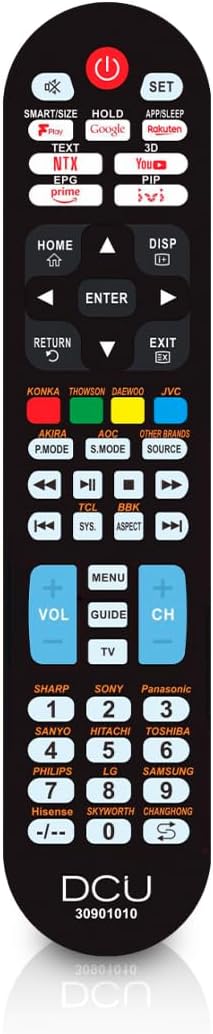
Image: The DCU TECNOLOGIC Universal Remote Control, black in color, showing its full button layout.
2. Configuración e emparellamento
To set up your universal remote control with your television, follow these steps:
- Ensure your television is turned on.
- Point the universal remote control towards your television from a distance of less than 1 meter (approximately 3 feet).
- Manteña premido o SET botón do mando a distancia.
- Continúe sostendo o SET button until the volume indicator appears on your TV screen.
- Once the volume indicator appears, release the SET botón inmediatamente.
The remote will now search for compatible codes for your TV. This process can take anywhere from 30 seconds to several minutes as it cycles through codes for various brands. Once the volume indicator appears, the remote has successfully found a compatible code and is paired with your TV.

Image: A visual representation of the remote control next to a television, illustrating the easy setup process.
3. Instrucións de funcionamento
The DCU TECNOLOGIC Universal Remote Control provides all commonly used functions and menu buttons for your TV. Familiarize yourself with the button layout for optimal use.
Special Function Buttons: Netflix and YouTube
This remote includes dedicated buttons for direct access to Netflix and YouTube. Please note that the functionality of these buttons depends on whether the original remote control for your TV model had similar features. If your original TV remote did not have a Netflix or YouTube button, the universal remote may not be able to create this new functionality, and these buttons might not work.

Image: The universal remote control with highlighted Netflix and YouTube buttons, indicating their presence for quick access.
Marcas compatibles
This universal remote control is compatible with TVs from almost all brands and models manufactured before 2021. Main compatible brands include, but are not limited to:
- AKIRA
- ANSONICO
- AOC
- BBK
- CHANGHONG
- DAEWOO
- DMTECH
- ELENBREG
- Haier
- Hisense
- HITACHI
- JVC
- KONKA
- LG
- NPG
- OPENBOX
- Panasonic
- PHILIPS
- PRIMA
- SAMSUNG
- SANIO
- SELECLINE
- SHARP
- SKYWORTH
- SONY
- SUPRA
- TCL
- TDSYSTEMS
- THOMSON
- TOSHIBA

Image: A visual list of major TV brands compatible with the DCU TECNOLOGIC universal remote control.
4. Mantemento
To ensure the longevity and optimal performance of your universal remote control, consider the following maintenance tips:
- Substitución da batería: The remote requires 2 x AAA batteries (not included). Replace batteries when the remote's response becomes sluggish or it stops functioning. Ensure correct polarity when inserting new batteries.
- Limpeza: Wipe the remote with a soft, dry cloth. Avoid using liquid cleaners or abrasive materials, as they may damage the surface or internal components.
- Almacenamento: Garde o mando a distancia nun lugar fresco e seco, lonxe da luz solar directa e de temperaturas extremas.
- Manexo: Avoid dropping the remote or subjecting it to strong impacts, which can damage its internal circuitry.
5 Solución de problemas
| Problema | Causa posible | Solución |
|---|---|---|
| O mando a distancia non responde. | As pilas están gastadas ou inseridas incorrectamente. | Replace batteries with new 2 x AAA batteries, ensuring correct polarity. |
| Remote does not control the TV after setup. | Pairing process was not completed successfully or interrupted. | Repeat the setup and pairing process (Section 2). Ensure you release the SET button immediately when the volume indicator appears. |
| Netflix/YouTube buttons do not work. | Original TV remote did not have these specific buttons, or TV does not support direct app launch via IR. | This is expected behavior if your TV's original remote did not feature these buttons. Use your TV's smart menu to access these applications. |
| Limited functionality after pairing. | The remote found a basic code, but not the most comprehensive one for your TV model. | Repeat the setup process. The remote will continue searching for codes. It may take several attempts to find the optimal code. |
6. Especificacións

Image: A visual summary of the remote control's key characteristics and specifications.
- Nome do modelo: 30901010
- Marca: DCU TECNOLÓXICO
- Tecnoloxía de conectividade: Infravermello
- Tipo de controlador: Control de botón
- Rango máximo: 8 metros
- Requisitos de enerxía: 2 pilas AAA (non incluídas)
- Número máximo de dispositivos compatibles: 1
- Dimensións do produto (L x W x H): 40 x 310 x 160 milímetros
- Dimensións do paquete (L x W x H): 22.7 x 5 x 2.4 centímetros
- Peso do paquete: 0.14 quilogramos
- Cor: Universal (Black)
- Ano modelo: 2023
- Data de primeira dispoñibilidade: 25 de xullo de 2019
7. Garantía e soporte
The DCU TECNOLOGIC Universal Remote Control comes with a 3 ano de garantía from the date of purchase, covering manufacturing defects. For technical assistance or warranty claims, please contact DCU TECNOLOGIC customer support through their official channels.


Image: Icons representing 3-year warranty and technical service availability.
For further information or to find contact details, please visit the official DCU TECNOLOGIC websitio web ou consulte a embalaxe do produto.