1. Introdución
This manual provides detailed instructions for the safe and efficient operation of your Auna Sarah Ann multi-functional audio system. Please read this manual thoroughly before using the device and retain it for future reference.
The Auna Sarah Ann is a versatile audio system featuring a 3-speed turntable, CD player, cassette player, DAB+ and FM radio, Bluetooth connectivity, USB and SD card playback, AUX input, and headphone output. It also includes integrated stereo speakers and a remote control for convenient operation.
2. Instrucións de seguridade
- Lea atentamente todas as instrucións antes do uso.
- Manteña a unidade afastada de fontes de calor, luz solar directa, humidade, auga e outros líquidos.
- Non utilice a unidade se estivo exposta á auga, á humidade ou a calquera outro líquido para evitar descargas eléctricas, explosións e/ou feridas e danos á unidade.
- Non utilice a unidade se caeu ou se estragou de algún xeito.
- As reparacións dos equipos eléctricos só deben ser realizadas por un electricista cualificado. As reparacións inadecuadas poden poñer o usuario en risco grave.
- Non use a unidade coas mans molladas.
- Non introduza obxectos en ningunha abertura.
- Manteña a unidade libre de po, pelusa, cabelos, etc.
- Non use esta unidade para outra cousa que non sexa o seu uso previsto.
- Manteña a unidade fóra do alcance dos nenos.
3. Contido do paquete
- Auna Sarah Ann Multi-functional Audio System
- Control remoto
- Adaptador de 45 rpm
- Manual de usuario (este documento)
4. Produto rematadoview
The Auna Sarah Ann combines classic audio playback with modern connectivity options.

Imaxe 4.1: Fronte view of the Auna Sarah Ann audio system, displaying the turntable, control panel, CD tray, and integrated speakers. A remote control and a smartphone connected via Bluetooth are also shown.
4.1 Características principais
- Tocadiscos de 3 velocidades: Supports 33 1/3, 45, and 78 RPM records. Includes a 45 RPM adapter.
- Altofalantes estéreo integrados: Ofrece unha saída de audio nítida.
- Conectividade Bluetooth: Transmite audio sen fíos desde dispositivos compatibles.
- Reproductor de CD: For playback of audio CDs.
- Reprodutor de casete: For playback of audio cassettes.
- Radio DAB+ e FM: Digital and analog radio reception.
- Ranuras para tarxetas USB e SD: For MP3 playback and recording.
- Entrada AUX: Connect external audio sources via 3.5mm jack.
- Saída de auriculares: For private listening via 3.5mm jack.
- Saída de liña RCA: Conectar a un externo amplevantadores ou altofalantes alimentados.
- Control remoto: Operación cómoda desde a distancia.
- Función de parada automática: Protects vinyl records by stopping the turntable when a record finishes.
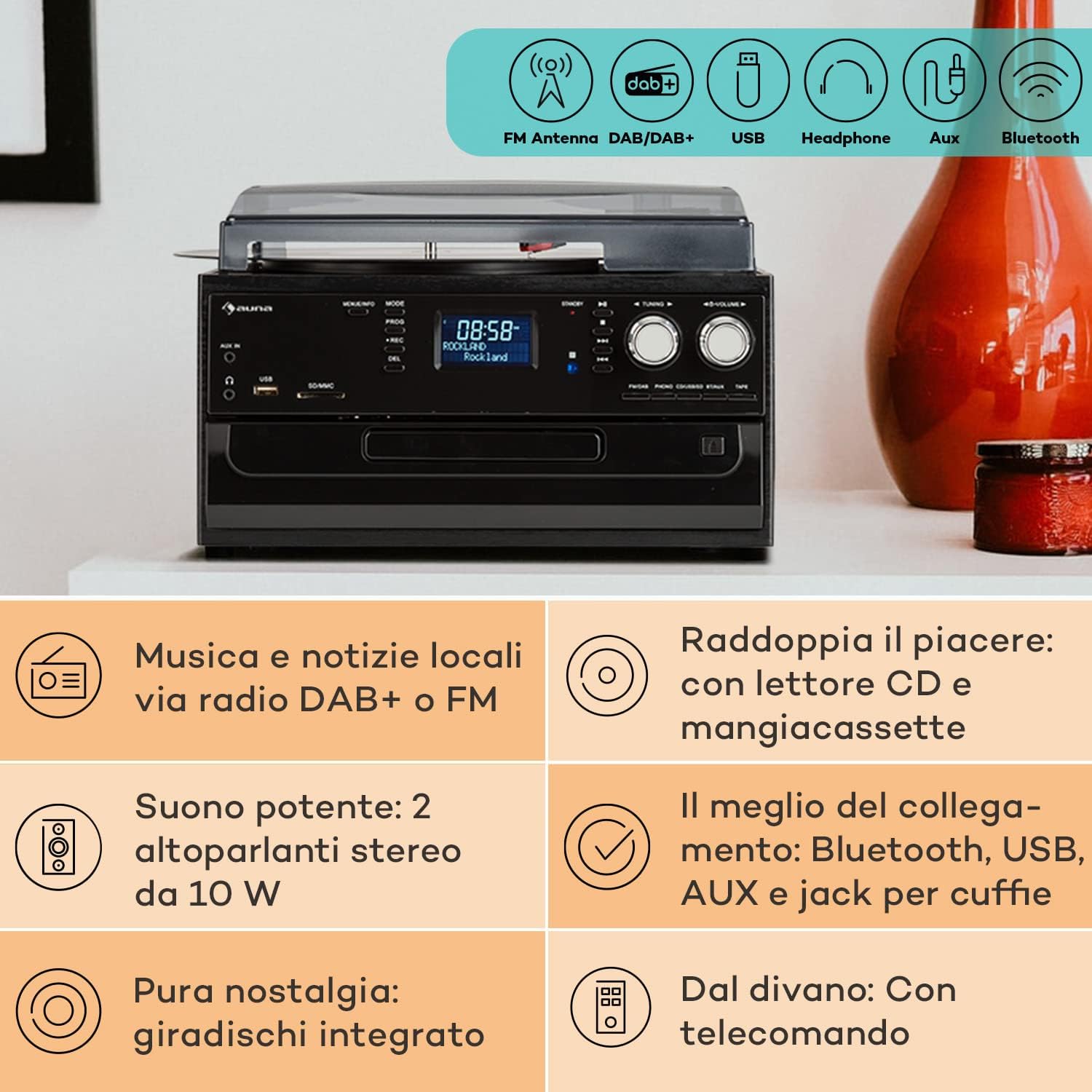
Image 4.2: Visual representation of the various connectivity options available on the Auna Sarah Ann, including FM/DAB+ radio, USB, headphone jack, AUX input, and Bluetooth.
5. Configuración
5.1 Desembalaxe e colocación
- Retire coidadosamente a unidade da súa embalaxe.
- Place the unit on a stable, level surface, away from direct sunlight, heat sources, and excessive dust or moisture.
- Asegúrese de que haxa unha ventilación axeitada arredor da unidade.
5.2 Conexión de alimentación
Connect the power cable to the AC inlet on the back of the unit and then to a standard 230V, 50Hz wall outlet.
5.3 Instalación da batería do control remoto
The remote control requires 2 x AAA batteries (not included). Open the battery compartment on the back of the remote control, insert the batteries according to the polarity indicators, and close the compartment.
5.4 Conexión de antena
The unit features an integrated FM antenna. For optimal DAB+ and FM radio reception, ensure the unit is placed in an area with good signal strength. Adjust the unit's position if reception is poor.
5.5 Connecting External Devices (Optional)
- Auriculares: Conecta uns auriculares de 3.5 mm á toma de auriculares do panel frontal.
- External Audio Source (AUX IN): Connect an external audio device (e.g., MP3 player, smartphone) to the AUX IN jack on the front panel using a 3.5mm audio cable.
- Externo Amplifier/Speakers (RCA LINE OUT): Connect the RCA LINE OUT jacks on the rear of the unit to the audio input of an external ampamplificador ou altofalantes amplificados mediante un cable RCA.
6. Instrucións de funcionamento
6.1 Funcionamento básico
- Preme o POTENCIA botón para encender ou apagar a unidade.
- Usa o MODO button on the unit or remote control to select the desired function (PHONO, CD, TAPE, USB, SD, AUX, FM, DAB, Bluetooth).
- Axuste o volume empregando o VOLUME knob on the unit or the VOL +/- botóns do control remoto.
6.2 Turntable Operation (PHONO)

Imaxe 6.1: Detallada view of the turntable section, showing the platter, tonearm, and a vinyl record in place, highlighting the classic playback functionality.
- Levante a tapa antipolvo.
- Coloque un disco de vinilo no prato do tocadiscos.
- Select the appropriate speed (33, 45, or 78 RPM) using the speed selector switch. Use the 45 RPM adapter for singles if needed.
- Libere o bloqueo do brazo.
- Gently lift the tonearm and position the stylus over the desired track of the record.
- Baixa o brazo lentamente sobre o disco. Comezará a reprodución.
- The automatic stop function will stop the turntable when the record finishes. To disable/enable this, refer to the specific switch on the unit (if present, usually labeled "AUTO STOP").
- At the end of playback, gently lift the tonearm, return it to its rest, and engage the tonearm lock.
6.3 CD Player Operation (CD)
- Preme o MODO para seleccionar o modo CD.
- Preme o ABRIR/PECHAR botón para abrir a bandexa de CD.
- Coloque un CD coa etiqueta cara arriba na bandexa.
- Preme o ABRIR/PECHAR botón de novo para pechar a bandexa. A unidade lerá o CD.
- Preme REPRODUCIR/PAUSA para iniciar ou pausar a reprodución.
- Use SALTAR ADIANTE/ATRÁS botóns para navegar polas pistas.
- Preme PARA para finalizar a reprodución.
6.4 Cassette Player Operation (TAPE)
- Preme o MODO botón para seleccionar o modo TAPE.
- Insert a cassette tape into the side cassette slot.
- Use the cassette control buttons (PLAY, STOP/EJECT, FWD, REW) to operate the cassette player.
6.5 Funcionamento da radio (DAB+/FM)
- Preme o MODO botón para seleccionar el modo FM o DAB.
- No modo FM, manteña premido o botón TUNING +/- buttons for automatic station search, or press briefly for manual tuning.
- In DAB mode, the unit will automatically scan for available stations. Use the TUNING +/- buttons to navigate through the station list.
- To save a station, refer to the manual's specific instructions for preset functions (usually involving a "PROG" or "MEMORY" button).
6.6 Funcionamento Bluetooth

Image 6.2: Demonstrates wireless music streaming via Bluetooth from a smartphone to the audio system, and the use of a USB drive for digital media playback.
- Preme o MODO button to select Bluetooth mode. The display will show "BT" or "Bluetooth" and the unit will enter pairing mode, indicated by a flashing Bluetooth icon.
- No teu dispositivo con Bluetooth (teléfono intelixente, tableta, etc.), activa Bluetooth e busca os dispositivos dispoñibles.
- Select "Auna Sarah Ann" (or similar name) from the list of devices.
- Once paired, the Bluetooth icon will stop flashing, and you can play music from your device through the Auna Sarah Ann.
6.7 USB/SD Card Operation
- Insert a USB flash drive into the USB port or an SD card into the SD/MMC slot.
- Preme o MODO button to select USB or SD mode. The unit will automatically detect and begin playing MP3 files.
- Use SALTAR ADIANTE/ATRÁS botóns para navegar polas pistas.
- Usa o CARPETA button on the remote to navigate through folders (if applicable).
- MP3 Recording: The unit supports recording from other sources (e.g., vinyl, CD, radio) to USB/SD. Press the REC button to start recording. Manual title division is available during recording. Refer to the full manual for detailed recording instructions.
6.8 Funcionamento da entrada AUX
- Connect your external audio device to the AUX IN jack using a 3.5mm audio cable.
- Preme o MODO botón para seleccionar o modo AUX.
- Control playback from your external device. The volume can be adjusted on the Auna Sarah Ann unit.
7. Mantemento
7.1 Limpeza da unidade
- Desenchufe sempre a unidade da toma de corrente antes de limpala.
- Use un pano suave e seco para limpar as superficies exteriores.
- Non empregues produtos de limpeza abrasivos, ceras ou disolventes, xa que poden danar o acabado.
- For the dust cover, use a soft cloth and a mild, non-abrasive cleaner if necessary.
7.2 Turntable Stylus Care
- The stylus (needle) is a delicate component. Handle it with extreme care.
- Limpe o punteiro periodicamente cun cepillo suave, cepillando suavemente de atrás para adiante.
- A worn stylus can damage records and degrade sound quality. Replace the stylus when signs of wear are apparent (e.g., distorted sound, skipping).
7.3 Coidado de rexistros
- Keep records clean and free of dust. Use a record brush before each play.
- Garda os discos en vertical nas súas fundas, lonxe da calor e da luz solar directa.
8 Solución de problemas
If you experience problems with your Auna Sarah Ann, please consult the following table before seeking professional service.
| Problema | Causa posible | Solución |
|---|---|---|
| Sen poder | Cable de alimentación non conectado; Toma de corrente non activa. | Asegúrate de que o cable de alimentación estea conectado correctamente; proba cunha toma de corrente diferente. |
| Sen son | Volume demasiado baixo; Modo incorrecto seleccionado; Auriculares conectados. | Increase volume; Select correct input mode; Disconnect headphones if using speakers. |
| Tocadiscos non xira | Unit not in PHONO mode; Auto-stop engaged and no record playing. | Select PHONO mode; Place a record and lower the tonearm. |
| Mala recepción de radio | Weak signal; Antenna position. | Adjust unit position for better signal; Perform a new auto-scan for DAB+ stations. |
| Fallo de sincronización de Bluetooth | Dispositivo demasiado lonxe; Bluetooth non activado no dispositivo externo; A unidade non está en modo de emparellamento. | Ensure devices are within range; Enable Bluetooth on your device; Select Bluetooth mode on the Auna Sarah Ann. |
| O control remoto non funciona | Pilas esgotadas ou inseridas incorrectamente; Obstrución entre o mando a distancia e a unidade. | Replace batteries; Check battery polarity; Remove any obstructions. |
Se o problema persiste despois de probar estas solucións, póñase en contacto co servizo de atención ao cliente.
9. Especificacións
| Característica | Detalle |
|---|---|
| Marca | AUNA |
| Nome do modelo | Sarah Ann |
| Dimensións do produto (L x W x H) | 30 x 32.5 x 21.5 cm |
| Peso | 4.55 kg |
| Fonte de alimentación | 230 V, 50 Hz |
| Velocidades de tocadiscos | 33 1/3, 45, 78 RPM |
| Tipo de motor | Unidade directa |
| Sintonizador de radio | DAB+, FM |
| Soporte Bluetooth | Si |
| Conectividade | USB Input, SD Input, AUX Input (3.5mm), Headphone Output (3.5mm), RCA Line Out |
| Modo de saída de audio | Estéreo |
| Baterías de control remoto | 2 x AAA (non incluído) |

Image 9.1: Visual representation of the unit's dimensions (length, width, height) and a summary of its various input/output connections.
10. Garantía e soporte
10.1 Información da garantía
Your Auna Sarah Ann audio system comes with a manufacturer's warranty. Please refer to the warranty card or documentation included with your purchase for specific terms, conditions, and duration of the warranty. Keep your proof of purchase for warranty claims.
10.2 Atención ao cliente
For technical assistance, troubleshooting beyond this manual, or warranty inquiries, please contact Auna customer support. Contact details can typically be found on the Auna websitio web ou na embalaxe do produto.


