1. Introdución
The Protmex PT625A is a handheld digital anemometer designed for measuring air velocity and airflow. This device is suitable for various applications, including environmental monitoring, HVAC system analysis, outdoor sports, and industrial use. It provides accurate and fast readings with multiple measurement units and data handling capabilities.
2. Produto rematadoview
2.1 Compoñentes
- Air Velocity Flow Sensor: The fan blade assembly at the top of the device.
- Visualización: LCD screen for showing measurement readings and indicators.
- Botóns de control: Power, Function, Unit, Max/Min/Avg, Data Hold, Record.
- Compartimento de batería: Situado na parte traseira para a instalación da batería.
- Porto micro USB: For data connection (on some models, not explicitly stated for PT625A but mentioned in video).
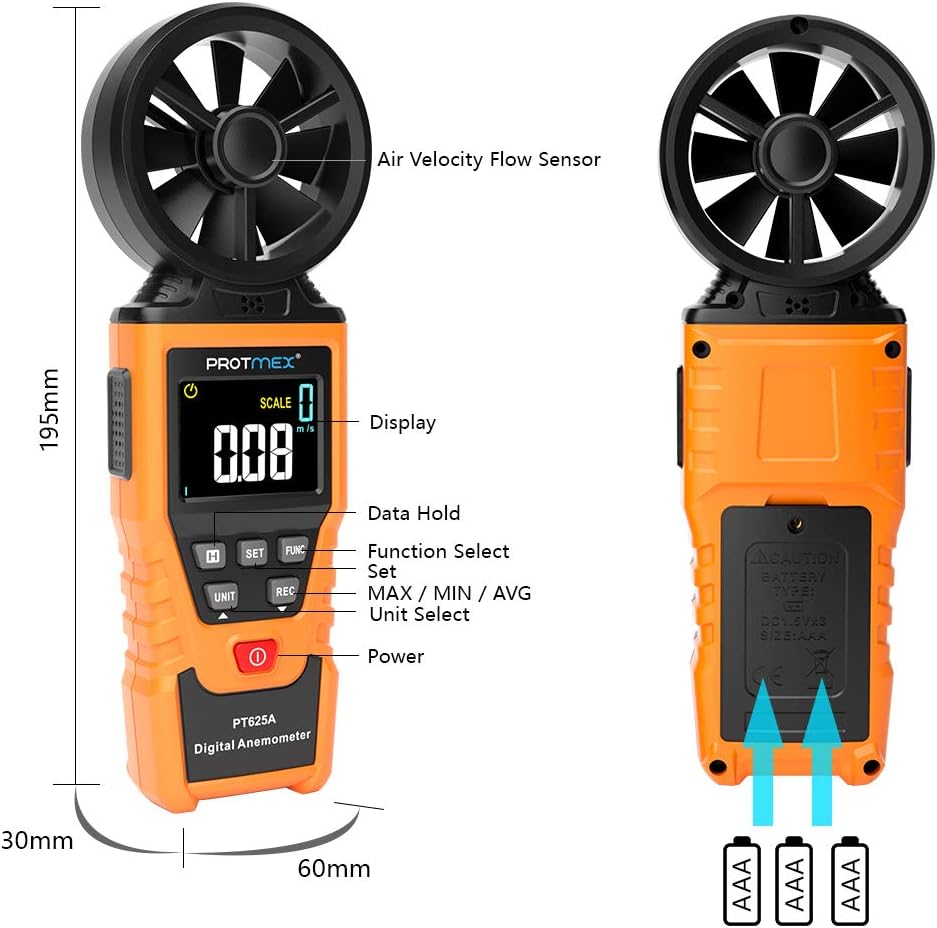
Figura 1: Fronte view of the Protmex PT625A Anemometer with key components labeled, including the air velocity flow sensor, display, and control buttons.
2.2 Características
- High accuracy for wind speed measurement (0.4~40 m/s).
- Multiple units for wind speed: m/s, km/h, ft/s, knots, mil/h, fp/m.
- Air volume measurement in CFM, CMM, CMS.
- 8-blade aviation wing fan for sensitive and accurate readings.
- MAX/MIN/AVG data display.
- Función de retención de datos.
- Apagado automático.
- Indicador de batería baixa.
- Air duct area setting for airflow calculation.
3. Configuración
3.1 Instalación da batería
- Localice o compartimento da batería na parte traseira do dispositivo.
- Use un desaparafusador para abrir a tapa do compartimento da batería.
- Insert the provided 9V battery, ensuring correct polarity (+/-).
- Coloque a tapa do compartimento da batería e fíxaa co parafuso.

Figura 2: Atrás view of the anemometer, indicating the battery compartment where a 9V battery is inserted. A screwdriver is required to open the compartment.
4. Instrucións de funcionamento
4.1 Encendido/apagado
Preme o Poder botón ( ) to turn the device on or off. The device features an auto power-off function to conserve battery life.
4.2 Measuring Air Velocity
- Turn on the anemometer.
- Point the air velocity flow sensor (fan) directly into the airflow you wish to measure. Ensure the airflow passes through the fan blades.
- The current air velocity reading will be displayed on the LCD screen.
- Preme o UNIDADE button to cycle through different measurement units (m/s, km/h, ft/s, knots, mil/h, fp/m).

Figure 3: The anemometer being used to measure wind speed in an outdoor environment, demonstrating how to position the sensor into the airflow.
4.3 Airflow Measurement (CFM/CMM/CMS)
- Turn on the anemometer.
- Preme o FUNC button to enter airflow measurement mode.
- Usa o SET button to input the cross-sectional area of the air duct or channel. This is crucial for accurate airflow calculation.
- Once the area is set, point the sensor into the airflow. The device will display the airflow volume in CFM, CMM, or CMS.
- Preme o UNIDADE button to select the desired airflow unit.

Figure 4: Illustration of the anemometer displaying airflow measurement after setting the air duct area. The screen shows both area input and calculated flow.
4.4 Data Hold, Max/Min/Avg, and Record Functions
- Retención de datos: Preme o ATENCIÓN botón para conxelar a lectura actual na pantalla. Prema de novo para soltala.
- MÁX/MÍN/MEDIA: Preme o MAX / MIN / AVG button to cycle through maximum, minimum, and average readings during a measurement session.
- Rexistro: Preme o REC button to initiate data recording. (Note: Specific details on data storage and retrieval may be in the full manual or software).
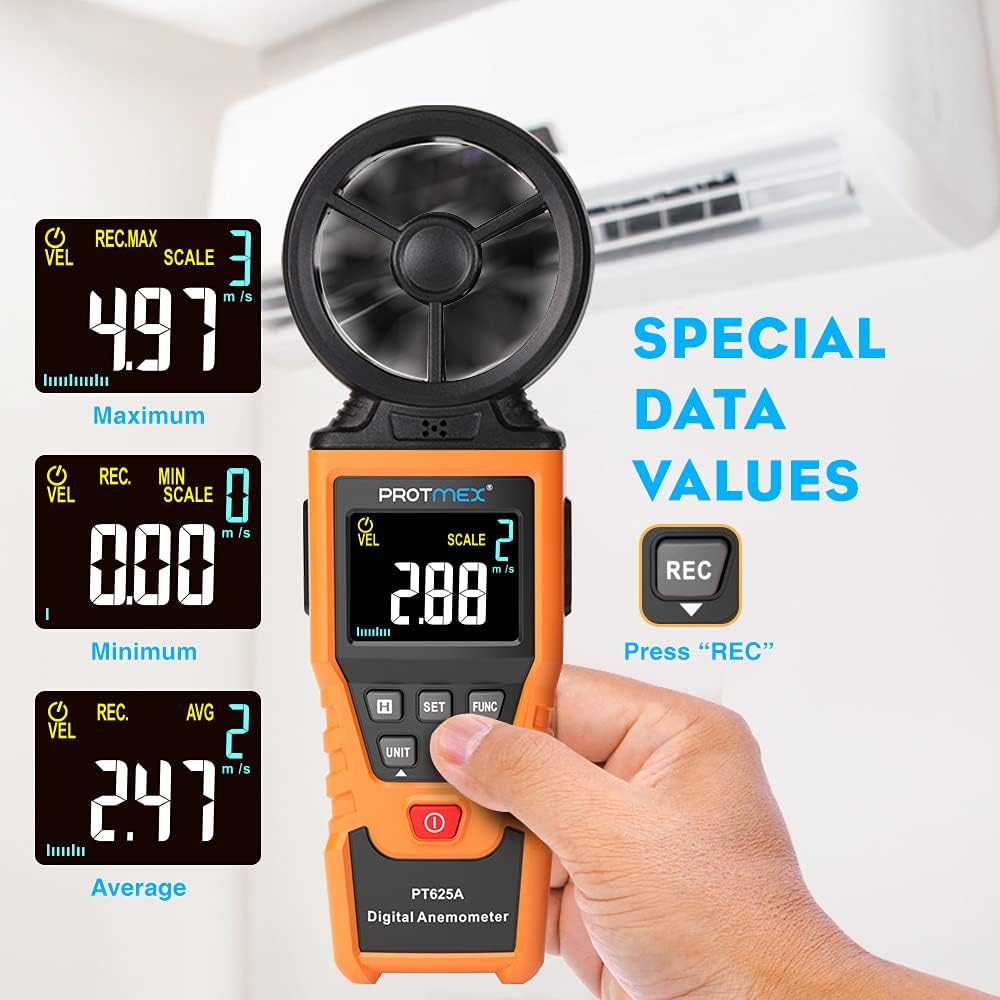
Figure 5: The anemometer's display showing maximum, minimum, and average wind velocity readings, accessible via the dedicated buttons.
5. Mantemento
- Manteña o dispositivo limpo e seco. Limpe cun pano suave e seco.amp pano. Non use produtos de limpeza ou disolventes abrasivos.
- Ensure the fan blades are free from dust and debris to maintain measurement accuracy.
- Cando non a use durante períodos prolongados, retire a batería para evitar fugas.
- Store the anemometer in its protective case in a cool, dry place.
6 Solución de problemas
- Sen pantalla/dispositivo que non se acende:
- Comprobe se a batería está instalada correctamente coa polaridade correcta.
- Replace the battery if it is low or depleted.
- Lecturas inexactas:
- Ensure the fan blades are clean and spinning freely.
- Verify that the sensor is pointed directly into the airflow.
- Check if the correct measurement unit is selected.
- For airflow measurements, confirm the air duct area setting is accurate.
- Botóns que non responden:
- Apague o dispositivo e logo acenda de novo.
- Substitúe a batería.
7. Especificacións
| Parámetro | Valor |
|---|---|
| Rango de velocidade do vento | 0.4 ~ 40 m/s |
| Unidades de velocidade do vento | m/s, km/h, ft/s, knots, mil/h, fp/m |
| Air Volume Units | CFM, CMM, CMS |
| Samptempo de ling | Approx. 0.5s/time |
| Valor máximo de visualización | 9999 |
| Fonte de alimentación | Batería de 9 V |
| Dimensións (L x W x H) | 8.85 x 4.52 x 1.77 polgadas |
| Peso do elemento | 10 onzas |
| Material | Goma |

Figure 6: A detailed screen introduction showing various symbols and their descriptions, including MAX, MIN, AVG, VEL, FLOW, AREA, and different units of measurement.
8. Garantía e soporte
Protmex products are designed for quality and reliability. For any issues or support, please refer to the contact information provided with your purchase or visit the official Protmex website. The product is CE (LVE, EMC), RoHS approved.
Protmex offers 24/7 online friendly support. Your satisfaction is our priority.